7 concepts22 worked examples31 exercises4 exam-level7 figures
What are you here for?
14 Review: the whole course as seven things the final can ask you to do
Start with this
One question before you read anything. Getting it wrong is the point: it shows you what this section is for.
§14.2 — one append, two names
A grid of zeros is built from a row, one cell of it is changed, and the whole grid is printed. Whatever you answer, the habit this question is about is the single most expensive one in the course.
len(grid) is 3 and grid[0] is grid[1] is True, so the structure has three slots and one row.
A grid needs a fresh list per row: build it in a loop with grid.append([0, 0]).
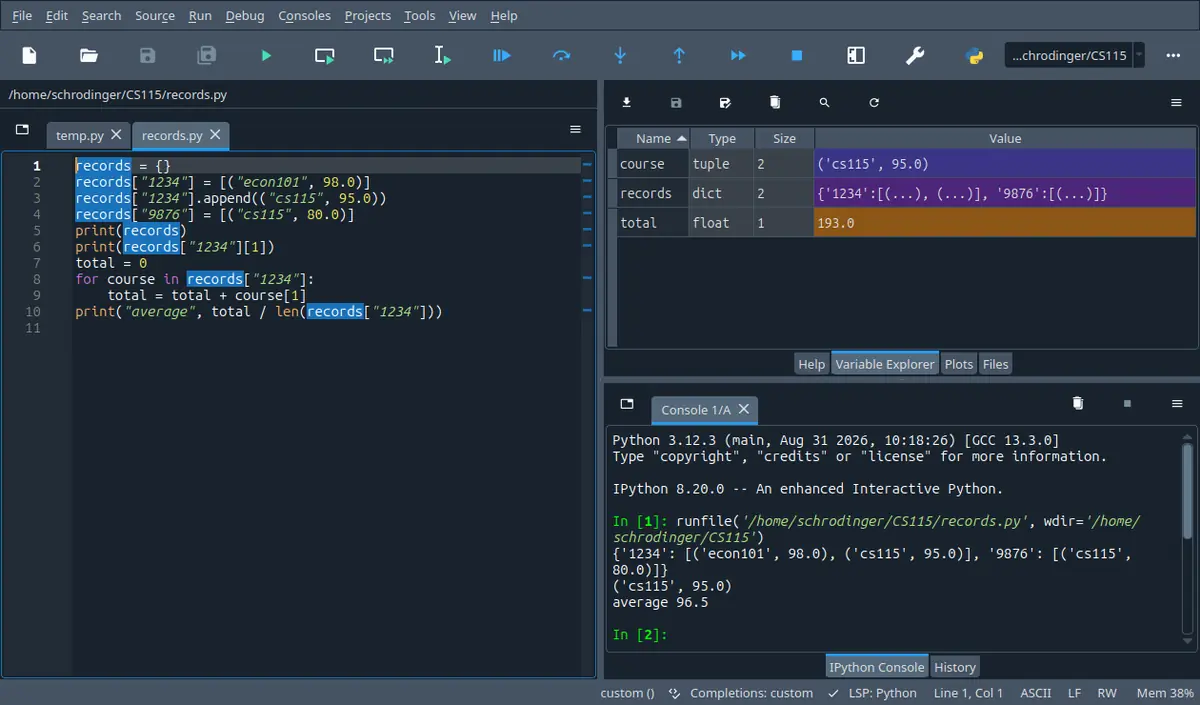
What this looks like in Spyder
The tab next to Help. It lists every name your program left behind with its type and its size, so it answers the one question a listing cannot: what is in this name right now. The stepper on this page shows the same four columns.
Spyder 5.5.1 on Linux, running the program in its own editor. A different version moves a few toolbar icons; the panes are named the same.
Twelve weeks of material, one three hour paper, and no interpreter on the desk. You open a past paper and the first thing it asks is not a definition: it is four short programs and the word output. You know every line in them. You still get two of the four wrong, because knowing what a line does is not the same as knowing what the machine holds after it has done it.
By the end of this section you can take any program from this course, write down what it prints without running it, say which names share one object while it runs, and turn a written specification into a program on paper in a fixed order of steps.
In 60 seconds
Everything examinable in this course reduces to four questions you can ask about any program: which line runs next, which names point at which objects, what does each call hand back, and how many steps does the whole thing take.
The state table, one row per executed line
$$\boxed{\text{row}=(\texttt{line},\ \text{names and their objects},\ \text{printed so far})}$$
Any question with the word output in it. Write the row after the line has run, never before, and never keep a value only in your head.
Two names, one object
$$\texttt{b = a}\;\Rightarrow\;\texttt{a is b}\quad\text{and}\quad\texttt{b = a[:]}\;\Rightarrow\;\texttt{a == b}\ \text{but}\ \texttt{a is not b}$$
The moment a list, a dictionary or an object is assigned to a second name, passed to a function, or stored inside another container.
Every list, string and dictionary call. The mistake is never the name of the method, it is which of the two shapes it has.
What the work costs
$$\text{one pass}=n,\quad\text{pair of nested passes}=\frac{n(n-1)}{2},\quad\text{halving}=\log_2 n$$
Any question that says how many comparisons, or asks what happens to the running time when the input doubles.
Three most common mistakes
Tracing a program by reading it instead of running it on paper. The eye reads the lines in the order they are written; the machine runs them in the order the loops and calls dictate, and those two orders are different in every question worth marks.
Treating assignment as copying. second = first gives one list two names, so a change made through either name is visible through both, and the same thing happens when a list is passed to a function or put inside a tuple.
Calling a method for its return value when it works in place, or the other way round. marks = marks.sort() throws the sorted list away and leaves marks bound to None, and nothing complains until a later line tries to index it.
The syllabus for this course puts labs at 20 per cent, the midterm at 40 and the final at 40, so the final is worth as much as every lab put together. What a paper looks like is a separate question from what it weighs, and only one past paper is available here, a midterm: on that one, a single question asking for the output of four short programs carried 30 of the marks, and the cover sheet supplied a list of function and method names. That is one paper from one term and not a prediction about yours. A supplied name list is in any case not a supplied semantics: it tells you insert exists, not where it puts the item or what it hands back. Check the shape and the rules of your own paper from your instructor's announcement rather than from this page.
How much time do you have?
10 minutes
The two traps that cost the most marks for the least understanding: names sharing one object, and calls that change the object rather than handing a new one back.
The 60-second card · Names, objects, and the three ways two names come to share one · In place or hands back · Formula card · Mistake ledger
45 minutes
Enough to work through a paper's worth of output questions: a written method for tracing, the name and object rules, what a call hands back, and the step counts for the searches and sorts.
The 60-second card · The state table: running a program on paper · Names, objects, and the three ways two names come to share one · What a call hands back, and what it can reach from the inside · In place or hands back · Counting the work · B · computation
full read
The whole course, in the order the final asks for it, with twenty five worked traces, a written routine for turning a specification into a program on paper, and the interleaved set that mixes every week together so that you have to decide which kind of question you are looking at.
The 60-second card · Recall first · Conventions · The state table: running a program on paper · Names, objects, and the three ways two names come to share one · What a call hands back, and what it can reach from the inside · In place or hands back · Which method body runs, and where the attribute was found · Counting the work · From a written specification to a program, in six steps · Method boxes · Look-alike pairs · Scaffolding comes off · Full exam-style question · Practice set · Mistake ledger · Glossary · Check yourself
By the end of this section
Trace any program from this course on paper with a state table and write its output exactly, blank lines and spacing included.
Decide, at any point in a program, which names share one object and which hold separate objects, and predict what a change through one name does to the other.
Separate what a function prints from what it hands back, and say which names a call can change from the outside.
Classify any list, string or dictionary call as working in place or handing back a new object, and write down what it returns.
Predict which method body runs for a given call on a class or its subclass, and what a default printed form of an instance looks like.
Count the comparisons a search or a sort performs on a given input and say how that count grows when the input doubles.
Build a complete program from a written specification in a fixed order of steps, and check it against a sample run before handing it in.
Syllabus coverage
covered
Review — covered
The whole course, reorganised around what a closed book paper can ask: tracing a program by hand
names, objects and the three ways two names come to share one
what a function hands back against what it prints
which collection calls work in place
classes and which method body runs
the cost of the searches and sorts
a written routine for turning a specification into a program on paper
deferred
Arrays, plotting, random walks and fitted lines — deferred
The last four weeks of the course
numpy arrays and array arithmetic
the pyplot calls
simulation by repeated random steps
fitting a line to measured points
Deferred to their own sections, where the syllabus puts them and they can be run. This page names the calls in a method box and in the practice set, but prints no output: numpy and matplotlib are not installed on the build machine, and an unrun output block is what this course teaches you to distrust. Run them in Spyder.
off syllabus
How this page decides what to revise — off syllabus
Why the review is organised by skill rather than by week, and what that costs you.
Not a syllabus item and not examinable. It is here because a review that walks the weeks again is a second reading of the same thirteen sections, and the last week before a paper is the wrong week for that. The cost: one week's material is spread across several concepts, so use this block when you want a single week.
Recall first
A name is a pointer, assignment binds it
a = [1, 2] builds a list and binds the name a to it. b = a binds a second name to the same list and copies nothing. b = a[:] or b = list(a) builds a second list with equal contents.
Half of the output questions in this course turn on which of those two lines was written.
Mutable and immutable
Lists and dictionaries can be changed in place, so a change is visible through every name bound to them. Numbers, strings and tuples cannot, so the only way to change what a name holds is to rebind it. A tuple holding a list is immutable in its slots and mutable in what those slots point at.
It decides whether passing an object to a function can change the caller's data.
Integer division, modulo and float equality
7 / 2 is 3.5, 7 // 2 is 3, and -7 // 2 is -4, because floor division rounds down rather than towards zero. 7 % 3 is 1. Two floats are never compared with ==; compare $\vert x-y\vert<\varepsilon$ with a named tolerance.
Every numerical question and every loop that counts down in halves uses one of these.
The string and list calls the paper supplies by name
On strings: find, index, strip, split, lower, len, and slicing, all of which hand back a new object because a string cannot be changed. On lists: append, extend, insert, pop, remove, index, reverse, count, sort, and the free function sorted.
The cover sheet gives the names. The behaviour is the part you have to bring.
A class, an instance, and inheritance
class Student(object) defines a type; Student('Deniz', 88) runs __init__ and hands back an instance; self.mark = mark stores an attribute on that instance. class GradStudent(Student) inherits every method, and a method written again in the subclass replaces the inherited one for instances of the subclass.
A class question is answered by deciding which of two method bodies runs.
The searches and the sorts, with their step counts
Linear search looks at up to $n$ items. Bisection search needs a sorted list and looks at about $\log_2 n$. Selection and bubble sort make $n(n-1)/2$ comparisons. Merge sort does about $n\log_2 n$ and needs extra space.
Used in the cost concept and in the interleaved practice, and stated here so that no number has to be recalled from another page.
Arrays, figures, walks and fits, as call shapes
array([1, 2, 3]) 2 multiplies each element, while [1, 2, 3] 2 repeats the list. A figure is built by plot(x, y, 'r*-') then title, xlabel, ylabel, legend, axis([x0, x1, y0, y1]), and subplot(m, n, p) chooses which panel those calls land in. A random walk adds choice([-1, 1]) to a position in a loop. A straight line fit gives coefficients from polyfit(x, y, 1) and predicted values from polyval.
The interleaved practice set mixes these in, and nothing on this page should send you to another tab to remember a call shape.
Try it yourself first (2 questions)
1§14.3 — printing the result of a function that prints
A function prints its argument one item per line and has no return statement. The caller assigns the call to a name and prints that.
Find(a) Write all three lines.
Given
defshow(values):
"""Print the values one per line."""for v in values:
print(v)
result = show([1, 2])
print(result)
IPython console
In [1]: %run untitled0.py
Printing and returning are different channels. show uses the first and not the second, so result is bound to None, and None printed is the four letter word. If you expected the list back, that is the habit the concept on the two channels out of a call is about.
Hint 1/4
Two things are printed here by two different pieces of code. Deal with the function's own printing first.
Hint 2/4
A function with no return hands back None, and printing None shows the four letters.
Hint 3/4
The data again: show([1, 2]) prints each item, and then print(result) prints whatever show handed back.
Hint 4/4
The two items, then the word None.
Show solution
Inside the function
$$\texttt{for v in values: print(v)}$$
one line per item, so two lines, and they come first because the call finishes before the caller's print starts
Back in the caller
$$\texttt{result = show([1, 2])}$$
the call hands back None, because no return statement ran
The list has two items and three lines are printed, so exactly one line came from outside the function.
If a caller needs the value, the function has to return it. Printing is for people, returning is for programs.
2§14.6 — when halving is not the faster choice
A program is given a list of 1000 names in no particular order and has to answer one membership question: is a given name in the list. A classmate says to use bisection search because it is the faster algorithm.
Find(a) Which answer is right, and why?
Given
The list is unsorted and is used for this one question only.
Sorting the list would cost about 500000 comparisons with a pairwise sort, or about 10000 with a merge sort.
A left to right search costs at most 1000 comparisons.
Hint 1/4
Add up the whole bill for each plan, not just the search part.
Hint 2/4
Bisection search requires a sorted list. That requirement is a cost, and it is paid once per sort and not once per search.
Hint 3/4
The data again: sorting is about 10000 comparisons at best, one linear search is at most 1000, and one bisection search is about 10.
Hint 4/4
One question does not repay the sort, so the single pass wins.
Show solution
Price both plans
$$\text{plan A} = 1000$$
one pass over the list, worst case, and no preparation
$$\text{plan B} = 10000 + 10$$
the sort dominates completely, so plan B is ten times dearer
Find the crossover
$$1000k\ \text{against}\ 10000 + 10k$$
k questions on the same list; the left side grows ten times faster
$$k \approx 10$$
above about ten questions the sort has paid for itself, which is why sorted data is kept sorted
At k equal to 1 the two bills are 1000 and 10010, and at k equal to 100 they are 100000 and 11000, so the crossover is between, as the algebra says.
An algorithm's cost includes its preconditions. Quote both or the comparison is not a comparison.
Notation
symbol
reads as
means
watch out
$\texttt{a is b}$
a is b
The two names are bound to the same object.
Not the same question as a == b, which asks whether the two objects have equal contents. Two equal lists are usually two different objects.
$\texttt{None}$
none
The object a function hands back when it has no return, or a bare return.
Printing it shows the four letters None. A method that works in place hands this back, so assigning its result loses your data.
$\mathcal{O}(n^{2})$
order n squared
The number of basic steps grows like the square of the input size, once the input is large.
A statement about growth, not about seconds. An order n squared program can beat an order n one on ten items.
$\texttt{xs[i:j]}$
xs from i up to j
A new object holding the items from position i up to but not including position j.
New object: this is the cheapest way to copy a flat list. It copies one level only, so a list of lists still shares its inner lists.
$\texttt{self}$
self
Inside a method, the instance the method was called on.
A name like any other, first in the parameter list, supplied by the call. You never pass it yourself in a.bump().
Conventions used here
What a review page assumes, and what it re-derives.
Everything from the first thirteen sections is assumed here, and nothing new is introduced. Where a rule is used, it is restated in full on this page before it is used, so that no line of reasoning sends you back to another page in the middle of a trace. The consequence is that this page has no new tools in it: if something here is unfamiliar rather than rusty, the section it came from is named in the recall list above.
A page you read three days before a paper has to be readable straight through, and a cross reference in the middle of a trace breaks the trace.
Every console block on this page is a recorded run.
Each block of output was produced by running the program beside it and copying what came back, including blank lines and trailing spaces. Where a program is meant to fail, the failure shown is the real one, with the middle of the replaced by a single line of dots: the first line and the last line are what a marker expects you to be able to name, and the file paths in between are particular to the machine that ran it.
In a programming course the printed answer is the whole claim. An output block that was guessed teaches the guess.
The two libraries this page names but does not run.
numpy and matplotlib appear here only as names and call shapes, never with an output block. Neither is installed on the machine that produced this page, so any printed array or described figure would be an unchecked claim. The array and plotting questions in the practice set are therefore about semantics you can reason out on paper, and the two sections that cover them are the place to run code.
Saying nothing is cheap; saying something unverified in a programming course is expensive.
Method calls are written with the kind of object they need.
A method is written as list.append, str.split, dict.get when the kind of object matters, and as xs.append(3) when a particular object is meant. Functions that are not methods are written bare: len(xs), sorted(xs), format(x, '.2f'). This distinction is the one the exam cover sheet does not make for you, and it is the difference between xs.sort() and sorted(xs).
Two thirds of the marks lost on collection questions come from reading a method as a function or a function as a method.
Names here use underscores, and the course uses both styles.
Functions and variables on this page are written read_marks, count_passes, by_letter. The course materials also use the run together style, getName and checkPrime, and both are accepted. Pick one per program and stay with it; a program that mixes them reads as two programs.
Marks are not given for a naming style, but a marker reading a handwritten answer follows a consistent one faster.
14.1The state table: running a program on paper
Write one row per executed line, with every name and what it points at, and the output stops being a guess.
Start where the marks are: the single heaviest thing a paper in this course asks is what a short program prints.
Solvable with what we have
Say what total = total + a[i] does on its own.
Say what range(3) and len(a) give back.
Not solvable yet
Get all four output questions on a paper right when each has a loop in it.
Say what a program prints when a list index is read out of that same list.
The usual method is to read from top to bottom and keep the values in your head. Try it here, answer first.
a = [3, 0, 2, 1]
i = 0
total = 0while i < len(a):
total = total + a[a[i]]
i = i + 1print(total)
print(a)
Why it fails
Reading gives the lines in written order. The machine runs the loop body four times, and the answer turns entirely on the value of a[a[i]] each time. Holding four numbers in your head while re-reading two lines is where it goes wrong, and that is not a mistake about Python.
MethodMethod 14.1: the state table
Conditions
The program is short enough to write out, which every exam program is.
You write the row after a line has run, never in advance.
Nothing is kept only in your head: a name with no column is a name you will get wrong.
$$\boxed{\text{one row}=\big(\texttt{which line just ran},\ \texttt{each name and its value},\ \texttt{output so far}\big)}$$
Make a table with one column per name in the program and one column for what has been printed. Every time a line runs, add a row: copy the previous row, change only what that line changed, and append anything that line printed. The last row's output column is the answer.
The table for the program above. The rows are turns of the loop, not lines of the listing, and the last column is the only one you are asked for.
Looks like this, but is not
A table with one row per line of the listing, filled in from top to bottom, looks like a trace and is much faster to write.
It is a copy of the program, not a record of a run. A while line gets one row when it ran five times, and a line inside an if that was never true gets a row as if it had happened. The value of a trace is exactly the part that ordering destroys.
Tracing a list that indexes itself
The program from the failed attempt above. Do not read it; run it on paper.
a = [3, 0, 2, 1]
i = 0
total = 0while i < len(a):
total = total + a[a[i]]
i = i + 1print(total)
print(a)
FindThe two lines this prints.
Given
a is [3, 0, 2, 1] and never changes.
i starts at 0, total starts at 0.
The loop condition is i < len(a), and len(a) is 4.
Solution
Set up the columns before running anything
$$\texttt{names: } a,\ i,\ total$$
three names appear on the left of an assignment, so three columns, plus one for the output
$$\texttt{a} = [3, 0, 2, 1]\ \text{ throughout}$$
no line assigns to a or calls a method on it, so that column is constant and can be written once
Run the loop, one row per turn
$$i=0:\ a[a[0]] = a[3] = 1,\ total = 1$$
the inner index is evaluated first, so read a[0] and then use that as the index
$$i=1:\ a[a[1]] = a[0] = 3,\ total = 4$$
a[1] is 0, so this is a[0], which is 3
$$i=2:\ a[a[2]] = a[2] = 2,\ total = 6$$
a[2] is 2, so the two indices agree here and the value is its own index
$$i=3:\ a[a[3]] = a[1] = 0,\ total = 6$$
a[3] is 1, so this is a[1], which is 0; adding zero is the step everybody drops
Stop and read off the output column
$$i=4 \not< 4$$
the condition fails, so the loop ends and the two print lines run once each
The four values added are a[3], a[0], a[2] and a[1], which is every item of the list exactly once in some order, so the total has to be 3 + 0 + 2 + 1 = 6 whatever the order turns out to be.
Four turns, two index reads per turn, eight reads in all.
When the index is an expression, evaluate the expression in its own column of the table. Written as one step, a[a[i]] is where the error goes.
A loop variable that is assigned inside the loop
A nested loop, with one line in the body that looks like it changes the loop.
for i inrange(3):
for j inrange(3):
if j == 1:
j = 2print(i, j, end=' ')
print()
FindThe exact output, with the spacing.
Given
The outer range(3) and the inner range(3).
print(i, j, end=' ') ends with two spaces instead of a new line.
The bare print() after the inner loop.
Solution
Decide what the assignment to j can and cannot do
$$\texttt{for j in range(3)}$$
the for statement rebinds j at the top of every turn from the sequence, so any change made in the body is thrown away when the next turn starts
$$\texttt{if j == 1: j = 2}$$
this changes the name j for the rest of this turn only, so it changes what gets printed and nothing else
Write the printed pieces for one outer turn
$$j=0 \to \texttt{0 0}$$
the condition is false, so j is printed as it came
$$j=1 \to \texttt{0 2}$$
rebound to 2 before the print, which is why the same pair appears twice in the line
$$j=2 \to \texttt{0 2}$$
the condition is false again and j is already 2
Add the separators
$$\texttt{end=' '}$$
each print ends with two spaces and no newline, so the three pairs run together and the line ends with two trailing spaces
$$\texttt{print()}$$
the bare print supplies the newline, once per outer turn, so there are three lines
The inner loop runs three times per outer turn whatever the body does, so there must be exactly nine pairs; count them in the answer and there are nine.
Assigning to the loop variable is legal and useless for controlling the loop. It is a favourite exam question precisely because it looks like it should work.
Checkpoint
§14.1 — a loop variable rebound in the body
Thirty seconds. The body assigns to the name the for statement is driving, and then the list is printed.
Find(a) Write the one line this prints.
Given
marks = [40, 55, 70]
total = 0for m in marks:
total = total + m
m = 0print(total, marks)
IPython console
In [1]: %run untitled0.py
m = 0 sets a name that is about to be rebound by the next turn of the loop, so it has no effect on anything. The list is untouched because the only way to change a list is to call a method on it or to assign into a slot of it, and neither happened here.
Hint 1/4
Two questions, in this order: what does the total end up as, and does the list change? Answer them separately.
Hint 2/4
for m in marks binds m to each item in turn. Assigning to m rebinds that name and does not reach into the list.
Hint 3/4
The data again: marks = [40, 55, 70]. The additions are 40, then 55, then 70, and each m = 0 happens after the addition for that turn.
Hint 4/4
One line: the sum, then the untouched list.
Show solution
Add up, ignoring the second body line
$$total = 0 \to 40 \to 95 \to 165$$
the three items are added in order; nothing removes them
$$m = 0$$
rebinds a local name that the next turn overwrites, so it cannot be observed
Answer $$\boxed{\texttt{165 [40, 55, 70]}}$$
Check
40 + 55 + 70 = 165, which is what sum(marks) would give, and the list printed after the loop is equal to the one printed before it would have been.
A name bound by for is a copy of the reference, not a window into the list.
⚠ Filling the table in listing order rather than run order
The listing is on the page and the run is not, so the eye follows the listing. It feels like progress because rows appear quickly.
wrong$$\text{rows: line 1, line 2, line 3, line 4, line 5}$$
Copying the line first and filling the values later feels tidier, and then the value written is the one the line is about to use rather than the one it produced.
wrong$$\texttt{i}=0\ \text{written on the row for }\texttt{i = i + 1}$$
right$$\texttt{i}=1\ \text{on that row: the row records the result}$$
⚠ Forgetting that print adds a separator and a newline
Spacing is invisible on paper, so it gets dropped, and an output question is marked on the characters.
wrong$$\texttt{print(1, 2)} \to \texttt{12}$$
right$$\texttt{print(1, 2)} \to \texttt{1 2}$$
14.2Names, objects, and the three ways two names come to share one
Assignment never copies. Two names share an object until one of them is rebound, and a change is seen through both.
The table from the previous concept has a column per name. This one is about what goes in the cell, because two cells can hold the same object.
RuleRule 14.2: binding, sharing and copying
Conditions
The object has to be mutable for sharing to be observable: lists, dictionaries and instances of your own classes.
A slice or a call to list copies one level only.
$$\boxed{\texttt{b = a}\ \Rightarrow\ \texttt{a is b};\quad \texttt{b = a[:]}\ \Rightarrow\ \texttt{a == b}\ \text{and}\ \texttt{a is not b}}$$
Assigning one name to another gives you two names for one object, so is says true and a change through either name is visible through both. Taking a full slice builds a second object with equal contents, so == says true but is says false, and the two can now be changed apart.
Three names and two lists. The only difference between the top two names and the bottom one is four characters on the line that created them.
Looks like this, but is not
second = first + [] looks like a pointless line, so it looks like sharing, the same as second = first.
The + operator on lists builds a new list, even when the second one is empty, so this line copies. It is a real copy and an unclear one: first[:] or list(first) says the same thing and says it on purpose.
One append, seen through two names
Three names, two of them for the same list, and then an append through each.
first = [4, 7]
second = first
third = first[:]
second.append(9)
third.append(1)
print(first)
print(second)
print(third)
print(first is second, first is third, first == third)
The run:
[4, 7, 9]
[4, 7, 9]
[4, 7, 1]
TrueFalseFalse
FindWhy the first two lines of output are identical.
Given
first is created as [4, 7].
second = first and third = first[:].
One append through second, one through third.
Solution
Decide how many list objects exist
$$\texttt{first = [4, 7]}$$
one list is built here, and the name first is bound to it
$$\texttt{second = first}$$
no list is built: the right hand side is a name, so its object is what gets bound to the new name
$$\texttt{third = first[:]}$$
a slice builds a list, so this is the second object
Apply each append to the object, not to the name
$$\texttt{second.append(9)}$$
appends to the object both first and second point at, so both names now show three items
$$\texttt{third.append(1)}$$
appends to the separate object, which nothing else points at
Read the identity line
$$\texttt{first is second} \to \texttt{True}$$
same object, which is exactly what is asked by is
$$\texttt{first is third} \to \texttt{False}$$
different objects, even though they were equal a moment ago
$$\texttt{first == third} \to \texttt{False}$$
the contents have drifted apart, 9 against 1, so even equality is now false
Count the appends. Two appends happened and the three printed lists have 3, 3 and 3 items, which is only possible if two of the names are showing the same list.
Ask of every line that produces a list: does this build an object, or does it name one that exists?
A default parameter that remembers
A function whose default value is a list, called four times.
defcollect(item, bag=[]):
bag.append(item)
return bag
print(collect('a'))
print(collect('b'))
print(collect('c', []))
print(collect('d'))
The run:
['a']
['a', 'b']
['c']
['a', 'b', 'd']
FindWhy the second call shows two items.
Given
def collect(item, bag=[]), with the empty list written in the header.
Four calls: 'a', 'b', 'c' with its own list, then 'd'.
Solution
Work out when the default list is built
$$\texttt{def collect(item, bag=[])}$$
the header runs once, when the function is defined, so the empty list is built once and stored with the function
$$\text{call 1: } \texttt{bag} \to \text{that one list}$$
a call with no second argument binds bag to the stored list, not to a fresh one
Follow the one list through the calls
$$\text{call 1} \to \texttt{['a']}$$
appends into the stored list and hands it back
$$\text{call 2} \to \texttt{['a', 'b']}$$
the same stored list, which already has one item
$$\text{call 3} \to \texttt{['c']}$$
an argument was supplied, so bag is bound to that new empty list and the stored one is not touched
$$\text{call 4} \to \texttt{['a', 'b', 'd']}$$
back to the stored list, which is now on its third item
Write the repair
$$\texttt{def collect(item, bag=None)}$$
None is immutable, so there is nothing to accumulate into
$$\texttt{if bag is None: bag = []}$$
builds a fresh list per call, which is what the header looked like it was promising
Two objects exist: the inner list and holder. holder has two slots and both point at the inner list, so the append shows up twice. This is the two dimensional list trap: a grid built as [row] * 3 or [row, row] has one row shown three times, and the loop that builds a fresh row each turn is the version that behaves.
Hint 1/4
Count the list objects first. There are fewer than the printed brackets suggest.
Hint 2/4
[outer, outer] stores the reference twice. A change to the object is visible at both positions, because both positions hold the same object.
Hint 3/4
The data again: outer = [1, 2], then holder = [outer, outer], then outer.append(3). len(holder) counts the slots of holder, len(holder[0]) the items of the inner list.
Hint 4/4
Both inner lists print with three items, and the lengths are 2 and 3.
Show solution
Name the objects
$$\text{object A} = \texttt{[1, 2]}$$
built by the first line and bound to outer
$$\text{object B} = \texttt{[A, A]}$$
built by the second line; its two slots hold references to A, not copies of it
Apply the append and read both prints
$$\texttt{outer.append(3)} \to A = \texttt{[1, 2, 3]}$$
the change happens to A, and B is unchanged as a list of two slots
$$\texttt{print(holder)}$$
printing B asks each slot for its printed form, and both slots are A
right$$\text{the rows are shared; copy each row to separate them}$$
⚠ Using `==` when the question is about identity
Both read as equality in English, and for numbers and short strings they agree, which trains the wrong habit.
wrong$$\texttt{a == b}\ \text{to test whether a change through a will be seen by b}$$
right$$\texttt{a is b}\ \text{asks that question; \texttt{==} asks about contents}$$
14.3What a call hands back, and what it can reach from the inside
A function changes the caller's world in two ways only: through its return value, and through objects it was given.
Sharing an object is the mechanism; a call is where it happens most often, because every argument is an assignment you did not write.
RuleRule 14.3: the two channels out of a call
Conditions
Parameters are ordinary local names, bound to the argument objects when the call starts.
A function with no return, or a bare return, hands back None.
Rebinding a parameter inside the body is invisible outside; mutating the object it points at is not.
$$\boxed{\text{out} = \big(\texttt{return}\ \text{value}\big)\ \cup\ \big(\text{changes to the objects passed in}\big)}$$
Whatever a function computes leaves it by one of two doors. The first is the return value, which the caller has to catch by assigning it. The second is a change made in place to an object the caller handed over, which needs no catching at all and is the one people forget. Printing is neither door: it puts characters on the screen and gives the caller nothing.
The line values = values + [0] builds a list and rebinds the local name to it. The caller's name is on the other side of a wall the assignment cannot cross.
Looks like this, but is not
values += [0] looks like the same line as values = values + [0], only shorter, so it looks equally safe.
On a list, += extends the object in place and then rebinds the name to that same object, so the caller's list does grow. Two spellings that differ by one character differ in whether the caller is affected.
Mutating the caller's list against building a new one
Two functions, one line apart in what they do to their argument.
defgrow_in_place(values):
"""Append a zero to the caller's list and hand nothing back."""
values.append(0)
defgrow_by_copy(values):
"""Build a longer list and hand it back, leaving the caller's alone."""
values = values + [0]
return values
nums = [5, 6]
grow_in_place(nums)
print(nums)
other = grow_by_copy(nums)
print(nums, other)
print(grow_in_place(nums))
print(nums)
Three appends ran in total, one per call to grow_in_place and one inside the copy. The caller's list ends with two extra items and the copy has one extra, and 2 + 1 is the three appends.
Before writing x = f(x), ask whether f returns anything. If it works in place, the assignment destroys your data.
Reading a module level name against assigning to it
A counter at module level and a function that tries to raise it.
count = 0defbump():
count = count + 1
bump()
The run:
Traceback (most recent call last):
...
UnboundLocalError: cannot access local variable 'count' where it isnot associated with a value
With one line added it works:
count = 0defbump():
"""Add one to the module level counter."""global count
count = count + 1
bump()
bump()
print(count)
The run:
2
FindWhy reading works but assigning does not, without the declaration.
Given
count = 0 at module level.
The body is count = count + 1.
The second version adds global count as the first statement.
Solution
Work out how Python classified the name
$$\texttt{count = count + 1}$$
an assignment to count anywhere in the body makes count local for the whole body, decided when the function is compiled, not when it runs
$$\text{right hand side first}$$
the local count is read before it has ever been assigned, which is the error
Separate the two cases
$$\text{read only body}$$
a body that only reads count finds no assignment, so count stays global and the read succeeds
$$\texttt{global count}$$
declares that assignments in this body are to the module level name, so the two calls take it to 2
The same body with print(count) instead of the assignment prints 0 and raises nothing, which shows the error is about the assignment and not about the name.
A function that needs global to do its job is usually a function that should return a value instead.
Checkpoint
§14.3 — a default value and two ways to pass arguments
Thirty seconds. One parameter has a default, and the third call passes both arguments by name, in the wrong order on purpose.
Find(a) Write all three lines.
Given
deflabel(text, times=2):
"""Return the text repeated, separated by a dash."""
out = ''for i inrange(times):
if i > 0:
out = out + '-'
out = out + text
return out
print(label('ab'))
print(label('ab', 3))
print(label(times=1, text='zz'))
IPython console
In [1]: %run untitled0.py
The third call is the one worth the marks: keyword arguments are matched by name, so writing times first is legal and binds text to 'zz'. With times equal to 1 the loop runs once, i > 0 is never true, and no dash is added.
Hint 1/4
Three calls, three answers. Work out for each one what text and times are bound to before you look at the body.
Hint 2/4
A parameter with a default may be left out. An argument written name=value is matched by name, so its position does not matter.
Hint 3/4
The data again: the default is times=2, and the calls are label('ab'), label('ab', 3), label(times=1, text='zz'). The body puts a dash before every part except the first.
Hint 4/4
Two copies, then three, then one with no dash at all.
A call either rearranges the object you called it on and hands back nothing, or leaves the object alone and hands back the answer. Read the call, decide which of the two shapes it has, and then you know whether to assign it. The names do not tell you: sort and sorted differ by two letters and by everything.
One question, asked of every call. The left column returns None, so assigning it is always a bug; the right column returns the answer, so not assigning it throws the work away.
Looks like this, but is not
xs.reverse() and xs[::-1] both reverse a list, so they look interchangeable.
The first changes the list and returns None; the second leaves it alone and builds a new one. Written as xs = xs.reverse() the first destroys the data and the second would have worked.
call
changes the object?
hands back
xs.append(v)
yes, one item longer
None
xs.extend(ys)
yes, len(ys) items longer
None
xs.insert(i, v)
yes, v lands at position i
None
xs.pop()
yes, one item shorter
the item removed
xs.pop(i)
yes
the item that was at i
xs.remove(v)
yes, first match only
None
xs.reverse()
yes, order flipped
None
xs.sort()
yes, order changed
None
sorted(xs)
no
a new sorted list
xs.index(v)
no
the position, or ValueError
xs.count(v)
no
how many times v appears
s.strip()
no, strings cannot change
a new string
s.split(sep)
no
a new list of strings
s.lower()
no
a new string
s.find(sub)
no
the position, or -1
d.pop(k)
yes, the pair is gone
the value that was at k
d.keys()
no
a view of the keys, not a list
d.get(k, default)
no
the value, or the default
Read down the middle column and the pattern is visible: a name with no result to give back returns None, and a name that reports something returns that. Only pop does both jobs, which is why it is the row worth memorising. The last row is the one that saves the most marks in practice: d.get(k, 0) replaces the three line if k in d pattern and never raises.
sort against sorted, printed side by side
Four prints, in the order that makes the difference visible.
marks = [70, 45, 90]
print(marks.sort())
print(marks)
print(sorted(marks, reverse=True))
print(marks)
The run:
None
[45, 70, 90]
[90, 70, 45]
[45, 70, 90]
FindAll four lines, and what the state of marks is at the end.
repr of the original still shows the newline, so the discarded strip really did leave the string alone, and the split produced two pieces from one comma, as it must.
Every string call needs a name on the left of an equals sign or it has done nothing.
A tally built in a dictionary, then taken apart
The counting pattern, then pop, then the keys.
tally = {}
words = ['red', 'blue', 'red', 'green', 'red']
for w in words:
if w in tally:
tally[w] = tally[w] + 1else:
tally[w] = 1print(tally)
print(tally.pop('blue'), tally)
print(list(tally.keys()))
The counts must add up to the length of the word list, and 3 + 1 + 1 is 5, which is how many words there were.
The whole counting loop collapses to tally[w] = tally.get(w, 0) + 1, and that one line is worth having ready for a paper.
Checkpoint
§14.4 — insert, pop, reverse and count in sequence
Thirty seconds. Four list calls in a row, two of which report something and two of which do not.
Find(a) Write both printed lines.
Given
words = ['pear', 'fig', 'apple']
words.insert(1, 'kiwi')
taken = words.pop(0)
print(taken, words)
words.reverse()
print(words, words.count('fig'))
IPython console
In [1]: %run untitled0.py
insert(1, 'kiwi') makes it four items, pop(0) hands back 'pear' and leaves three, reverse() flips those three in place and prints nothing, and count('fig') reports 1 without touching anything.
Hint 1/4
Keep one list on your page and edit it call by call. Only two of the four calls produce a value that gets printed.
Hint 2/4
insert(i, v) puts v at position i and shifts the rest right. pop(0) removes and returns the first item. reverse and count differ in shape: one changes, one reports.
Hint 3/4
The data again: ['pear', 'fig', 'apple'], then insert(1, 'kiwi'), then pop(0), then reverse(), then count('fig').
Hint 4/4
The popped item with the three item list, then the flipped list with the count.
Show solution
Apply the two changing calls
$$\texttt{insert(1, 'kiwi')}$$
kiwi goes to position 1 and fig and apple shift right
$$\texttt{pop(0)} \to \texttt{'pear'}$$
removes the first item and hands it back, which is why the first printed line has two parts
Apply the last two
$$\texttt{reverse()}$$
in place, returns None, and is not printed on its own here
$$\texttt{count('fig')} \to 1$$
reports without changing, so the list printed beside it is the reversed one
⚠ Removing items from a list while looping over it
The loop looks like it walks the items, so removing the current one seems harmless; in fact the positions shift under the loop and one item is skipped.
wrong$$\texttt{for v in xs: if bad(v): xs.remove(v)}$$
right$$\text{build a new list, or loop over }\texttt{xs[:]}$$
⚠ Expecting `index` and `find` to behave alike when the item is missing
They answer the same question on different types, so the pair gets remembered as one call with two names.
14.5Which method body runs, and where the attribute was found
A call looks for the name on the instance, then its class, then the parent, and stops at the first hit.
A class is one more place a name can live, so the question from the last three concepts comes back in a new form: which name did this call find?
RuleRule 14.5: and overriding
Conditions
The search order is the instance first, then its class, then the class it inherits from.
self inside a method is the instance the call was made on, whatever class the method body was written in.
$$\boxed{\texttt{b.m()}\ \text{finds}\ \texttt{m}\ \text{on}\ \texttt{b},\ \text{else on}\ \texttt{type(b)},\ \text{else on its superclass}}$$
To work out which body runs, start at the instance and walk outwards until the name turns up, then stop. A method written again in the subclass hides the inherited one, and that holds even when the caller is an inherited method: the inherited code asks self for the name, and self is still the subclass instance.
Three steps for one call. The printed form comes from the parent, and the grade it asks for comes from the child, which is why the two instances print differently from the same mark.
Looks like this, but is not
A name assigned at the top of a class body looks like an initial value for every instance, in the way bag=[] looks like a fresh list per call.
It is one object stored on the class, shared by every instance. If it is a list and a method appends to it, every instance sees the append. Per instance data belongs in __init__, assigned through self.
Two instances, one mark, two letters
A class, a subclass that redefines one method, and three prints.
classStudent(object):
def__init__(self, name, mark):
"""Hold one name and one mark."""self.name = name
self.mark = mark
defgrade(self):
"""Return the letter this mark earns."""ifself.mark >= 85:
return'A'elifself.mark >= 70:
return'B'return'C'def__str__(self):
returnself.name + ' (' + self.grade() + ')'classGradStudent(Student):
def__init__(self, name, mark, advisor):
Student.__init__(self, name, mark)
self.advisor = advisor
defgrade(self):
"""Graduate marks are judged on a stricter scale."""ifself.mark >= 90:
return'A'elifself.mark >= 80:
return'B'return'C'
a = Student('Deniz', 88)
b = GradStudent('Ece', 88, 'Kaya')
print(a)
print(b)
print(b.advisor, isinstance(b, Student))
The run:
Deniz (A)
Ece (B)
Kaya True
FindWhy the same mark prints as A in one line and B in the next.
Given
Both instances hold the mark 88.
Student.grade gives A from 85 up; GradStudent.grade gives A from 90 up.
__str__ is written once, in Student.
Solution
Work out what print asks for
$$\texttt{print(a)}$$
print asks the object for its printed form, which means looking up __str__
Give the graduate instance a mark of 90 instead of 88 and the second line becomes Ece (A), which is what it should be if the strict body is the one running.
Inherited code calls the overridden method. That is the whole point of overriding, and the most common exam question about classes.
A list on the class, shared by every instance
The class body assigns a list, and one instance appends to it.
classTeam(object):
members = []
def__init__(self, name):
"""Hold this team's own name."""self.name = name
defadd(self, who):
"""Add a member to this team."""self.members.append(who)
x = Team('alpha')
y = Team('beta')
x.add('Ada')
print(x.members, y.members)
print(x.name, y.name)
The run:
['Ada'] ['Ada']
alpha beta
FindWhy the second team has a member it was never given.
Given
members = [] is written in the class body, not in __init__.
self.name = name is written in __init__.
Only x.add('Ada') is called.
Solution
Separate the two kinds of attribute
$$\texttt{members}\ \text{on the class}$$
the class body runs once, so one list exists and it belongs to the class
$$\texttt{self.name}\ \text{on the instance}$$
assigned during each call to __init__, so each instance has its own
Follow the append
$$\texttt{self.members.append(who)}$$
the lookup for members fails on the instance and succeeds on the class, so the one shared list is the one appended to
$$\texttt{y.members}$$
the same lookup, the same list, so the second team reports Ada
Write the repair
$$\texttt{def \_\_init\_\_(self, name):}$$
the fix is one line inside the constructor
$$\texttt{self.members = []}$$
assigns a fresh list per instance, and now the lookup stops at the instance
The names printed on the second line differ, so per instance data does work here; only the attribute that was assigned in the class body is shared.
This is the mutable default parameter trap wearing a class. Both come from one mutable object created once.
Checkpoint
§14.5 — an inherited method calling an overridden one
Thirty seconds. describe is written once, in the parent, and it calls sides, which the child redefines.
Find(a) Write both printed lines.
Given
classShape(object):
def__init__(self, name):
"""Hold the shape's name."""self.name = name
defdescribe(self):
"""Return a one line description."""returnself.name + ' with ' + str(self.sides()) + ' sides'defsides(self):
"""Return the number of sides; shapes in general do not know."""return0classSquare(Shape):
defsides(self):
"""A square has four."""return4print(Shape('blob').describe())
print(Square('tile').describe())
IPython console
In [1]: %run untitled0.py
describe is inherited unchanged, so both lines have the same shape. The number inside comes from self.sides(), and for the square that lookup finds the redefined body. A parent method that calls a method the child is expected to supply is the normal way of writing this, and it is why the parent's version returning 0 is a placeholder rather than an answer.
Hint 1/4
Two calls to the same method body. The only thing that differs is what self is bound to.
Hint 2/4
Inside describe, self.sides() starts its search at the instance, so it finds whatever that instance's class defines first.
Hint 3/4
The data again: Shape.sides returns 0, Square.sides returns 4, and describe builds name + ' with ' + str(...) + ' sides'.
Hint 4/4
The shape reports zero sides and the square reports four.
Show solution
First call
$$\texttt{Shape('blob').describe()}$$
self is a Shape, so self.sides() finds the parent body and returns 0
Second call
$$\texttt{Square('tile').describe()}$$
describe is not on Square, so the inherited body runs
$$\texttt{self.sides()} \to 4$$
self is a Square, so the search stops at the redefined body before reaching the parent's
Answer $$\boxed{\texttt{blob with 0 sides}\ /\ \texttt{tile with 4 sides}}$$
Check
Delete Square.sides and the second line becomes tile with 0 sides, which confirms that the override and not the constructor is what changed the number.
Ask what self is bound to. Every class question in this course is that question in disguise.
⚠ Forgetting `self` in the parameter list
The call a.bump() has no argument in it, so the header looks like it should have no parameter; the error message arrives one call later and mentions an argument count.
wrong$$\texttt{def bump(by=1):}$$
right$$\texttt{def bump(self, by=1):}$$
⚠ Assigning a plain name instead of an attribute
Inside a method it looks like ordinary code, and it runs without complaint; the value simply disappears when the call ends.
Walking a list from one end costs one comparison per item. Halving a sorted list costs one comparison per halving, and a list can only be halved about log two of n times. A sort that compares every pair once costs n times n minus one over two. A sort that splits, sorts the halves and merges them costs about n log n, which is far below the pairwise count and above the single pass.
The four counts drawn against list length. At sixteen items the pairwise sort has done 120 comparisons and the halving search has done 4, and the gap widens from there.
Looks like this, but is not
Two nested loops look like the signature of the pairwise count, so a program with two nested loops looks like it costs n squared.
Only if both loops run over the whole input. A loop over the rows of a grid inside a loop over its columns costs rows times columns, and if one of them is fixed at three, the cost grows like n and not like n squared.
n
log n, halving
n, one pass
n log n, merge
n(n-1)/2, pairwise
8
3
8
24
28
16
4
16
64
120
32
5
32
160
496
64
6
64
384
2016
Doubling the length adds one to the halving column, doubles the one pass column, slightly more than doubles the merge column, and roughly quadruples the pairwise column. That last sentence is the answer to every question of the form what happens when the input doubles, and it is worth being able to say without the table in front of you.
Counting the comparisons a selection sort makes
The sort with a counter added, so that the count comes out of a run rather than out of a formula.
defselection_sort(values):
"""Sort in place and return how many comparisons it took."""
checks = 0for start inrange(len(values)):
smallest = start
for i inrange(start + 1, len(values)):
checks = checks + 1if values[i] < values[smallest]:
smallest = i
values[start], values[smallest] = values[smallest], values[start]
return checks
data = [5, 2, 9, 1, 6]
n = len(data)
print(selection_sort(data), n * (n - 1) // 2)
print(data)
The run:
1010
[1, 2, 5, 6, 9]
FindThe comparison count, and why the formula predicts it.
Given
The list is [5, 2, 9, 1, 6], so n is 5.
checks is raised once per comparison in the inner loop.
The second printed number is n * (n - 1) // 2.
Solution
Count the inner turns for each outer turn
$$\text{start}=0:\ 4\ \text{comparisons}$$
the inner range runs from 1 to 4, so four items are compared against the current smallest
$$\text{start}=1,2,3:\ 3+2+1$$
each outer turn has one fewer item left to its right
$$\text{start}=4:\ 0$$
the last position has nothing to its right, which is why the last outer turn is free
Add them and compare with the formula
$$4+3+2+1+0 = 10$$
the triangular sum of n minus one
$$\frac{n(n-1)}{2} = \frac{5\cdot 4}{2} = 10$$
the two numbers printed agree, which is what the second print is for
Say what doubling does
$$n=10 \to 45,\ n=20 \to 190$$
a bit more than four times, because the minus one matters less as n grows
A linear search for 61 would look at seven items and for 12 all eight, against three probes here, and the ratio is about what log two of eight against eight predicts.
Absent values cost the same as present ones in the worst case, so a cost question does not need to know whether the value is there.
Reading a recursion from its own printed trace
The recursion prints one line on the way down and one on the way back up, so the stack is visible.
defcount_down(n, depth=0):
"""Add n down to 0, printing a line on the way in and on the way out."""print(' ' * depth + 'enter ' + str(n))
if n == 0:
print(' ' * depth + 'base')
return0
result = n + count_down(n - 1, depth + 1)
print(' ' * depth + 'leave ' + str(n) + ' -> ' + str(result))
return result
print(count_down(3))
The run:
enter 3
enter 2
enter 1
enter 0
base
leave 1 -> 1
leave 2 -> 3
leave 3 -> 66
FindThe order of the printed lines, and how many calls were made.
Given
count_down(3) is the only call made from outside.
The base case is n == 0 and returns 0.
depth only controls the indentation.
Solution
Go down to the base case
$$\texttt{enter 3, enter 2, enter 1, enter 0}$$
each call prints before it calls, so all four enter lines come out before any leave line
$$\texttt{base}$$
the fourth call takes the base branch and returns without calling further, which is what stops the recursion
Come back up
$$\texttt{leave 1 -> 1}$$
the innermost pending call finishes first: 1 plus the 0 it got back
$$\texttt{leave 2 -> 3}$$
2 plus 1, and the indentation shrinks because depth shrinks
$$\texttt{leave 3 -> 6}$$
3 plus 3; the outermost call is the last to finish
Count the calls and the cost
$$4\ \text{calls for}\ n=3$$
n plus one calls, one of them the base case
$$\text{cost} = n$$
linear in n, and the depth of the stack is also n, which is why a large n is a problem here and not for a loop
Answer $$\boxed{\text{four enter lines, then}\ \texttt{base},\ \text{then three leave lines, then}\ 6}$$
Check
The returned total is 3 + 2 + 1 + 0 = 6, which is the triangular sum of 3, and the last printed line is 6.
Every recursion question is answered by writing the enter lines down to the base case first, and only then filling in the returns upwards.
Checkpoint
§14.6 — probes used by a left to right search
Thirty seconds. The same sorted list as above, but searched from the left, and asked for three targets: the first item, the last, and one that is absent.
Find(a) Write the one line this prints.
Given
deflinear_probes(values, target):
"""Return how many items a left to right search looks at."""
probes = 0for v in values:
probes = probes + 1if v == target:
return probes
return probes
data = [11, 18, 23, 30, 42, 55, 61, 70]
print(linear_probes(data, 11), linear_probes(data, 70), linear_probes(data, 99))
IPython console
In [1]: %run untitled0.py
The best case for a linear search is one probe and the worst is n, and a missing value always costs the full n because the loop has no way to stop early. That is the difference from bisection, which spends about log two of n whatever the answer turns out to be, and it is also why the sorted order is worth nothing to a left to right search.
Hint 1/4
Three separate searches, three counts. Ask for each one how many items the loop looks at before it stops.
Hint 2/4
The loop raises probes before the comparison, and returns as soon as the item matches, so a match at position k costs k plus one.
Hint 3/4
The data again: [11, 18, 23, 30, 42, 55, 61, 70], eight items, and the targets are 11 at position 0, 70 at position 7, and 99 which is absent.
Hint 4/4
One probe, then eight, then eight again.
Show solution
Count each search
$$\text{target } 11$$
matches on the first comparison, so one probe: the best case
$$\text{target } 70$$
matches on the last, so eight: the worst case for a value that is present
$$\text{target } 99$$
never matches, so the loop runs out and the count is eight again
Answer $$\boxed{\texttt{1 8 8}}$$
Check
The counts cannot exceed the length of the list, and the two eights equal the length, which is the most a single pass can spend.
Whenever a cost question does not say where the target is, answer with the worst case and say so.
⚠ Counting the loops in the listing instead of the passes over the data
Two nested for statements are easy to see and the ranges they run over are not, so the shape of the code gets taken for the shape of the cost.
Name the inputs and the one thing to be printed. Choose the container that holds the answer while it is being built. Write the function header and its docstring, and decide there whether it returns or prints. Write the loop that fills the container. Write the printing in the exact format asked for. Then trace the whole thing on the sample data and compare, character by character, with the sample run.
The six steps, and the one arrow that matters: a trace that disagrees with the sample run sends you back to the container, because the wrong container is what most disagreements turn out to be.
Looks like this, but is not
Writing the loop first looks like the efficient order, because the loop is the part that does the work.
The loop's body is decided by the container: appending to a list, adding into a dictionary and assigning into a row of a grid are three different bodies. Choosing the container after writing the loop means writing the loop twice.
A per course report read from a file
The specification: a file holds one line per mark in the form course,mark. Print one line per course, in alphabetical order, with the number of marks and their average to one decimal, the course in a nine wide column and the count in a three wide one. The program writes its own data file first, so that the run repeats.
defwrite_sample(name):
"""Create the data file this program reads, so the run repeats."""
out = open(name, 'w')
out.write('cs115,70\ncs115,88\nmath101,55\ncs115,64\nmath101,91\n')
out.close()
defread_marks(name):
"""Return a dictionary of course to list of marks, read from the file."""
marks = {}
f = open(name, 'r')
for line in f:
line = line.strip()
if line == '':
continue
course, mark = line.split(',')
if course in marks:
marks[course].append(int(mark))
else:
marks[course] = [int(mark)]
f.close()
return marks
defreport(marks):
"""Print one line per course in name order, average to one decimal."""for course insorted(marks.keys()):
values = marks[course]
average = sum(values) / len(values)
print('{0:<9}{1:>3}{2:>8}'.format(course, len(values),
format(average, '.1f')))
write_sample('marks.txt')
data = read_marks('marks.txt')
report(data)
Sample Run:
cs115 374.0
math101 273.0
FindHow the six steps produce this program.
Given
The file content is cs115,70, cs115,88, math101,55, cs115,64, math101,91, one per line.
Output columns: course left in 9, count right in 3, average right in 8.
The counts in the second column must add up to the number of lines in the file, and 3 + 2 is the five lines that were written.
Two passes over the data: one to fill, one to print.
Sorting the keys is what makes the output repeatable. A report that prints in dictionary order is right on the numbers and unmarkable on the order.
Row and column summaries of a rectangular grid
The specification: given a rectangular grid of numbers, print each row followed by its total, then the list of column totals, then which column is largest, counting from one.
defcolumn_totals(grid):
"""Return a list holding the total of each column of a rectangular grid."""
totals = []
for c inrange(len(grid[0])):
running = 0for r inrange(len(grid)):
running = running + grid[r][c]
totals.append(running)
return totals
defwidest(totals):
"""Return the position of the largest total, counting from 1."""
best = 0for i inrange(len(totals)):
if totals[i] > totals[best]:
best = i
return best + 1
sales = [[4, 9, 2], [7, 1, 5], [3, 8, 6]]
for row in sales:
print(row, sum(row))
totals = column_totals(sales)
print(totals)
print('best column', widest(totals))
The row totals and the column totals must have the same sum, and 15 + 13 + 17 = 45 is also 14 + 18 + 13 = 45.
When both a row and a column summary are wanted, do the rows without indices and the columns with two, rather than writing one loop that tries both.
Checkpoint
§14.7 — a function that both prints and returns
Thirty seconds. The function prints a formatted line per pair and also returns a total, and the caller prints the returned value.
Find(a) Write all three lines, spacing included.
Given
defsummarise(pairs):
"""Print one line per pair and return the total of the numbers."""
total = 0for name, value in pairs:
total = total + value
print('{0:<6}{1:>4}'.format(name, value))
return total
rows = [('nut', 7), ('bolt', 12)]
print(summarise(rows))
IPython console
In [1]: %run untitled0.py
A function is allowed to print and to return, and this one does both: two lines come from inside the loop and the third from the caller. The spacing is the part that gets dropped on paper. nut is three characters in a six wide left aligned field, so three spaces follow it, and 7 is one character in a four wide right aligned field, so three spaces come before it.
Hint 1/4
Two kinds of output are interleaved here. Work out the printing inside the function first, then the one print outside it.
Hint 2/4
'{0:<6}' puts the name in a six wide field padded on the right, and '{1:>4}' puts the number in a four wide field padded on the left.
Hint 3/4
The data again: [('nut', 7), ('bolt', 12)]. The name nut is three characters in a six wide field; the number 7 is one character in a four wide field.
Hint 4/4
Two formatted lines from inside the function, then the total on its own.
Show solution
First row
$$\texttt{nut}\ \text{in}\ \texttt{<6}$$
left aligned, so three spaces are added after it
$$7\ \text{in}\ \texttt{>4}$$
right aligned, so three spaces come first, giving six spaces between the letters and the digit
Each of the first two lines must be exactly ten characters wide, six plus four, and counting the characters in the answer gives ten for both.
are marks. Count the padding on paper rather than trusting the look of your handwriting.
⚠ Starting to write code before the container is chosen
The loop is the visible part of the answer, so it is where writing starts, and the container then has to fit the loop rather than the question.
wrong$$\text{loop} \to \text{container} \to \text{rewrite the loop}$$
right$$\text{container} \to \text{loop, written once}$$
⚠ Printing inside a function that was asked to return
Both put the answer in front of you while you are testing, and the difference only shows when the caller needs the value.
wrong$$\texttt{def total(xs): print(sum(xs))}$$
right$$\texttt{def total(xs): return sum(xs)}$$
⚠ Skipping the trace because time is short
It is the only step with no writing to show for it, so it looks like the cheapest one to drop, and it is the step that catches the off by one.
wrong$$\text{write} \to \text{hand in}$$
right$$\text{write} \to \text{trace on the sample} \to \text{hand in}$$
Tracing a program under exam conditions
Any question whose wording contains the word output, and as the last step of every question that asks you to write a program.
Draw the columns.
One column per name that appears on the left of an assignment or in a for header, plus one column headed output. Do this before reading the body.
Write the starting row.
Fill in the values the lines above the loop produced. Names that do not exist yet get a dash, not a zero.
Run one line at a time, and write the row after.
Copy the previous row, change only what this line changed. For a while, evaluate the condition out loud before the body.
Mark the objects, not just the values.
When two names hold the same list, write the list once and draw two arrows to it. A change then has one place to happen.
Append printing exactly.
print(a, b) puts one space between the two and a newline after. end='' removes the newline. Write the spaces; they are marked.
Check the loop ended for the right reason.
Name it: the condition went false, a return ran, or the sequence was exhausted. A trace that stops because you ran out of patience is usually a trace with a missing turn.
Where it goes wrong
Tracing in listing order rather than in run order, which gives a table with one row per line and no turns.
Keeping the accumulator in your head because it is only a number, which is how the last turn gets dropped.
Writing [1, 2] in two columns when there is one list, which makes an append through one name invisible in the other.
Writing a program from a specification on paper
Any question that gives a sample run and asks for a program, and every lab question in the same shape.
Underline the inputs and the output.
In the question's own words. If the sample run shows a format, that format is the specification and is worth copying out before you start.
Choose the container.
A list if the answer is a sequence, a dictionary if the answer is per key, a list of lists if the data is a table. Write one line of the container filled in by hand with the sample data.
Write the headers and docstrings first.
One function per job, and decide in the header whether it returns or prints. A function that does both is fine as long as it is deliberate.
Write the filling loop.
Read a record, clean it, convert it, put it in the container. strip before split, int after split, and a guard for the empty line if the input is a file.
Write the printing.
Sort whatever you iterate over, so that the output is the same on every run. Use format or '{0:<8}' for widths that the question specifies.
Trace on the sample data and compare.
Character by character against the sample run. A disagreement in the numbers means the loop; a disagreement in the spacing means the format; a disagreement in the order means you did not sort.
Where it goes wrong
Writing the loop before choosing the container, which means writing the loop twice.
Printing inside a function the question asked to return from, which loses the marks for the interface even when the numbers are right.
Leaving the output in dictionary order, which is correct on the numbers and unmarkable on the order.
The last four weeks in the calls a paper can ask for
Revising arrays, figures, simulation and fitting, which have their own sections; this box is the index, not the lesson.
Arrays.
array([1, 2, 3]) builds one; arithmetic applies element by element, so a 2 doubles every element while [1, 2, 3] 2 repeats a list. a.size, a.mean() and a.std() report on the whole array.
One figure.
plot(x, y, 'r*-') names a colour, a marker and a line style in one string. Then title, xlabel, ylabel, legend([...]) in the order the series were plotted, and axis([x0, x1, y0, y1]) for the frame.
Several panels.
subplot(m, n, p) cuts the figure into m rows and n columns and selects panel p, counted along the rows. Every decorating call after it lands in that panel.
Distributions.
hist(data, k) cuts the range into k equal bins and counts; the bin width is the range divided by k. bar compares one value per category and pie shows shares of a whole.
Simulation.
A walk is a loop that adds choice([-1, 1]) to a position and records it. Many walks means a loop around that loop, collecting one end position per walk. seed(0) makes a run repeatable, which is what makes a simulation debuggable.
Fitting.
polyfit(x, y, 1) returns the coefficients of the best straight line and polyval evaluates it at your x values, so that the model can be plotted on top of the measurements. The coefficient of determination compares the spread around the model with the spread around the mean.
Where it goes wrong
Reading a list operator as an array operator, so that * is expected to multiply the elements of a list.
Decorating a figure after selecting the next panel, which puts every label on the last panel.
Quoting a coefficient of determination as a statement about the next measurement, or about cause.
Sorting in place, where the old order is not wanted
The median of a list of marks. The caller has no use for the original order, so sorting the caller's list is the cheaper choice.
defrank_order(marks):
"""Sort the marks in place and report the middle one."""
marks.sort()
middle = len(marks) // 2return marks[middle]
data = [70, 45, 90, 61, 88]
print(rank_order(data))
print(data)
The run:
70
[45, 61, 70, 88, 90]
FindThe printed median, and the state of the caller's list after the call.
Given
data is [70, 45, 90, 61, 88], five marks.
marks.sort() is called on the parameter.
Solution
Sort and index
$$\texttt{marks.sort()}$$
in place, so the parameter and the caller's name are the same sorted list
$$\texttt{len(marks) // 2} = 2$$
five items, so position 2 is the middle one with two on each side
$$\to 70$$
the third of [45, 61, 70, 88, 90]
Notice the side effect
$$\texttt{print(data)}$$
shows the sorted order, because the function changed the caller's list; this is a feature here and a bug in the next example
Two marks are below 70 and two above, which is what the middle of five means.
In place is the right choice when nobody needs the old order, and the docstring should say so.
Sorting a copy, where the old order must survive
The two largest marks, from a list that the caller will go on to use in its original order.
deftop_two(marks):
"""Return the two largest marks without disturbing the caller's list."""
ordered = sorted(marks, reverse=True)
return ordered[0], ordered[1]
data = [70, 45, 90, 61, 88]
print(top_two(data))
print(data)
The run:
(90, 88)
[70, 45, 90, 61, 88]
FindThe returned pair, and the state of the caller's list.
Given
data is the same [70, 45, 90, 61, 88].
sorted(marks, reverse=True) is assigned to a local name.
Solution
Sort a copy
$$\texttt{sorted(marks, reverse=True)}$$
builds a new list in descending order and hands it back, leaving the argument alone
$$\texttt{ordered[0], ordered[1]}$$
the two largest, returned as a tuple
Notice the absence of a side effect
$$\texttt{print(data)}$$
shows the original order, which is what makes this version safe to call from anywhere
The printed list is in the same order as the one written in the source, so nothing was sorted in place.
A function that is called for its answer should leave its arguments as it found them.
Both programs sort five marks and both print an answer, and the only difference visible from outside is the second printed line: the first changed the caller's list and the second did not.
How to tell them apart
Ask who owns the order. If the caller needs its original order after the call, the function may not use sort; if nobody does, sort saves building a second list. Writing the answer to that question into the docstring is what stops the next reader from guessing.
A left to right search, present and absent
Six names in no particular order, searched from the left, with the comparisons counted.
deflinear_find(names, target):
"""Return the position of target, or -1, and the comparisons used."""
checks = 0for i inrange(len(names)):
checks = checks + 1if names[i] == target:
return i, checks
return -1, checks
roll = ['ece', 'ada', 'kaya', 'bora', 'deniz', 'can']
print(linear_find(roll, 'deniz'))
print(linear_find(roll, 'zeynep'))
The run:
(4, 5)
(-1, 6)
FindBoth printed pairs, and what the absent case costs.
Given
The list is unsorted and has six names.
'deniz' is at position 4; 'zeynep' is absent.
Solution
Search for the name that is there
$$\text{positions } 0..4$$
five comparisons, one per name up to and including the match
$$\to \texttt{(4, 5)}$$
the position and the count, and the count is one more than the position
Search for the name that is not
$$\text{all six}$$
the loop cannot stop early, because any of the remaining names might be the one
Six items halve to three, then to one, so no search on this list can need more than three probes, which is what both runs used.
Halving needs sorted input, and it pays for it by making absence as cheap as presence.
On six names the halving search uses three probes against five or six comparisons, and the gap is small; at a thousand names it is ten against a thousand, and the sort that made it possible cost about ten thousand.
How to tell them apart
Count the questions, not the searches. One question on unsorted data goes left to right; many questions on the same data are worth a sort first, and after the sort every later question is a halving. If a question says the list is sorted, that is a hint about which search is wanted.
Scaffolding comes off
The common skeleton
Name the inputs and the single thing to be printed.
Choose the container that holds the answer while it is built.
Write the function header and docstring, and decide return or print.
Write the loop that fills the container.
Write the printing, in the format the question specifies.
Trace it on the sample data and compare with the sample run.
1 · fully worked
Days above the average, fully worked
The specification: given a list of daily step counts, print one line per day whose count is above the average, in the form day n count, and then a final line giving how many such days there were and the average to one decimal.
defabove_average(steps):
"""Return the day numbers whose step count is above the average."""
average = sum(steps) / len(steps)
picked = []
for i inrange(len(steps)):
if steps[i] > average:
picked.append(i + 1)
return picked
steps = [6200, 9100, 7400, 12000, 5300]
days = above_average(steps)
average = sum(steps) / len(steps)
for d in days:
print('day', d, steps[d - 1])
print(len(days), 'days above', format(average, '.1f'))
Sample Run:
day 29100
day 4120002 days above 8000.0
FindThe program, and the six steps that produced it.
Given
steps is [6200, 9100, 7400, 12000, 5300].
Days are numbered from 1, so day 1 is steps[0].
Above means strictly greater than the average.
Solution
Steps one and two: input and container
$$\text{input} = \text{one list of counts}$$
and the output is a line per selected day plus a summary line
$$\text{container} = \text{a list of day numbers}$$
not a list of counts: the output needs the day and the count, and the count can be looked up from the day
Step three: the header
$$\texttt{def above\_average(steps):}$$
one job, one function, and it returns rather than prints because the caller needs the list for two different lines of output
$$\text{docstring}$$
says day numbers, which is what stops the caller from treating the returned values as positions
Step four: the loop
$$\texttt{average = sum(steps) / len(steps)}$$
computed once before the loop; inside it, it would be recomputed on every turn for no reason
The counts above the average and below it must together be all five days, and 2 plus 3 is 5. The average of the five counts is a round 8000, which is worth noticing because it makes the comparison easy to check by eye.
One pass to select, one pass to print, and one sum.
Convert between positions and day numbers in exactly one place. Two conversions in two places is how the off by one gets in.
2 · you write the reasoning
Simpler than the rung above: one list, one number to print, no conversion between positions and day numbers. The specification is to print how many of a list of marks are at least 50. The steps are given. Write the reason for each one yourself, in a sentence, and then open the model reasons and compare.
The data is [45, 50, 88, 12, 70].
def count_passes(marks): with a docstring
reasoning
One job per function, and the job is counting. The docstring fixes the in words so that the reader does not have to guess whether 50 counts.
passes = 0 before the loop
reasoning
An accumulator has to start somewhere, and it has to start outside the loop or it would be reset on every turn.
for m in marks: rather than over a range
reasoning
The positions are not needed, only the values, so the simpler loop is the right one; range(len(marks)) would force an index that nothing uses.
if m >= 50: rather than > 50
reasoning
At least 50 includes 50. The specification's wording decides this, and it is the single most common place a correct program loses a mark.
passes = passes + 1 inside the if
reasoning
Inside the if, because only the marks that pass are counted. One indentation level out and the answer would be the length of the list.
return passes, and the caller prints it
reasoning
The caller decides what to do with the number, so the function returns it. Printing here would make the function unusable in any other program.
3 · find the buried error
Harder than the rung above: a file, a blank line in it, two and a boundary. Below is a classmate's program, with their own claim written beside each step. The specification was: read a file of name,mark lines, print the names of everyone strictly above the average mark one per line in alphabetical order, and then the average to two decimals. Two of the six steps are wrong, and neither of them raises anything.
The file holds deniz,70, ece,55, a blank line, kaya,64 and ada,91. The program prints four lines where it should print two.
f = open('marks.txt', 'r')
lines = f.readlines()
f.close()
Their claim: read the whole file into a list of lines and close it.
names = []
marks = []
for line in lines:
    line = line.strip()
    if line == '':
        continue
    who, mark = line.split(',')
    names.append(who)
    marks.append(int(mark))
Their claim: split each non blank line and keep the names and the marks in two lists, in the same order.
average = sum(marks) / len(lines)
Their claim: average the marks over the number of records.
picked = []
for i inrange(len(marks)):
if marks[i] >= average:
picked.append(names[i])
Their claim: collect the names of everyone above the average.
for who insorted(picked):
print(who)
Their claim: print those names one per line, in alphabetical order.
print(format(average, '.2f'))
Their claim: print the average to two decimals on the last line.
the two buried errors (2)
⚠ step 3
The average is divided by len(lines) and not by len(marks). The file has five lines and four records, because one line is blank, so the average comes out as 280 over 5, which is 56.00, instead of 280 over 4, which is 70.00.
lines is the thing that was read and counted first, so it is the name in mind when the divisor is written, and on a file with no blank lines the two counts agree, which means this bug passes every test until the day it does not.
right
Divide by len(marks), the number of records actually collected. A stronger habit is never to count one list and divide by another: the divisor should come from the same list as the sum.
⚠ step 4
The comparison is >= where the specification says strictly above. With the correct average of 70.00, deniz sits exactly on it and would be printed by this version and not by a correct one.
At least and above are the same phrase in ordinary speech, and the boundary case only appears when a value lands exactly on the average, which is rare in test data and common in exam data.
right
Write > and, in the docstring, write down which of the two the specification asked for. The docstring is what makes the choice reviewable.
4 · the bare problem
§14.7 — an overtime report, bare problem
The bare problem, in the shape of a lab question. No steps are given: use the skeleton above.
Find
(a) Write the program, with a docstring on every function.
(b) Write the sample run your program produces.
Given
A file hours.txt holds one line per worker in the form name,hours, for example deniz,46.
Write a program that prints, for each worker who worked more than 40 hours, the line name: N hours overtime where N is the hours above 40, and then a final line total overtime T.
Write the data file from the program itself so that your run repeats. Use the four records deniz,46, ece,38, kaya,52, ada,40.
Hint 1/4
Two jobs, so two functions: one that turns the file into data, and the main part that reports on it. Decide which returns and which prints before writing either.
Hint 2/4
A worker and a number belong together, so the reading function returns a list of pairs. who, hours = line.split(',') unpacks one record, and int converts the second part.
Hint 3/4
The data again: deniz,46, ece,38, kaya,52, ada,40. Only hours strictly greater than 40 are reported, so 40 itself does not appear, and the overtime values are 6 and 12.
Hint 4/4
Two report lines and one total line: 6 plus 12 is 18.
The total must equal the sum of the numbers on the report lines, and 6 plus 12 is the 18 that was printed. The worker at exactly 40 appears on no line, which is what the strict comparison is for.
The boundary record is the one to put in your own test data. A specification that says more than is testing whether you noticed.
Full exam-style question
A None default, a shared return value and an identity testexam format
Exam format. One program, four printed lines, and every line tests a different one of this section's concepts.
defadd_mark(name, marks=None, bonus=2):
"""Append the bonus adjusted mark and hand the list back."""if marks isNone:
marks = []
marks.append(len(name) + bonus)
return marks
first = add_mark('ali')
second = add_mark('veli', first)
third = add_mark('ayse', bonus=0)
print(first)
print(second)
print(third)
print(first is second, first == second)
The run:
[5, 6]
[5, 6]
[4]
TrueTrue
FindAll four printed lines.
Given
add_mark(name, marks=None, bonus=2): the default for the list is None and the guard builds a fresh list.
The appended value is len(name) + bonus.
The three calls are add_mark('ali'), add_mark('veli', first) and add_mark('ayse', bonus=0).
Solution
Call one: the default path
$$\texttt{marks is None} \to \texttt{True}$$
so a fresh list is built inside this call, which is the whole point of the None default
$$\texttt{len('ali') + 2} = 5$$
three letters plus the default bonus, appended to the new list
$$\texttt{first} \to \texttt{[5]}$$
the call returns the list it built
Call two: the shared path
$$\texttt{marks} = \texttt{first}$$
an argument was supplied, so the guard is false and nothing new is built
$$\texttt{len('veli') + 2} = 6$$
appended into the caller's list, so first grows as well
$$\texttt{second is first}$$
the function returned the object it was handed, so the two names share one list
Call three: the keyword path
$$\texttt{add\_mark('ayse', bonus=0)}$$
the list argument is skipped and the bonus is given by name, which is legal and is the only way to skip a parameter
$$\texttt{len('ayse') + 0} = 4$$
a fresh list again, because no list was supplied
$$\to \texttt{[4]}$$
independent of the first two
The identity line
$$\texttt{first is second} \to \texttt{True}$$
one object, two names
$$\texttt{first == second} \to \texttt{True}$$
trivially, since comparing an object with itself compares equal contents
Three appends happened in total and the printed lists hold 2, 2 and 1 items, so two of the three lists on the screen must be one list, which is what the last line says.
Three calls, three appends, two list objects.
The None default is the correct idiom and it does not stop a supplied list from being shared. Those are two separate questions and a paper can ask both in one program.
Practice
A · concept 4 questions
1§14.4 — assigning the result of sort
A classmate's program sorts a list of marks with marks = marks.sort() and then indexes marks[0] to get the lowest. They say it reads better than the two line version.
Find(a) True or false, and say what the program does instead.
GivenThe claim: marks = marks.sort() is a safe way to sort a list and keep it under the same name.
Hint 1/4
Two separate questions: does the sorting happen, and what does the call hand back?
Hint 2/4
list.sort works in place and returns None. A call that has nothing to report returns None.
Hint 3/4
The data again: marks = marks.sort(). The right hand side is evaluated first, the sorting happens, and then the assignment runs.
Hint 4/4
False: the sort happens and then the name is overwritten with None.
Show solution
Run the line in the right order
$$\texttt{marks.sort()}$$
the list is sorted in place, so the data is fine at this instant
$$\to \texttt{None}$$
the call's value, which is what the assignment then stores
Run the next line
$$\texttt{marks[0]}$$
indexing None is not defined, so the error names None and not sort, one line away from the cause
the minus one is negligible at this size, which is why the square is the whole story
$$n=2\times10^{4}: \approx 2.0\times10^{8}$$
four times as many
Scale the time
$$2\ \text{s} \times 4 = 8\ \text{s}$$
valid only because the time per comparison is unchanged, which is what same machine means
Answer $$\boxed{\approx 8\ \text{seconds}}$$
Check
The ratio of the two exact counts is 199990000 / 49995000 = 4.0002, so the factor of four is not an approximation worth worrying about here.
Doubling the input: a single pass doubles, a halving search adds one step, a pairwise sort quadruples.
B · computation 7 questions
1§14.1 — slicing and searching one string
A word is walked in steps of three, and then three string calls are printed. Every call here is one the exam cover sheet lists by name.
Find(a) Write all three lines.
Given
word = 'programming'
out = ''for i inrange(0, len(word), 3):
out = out + word[i]
print(out)
print(word[2:7], word[-4:])
print(word.find('m'), word.count('m'))
IPython console
In [1]: %run untitled0.py
The step of three picks positions 0, 3, 6 and 9, which is p, g, m, n. The slice word[2:7] is five characters because the stop is excluded, and word[-4:] takes the last four. find gives the first m at position 6, and count gives 2, because the double letter is two separate items.
Hint 1/4
Three lines, three separate jobs: the built string, two slices, and two searches.
Hint 2/4
range(0, len(word), 3) gives 0, 3, 6, 9 for an eleven character word. A slice word[2:7] includes 2 and excludes 7, and word[-4:] counts from the end.
Hint 3/4
The data again: word = 'programming', eleven characters, positions 0 to 10. find reports the first position of 'm' and count reports how many there are.
Hint 4/4
Four letters, then two slices, then a position and a count.
Show solution
Build the string
$$\text{positions } 0,3,6,9$$
range stops before 11, so 12 is never reached
$$\to \texttt{pgmn}$$
the letters at those four positions, concatenated in order
Take the slices
$$\texttt{word[2:7]} \to \texttt{ogram}$$
from 2 up to but not including 7, so five characters
$$\texttt{word[-4:]} \to \texttt{ming}$$
negative start counts from the end, and an empty stop means to the end
Search
$$\texttt{find('m')} \to 6$$
the first of the two m letters
$$\texttt{count('m')} \to 2$$
both letters count, even though they are next to each other
Two rows on the screen does not mean two rows in memory. The first grid holds one row twice, so writing into grid[0] shows up in grid[1]; the second grid holds two separate lists, because the display inside the loop runs once per turn. This is the whole reason the course builds grids with a loop.
Hint 1/4
The two halves of this program differ only in how the rows were created. Count the list objects in each half.
Hint 2/4
[row, row] stores one reference twice. A loop that appends a display builds a new list on each turn.
Hint 3/4
The data again: row = [0, 0, 0] then grid = [row, row], against a loop appending [0, 0, 0] twice. Both then get [0][1] = 5.
Hint 4/4
The first grid shows the five in both rows, the second in one.
Show solution
First half
$$\texttt{[row, row]}$$
two slots, one object, so the structure has two references and one row
grid[0] is grid[1] is True and grid2[0] is grid2[1] is False, which is exactly the difference the two printed lines show.
Build a grid with a loop. [[0] 3] 2 is the same trap written more briefly.
3§14.1 — finding a largest value and its position
The standard scan for a largest value, with the position tracked beside it, and then the same two answers taken from two built in calls.
Find(a) Write both printed lines.
Given
values = [8, 3, 12, 7]
best = values[0]
where = 0
i = 1while i < len(values):
if values[i] > best:
best = values[i]
where = i
i = i + 1print(best, where)
print(values.index(best), max(values))
IPython console
In [1]: %run untitled0.py
Starting from the first item and scanning the rest is the pattern to reach for: it needs no sentinel value and it cannot fail on a one item list. The second line is the same answer through index and max, and it is worth printing while you are still writing the loop, because a disagreement between the two lines locates the bug immediately.
Hint 1/4
Two answers per line, and the second line asks the same two questions a different way.
Hint 2/4
The loop starts at position 1 with the first item already taken as the best, which is the usual way to avoid a special case.
Hint 3/4
The data again: [8, 3, 12, 7]. best starts at 8 with where at 0, and index reports the position of its argument.
Hint 4/4
The largest is 12 at position 2, and both lines agree.
Show solution
Run the scan
$$i=1: 3 > 8?\ \text{no}$$
nothing changes, and the pair stays 8 and 0
$$i=2: 12 > 8?\ \text{yes}$$
both names move together, which is the point of the pattern
The two lines hold the same two numbers in opposite order, which is what agreement between the hand written scan and the built in calls looks like.
Update the value and its position on the same line. Separating them is how the reported position ends up belonging to a different item.
4§14.4 — a dictionary whose values are lists
Names are grouped by their first letter, and then a summary is printed in key order.
Find(a) Write all four lines.
Given
by_letter = {}
names = ['ada', 'bora', 'arda', 'can', 'ayse']
for n in names:
key = n[0]
if key notin by_letter:
by_letter[key] = []
by_letter[key].append(n)
print(by_letter)
for key insorted(by_letter.keys()):
print(key, len(by_letter[key]))
IPython console
In [1]: %run untitled0.py
Two orders appear in one program: the dictionary prints in insertion order, which is a, b, c here because that is the order the letters were first met, and the loop prints in sorted order, which happens to agree. Change 'can' to come first in the list and the two orders disagree, which is why a report that has to be markable sorts the keys.
Hint 1/4
Build the dictionary first and write it out, then produce the summary from it.
Hint 2/4
A dictionary prints its pairs in the order the keys were first inserted. sorted(d.keys()) gives them in alphabetical order instead.
Hint 3/4
The data again: ['ada', 'bora', 'arda', 'can', 'ayse'], grouped by n[0]. Three names start with a, one with b, one with c.
Hint 4/4
The dictionary, then three lines of letter and count.
Show solution
Group
$$\texttt{'ada'} \to \texttt{a: ['ada']}$$
the key is new, so an empty list is started and then appended to
$$\texttt{'bora'},\ \texttt{'can'}$$
each starts its own key, in the order first met
$$\texttt{'arda'},\ \texttt{'ayse'}$$
the key exists, so these append to the list that is already there
Report
$$\texttt{sorted(keys)} \to a, b, c$$
alphabetical, chosen so that the output does not depend on the input order
The counts must add up to the number of names, and 3 + 1 + 1 is 5.
The if key not in d guard plus append is the grouping pattern. Learn it as one unit.
5§14.1 — integer division, modulo and float printing
Four lines of arithmetic, chosen so that each one is a place marks are lost: a clock conversion, floor division with a negative, a formatted float, and a float comparison.
Three separate traps. -7 // 2 rounds down to -4, because floor division goes towards minus infinity and not towards zero. round(2.675, 2) gives 2.67 rather than 2.68, because the nearest double to 2.675 is a shade below it, and rounding rounds what is stored. And 0.1 + 0.2 == 0.3 is False for the same reason, which is why every float comparison in this course is written as a difference against a tolerance.
Hint 1/4
Four independent lines. Do them in order and do not carry anything between them.
Hint 2/4
// rounds down, so -7 // 2 is -4 and not -3. format with '.3f' rounds to three decimals, and round on a float is limited by how the float is stored.
Hint 3/4
The data again: 3671 seconds; then 7 / 2, 7 // 2, -7 // 2, 7 % 3; then 2 / 3 to three decimals and round(2.675, 2); then a float equality and a tolerance test.
Hint 4/4
One hour one minute eleven seconds, then the four operators, then a rounded pair, then False and True.
Show solution
The clock line
$$3671 // 3600 = 1,\ 3671 \% 3600 = 71$$
the hours and the remainder in seconds
$$71 // 60 = 1,\ 71 \% 60 = 11$$
the minutes and the seconds left, printed as 1 1 11
The operator line
$$7/2 = 3.5,\ 7//2 = 3$$
true division always gives a float, floor division an integer here
$$-7//2 = -4$$
rounds down, not towards zero, which is the one to remember
1 hour, 1 minute and 11 seconds is 3600 + 60 + 11 = 3671, which is the number we started from.
Three rules to carry into the paper: floor division rounds down, printed floats are rounded not stored, and float equality is a tolerance test.
6§14.3 — a function returning two values
A name is split at its first space. The function returns a pair, and the three calls unpack it in three different ways.
Find(a) Write all three lines.
Given
defsplit_name(full):
"""Return the first word and whatever follows it."""
space = full.find(' ')
if space == -1:
return full, ''return full[:space], full[space + 1:]
head, tail = split_name('ada lovelace')
print(head, '|', tail)
print(split_name('solo'))
print(split_name('a b c')[1])
IPython console
In [1]: %run untitled0.py
return full, '' builds a tuple even without brackets, which is why the second line prints with brackets and a comma while the first does not: the first was unpacked into two names before printing. The third call slices from just after the first space, so everything after it stays in one piece, spaces included.
Hint 1/4
Three calls, three answers. Decide for each one what the pair is before deciding how it is printed.
Hint 2/4
return a, b hands back a tuple. Assigning it to two names unpacks it; printing it shows the brackets and the comma; indexing it takes one part.
Hint 3/4
The data again: 'ada lovelace' has a space at position 3, 'solo' has none, so find returns -1, and 'a b c' has its first space at position 1.
Hint 4/4
A name and a surname, then a pair with an empty second part, then the rest of the third name.
Show solution
Call one
$$\texttt{find(' ')} = 3$$
so the pieces are positions 0 to 2 and 4 to the end
$$\texttt{head, tail = ...}$$
unpacked into two names, so the print shows two strings and the bar between them
Call two
$$\texttt{find(' ')} = -1$$
no space, so the guard returns the whole name and an empty string
$$\texttt{print(pair)}$$
printing a tuple shows its brackets, its comma and the empty string as two quotes
Call three
$$\texttt{'a b c'}: \texttt{find(' ')} = 1$$
the first space only, which is what find reports
$$\texttt{[1]} \to \texttt{b c}$$
position 1 of the returned pair is everything after the first space, and the second space is inside it
The two pieces of the first call, joined by one space, rebuild the original name, which is what splitting on the first space has to satisfy.
A function that has two things to say returns a tuple. The caller decides whether to unpack it or keep it whole.
7§14.5 — an overridden method with a default argument
A counter class and a subclass that changes only what one step adds. Each is bumped twice, once with the default and once with an argument, and then both are printed.
Find(a) Write all three lines.
Given
classCounter(object):
def__init__(self, start=0):
"""Hold one running value."""self.value = start
defbump(self, by=1):
"""Add by to the value and return the new value."""self.value = self.value + by
returnself.value
def__str__(self):
return'Counter at ' + str(self.value)
classDoubler(Counter):
defbump(self, by=1):
"""Add twice by instead of by."""self.value = self.value + 2 * by
returnself.value
a = Counter(5)
b = Doubler(5)
print(a.bump(), b.bump())
print(a.bump(3), b.bump(3))
print(a, b)
IPython console
In [1]: %run untitled0.py
Each bump returns the new value, so the first two lines are the returned numbers rather than the stored ones. The plain counter goes 5, 6, 9; the doubler goes 5, 7, 13. The last line uses the parent's __str__, which reads the value attribute, so both objects print in the same shape with different numbers.
Hint 1/4
Keep two running values on your page, one per object, and update them call by call.
Hint 2/4
The subclass redefines bump and inherits __init__ and __str__, so the printed form is the parent's and the step size is the child's.
Hint 3/4
The data again: both start at 5, Counter.bump adds by and Doubler.bump adds 2 * by, and the default for by is 1.
Hint 4/4
Six and seven, then nine and thirteen, then the two printed forms.
Show solution
First bump of each
$$\texttt{a.bump()}: 5 + 1 = 6$$
the default argument is 1 and the parent body adds it once
$$\texttt{b.bump()}: 5 + 2 = 7$$
the child body doubles the step, so the same call gives a different number
Second bump of each
$$\texttt{a.bump(3)}: 6 + 3 = 9$$
the argument replaces the default
$$\texttt{b.bump(3)}: 7 + 6 = 13$$
twice three, added to the value the first bump left
the child does not define one, so the parent's body runs for both objects
$$\to \texttt{Counter at 9 Counter at 13}$$
one print with two arguments, so the two forms appear on one line separated by a space
Answer $$\boxed{\texttt{6 7}\ /\ \texttt{9 13}\ /\ \texttt{Counter at 9 Counter at 13}}$$
Check
The doubler's total rise is 2 + 6 = 8 from 5, which is 13, and the plain counter's is 1 + 3 = 4 from 5, which is 9. Both agree with the printed forms.
An inherited printed form can be misleading: the class name in the text came from the parent's string, not from the object's type.
C · exam level 4 questions
1§14.7 — a search that reports the wrong one of two hits
A classmate's answer to an exam question. The specification was: return the position of the first mark below 50, or -1 if every mark is at least 50. It raises no error and it is right on some inputs, which is what makes it worth the marks it loses.
Find(a) Which step is wrong, and what does it do instead of what was asked?
Given
deffirst_fail(marks):
"""Return the position of the first mark below 50, or -1 if none."""
found = -1# Step 1for i inrange(len(marks)): # Step 2if marks[i] < 50: # Step 3
found = i # Step 4return found # Step 5
On [70, 45, 30, 88] the specification wants 1. This function returns 2.
On [70, 80] it returns -1, which is correct.
Hint 1/4
Run the function on the failing input and write down what found holds after each turn of the loop.
Hint 2/4
The loop visits every position. Nothing stops it once a low mark has been seen, so a later low mark replaces an earlier one.
Hint 3/4
The data again: [70, 45, 30, 88]. The low marks are at positions 1 and 2, and found is assigned on both of those turns.
Hint 4/4
Step 4 is reached twice, and the second time overwrites the answer the first time found.
Show solution
Trace the loop
$$i=0: 70 < 50?\ \text{no}$$
found stays -1
$$i=1: 45 < 50?\ \text{yes}$$
found becomes 1, which is the answer the specification wants
$$i=2: 30 < 50?\ \text{yes}$$
found becomes 2, and the correct answer has now been lost
$$i=3: 88 < 50?\ \text{no}$$
found stays 2 and is returned
Choose a repair
$$\texttt{return i}\ \text{at Step 4}$$
the first hit is also the last thing that happens, so no later turn can overwrite it
On [45, 30] the broken version returns 1 and the repaired one returns 0, and the specification wants 0, so the repair is tested by an input where the two disagree.
First means stop. A loop that keeps going after finding what it was asked for reports the last one.
2§14.4 — a dictionary passed in and mutated
A counting function takes an optional dictionary to add into. It is called twice, the second time with the dictionary the first call handed back.
Find(a) Which three lines does this print?
Given
deftally_up(words, seen=None):
"""Count how many times each word appears."""if seen isNone:
seen = {}
for w in words:
seen[w] = seen.get(w, 0) + 1return seen
one = tally_up(['a', 'b', 'a'])
two = tally_up(['b'], one)
print(one)
print(two is one)
print(sorted(one.keys()))
Hint 1/4
Three lines, three separate questions: the counts, the identity, and the keys.
Hint 2/4
seen is None is only true when no second argument was supplied. When one is supplied, the function adds into that object and returns the same object.
Hint 3/4
The data again: the first call gets ['a', 'b', 'a'] and no dictionary, the second gets ['b'] and the dictionary the first returned.
Hint 4/4
Two of each, the two names share one dictionary, and the keys are the two letters.
Show solution
First call
$$\texttt{seen is None} \to \texttt{True}$$
so a fresh dictionary is built inside the call
$$\to \{\texttt{'a'}: 2, \texttt{'b'}: 1\}$$
two a and one b, and the object is handed back to one
Second call
$$\texttt{seen} = \texttt{one}$$
the guard is false, so nothing new is built and the argument is what gets counted into
$$\texttt{'b'} \to 2$$
the existing 1 becomes 2, which is visible through both names
The counts must add up to the four words counted in total, and 2 + 2 is 4.
The None guard protects against a shared default, not against a shared argument. Those are two different questions.
3§14.6 — a search inside a loop over the same list
A program has a list of n names with some repeats. For each name in the list it does a left to right search of the whole list to count how many times that name appears.
Find(a) How does the total number of comparisons grow with n?
Given
The outer loop runs once per name, so n times.
Each inner search looks at up to n names.
Nothing is sorted and nothing is remembered between the outer turns.
Hint 1/4
Count the comparisons one outer turn costs, then multiply by the number of outer turns.
Hint 2/4
Nested loops cost the product of their turn counts, and here both counts are the length of the same list.
Hint 3/4
The data again: n outer turns, up to n comparisons in each, nothing remembered between them.
Hint 4/4
The product of two counts that are both n.
Show solution
Price the parts
$$\text{inner} \le n$$
a left to right search of a list of n items
$$\text{outer} = n$$
one turn per name in the same list
Multiply and name the repair
$$n \times n = n^{2}$$
the product, because the inner cost is paid in full on every outer turn
$$\text{tally in a dictionary} \Rightarrow O(n)$$
one pass to count, then a lookup per name, which replaces the inner pass with a single step
Answer $$\boxed{\text{about } n^{2}}$$
Check
At n equal to 100 this is 10000 comparisons and at n equal to 200 it is 40000, which is the quadrupling that a square predicts.
A search inside a loop is the easiest accidental n squared to write, and a dictionary is nearly always the repair.
4§14.2 — building a grid whose rows are independent
A program needs a two by three grid of zeros in which writing into one row leaves the other row alone. Four candidate lines are offered.
Find(a) Which of these builds a grid that passes the test?
GivenThe test the grid must pass: after grid[0][1] = 5, grid[1] is still [0, 0, 0].
Hint 1/4
For each candidate, count how many inner list objects the lines actually build.
Hint 2/4
A list display builds a list each time it is evaluated. Multiplying a list repeats the references inside it and builds no new inner lists.
Hint 3/4
The test again: after grid[0][1] = 5, grid[1] must still be [0, 0, 0], so the two rows have to be two objects.
Hint 4/4
Only the version whose display is evaluated once per row passes.
Show solution
The three that fail
$$\texttt{[[0] * 3] * 2}$$
the inner display runs once; the outer multiplication copies the reference
$$\texttt{[row, row]}$$
one object named twice
$$\texttt{grid * 2}$$
same as the first, written in two lines
The one that passes
$$\texttt{for r in range(2): grid.append([0] * 3)}$$
the display is inside the loop, so it is evaluated twice and two lists exist
$$\texttt{grid[0] is grid[1]} \to \texttt{False}$$
the test that separates this from the other three
Answer $$\boxed{\text{append a fresh display inside the loop}}$$
Check
Run grid[0][1] = 5 on all four and print each; three show the five twice and one shows it once.
Multiplication is repetition of references. Only an evaluated display builds an object.
D · interleaved 5 questions
1§14.4 — arithmetic on an array against a list
Two names hold the same three numbers, one as a numpy array and one as an ordinary list. The same expression is written for each.
Find(a) Which pair of results is right?
Given
a is array([1, 2, 3]), built with numpy.
b is [1, 2, 3], an ordinary list.
The expressions are a 2 and b 2.
Hint 1/4
Two separate questions with the same written expression. Ask what * means for each type.
Hint 2/4
On a list, * repeats the items. On a numpy array, arithmetic is applied to each element.
Hint 3/4
The data again: a is an array of 1, 2, 3 and b is a list of 1, 2, 3, and both are multiplied by 2.
Hint 4/4
The array elements double; the list gets a second copy of itself.
Show solution
The array
$$\texttt{a * 2}$$
numpy applies the multiplication to every element and gives back an array of the same length
$$\to \texttt{array([2, 4, 6])}$$
three items, each doubled
The list
$$\texttt{b * 2}$$
the list operator repeats the sequence, which is the meaning Python has had since before numpy existed
The lengths differ, 3 against 6, so the two operators cannot be doing the same thing.
When a question mixes arrays and lists, write the type next to every name before reading any operator.
2§14.1 — which panel a decorating call lands in
A plotting script draws a figure with two panels side by side. The calls are made in the order below, and the question is where the title appears.
Find(a) Where does the title appear?
Given
subplot(1, 2, 1), then two plot calls, then legend(['high', 'low']).
Then subplot(1, 2, 2), then one plot call.
Then title('Monthly range'), and nothing after it.
Hint 1/4
Only one panel is current at any moment. Track which one it is as the calls go by.
Hint 2/4
A subplot(m, n, p) call both creates and selects panel p, and every later call lands in the selected one until the next subplot call.
Hint 3/4
The order again: subplot 1, two plots, legend, subplot 2, one plot, title.
Hint 4/4
The last subplot call selected the right panel, so the title goes there.
Show solution
Follow the selection
$$\texttt{subplot(1, 2, 1)}$$
panel 1 becomes current, so the two plots and the legend all go there
$$\texttt{subplot(1, 2, 2)}$$
panel 2 becomes current, and panel 1 is no longer addressable without another subplot call
Place the title
$$\texttt{title(...)}$$
goes to whatever is current, which is panel 2, the right one
Answer $$\boxed{\text{the right panel}}$$
Check
Moving the title call to just before the second subplot call puts it on the left panel, which shows that the position in the script and not the call itself decides.
Finish one panel before selecting the next. It costs nothing and removes a whole class of mistake.
3§14.1 — end positions a ten step walk cannot reach
A walk starts at position 0. Each of its ten steps moves it one unit up or one unit down, chosen at random. A program records where it ends.
Find(a) Which of these end positions is impossible?
Given
Ten steps, each either plus one or minus one.
The walk starts at 0.
There are up steps and down steps, and up plus down is 10.
Hint 1/4
Write the end position in terms of how many steps went up and how many went down.
Hint 2/4
If u steps go up and d go down then u + d = 10 and the end position is u - d. Those two facts together restrict the answer.
Hint 3/4
The candidates again: 0, 4, 7 and 10, from a walk of exactly ten unit steps starting at 0.
Hint 4/4
The end position must have the same as the number of steps, so an odd one is out.
Show solution
Write the two facts
$$u + d = 10$$
every step is either up or down, so the counts add to the number of steps
$$\text{end} = u - d$$
each up adds one and each down subtracts one
Eliminate the odd candidate
$$\text{end} = u - (10 - u) = 2u - 10$$
substituting removes d and shows the end position is twice an integer minus ten
$$\Rightarrow \text{end is even}$$
so 0, 4 and 10 are reachable and 7 is not
Answer $$\boxed{7}$$
Check
0 needs u equal to 5, 4 needs u equal to 7 and 10 needs u equal to 10, all whole numbers between 0 and 10, while 7 needs u equal to 8.5.
Before simulating, work out which outcomes are possible. It is the cheapest test a simulation can have.
4§14.6 — reading a coefficient of determination
Twenty points have been measured and a straight line has been fitted to them. The fit reports a coefficient of determination of 0.94.
Find(a) Which statement does this support?
Given
Twenty measured points.
A straight line model.
The reported value is 0.94.
Hint 1/4
Ask what the statistic compares. Two sums are involved, and both are about spread.
Hint 2/4
It compares how much the measurements vary around the model with how much they vary around their own mean, and reports one minus that ratio.
Hint 3/4
The data again: twenty points, a straight line, and a value of 0.94 on a scale where 1 is a perfect fit.
Hint 4/4
It is a share of the variation, not a count of points and not a prediction.
Show solution
Name the quantities
$$SS_{\text{res}} = \sum (y_i - \hat{y}_i)^{2}$$
how far the measurements sit from the model
$$SS_{\text{tot}} = \sum (y_i - \bar{y})^{2}$$
how far they sit from their own mean, which is the spread a model has to explain
a statement about these twenty points and this model, and about nothing else
Answer $$\boxed{\text{94 per cent of the variation}}$$
Check
A value of 0 would mean the line does no better than the mean and a value of 1 that every point is on it, so 0.94 has to mean most of the spread is gone, which is what the chosen statement says.
Quote the statistic with what it is about: these points, this model. Every other reading of it is an overstatement.
5§14.7 — a file, a dictionary and a blank line
A program writes a small data file and then reads it back to total the amounts per colour. One line of the file is blank, and one colour appears twice.
Find(a) Write all four lines.
Given
defwrite_sample(name):
"""Create the file this program reads."""
out = open(name, 'w')
out.write('red 3\nblue 1\nred 2\n\ngreen 4\n')
out.close()
write_sample('counts.txt')
totals = {}
f = open('counts.txt', 'r')
for line in f:
line = line.strip()
if line == '':
continue
colour, amount = line.split()
if colour in totals:
totals[colour] = totals[colour] + int(amount)
else:
totals[colour] = int(amount)
f.close()
print(totals)
for colour insorted(totals.keys()):
print(colour, totals[colour])
IPython console
In [1]: %run untitled0.py
Three things are being tested at once. The blank line is skipped by the guard, which is why it has to come after the strip and not before it: without the strip the line is '\n' and is not equal to the empty string. The repeated colour is added to rather than replaced, which is the if colour in totals branch. And the two printings show the two orders: insertion order for the dictionary itself, alphabetical for the report, which is the order a marker can check.
Hint 1/4
Two prints of the same information in two orders. Build the dictionary first and write it out.
Hint 2/4
split() with no argument splits on whitespace. The if line == '' guard after strip is what keeps the blank line from reaching split.
Hint 3/4
The data again: the file holds red 3, blue 1, red 2, a blank line, and green 4. The dictionary prints in insertion order and the loop prints in sorted order.
Hint 4/4
Red totals five, and the two printings differ in order.
Show solution
Read and total
$$\texttt{red} \to 3$$
a new key, so it is created with its amount
$$\texttt{blue} \to 1,\ \texttt{red} \to 5$$
blue is new, and the second red adds 2 to the 3 already there
$$\text{blank line}$$
strip leaves the empty string, and the guard skips it before split can raise
$$\texttt{green} \to 4$$
a new key, inserted last
Print twice
$$\text{dictionary}$$
insertion order: red, blue, green, which is the order the colours were first met
$$\texttt{sorted(keys)}$$
blue, green, red, which is a different order and the one the report uses
Copying the line first and filling the values later feels tidier, and then the value written is the one the line is about to use rather than the one it produced.
wrong$$\texttt{i}=0\ \text{written on the row for }\texttt{i = i + 1}$$
right$$\texttt{i}=1\ \text{on that row: the row records the result}$$
⚠ Forgetting that print adds a separator and a newline
Spacing is invisible on paper, so it gets dropped, and an output question is marked on the characters.
wrong$$\texttt{print(1, 2)} \to \texttt{12}$$
right$$\texttt{print(1, 2)} \to \texttt{1 2}$$
⚠ Reading assignment as copying
In mathematics and on a calculator, assignment is a copy. In Python the right hand side is evaluated to an object and the name is tied to it.
⚠ Removing items from a list while looping over it
The loop looks like it walks the items, so removing the current one seems harmless; in fact the positions shift under the loop and one item is skipped.
wrong$$\texttt{for v in xs: if bad(v): xs.remove(v)}$$
right$$\text{build a new list, or loop over }\texttt{xs[:]}$$
⚠ Expecting `index` and `find` to behave alike when the item is missing
They answer the same question on different types, so the pair gets remembered as one call with two names.
The call a.bump() has no argument in it, so the header looks like it should have no parameter; the error message arrives one call later and mentions an argument count.
wrong$$\texttt{def bump(by=1):}$$
right$$\texttt{def bump(self, by=1):}$$
⚠ Assigning a plain name instead of an attribute
Inside a method it looks like ordinary code, and it runs without complaint; the value simply disappears when the call ends.
right$$\texttt{xs.sort()}\ \text{first, and then count that cost too}$$
⚠ Writing a recursion with no reachable base case
The base case is written, but the recursive call does not move towards it, which reads correctly and runs until the stack is full.
wrong$$\texttt{return n + f(n)}$$
right$$\texttt{return n + f(n - 1)}\ \text{and}\ \texttt{if n == 0: return 0}$$
⚠ Starting to write code before the container is chosen
The loop is the visible part of the answer, so it is where writing starts, and the container then has to fit the loop rather than the question.
wrong$$\text{loop} \to \text{container} \to \text{rewrite the loop}$$
right$$\text{container} \to \text{loop, written once}$$
⚠ Printing inside a function that was asked to return
Both put the answer in front of you while you are testing, and the difference only shows when the caller needs the value.
wrong$$\texttt{def total(xs): print(sum(xs))}$$
right$$\texttt{def total(xs): return sum(xs)}$$
⚠ Skipping the trace because time is short
It is the only step with no writing to show for it, so it looks like the cheapest one to drop, and it is the step that catches the off by one.
wrong$$\text{write} \to \text{hand in}$$
right$$\text{write} \to \text{trace on the sample} \to \text{hand in}$$
Formula card
Method 14.1: the state table
$$\boxed{\text{one row}=\big(\texttt{which line just ran},\ \texttt{each name and its value},\ \texttt{output so far}\big)}$$
The program is short enough to write out, which every exam program is.; You write the row after a line has run, never in advance.; Nothing is kept only in your head: a name with no column is a name you will get wrong.
Rule 14.2: binding, sharing and copying
$$\boxed{\texttt{b = a}\ \Rightarrow\ \texttt{a is b};\quad \texttt{b = a[:]}\ \Rightarrow\ \texttt{a == b}\ \text{and}\ \texttt{a is not b}}$$
The object has to be mutable for sharing to be observable: lists, dictionaries and instances of your own classes.; A slice or a call to list copies one level only.
Rule 14.3: the two channels out of a call
$$\boxed{\text{out} = \big(\texttt{return}\ \text{value}\big)\ \cup\ \big(\text{changes to the objects passed in}\big)}$$
Parameters are ordinary local names, bound to the argument objects when the call starts.; A function with no return, or a bare return, hands back None.; Rebinding a parameter inside the body is invisible outside; mutating the object it points at is not.
Strings and tuples are immutable, so every string call is of the second shape.; The first shape is available only on lists, dictionaries and your own objects.
Rule 14.5: attribute lookup and overriding
$$\boxed{\texttt{b.m()}\ \text{finds}\ \texttt{m}\ \text{on}\ \texttt{b},\ \text{else on}\ \texttt{type(b)},\ \text{else on its superclass}}$$
The search order is the instance first, then its class, then the class it inherits from.; self inside a method is the instance the call was made on, whatever class the method body was written in.
The count is of comparisons, the basic step these algorithms are measured in.; Bisection search needs the list to be sorted already; the cost of sorting it is not included in its count.
The specification names its inputs and says exactly what is to be printed; if it does not, the first step is to write down your reading of it.; There is a sample run, or you invent one from the numbers in the question.
Triangular sum, the comparison count of a pairwise sort
$$a = (a \;\texttt{//}\; b)\cdot b + (a \;\texttt{\%}\; b),\quad -7\;\texttt{//}\;2 = -4$$
Floor division rounds down, not towards zero.
Comparing floats
$$\vert x - y \vert < \varepsilon \quad\text{instead of}\quad x \;\texttt{==}\; y$$
A tolerance named once and used everywhere.
End position of a walk of unit steps
$$u + d = n,\quad \text{end} = u - d = 2u - n$$
Every step is one unit up or one unit down.
Check yourself
Close the page and take a blank sheet. Write down, without looking: the four columns of a state table; the difference between b = a and b = a[:] and the two tests that tell them apart; the two channels a function can change the caller's world through; four calls that work in place and four that hand back a new object; the order in which a call searches for a method; the comparison counts for a linear search, a halving search, a pairwise sort and a merge sort; and the six steps from a specification to a program. Then open the page and mark your sheet. Whatever is missing is the concept to reread, and there is no need to reread anything else.
Trace a program with a loop and a rebound name, and write its output with the spacing right?
c-trace-table
Say, for any pair of names, whether a change through one will be visible through the other, and name the test that decides it?
c-names-objects
Say what a call hands back when there is no return, and when a call can change the caller's data?
c-function-contract
Sort a list two ways, and say for each of append, pop, sorted, strip and split what it returns?
c-collection-methods
Work out which of two method bodies runs when an inherited method calls an overridden one?
c-class-inheritance
Count the comparisons a search or a sort makes on a given list, and say what doubling the list does to that count?
c-cost-and-algorithms
Turn a written specification with a sample run into a program on paper, in the six steps, and check it?
c-spec-to-program
Glossary (18 terms)
elle izleme
Running a program on paper, one executed line at a time, writing down the value of every name after each line.
state tabledurum tablosu
The table a hand trace produces: one column per name plus one for the output, and one row per executed line.
traceback
The report Python prints when an is not caught: the chain of calls that led to it, with the exception type and message on the last line.
exceptionistisna
An error raised while the program runs, which stops it unless it is caught. Its type is the first word of the last line of the traceback.
boundary casesınır durumu
An input that sits exactly on a threshold in the specification, such as a mark equal to the average when the wording says above it.
parityparite
Whether a number is even or odd. Used here to rule out impossible outcomes of a walk before simulating it.
büyüme mertebesi
How the number of basic steps changes as the input grows, stated as a shape such as n, n log n or n squared rather than as a number of seconds.
The input size or repetition count at which one algorithm stops being cheaper than another, once its preparation is counted.
Deciding what the parts of a program are and what each hands back before writing the body of any of them.
A function written with its header, its docstring and a placeholder body, so that the rest of the program can be written and traced around it.
What a caller has to know: the parameters, what comes back, and whether the arguments are changed. The body is not part of it.
Supplying an argument as name=value, which is matched to the parameter of that name whatever position it is written in.
attribute lookup
The search for a name on an object: the instance first, then its class, then the class it inherits from, stopping at the first place the name is found.
A name assigned in the class body rather than through self. One object, shared by every instance, which is a trap when it is mutable.
parallel lists
Two lists in which position i of one belongs with position i of the other. Cheap to write and easy to get out of step; a list of pairs or a dictionary usually replaces them.
A run that produces the same output every time, achieved by writing the input data from the program itself, sorting before printing, and seeding any random source.
field widthalan genişliği
The number of character positions a value is padded into when printed, written as '{0:<9}' for left aligned or '{1:>3}' for right aligned.
early return
Leaving a function as soon as the answer is known, rather than finishing the loop. It is what turns a search that reports the last match into one that reports the first.
What comes next
This is the last section. What follows it is a paper, and the one thing worth doing with the time left is the interleaved set above: it is the only part of this page that does not tell you in advance which kind of question you are looking at, which is the one thing the paper has in common with it.
Sources
textbookJohn Guttag, Introduction to Computation and Programming Using Python, with Application to Understanding Data, second edition, MIT Press. The course textbook. This section revises material from its earlier chapters and introduces nothing new, so no chapter number is quoted here: the syllabus line for this week is the single word Review and carries no section numbers.
course materialThe course syllabus and its assessment weights. Labs 20 per cent, midterm 40, final 40. The syllabus does not state a separate passing rule, so the general university rule applies and no threshold is quoted on this page.
standard resultThe Python language reference for the built in types. Used only to confirm the two things this section insists on: which list and dictionary methods work in place, and what each of them returns. Every claim of that kind on this page was also checked by running it.