7 concepts19 worked examples26 exercises4 exam-level7 figures
What are you here for?
06 Structured Types, Mutability, and Higher-Order Functions (Chapter 5)
Start with this
One question before you read anything. Getting it wrong is the point: it shows you what this section is for.
§06.0 — a word you already know how to slice
Three questions before the new material, to find out which old part you should reread first. Not knowing them is not a problem; each one says where to look. Here is the first, on a string, which is the you already have.
word = 'structured'print(word[0:4], word[-3:], word[4])
print(len(word), word[0] + word[-1])
Find(a) Write the two lines this prints.
Given
The word has ten characters.
starts at 0 and a negative index counts back from the end.
IPython console
In [1]: %run untitled0.py
If the second line surprised you, the thing to reread is that word[0] and word[-1] are single characters and + between two strings joins them rather than adding anything. If the first line surprised you, reread the rule that a slice stops before its second index.
Hint 1/4
Each of the five things being printed is either a slice, a single character, or a length. Do them one at a time and write the pieces down before joining them with spaces.
Hint 2/4
s[a:b] stops before b, so it has b minus a characters. s[-3:] is the last three. print puts a single space between its arguments.
Hint 3/4
The word is structured, so index 0 to 3 is s, t, r, u and index 4 is the fifth character. Its length is 10 and word[-1] is the last character.
Hint 4/4
The first line is three items separated by spaces and the second is a number and a two letter string.
Both are strings, so + joins them; nothing here is a number.
Answer $$\boxed{\texttt{stru red c}\;/\;\texttt{10 sd}}$$
Check
Count the letters of the word on your fingers: s t r u c t u r e d is ten, the fifth is c, and the last three are r e d.
What this looks like in Spyder
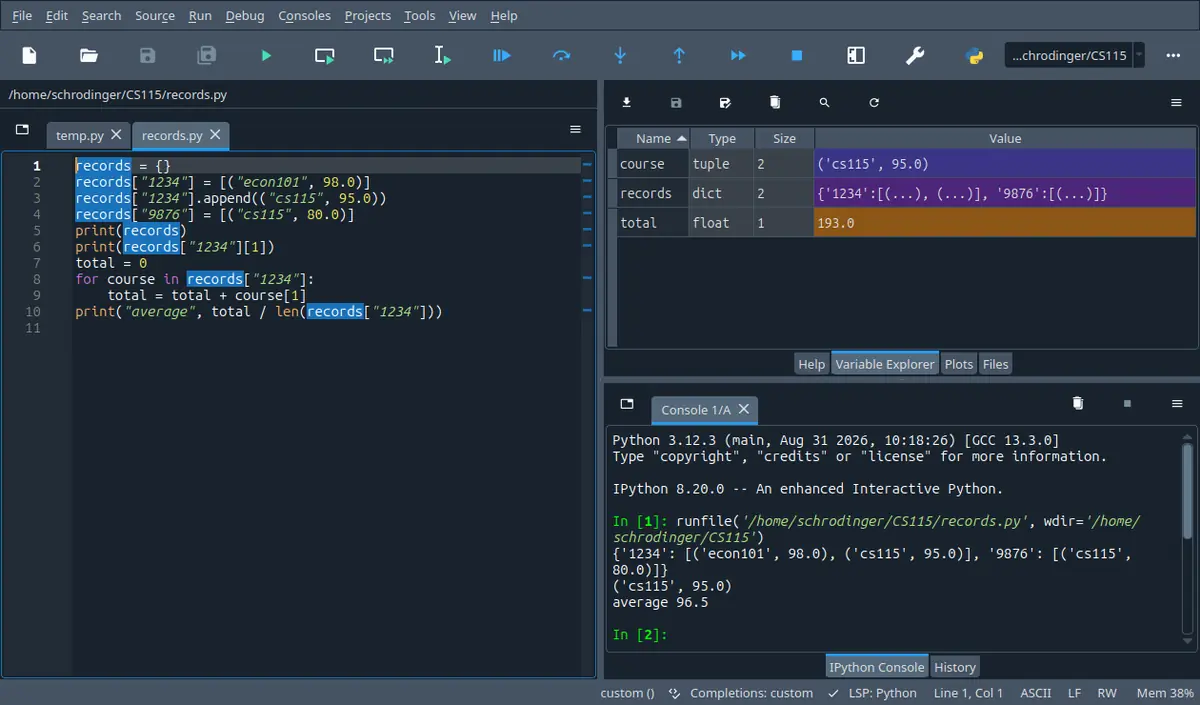
The tab next to Help. It every name your program left behind with its type and its size, so it answers the one question a listing cannot: what is in this name right now. The stepper on this page shows the same four columns.
Spyder 5.5.1 on Linux, running the program in its own editor. A different version moves a few toolbar icons; the panes are named the same.
A program keeps the marks of a lab group in order to report them two ways, so before sorting them it saves a copy under a second name. It sorts, prints the sorted marks, then prints the copy to show the original order. The copy comes out sorted too, and nothing in the program ever told it to change.
By the end of this section you can take any short program built from , , lists, dictionaries and functions passed as values and write down exactly what it prints, including the word None and the order the come out in; and you can say, for every operation the course gives you, whether it changes the thing you handed it or builds a new one.
In 60 seconds
Four containers arrive at once, and the only question that matters about each of them is whether an operation rewrites the thing you already have or builds a new one. Tuples and ranges cannot be rewritten, lists and dictionaries can, and a function is itself a value you can store and pass.
A name holds a reference, not a copy
$$\texttt{b = a}\;\Longrightarrow\;\text{one object, two names}$$
Every assignment of a list or a dictionary. Changing the object through either name is visible through both, because there is only one object.
Any line of the form name equals L dot something. If the method changes the list, the value of the call is None and the name you assigned to is now useless.
Every dictionary. A missing key is a rather than a silent wrong answer, so test with in or use get with a fallback.
Three most common mistakes
Writing sorted_marks = marks.sort() and then using sorted_marks. The list really is sorted, and the name holds None, so the next line that indexes it stops the program.
Making a backup with backup = marks and expecting it to survive a change to marks. It does not: that line made a second name for one list, and the copy that does survive is marks[:] or list(marks).
Removing items from a list inside a for loop over that same list. The loop counts positions while the positions move underneath it, so items get skipped, and the bug hides because on many inputs the answer still comes out right.
Labs are 20 per cent of the course mark, the midterm 40 and the final 40. On the one past midterm paper that was read while writing this page, the single heaviest question was worth 30 marks and consisted of four short programs to be traced by hand; two of its four parts were about exactly this week's material, one being a list indexed by its own contents inside a while loop and one being a tuple that held a list. That is one paper rather than a rule, but tracing is the cheapest 30 marks on it and this week is where tracing gets hard.
How much time do you have?
10 minutes
The two facts that decide most of the marks: which list operations change the list and hand back None, and why two names can be one list.
The 60-second card · Lists, and the two families every list operation belongs to · Two names, one list · Formula card
45 minutes
Everything a lab answer needs: a tuple to hand back two values, the list methods with their return values, cloning, and a dictionary built key by key.
The 60-second card · Tuples: one value that carries several · Lists, and the two families every list operation belongs to · Two names, one list · Dictionaries · Scaffolding comes off · B · computation
full read
Adds the three parts that the lecture spends time on and that the exam has used: ranges as a sequence you never store, a function passed to another function or used as a default value, and the rules for changing a structure while you are walking through it.
The 60-second card · Recall first · Conventions · Tuples: one value that carries several · Ranges · Lists, and the two families every list operation belongs to · Two names, one list · Dictionaries · Functions are values too · Changing a structure while a loop is walking through it · Method boxes · Look-alike pairs · Scaffolding comes off · Full exam-style question · A · concept · B · computation · C · exam level · D · interleaved · Mistake ledger · Formula card · Check yourself
By the end of this section
Return more than one value from a single function by building a tuple, and read values back out of a tuple or a nested tuple by index and by slice.
Predict what a range prints, how long it is, which values it contains and when two ranges written differently are equal.
Classify every list operation the course gives you as one that changes the list and hands back None, or one that leaves it alone and hands back a new value, and say what each returns.
Draw the names and the objects for a program that assigns, clones and passes a list, and use the drawing to say which prints change after a call.
Build a dictionary key by key from data, including a dictionary whose values are lists or tuples, and handle a missing key without stopping the program.
Pass a function to another function, store functions in a structure and use a function as the default value of a parameter, and tell passing a function apart from calling it.
Rewrite a loop that removes items from the structure it is walking through, using one of the three safe patterns, and say what the unsafe version prints instead.
Syllabus coverage
covered
Structured Types — covered
Objects with parts you can reach: strings as the one you already know, then tuples, ranges, lists and dictionaries. Creating them, indexing, slicing, length, membership with in, walking them with for, nesting one inside another, and the operations the four of them share as against the ones only some of them have.
covered
Mutability — covered
Which of the four can be rewritten and which cannot, what a name really holds, aliasing and side effects, cloning with a full slice or with list, the difference between is and equals equals, what happens to a list passed as an argument, and the rules for changing a structure while a loop is walking it.
covered
Higher-Order Functions — covered
A function name as a value that can be stored in a name, put in a list or a dictionary, passed as an argument and used as the default value of a parameter, and a function that takes another function as a parameter and applies it to every item of a list.
covered
Chapter 5 — covered
The whole of the chapter on structured types, mutability and , read as four containers and one question about each of them.
The chapter also introduces list comprehensions and the built in higher order functions map and filter. The lecture for this week does not use them and the lab sheet says only material covered in the course may be used, so they are named here and not taught, and no solution on this page uses one.
deferred
Tables as lists of lists — deferred
A table built as a list whose items are lists, reached with two index brackets and walked with two nested loops.
The lecture slides for this week end with tables, and the syllabus gives multi dimensional structures a week of their own straight after this one. Everything needed for them is on this page, which is why the next section can start from the second bracket and nothing here needs it.
Recall first
Indexing and slicing a string
For a string s, s[0] is the first character, s[-1] the last, and s[a:b] the characters from index a up to but not including b. len(s) is how many characters there are, so the last index is len(s) - 1.
Tuples, lists and ranges use the same two notations with the same rules, so everything you already do to a word works on a list of marks. The only new part is that a list also lets you assign to L[i].
A string is immutable and its methods return new strings
name.strip() does not shorten name. It builds and hands back a new string, and unless you write name = name.strip() the old one is still there with its spaces.
This is the same distinction the whole section turns on, met once already. Half of the list methods behave like strip and hand back something new; the other half do the opposite and change the list in place.
for with range, and while with a counter
for i in range(a, b): gives i the values a up to b minus 1. A while loop needs three parts you write yourself: something set up above it, a test, and a change inside the body to whatever the test reads.
Walking a structure by position uses for i in range(len(L)):, and the safe way to remove items while walking uses a while whose counter only advances sometimes. That second pattern is the point of the last concept here.
Functions, return, and the docstring as a contract
def name(p1, p2): creates a name; the body runs only when the name is called. A body that reaches its end without a return hands back None. The docstring says what the function assumes and what it returns.
Every exercise on this page is a function, and the new questions are about what the contract has to promise now that arguments can be changed by the body.
is new, and it is what turns a line of a file into pieces
'a,b,c'.split(',') hands back ['a', 'b', 'c'], a list of strings. With no argument, split() cuts on runs of whitespace instead. It is a string method, and it appears here because until this week there was nothing for it to hand back.
It is the join between the strings and files of the earlier sections and the structures of this one, and it is how almost every lab question reads its data.
Try it yourself first (2 questions)
1§06.0 — a method whose answer you forgot to keep
The second one. A name holds a string with spaces around it, and the program tries to tidy it.
name = '  Ada  '
name.strip()
print('[' + name + ']')
name = name.strip()
print('[' + name + ']')
Find(a) Write the two lines this prints.
Given
name starts as two spaces, the letters Ada, two spaces.
The square brackets in the output are printed characters, put there so that the spaces can be seen.
IPython console
In [1]: %run untitled0.py
This is the trap on purpose, and it is the same trap the whole of this section is about. The method did its work and handed the result back; nobody caught it. Half the list operations you are about to meet behave exactly like this, and the other half do the opposite, which is why the page keeps asking two questions about every one of them.
Hint 1/4
Ask what the second line of the program did with the value that strip handed back, and where that value went.
Hint 2/4
A string cannot be changed. Every string method builds a new string and hands it back, and a call whose value is not assigned anywhere is thrown away.
Hint 3/4
Here the bare call is name.strip() on line 2 with nothing on its left, and the assignment name = name.strip() only happens on line 4.
Hint 4/4
The first print still shows the spaces and the second does not.
Show solution
Read the bare call for what it is
$$\texttt{name.strip()}$$
A call on a line of its own. Its value has nowhere to go, so it is discarded.
$$\texttt{name}\;\text{unchanged}$$
Strings are immutable, so there is no version of this where the call edits the original.
Then the assignment
$$\texttt{name = name.strip()}$$
Now the new string is bound to the old name, which is the only way the change survives.
Answer $$\boxed{\texttt{[ Ada ]}\;\text{then}\;\texttt{[Ada]}}$$
Check
Check it the other way round: if the bare call had changed the string, the fourth line would be pointless and both printed lines would be the same.
2§06.0 — a loop that eats a number one digit at a time
The last one. A while loop walks the digits of a whole number from the right, using the two operators from the numerical programs section.
n = 4236
total = 0while n > 0:
total = total + n % 10
n = n // 10print('digit sum', total)
print('n is now', n)
Find(a) Write the two lines this prints.
Given
n starts at 4236.
% gives the remainder and // throws away the remainder.
IPython console
In [1]: %run untitled0.py
The second line is the part worth keeping. This loop destroys the number it was given, which does not matter for an int, since n was a copy of the value. For a list handed to a function it matters a great deal, and that is the difference this section is built on.
Hint 1/4
Two separate questions: what the digits add up to, and what is left in n when a loop with this test finally stops.
Hint 2/4
n % 10 is the rightmost digit and n // 10 is the number without it. The loop runs while n is above 0.
Hint 3/4
With n starting at 4236 the digits come off in the order 6, 3, 2, 4, and n goes 4236, 423, 42, 4 and then 0.
Hint 4/4
The digits add to 15 and the loop can only stop once n has been emptied.
Show solution
Walk the four passes
$$6 + 3 + 2 + 4 = 15$$
The remainders come off right to left, one per pass.
$$4236 \to 423 \to 42 \to 4 \to 0$$
Floor division by ten drops a digit each time, and the test fails only at 0.
Answer $$\boxed{\texttt{digit sum 15}\;/\;\texttt{n is now 0}}$$
Check
Independent check on the sum: 4236 has digits 4, 2, 3, 6, and 4 plus 2 is 6, plus 3 is 9, plus 6 is 15, added in the opposite order to the loop and giving the same total.
Notation
symbol
reads as
means
watch out
$\texttt{(1, 'two', 3)}$
a tuple of three items
An ordered group of values written with round brackets. The items may be of different types and may themselves be tuples or lists.
The brackets are not what make it a tuple, the commas are. A single item needs a trailing comma, so (5,) is a tuple and (5) is just the number 5.
$\texttt{[2, 8, 3]}$
a list of three items
An ordered group of values written with square brackets, and the only sequence in this section whose items can be replaced one by one.
Square brackets do two unrelated jobs. Around a group of values they build a list; after a name they index into one.
$\texttt{\{'Ada': 91\}}$
a dictionary from Ada to 91
A group of key and value pairs written with curly braces. The key is what you look a value up by.
Curly braces with nothing in them, {}, make an empty dictionary. There is no such thing as an empty list written that way.
$\texttt{s[i]}$
the item of s at index i
For a string, tuple, list or range, the item at position i, counting from 0. For a dictionary, the value stored under the key i.
Two different jobs behind one notation. On a sequence an index past the end is an , on a dictionary a key that is not there is a KeyError.
$\texttt{s[a:b]}$
the slice of s from a up to b
A new object holding the items from index a up to but not including index b. Slicing a tuple gives a tuple, slicing a list gives a list.
A slice always builds something new, which is why L[:] is the cheapest way to clone a list. An index out of range in a slice is not an error, it is silently trimmed.
$\texttt{x in s}$
x is in s
True when x is one of the items of the sequence s, and for a dictionary, True when x is one of its keys.
On a dictionary it looks at keys only. Asking whether a value is in a dictionary with this needs x in d.values().
$\texttt{L.append(e)}$
append e to L
Adds one item to the end of the list L, changing L itself.
It hands back None. L = L.append(e) throws the list away and leaves the name holding nothing.
$\texttt{L[:]}\;\text{and}\;\texttt{list(L)}$
a clone of L
Two ways of building a new list with the same items, so that changing one list does not change the other.
The new list holds the same item objects. If an item is itself a list, that inner list is still shared by both.
$\texttt{a is b}$
a is the same object as b
True only when the two names refer to one and the same object, whatever it contains.
Not a test of contents. Two different lists with equal items give True for == and False for is.
$\texttt{f}\;\text{against}\;\texttt{f(x)}$
the function itself against a call of it
A name with no brackets after it is the , a value like any other. With brackets it is a call and the whole thing stands for what the call handed back.
Passing f() where f was wanted calls the function too early, usually with the wrong number of arguments, and the error message says the type of the result is not callable.
Conventions used here
Every output on this page came out of an interpreter.
No block of output here was predicted by eye. Each program was written to a file, run, and the characters it wrote were copied back in, which is why some of them look odd rather than tidy: a line that says None where an answer was expected, a slice of a range that reports a stop it never reaches, a run that ends in a traceback.
In a programming course the printed answer is the whole claim, so the page cannot itself be guessing.
What this page is allowed to use, and what it waits for.
Everything here is built from what the course has covered by the end of this week: numbers, text, True and False, input, print, if, while, for, range, def and return, the string operations, files, and from now on tuples, ranges, lists and dictionaries with the methods the exam paper lists on its cover.
The lab sheet says in as many words that only functionality covered in the course may be used, and a solution that reaches forward teaches you to write something this week's lab will not accept.
How this page reports what an operation does.
For every operation there are two separate questions, and both are always answered: does it change the object you handed it, and what does it hand back. So L.sort() is written as changes L, hands back None, while sorted(L) is leaves L alone, hands back a new list.
The cover sheet of the exam gives you the names of the methods, so the names are not what is being tested.
The order the keys of a dictionary come out in.
On the Python this course uses, a dictionary keeps the order in which each key was first added, and every dictionary printed on this page shows that order rather than a sorted one. The lecture still advises not to lean on it, and this page follows that advice in one direction only: where an answer has to be in a fixed order, it walks sorted(d.keys()) instead.
A tracing question asks for the exact characters, and refusing to say what the order is would leave you unable to answer it.
A Sample Run shows what the user typed.
Where a program calls input, the Sample Run shows the prompt and then, on the same line, the characters the user typed, exactly as a lab sheet does. The terminal echoes what is typed, which is why those characters are part of the picture even though the program never printed them.
The lab sheets are marked against a Sample Run in this shape, so an exercise here is only in lab format if it carries one.
Where the word immutable is used, it is about the slots.
A tuple, a range and a string are called immutable on this page, and the claim is precise: you cannot replace an item of one, and you cannot make one longer or shorter. It is not a claim about the objects inside.
The commonest wrong sentence in this part of the course is that a tuple cannot contain anything that changes, and it is wrong in a way that costs marks on a tracing question.
6.1Tuples: one value that carries several
A tuple is a fixed row of values, so one call can hand back two answers at once.
Everything so far could hand back exactly one thing: one number, one string, one True or False. The first new type lifts that limit.
Solvable with what we have
Return one number, such as the largest common divisor of two numbers.
Print several things at once with one print.
Keep two answers in two names inside the body.
Not solvable yet
Hand two numbers back from one call, ready for arithmetic.
Keep a course name and a mark together as one value.
Walk a group of mixed types with one loop.
The lab question wants both the smallest and the largest common divisor from one function. The loop is easy. The trouble is the last line of the body:
returnstr(smallest) + ' ' + str(largest)
and what every caller then has to do before it can count anything:
report = divisor_report(84, 60)
space = report.find(' ')
low = int(report[:space])
high = int(report[space + 1:])
print('the gap is', high - low)
Why it fails
It runs, and the shape is still wrong. The caller gets characters, so it must know that a space separates the two numbers, find it, slice on either side and call int twice, and every caller repeats that. The value itself never says that there are two numbers in it; only the docstring does.
DefinitionDefinition 6.1: tuple
Conditions
Written with round brackets and commas: (1, 'two', 3). The commas are what build it; a one item tuple must be written (5,) with the trailing comma, and () is the empty tuple.
Ordered, so there is a first item and indexing works: t[0], t[-1], and slices t[1:3] which hand back a new tuple.
May mix types freely, including tuples and lists as items.
Immutable: no item can be replaced, and the tuple cannot grow or shrink. t[0] = 5 is a TypeError.
Supports + to join two tuples, * to repeat one, len for how many items, in to test membership, and for to walk the items.
Both + and * build a new tuple. t1 = t1 + t2 does not change the old tuple, it binds the name to a new one.
$$\boxed{\texttt{t = (v}_0\texttt{, v}_1\texttt{, ..., v}_{n-1}\texttt{)}\quad\text{indices }0\ \text{to}\ n-1,\ \text{no item may be replaced}}$$
A tuple is a row of values in a fixed order, reached by position, that cannot be edited after it is made. Anything that looks like editing one actually makes a second tuple.
One tuple of four items, with the two ways of naming a position, and what a slice does. The numbers above the boxes count from the left and the negative ones count from the right, so both of them name the same four slots.
Looks like this, but is not
One value in brackets should be a tuple of one item.
one = (5)
two = (5,)
print(one, type(one))
print(two, type(two))
print(len(two))
It prints 5 <class 'int'> and then (5,) <class 'tuple'>. Brackets around one value are the brackets of arithmetic, so (5) is the number 5 and has no length. The comma is what makes a tuple, which is why a tuple of one item looks unfinished and is written that way anyway.
Smallest and largest common divisor, handed back together
Write a function that takes two positive whole numbers and hands back both the smallest and the largest of their common divisors above 1, and (None, None) when they have none.
First, in full, the version that glues the two numbers into a string, so that the two can be compared line for line:
defdivisor_report(n1, n2):
"""Assumes n1 and n2 are ints greater than 0. Returns a string holding the smallest and the largest common divisor. """
smallest = 0
largest = 0for d inrange(2, min(n1, n2) + 1):
if n1 % d == 0and n2 % d == 0:
if smallest == 0:
smallest = d
largest = d
returnstr(smallest) + ' ' + str(largest)
report = divisor_report(84, 60)
print('the report says:', report)
space = report.find(' ')
low = int(report[:space])
high = int(report[space + 1:])
print('the gap between them is', high - low)
Sample Run:
the report says: 212
the gap between them is10
And now the same job with a tuple. The loop is untouched; only the last line of the body and the three lines of the caller change.
defcommon_divisors(n1, n2):
"""Assumes n1 and n2 are ints greater than 0. Returns a tuple (smallest, largest) of the common divisors greater than 1. Returns (None, None) when there is no such divisor. """
smallest = None
largest = Nonefor d inrange(2, min(n1, n2) + 1):
if n1 % d == 0and n2 % d == 0:
if smallest == None:
smallest = d
largest = d
return (smallest, largest)
pair = common_divisors(84, 60)
print('for 84 and 60:', pair)
print('smallest is', pair[0], 'and largest is', pair[1])
print('the gap between them is', pair[1] - pair[0])
print('for 13 and 8:', common_divisors(13, 8))
Sample Run:
for84and60: (2, 12)
smallest is2and largest is12
the gap between them is10for13and8: (None, None)
FindOne value that carries both answers, and the arithmetic the caller can then do with it.
Given
The two numbers are 84 and 60, and then 13 and 8.
A divisor counts only if it divides both numbers exactly, and 1 does not count.
Two numbers with different meanings, always both present, order fixed by the docstring: that is a tuple rather than a list, because nothing about the answer will ever be appended to.
$$\texttt{smallest = None}$$
A starting value that cannot be mistaken for a real divisor, which 0 could be in other questions and None never can.
One pass finds both ends
$$\texttt{for d in range(2, min(n1, n2) + 1)}$$
No common divisor can exceed the smaller number, and starting at 2 is how 1 is excluded without a special case.
$$\texttt{if smallest == None: smallest = d}$$
The first divisor found is the smallest, because the loop goes upwards; the test is what stops the later ones overwriting it.
$$\texttt{largest = d}$$
Assigned every time, so when the loop ends it holds the last and therefore the biggest divisor.
Return the pair and use it
$$\texttt{return (smallest, largest)}$$
One value leaves the function, and it has two parts. The brackets here are the tuple, not the call.
$$\texttt{pair[1] - pair[0]} = 12 - 2 = 10$$
The caller indexes the answer instead of cutting up a string, and the result is a number it can do arithmetic with straight away.
Check the two ends by hand and from the other direction. 84 is 2 times 42 and 60 is 2 times 30, so 2 divides both and no smaller divisor above 1 exists.
One loop, two names, one tuple built at the end. The string version needed a loop, two names, two conversions to string, and then in every caller a find, two slices and two calls to int.
When a question says and, the answer is often a tuple. Deciding that before writing the loop is what keeps the body to one pass.
Checkpoint
§06.1 — joining, slicing and nesting in four lines
Thirty seconds. Three tuples, and the last one has a tuple inside it.
t = (7, 'lab', 2.5)
u = t[1:] + (7,)
print(u)
print(len(u), u[-1] + t[0])
print(t)
Find(a) Write the three lines this prints.
Given
t is (7, 'lab', 2.5).
u is built from a slice of t joined to a one item tuple.
IPython console
In [1]: %run untitled0.py
The third line is the one that matters. Joining made a new tuple and left t alone, which is why the same four lines would behave differently with lists: there the operation that looks like joining is often extend, and that one does change the list.
Hint 1/4
Work out what u is first and write it down, then answer the three prints from that. The last line is asking something about t, not about u.
Hint 2/4
A slice stops before its second index and hands back a new tuple. + joins two tuples into a third and changes neither.
Hint 3/4
Here t[1:] is everything from index 1 on, which is ('lab', 2.5), and the tuple joined to it is (7,).
Hint 4/4
u has three items, u[-1] + t[0] adds two numbers, and t is exactly what it was.
Independent check on the middle line: u[-1] is the last item of u, which the first printed line shows as 7, and t[0] is the first item of t, which the third printed line shows as 7.
⚠ Writing a one item tuple without the comma
Brackets look like what makes a tuple, and in every other line of Python they group an expression.
wrong$$\texttt{t = (5)}\;\Rightarrow\;\texttt{len(t)}\;\text{is a TypeError}$$
right$$\texttt{t1 + t2}\;\Rightarrow\;\text{a new tuple};\ \texttt{t1}\;\text{unchanged}$$
⚠ Assigning to an item of a tuple
Indexing works for reading, so it looks as though it will work for writing, which is true of lists and of nothing else here.
wrong$$\texttt{week[0] = 'sun'}$$
right$$\texttt{week = ('sun',) + week[1:]}$$
6.2Ranges: a sequence that is worked out, not stored
A range is an immutable sequence of whole numbers that knows its three arguments and hands out values one at a time.
The tool that has driven every counted loop so far turns out to be one of these types too, and it has been a structured value all along.
DefinitionDefinition 6.2: range
Conditions
range(start, stop, step) stands for start, start plus step, start plus twice step, and so on, stopping before stop. With two arguments the step is 1; with one argument the start is 0 as well.
Immutable, like a tuple: no item can be replaced.
Indexing and slicing work. An index gives an int, a slice gives another range.
len, in and for all work. + and * do not: joining or repeating a range is a TypeError.
== on two ranges compares the sequences of integers they stand for, not the three numbers they were written with.
Printing a range shows the call rather than the values, so print(range(5)) puts range(0, 5) on the screen.
$$\boxed{\texttt{range(a, b, c)} \equiv a,\ a+c,\ a+2c,\ \dots\ \text{while still short of}\ b}$$
A range is a promise to count from the start towards the stop in steps of the given size, never reaching the stop, and it keeps the promise one value at a time instead of storing the values anywhere.
Three ranges drawn as the integers they hand out, on one number line. The first two are written differently and stand for the same four values in the same order, so they are equal; the third has those values in the opposite order, which is why the equality test says False.
Looks like this, but is not
Two ranges with the same values should be equal.
a = range(0, 7, 2)
b = range(0, 8, 2)
c = range(6, -1, -2)
print(a == b)
print(a == c)
print(len(a), len(c))
first = ()
for value in c:
    first = first + (value,)
print(first)
It prints True, then False. Both ranges hold 0, 2, 4 and 6, and both have length 4, but one counts up and the other counts down. A sequence is its values in their order, so reversing them makes a different sequence.
Reading length, ends and membership off range(3, 30, 4)
Without listing the values by hand, say how many there are, what the first and last ones are, what a slice of the range is, and whether two given numbers are in it. Then add them up.
r = range(3, 30, 4)
print(r)
print(len(r), r[0], r[-1])
print(r[1:3])
print(19in r, 20in r)
total = 0for value in r:
total = total + value
print('total', total)
Sample Run:
range(3, 30, 4)
7327range(7, 15, 4)
TrueFalse
total 105
FindThe five printed facts, and where the last value comes from.
Given
The range is range(3, 30, 4).
Nothing is converted to a tuple or a list anywhere in the program.
Solution
Find the values without writing them all out
$$3,\ 7,\ 11,\ 15,\ 19,\ 23,\ 27$$
Start at 3 and add 4 while still under 30. The next one would be 31, which is over the stop, so it never appears.
$$\texttt{len(r)} = 7$$
Seven values, and the length is available without walking the range because a range knows its own arithmetic.
The two ends, and why the last is not 29
$$\texttt{r[0]} = 3,\ \texttt{r[-1]} = 27$$
Indexing a range gives an int. The last value is the largest one reachable by adding 4 to 3, not the largest number below the stop.
Membership and the slice
$$\texttt{19 in r}\;\rightarrow\;\texttt{True},\quad \texttt{20 in r}\;\rightarrow\;\texttt{False}$$
19 is 3 plus four steps; 20 is between two of the values, and being inside the interval is not the same as being in the sequence.
Slicing hands back another range rather than a tuple, and it reports itself with its own start, stop and step, which is why the printed stop is 15 and not 11.
The total
$$3+7+11+15+19+23+27 = 105$$
The for loop walks the same seven values the arithmetic above predicted, which is what makes the total a check on them.
A check from the other end: len(range(1, 6)) is 5 and the tuple printed has five items, so nothing was lost in the conversion and nothing was invented by it.
This is why a debugging print on a range tells you so little, and why turning it into a tuple for one line is a reasonable thing to do while you are working.
Checkpoint
§06.2 — four facts about one range
Thirty seconds, and no listing of values on paper if you can avoid it.
The last line is the interesting one. Two ranges written with different stop values are equal here because 12 and 13 both cut the sequence in the same place. This is the only equality test in the whole section that ignores how the value was written and looks only at what it stands for.
Hint 1/4
The last line is not asking whether the two ranges were written the same way. It is asking whether they hand out the same numbers in the same order.
Hint 2/4
A range stops before its stop value, and two ranges are equal when the sequences they stand for are equal.
Hint 3/4
From 2 in steps of 3 while under 12 gives 2, 5, 8, 11. While under 13, the next one after 11 would be 14, so nothing is added.
Hint 4/4
Four values, the third of them is at index 2, 11 is one of them and 12 is not, and the two ranges are equal.
Show solution
List the values once
$$2,\ 5,\ 8,\ 11$$
Adding 3 each time and stopping before 12.
$$\texttt{r[2]} = 8,\ \texttt{len(r)} = 4$$
Index 2 is the third value, since counting starts at 0.
The two comparisons
$$\texttt{11 in r}\;\rightarrow\;\texttt{True},\ \texttt{12 in r}\;\rightarrow\;\texttt{False}$$
12 is the stop, and a range never reaches its stop.
Check the equality the long way: walk both ranges into tuples and they both come out as (2, 5, 8, 11). Same four numbers, same order, so True is right.
⚠ Expecting print to show the numbers of a range
Every other structured value prints its contents, so a range looks broken when it does not.
6.3Lists, and the two families every list operation belongs to
A list is a sequence you may write on, so each of its operations either changes it and returns None or leaves it alone and returns something.
Tuples and ranges refuse to be edited, which is exactly what a growing collection of marks or words needs to be able to do.
RuleRule 6.3: the two families of list operation
Conditions
Written with square brackets: [2, 8, 3], and [] is the empty list. Ordered, indexable, sliceable, and it may hold values of any types including other lists.
, which is the whole difference: L[i] = value replaces an item, and the list can grow and shrink.
Family one changes the list and hands back None: append(e) adds one item at the end, extend(L2) adds all the items of another list, insert(i, e) puts one item at a position, remove(e) deletes the first item equal to e, reverse() turns it round, sort() puts it in order.
Family two leaves the list alone and hands back a value: sorted(L) a new list in order, L + L2 a new joined list, L[a:b] a new list, list(L) a new list, len(L) an int, L.index(e) an int, L.count(e) an int, sum(L), max(L), min(L) numbers.
L.pop(i) is in both families at once: it removes the item at i, changes the list, and hands the removed item back.
remove(e) with no such item is a and index(e) with no such item is a ValueError, so test with in first.
$$\boxed{\text{changes }L\Rightarrow\texttt{None}\ \text{back};\quad \text{hands a value back}\Rightarrow L\ \text{untouched};\quad \texttt{pop}\ \text{does both}}$$
For every list operation ask two questions, not one: did it edit the list I gave it, and what did it hand me back. Almost every operation answers yes to one and no to the other, and only pop answers yes to both.
Every list operation in this course, sorted by the only question that matters at the keyboard. The left column is written as a statement on a line of its own, the right column is written on the right of an assignment, and the dashed box is what happens when the two are confused.
Looks like this, but is not
sorted and sort differ by two letters, so best = L.sort() should keep a sorted list in best.
marks = [70, 45, 90]
best = marks.sort()
print(best)
print(marks)
It prints None, then the sorted list. The sorting really happened, in marks itself, and best holds the None that sort handed back. The version that fills a name is best = sorted(marks), and that one leaves marks in its original order.
Six list methods in a row, with the list printed after each
Run the six operations of the first family one after another on the same list and print it each time, so that the shape of each change is visible rather than remembered.
[55, 90, 70] 3
after append [55, 90, 70, 48]
after insert [55, 100, 90, 70, 48]
pop gave back 90and left [55, 100, 70, 48]
after remove [55, 100, 70]
after reverse [70, 100, 55]
FindWhat each of the six lines leaves behind, and which one also hands something back.
In place and returning None, like the rest of this family. The version that hands a value back is a slice with a negative step, which this course does not use.
Count the items at each step as a check on the story: 3, then 4 after the append, 5 after the insert, 4 after the pop, 3 after the remove, 3 after the reverse.
Six lines, six changes to one object, no new list built anywhere. Doing the same thing with only the second family would build six new lists and need a name for each.
In a trace, write the list out again after every line of this family. The value pop hands back depends on what the line before it did.
extend against append against plus, on the same two lists
Three operations that all put two lists together, and they leave three different things behind. This is the trace the lecture spends the most time on.
Six items, not seven: the nested list counts as one. This is the line that settles the difference between the two methods.
Answer $$\boxed{\texttt{+}\ \text{builds},\ \texttt{extend}\ \text{adds items},\ \texttt{append}\ \text{adds one item}}$$
Check
An independent check on the last item: len(L1[-1]) would be 2, because that item is a list of two numbers, whereas len(L1[0]) would be an error because 1 is a number and has no length.
If an exam line has append and the argument is a list, expect the answer to have brackets inside brackets and count the items carefully.
Checkpoint
§06.3 — two families in two lines
Thirty seconds. One line uses an operation from each family, the other uses one from the first family in a place it does not belong.
L = [4, 1, 3]
print(L.count(3), sorted(L))
print(L.sort(), L)
Find(a) Write the two lines this prints.
Given
L is [4, 1, 3].
print works out its arguments from left to right before printing anything.
IPython console
In [1]: %run untitled0.py
The two printed lists are identical and they come from opposite places: the first is a new list built by sorted, and the second is L itself after sort rewrote it. If you wrote the second line as [1, 3, 4] None, the thing to fix is the order in which print works out its arguments: the sort has already happened by the time L is read.
Hint 1/4
On the second line, two things are printed and one of them is a call. Ask what that call hands back, and separately what it does to the list before the second argument is looked at.
Hint 2/4
sorted(L) hands back a new list and leaves L alone. L.sort() sorts L itself and hands back None. Arguments are worked out left to right.
Hint 3/4
Here the first line calls L.count(3) and sorted(L) on [4, 1, 3], and the second line calls L.sort() and then reads L.
Hint 4/4
The first line ends with a sorted new list while L is still unsorted; on the second line the word None is followed by an L that is now in order.
Show solution
First line, two calls from two families
$$\texttt{L.count(3)} = 1$$
Counting hands back an int and changes nothing, so L is still [4, 1, 3] after it.
right$$\texttt{if 'Zeynep' in friends: friends.index('Zeynep')}$$
⚠ Reading pop as remove by value
The two words are close in meaning and both take one argument.
wrong$$\texttt{L.pop(48)}\;\Rightarrow\;\text{removes the item}\ 48$$
right$$\texttt{L.pop(48)}\;\Rightarrow\;\text{item at index}\ 48;\ \texttt{L.remove(48)}\ \text{by value}$$
6.4Two names, one list: aliasing, cloning and side effects
An assignment copies a reference and not an object, so a change made through one name is visible through every other name for it.
Everything in the previous block changed a list in place, and that raises a question the earlier sections never had to ask: whose list was it.
RuleRule 6.4: what a name holds
Conditions
A name never holds a structured object. It holds a reference to one, so b = a makes a second name for the same object and copies nothing.
Two or more names for one object are . Changing the object through one of them changes it for all of them, because there is only one object.
a is b is True only when the two names refer to one object. a == b is True when the contents match, whether or not they are the same object.
Cloning a list takes a[:] or list(a). Both build a new list with the same items, so the two lists can then be changed independently.
A clone is one level deep. The new list holds the same item objects, so if an item is itself a list, both lists share it.
Passing a list to a function passes the reference, so the body can change the caller's list. Rebinding the parameter with values = ... does not, because that only points the local name somewhere else.
None of this is true of ints, floats, strings, tuples or ranges. There is no operation that changes one of those, so an alias for one can never surprise you.
Assignment hands over the address of the object rather than a copy of it, so after it there are two ways in to one thing. A slice of the whole list is the cheap way to get a second thing.
The same two lines of code drawn twice, once with an assignment and once with a full slice. In the top picture both names point at one row of slots, so appending through b is visible through a.
Looks like this, but is not
A full slice clones a list, so it should protect everything inside it.
rows = [[1, 2], [3, 4]]
copy = rows[:]
print('copy is rows :', copy is rows)
copy.append([5, 6])
print('rows after append :', rows)
copy[0].append(99)
print('rows after inner  :', rows)
The clone is a different object, which the False on the first line shows, and appending a new row to it leaves rows alone. The third line is the catch: copy[0] and rows[0] are the same inner list, so appending 99 to it shows up in both.
The backup that sorted itself, and the one line that fixes it
This is the program from the top of the page. It saves the marks under a second name before sorting, prints both, and the backup comes out sorted too.
marks = [72, 45, 91, 60]
backup = marks
marks.sort()
print('sorted :', marks)
print('backup :', backup)
FindWhy the first backup changed when nobody wrote to it, and what the fix costs.
Given
The marks are [72, 45, 91, 60].
Only the line that makes the backup differs between the two programs.
Solution
Read the assignment as what it is
$$\texttt{backup = marks}$$
No new list is built here. The right hand side is a reference and that reference is what gets copied, so after this line there is one list with two names.
$$\texttt{marks.sort()}$$
An operation of the first family: it rewrites the object rather than building a new one, and the object is the one both names point at.
An independent check that does not involve sorting at all: add print(backup is marks) to each program. The first prints True and the second prints False, which is the whole difference, visible before anything is changed.
The fix is four characters and one new list of four items. The bug it prevents is silent: the first program runs, prints two lines and never reports an error.
Whenever a program keeps a before and an after, look at the line that made the before. If it has no slice and no call to list in it, there is no before.
A tuple that cannot be changed, holding a list that can
The trap that a past midterm paper used, with different data. A tuple holds a string, a list and a number. Three lines succeed, the fourth stops the program.
record = ('cs115', [55, 90], 2024)
print(record)
record[1].append(70)
print(record)
part = record[1][0:1]
part = part + part
print(part, type(part))
record[1] = [0]
print('this line never runs')
Sample Run:
('cs115', [55, 90], 2024)
('cs115', [55, 90, 70], 2024)
[55, 55] <class'list'>
Traceback (most recent call last):
File "record.py", line 8, in <module>
record[1] = [0]
~~~~~~^^^
TypeError: 'tuple'object does not support item assignment
FindWhich changes go through, which does not, and what the type of part is.
Given
The tuple is ('cs115', [55, 90], 2024).
part is built from a slice of the list inside the tuple.
The tuple is not being changed at all here. It still holds the same three references; the second of them points at a list, and it is that list that grew.
Slicing a list gives a list, even when the slice has one item. It is also a new list, so what happens to it next cannot reach the tuple.
$$\texttt{part = part + part}\;\rightarrow\;\texttt{[55, 55]}$$
Joining two lists builds a third and rebinds the local name. The list inside the tuple is not involved, which is why the printed type is list and the record still shows the appended 70.
A check that separates the two claims: print(len(record)) is 3 before and after the append, so the tuple genuinely did not change, while print(len(record[1])) goes from 2 to 3.
Immutable is a promise about the slots. Read a tuple in an exam question by asking what is in each slot, and then whether that thing has any operation that changes it.
A default value that remembers the last call
A function collects values into a list, and the list is the default value of its second parameter. Called three times with one argument, it does not start empty.
defcollect(value, seen=[]):
"""Assumes value is a number. Adds value to seen and returns seen."""
seen.append(value)
return seen
print(collect(1))
print(collect(2))
print(collect(3))
defcollect_safe(value, seen=None):
"""Assumes value is a number. Returns a list holding value, added to seen when seen was given. """if seen == None:
seen = []
seen.append(value)
return seen
print(collect_safe(1))
print(collect_safe(2))
Sample Run:
[1]
[1, 2]
[1, 2, 3]
[1]
[2]
FindWhy the second call prints two items, and what the safe version does differently.
Given
The header is def collect(value, seen=[]).
The three calls all pass one argument, so the default is used every time.
Solution
When the default is worked out
$$\texttt{seen=[]}\;\text{runs once}$$
The default is worked out when the def line is read, not on each call, so one list is made and every call that uses the default gets that same list.
$$\texttt{seen.append(value)}$$
An operation of the first family on an object that outlives the call, so the next call sees what the previous one left.
The safe shape
$$\texttt{seen=None}$$
None is immutable, so there is nothing for a call to change. It is a flag rather than a value.
$$\texttt{if seen == None: seen = []}$$
The new list is built inside the body, which means once per call, which is what the docstring was promising all along.
An independent check on the diagnosis: print(collect(4) is collect(5)) would print True, because both calls hand back the one list that was built when the def was read.
A default value that can be changed is the one place where two separate calls can quietly share a structure.
Checkpoint
§06.4 — one assignment, one slice, two appends
Thirty seconds. Two names are made from one list, in the two different ways.
a = [1, 2]
b = a
c = a[:]
b.append(3)
c.append(4)
print(a, b, c)
print(a is b, a is c, a == b)
Find(a) Write the two lines this prints.
Given
a starts as [1, 2].
b is made by assignment and c by a full slice.
IPython console
In [1]: %run untitled0.py
The second line is the part to remember. a is b is True because there is one object; a is c is False because there are two; and a == b is True for the same reason as the first, but it would have been True even for two separate lists with the same items.
Hint 1/4
Draw the names and the objects before you read the appends. The question is how many list objects exist after the first three lines.
Hint 2/4
Assignment makes a second name for one object. A full slice builds a second object. A change through a name reaches whatever that name points at.
Hint 3/4
Here b = a makes an alias and c = a[:] makes a clone, so the 3 appended through b lands in the object a also names, and the 4 appended through c does not.
Hint 4/4
Two of the three printed lists are identical and the third has the 4 in it; on the second line, one comparison is False.
Show solution
Count the objects first
$$\texttt{b = a}\Rightarrow\ \text{one object, two names}$$
Nothing on that line builds a list.
$$\texttt{c = a[:]}\Rightarrow\ \text{a second object}$$
Slicing is the operation that builds, so now there are two.
It looks like the tidiest possible default and the bug only shows on the second call.
wrong$$\texttt{def collect(value, seen=[]):}$$
right$$\texttt{def collect(value, seen=None):}\;\text{then build it in the body}$$
6.5Dictionaries: looking a value up by a key instead of a position
A dictionary stores pairs and finds a value by its key, so data with names in it stops needing two parallel lists.
Positions are the wrong handle for most real data: nobody knows which index a student number sits at, and the list has to be searched to find out.
DefinitionDefinition 6.5: dictionary
Conditions
Written with curly braces and colons: {'Ada': 91, 'Bora': 68}, and {} is the empty dictionary.
d[key] hands back the value stored under that key. d[key] = value stores one, replacing what was there if the key already existed and adding a new pair if it did not.
Keys are unique and must be immutable. A string, a number or a tuple can be a key; a list or a dictionary cannot, and trying gives a TypeError about an .
Values can be anything at all, including lists, tuples and other dictionaries, and they may repeat.
A key that is not there is a KeyError. key in d tests for one, and d.get(key, fallback) hands back the fallback instead of stopping the program.
len(d) is the number of pairs. d.pop(key) removes a pair and hands the value back. d.keys() and d.values() give you can walk or pass to sum, and they are not lists, so they cannot be indexed.
for k in d: walks the keys, one at a time, and the value is then d[k]. There is no indexing by position anywhere: d[0] looks for the key 0.
$$\boxed{\texttt{d[k]}\ \text{finds the value stored under}\ k;\quad \text{keys unique and immutable, values anything}}$$
A dictionary is a set of labelled boxes. You fetch a box by saying its label, never by saying how many boxes along it is, and asking for a label that was never used stops the program unless you check first.
A dictionary of three pairs, drawn as the only thing it really is: an arrow from each key to its value. The solid arrow across the middle is what stock['bolt'] follows.
Looks like this, but is not
The brackets are the same brackets as on a list, so d[0] should be the first pair.
The first line works and prints no number, because get was asked for a missing key with a fallback. The second line stops the program with KeyError: 0. A dictionary has no first pair to ask for; the 0 in the brackets is a key that was never stored, and if some pair happened to use 0 as its key you would silently get that pair instead of the first one.
How many times each character occurs in a phrase
Write a function that takes a string and hands back a dictionary from each character to how many times it occurs, then print the pairs in alphabetical order of the character.
defletter_counts(text):
"""Assumes text is a string. Returns a dictionary whose keys are the characters of text and whose values are how many times each character occurs. """
counts = {}
for ch in text:
if ch in counts:
counts[ch] = counts[ch] + 1else:
counts[ch] = 1return counts
phrase = 'lab data'
table = letter_counts(phrase)
print(table)
for ch insorted(table.keys()):
print(repr(ch), table[ch])
Independent check on the total: the counts are 3 for a and 1 for each of the five others, which adds to 8, and len('lab data') is 8.
Any question of the form how many of each is this dictionary and this three line pattern. The only decision left is what the key should be.
Student records: a dictionary of lists of tuples
All four structures at once, which is what a lab question about grades actually needs. The key is a student number, the value is a list, and each item of the list is a course and a mark held together.
records = {}
records['1234'] = [('econ101', 98.0)]
records['1234'].append(('cs115', 95.0))
records['9876'] = [('cs115', 80.0)]
print(records)
print(records['1234'][1])
print(records['1234'][1][0])
total = 0for course in records['1234']:
total = total + course[1]
print('average', total / len(records['1234']))
Independent check on the average: 98 and 95 differ by 3, so their average is 3 halves below 98, that is 96.5. The printed value agrees without repeating the loop.
Write down the shape before the code: key is a student number, value is a list, item is a pair.
Checkpoint
§06.5 — one dictionary, six lines, two removals
Thirty seconds. Watch the third line, which reads a value and writes it back.
The last line is the one that usually costs a mark. After the pop there is no key 'x', so 'x' in d is False, and d.get('x', 0) hands back the fallback rather than stopping the program. Writing d['x'] there would have printed a KeyError and ended the run.
Hint 1/4
Keep a running picture of the pairs, and remember that the last line is asked after something has been removed.
Hint 2/4
Assigning to an existing key replaces its value. pop removes the pair and hands the value back. get with a fallback never stops the program.
Hint 3/4
Here d['x'] = d['x'] + 10 turns the 1 into 11, and d.pop('x') then takes that pair away, leaving only the pair for y.
Hint 4/4
Two pairs, then the popped value with the one remaining pair, then a False and a 0.
Check the length against the story: two assignments to a one pair dictionary gave 2 rather than 3, so one of them replaced; and after one pop the printed dictionary has one pair.
⚠ Indexing a dictionary by position
The notation is the same as a list and the pairs are printed in a visible order, so the first one looks reachable.
wrong$$\texttt{phone[0]}\;\Rightarrow\;\text{the first pair}$$
6.6Functions are values too: passing one, storing one, defaulting to one
A function name without brackets is an ordinary value, so it can be passed to another function that then decides when to call it.
Three structures can now hold anything, and it turns out that anything includes the functions written in the previous sections.
RuleRule 6.6: a function name is a value, the brackets are the call
Conditions
f is the function object itself and can be assigned, stored in a list, a tuple or a dictionary, passed as an argument and handed back from a return.
f(x) is a call, and the whole expression stands for what the call handed back.
A function that takes a function as a parameter, or hands one back, is called a higher order function. The parameter is an ordinary parameter and gets an ordinary local name.
A parameter may have a function as its default value: def convert(value, using=int). A caller who passes nothing gets int, and a caller who passes abs gets abs.
The built in functions of the course, int, float, str, abs, bool, len, round, sorted, are values in exactly the same way and are the ones the lecture passes around.
Passing f() where f was meant calls it too early. What arrives is the result, and using that result as a function gives a TypeError saying the object is not callable.
$$\boxed{\texttt{f}\ \text{is the function};\quad \texttt{f(x)}\ \text{is its result};\quad \text{a parameter can hold either}}$$
Write the name on its own to hand somebody the tool; write the name with brackets to use the tool yourself. A higher order function is one that takes the tool and decides how many times to use it.
What passing a function looks like in the same drawing style as the aliasing pictures, because it is the same idea: the argument abs and the parameter f end up as two names for one function object, which has not run yet.
Looks like this, but is not
A function name is being used, so a pair of brackets after it cannot hurt.
defsquare(n):
"""Assumes n is a number. Returns n times n."""return n * n
defuse_twice(f, value):
"""Assumes f is a function of one argument. Returns f of f of value."""return f(f(value))
print(use_twice(square, 3))
print(use_twice(square(3), 2))
The first call prints 81, since square arrives as a value and is used twice on 3. The second line passes square(3), which is the number 9, and the body then tries 9(9(2)).
One function that applies any other function to every item
The pattern the lecture builds this idea on. Write a function that takes a list and a function, and replaces every item by what the function makes of it. Then call it three times with three different functions, one of them your own.
defapply_to_each(values, f):
"""Assumes values is a list and f is a function of one argument. Replaces every item of values with f of that item and returns nothing. """for i inrange(len(values)):
values[i] = f(values[i])
deffactorial(n):
"""Assumes n is an int greater than or equal to 0. Returns n factorial."""
product = 1for i inrange(1, n + 1):
product = product * i
return product
L = [1, -2, 3.33]
print('L =', L)
apply_to_each(L, abs)
print('after abs :', L)
apply_to_each(L, int)
print('after int :', L)
apply_to_each(L, factorial)
print('after fact:', L)
Sample Run:
L = [1, -2, 3.33]
after abs : [1, 2, 3.33]
after int : [1, 2, 3]
after fact: [1, 2, 6]
FindThe list after each call, and why the last one gives 6.
Given
The list starts as [1, -2, 3.33].
The three functions applied in turn are abs, int and a factorial written on the spot.
Solution
The parameter that holds a function
$$\texttt{def apply\_to\_each(values, f):}$$
Two ordinary parameters. Nothing in the header says that the second one is a function; the body says it by putting brackets after it.
$$\texttt{values[i] = f(values[i])}$$
Assigning to an item, so this changes the caller's list. Walking by index is what makes that possible, since walking the items would only rebind a local name.
An independent check on the last step: the third call is only legal because the second one made every item a whole number. Swap the order of the int and factorial calls and the program stops, since a factorial loop over a range needs an int.
One function with a loop in it, used three times. Writing three functions with the same loop in each would be the same work three times and three places to fix a mistake.
This is the shape to recognise in an exam: a parameter that is used with brackets somewhere in the body is a function, and the question is what the caller handed over.
A conversion function chosen per item, with int as the default
A past paper used a header of this shape, with a function as the default value of the second parameter, and asked what the program printed. Here is the same idea on different data. Three branches choose three different tools for three kinds of reading.
defconvert(value, using=int):
"""Assumes value is a number and using is a function of one argument. Returns using applied to value. """return using(value)
readings = [-40.5, 0, 12.25, -3.75, 91.6]
for i inrange(len(readings)):
if readings[i] > 50:
readings[i] = convert(readings[i])
elif readings[i] > -10:
readings[i] = convert(readings[i], bool)
else:
readings[i] = convert(readings[i], abs)
print(readings)
Sample Run:
[40.5, False, True, True, 91]
FindThe printed list, item by item, and why two of its items are the word True.
Given
The readings are [-40.5, 0, 12.25, -3.75, 91.6].
The branches use int by default for readings above 50, bool for readings above minus 10, and abs otherwise.
Solution
Which branch each reading takes
$$-40.5 \le -10$$
Neither above 50 nor above minus 10, so the else branch applies abs and the item becomes 40.5, still a float.
$$0 > -10\ \text{and}\ 0 \le 50$$
Middle branch, so bool is applied, and bool(0) is False. Zero is the only number that gives False, which is the point of putting it in the data.
$$12.25 > -10,\ -3.75 > -10$$
Both take the middle branch and both are non zero, so both become True. The values are lost entirely, which is what applying bool means.
$$91.6 > 50$$
First branch, and the default is used because the call passes one argument. int(91.6) is 91, throwing the fraction away rather than rounding to 92.
Independent check on the mix of types: the printed list has a float, two booleans and an int in it, which is four different types in five items.
Reading this kind of trace, do the branch test first and the conversion second. Most lost marks here come from applying the right function to the wrong item.
Checkpoint
§06.6 — one function used twice, on two different tools
Thirty seconds. A higher order function is called three times, once with a function written here and once with a built in one.
defadd3(n):
"""Assumes n is a number. Returns n plus 3."""return n + 3deftwice(f, v):
"""Assumes f is a function of one argument. Returns f of f of v."""return f(f(v))
print(twice(add3, 10))
print(twice(abs, -5))
g = add3
print(g(1), twice(g, 1))
Find(a) Write the three lines this prints.
Given
add3 adds three to its argument.
twice(f, v) hands back f(f(v)).
IPython console
In [1]: %run untitled0.py
The middle line is the interesting one: abs(abs(-5)) is 5, because the second application has nothing left to do. A tool that does nothing when applied twice is worth noticing, since it is the case where a trace can be done without any arithmetic at all.
Hint 1/4
Work the inner call out first in each case, exactly as with any nested call, and remember that the last line prints two things.
Hint 2/4
f(f(v)) applies the tool to the result of applying the tool. A name assigned from a function name is a second name for the same function.
Hint 3/4
Here the calls are twice(add3, 10), twice(abs, -5) and, after g = add3, both g(1) and twice(g, 1).
Hint 4/4
Adding three twice moves 10 by six; applying abs twice is the same as applying it once; and the last line is a single application followed by a double one.
right$$\texttt{apply\_to\_each(L, round)}\;\text{on a line of its own}$$
⚠ Storing the result where the function was wanted
The dictionary of operations is usually written by copying a line that called one of them.
wrong$$\texttt{table = \{'add': add(3, 8)\}}$$
right$$\texttt{table = \{'add': add\}}$$
⚠ Passing a function's name as a string
The user types a word, so the word feels like the thing to pass on.
wrong$$\texttt{apply\_to\_each(L, 'abs')}$$
right$$\texttt{apply\_to\_each(L, abs)}\;\text{or look the string up in a dictionary first}$$
6.7Changing a structure while a loop is walking through it
A for loop over a list counts positions, so removing items underneath it makes the positions move and some items are never seen.
Removing items is now possible and walking items was possible from the start, and doing both at once is where the marks go missing.
RuleRule 6.7: three safe patterns, and one that is not
Conditions
A for loop over a list keeps a hidden position counter and asks the list for the item at that position each time.
So removing an item inside such a loop slides the later items one place left while the counter moves one place right, and the item that slid into the vacated place is stepped over.
Safe pattern one: walk a clone and change the original. for mark in group[:] reads from the copy, so the positions it counts never move.
Safe pattern two: a while loop with a counter you advance yourself, advancing only when nothing was removed. This is the pattern a past exam solution used.
Safe pattern three: build a new list of the items you want to keep and hand that back, changing nothing. Usually the clearest of the three, and the only one that leaves the caller's list alone.
For a dictionary the rule is stricter: changing the number of pairs during a walk over it stops the program with a RuntimeError rather than silently skipping.
Adding items inside a loop over the same list is worse still, since the loop can then keep finding new work and never end.
$$\boxed{\text{remove inside}\ \texttt{for}\ \text{over the same list}\Rightarrow\ \text{items skipped};\quad \text{clone, or}\ \texttt{while},\ \text{or build new}}$$
The loop is counting places, not items, so anything that moves the items between two passes moves them behind the loop's back. Either walk something that cannot move, or move the counter yourself.
Two passes of a for loop that removes items below fifty. On the first pass the counter is at position 0 and the 30 is removed. Everything then slides one place left, so the 40 is now at position 0, while the counter has already moved on to position 1.
Looks like this, but is not
The loop below removes every mark below fifty, and here it really does. So the pattern is fine.
marks = [30, 75, 40, 90, 20]
for mark in marks:
    if mark < 50:
        marks.remove(mark)
print(marks)
Sample Run:
[75, 90]
The answer is right and the program is still wrong. In this list the three low marks are separated by high ones, so every time the items slide left the item skipped is one that was going to be kept anyway.
The same six lines, on a list where two low marks are neighbours
The unlucky input. Two marks below fifty are next to each other, and one of them survives.
marks = [30, 40, 75, 20, 90]
for mark in marks:
    if mark < 50:
        marks.remove(mark)
print(marks)
Sample Run:
[40, 75, 90]
FindWhich mark survives, and at which pass it was skipped.
Given
The marks are [30, 40, 75, 20, 90].
The loop removes any mark below fifty.
Solution
Follow the counter, not the items
$$\text{pass 1: position }0,\ \text{item }30$$
Below fifty, so it goes. The list becomes [40, 75, 20, 90] and everything after the 30 has moved one place left.
$$\text{pass 2: position }1,\ \text{item }75$$
The counter has moved to 1, but position 1 now holds 75, because the 40 slid into position 0 behind the counter.
The rest of the walk
$$\text{pass 3: position }2,\ \text{item }20$$
Below fifty, removed, and the list becomes [40, 75, 90] with length 3.
$$\text{pass 4: position }3$$
The length is now 3, so there is no position 3 and the loop stops.
Answer $$\boxed{\texttt{[40, 75, 90]}\quad\text{with}\ 40\ \text{below the limit}}$$
Check
An independent check that the bug is about positions rather than about the number 40: reverse the input to [90, 20, 75, 40, 30] and the survivor changes, while passing_only on either input gives a list with nothing below fifty in it.
When a removal loop gives a nearly right answer, count how many items it actually tested. It is always fewer than the length it started with.
The three patterns that work, on the same unlucky list
First the while loop with a counter advanced by hand, which also hands back what it took out. This is the shape a past exam solution used for exactly this job.
deftake_out_failing(marks):
"""Assumes marks is a list of numbers. Removes every mark below 50 from the list it was given and returns a new list holding the removed marks, in the order they were found. """
failed = []
i = 0while i < len(marks):
if marks[i] < 50:
failed.append(marks.pop(i))
else:
i = i + 1return failed
group = [30, 40, 75, 20, 90]
print('before:', group)
out = take_out_failing(group)
print('after :', group)
print('failed:', out)
Then the version that builds a new list and changes nothing.
defpassing_only(marks):
"""Assumes marks is a list of numbers. Returns a new list of the marks that are 50 or more and leaves the list it was given untouched. """
kept = []
for mark in marks:
if mark >= 50:
kept.append(mark)
return kept
group = [30, 40, 75, 20, 90]
print('kept :', passing_only(group))
print('before:', group)
Sample Run:
kept  : [75, 90]
before: [30, 40, 75, 20, 90]
And the shortest fix to the broken loop, which is to walk a clone.
group = [30, 40, 75, 20, 90]
for mark in group[:]:
    if mark < 50:
        group.remove(mark)
print(group)
Sample Run:
[75, 90]
FindWhat each one leaves in the original list, what each hands back, and which to reach for.
Pop both removes and reports, so the removed mark can be kept. The counter is deliberately not advanced here, because the item that slid into position i has not been tested yet.
$$\texttt{else: i = i + 1}$$
The only place the counter moves. This single line is the whole difference from the broken version.
Independent check across the three: the three surviving lists are identical and the removed marks add up to 30 plus 40 plus 20, which is 90, while the original total was 255 and the surviving total is 165. 165 plus 90 is 255, so nothing was lost or invented by any of them.
The clone costs one extra list of five items. The while loop costs no extra memory and one more line of thinking.
If the question says remove, the while loop or the clone. If it says return the ones that, build a new list.
The same mistake on a dictionary, where it stops the program
Dropping the parts that are out of stock, written the way the list version was written.
stock = {'nut': 0, 'bolt': 12, 'washer': 0}
for part in stock:
    if stock[part] == 0:
        stock.pop(part)
print(stock)
Sample Run:
Traceback (most recent call last):
  File "stock_clean.py", line 2, in <module>
    for part in stock:
RuntimeError: dictionary changed size during iteration
FindWhy this one reports an error rather than skipping quietly, and the fix.
Given
The dictionary is {'nut': 0, 'bolt': 12, 'washer': 0}.
The loop removes any pair whose value is 0.
Solution
What the error is saying
$$\texttt{RuntimeError: dictionary changed size during iteration}$$
A dictionary walk checks that the number of pairs has not changed, so the failure is loud.
The fix, which is pattern one again
$$\texttt{for part in sorted(stock.keys())}$$
Sorting builds a new list of the keys, so the walk is over something nobody is changing, and the removals land in the dictionary as intended.
$$\texttt{list(stock.keys())}$$
The same fix without imposing an order, for when the order does not matter.
Answer $$\boxed{\text{no output, a RuntimeError};\ \text{fix by walking}\ \texttt{sorted(stock.keys())}}$$
Check
A check on which of the two objects is the problem: reading stock[part] inside the loop is fine, and stock[part] = 0 would also be fine, because neither changes the number of pairs.
The dictionary tells you off and the list does not. Treat the loud error as the lucky case and apply the same fix to both.
Checkpoint
§06.7 — removing the even numbers, one pass too few
Thirty seconds, and the answer is not what the code says it wants.
items = [1, 2, 4, 5, 6]
for x in items:
    if x % 2 == 0:
        items.remove(x)
print(items)
Find(a) Write the one line this prints.
Given
The list is [1, 2, 4, 5, 6].
The loop removes any even item.
IPython console
In [1]: %run untitled0.py
The 4 is still there. Trace it: position 0 holds 1 and is kept, position 1 holds 2 and is removed so the list becomes [1, 4, 5, 6], position 2 now holds 5 rather than 4, position 3 holds 6 and is removed, and then the length is 3 so the loop stops. Three of the five items were ever tested.
Hint 1/4
Write the list out again after each removal, with the position the loop is about to look at marked. The question is which positions the loop ever reaches.
Hint 2/4
The loop counts positions. A removal slides everything after it one place left, and the counter still moves one place right.
Hint 3/4
Here the two evens 2 and 4 are neighbours, so when the 2 goes the 4 slides into its place at position 1 while the counter moves to position 2.
Hint 4/4
One even number survives, and it is the one that was next to the first one removed.
Show solution
Pass by pass, with the list rewritten each time
$$\text{position }0:\ 1\ \text{kept}$$
Odd, so nothing moves and the picture is unchanged.
right$$\texttt{else: i = i + 1}\ \text{so the counter waits when something was removed}$$
⚠ Removing pairs from a dictionary while walking it
The list version of the same loop runs without complaining.
wrong$$\texttt{for part in stock: stock.pop(part)}$$
right$$\texttt{for part in sorted(stock.keys()): stock.pop(part)}$$
⚠ Walking by index over a shrinking list
range(len(L)) is the standard walk, and it is worked out once before the loop starts.
wrong$$\texttt{for i in range(len(marks)): marks.pop(i)}\;\Rightarrow\;\text{IndexError}$$
right$$\texttt{while i < len(marks):}\ \text{with the counter advanced by hand}$$
Choosing between a tuple, a list, a dictionary and a range
Before writing any code for a question that mentions more than one value. Five minutes here saves the rewrite that happens when a list turns out to need names instead of positions.
Ask whether the values are looked up by name or by position
By name, such as a student number or a part code, means a dictionary. By position, or in an order that matters, means one of the sequences.
Ask whether the group will grow or shrink
If items will be added or taken away, it is a list. If the group is a fixed record, such as a course name with a mark, it is a tuple.
Ask whether you are storing values or counting
A sequence of consecutive whole numbers that is only being walked over never needs storing at all: that is range. Turning a range into a tuple or a list is only worth it when you have to index it repeatedly or keep it after the loop.
Decide what one item looks like, then write that down
Say it as a sentence: key is a student number, value is a list, item is a tuple of a course and a mark.
Where it goes wrong
Two parallel lists, one of names and one of marks, kept in step by hand. Every lookup is then a search, and the day one list is sorted the other is wrong.
A dictionary where the key is never used to look anything up, only walked. That is a list of pairs written the long way.
A tuple for a group that the question later asks you to extend, which forces a rebuild on every addition.
Storing a range as a list of a thousand numbers when the loop only needed to walk it once.
Deciding whether a function should change its argument or hand something back
Every time you write a function whose parameter is a list or a dictionary. The wrong choice still runs, and it costs marks because the caller in the question expects the other one.
Read the question for the word the marker will read
Removes, adds, sorts and updates all describe a change to the thing that was passed in. Returns, gives and finds all describe a new value.
If it changes the argument, return nothing and say so
No return statement at all, and a docstring that says changes the list it was given. The caller then has to use the argument afterwards, never the value of the call, because the value is None.
If it returns a new value, do not touch the argument
Build a new list or dictionary inside the body and return it. Read the parameter as much as you like and assign to nothing that belongs to the caller.
When both are needed, use pop and return the removals
A question that says remove the failing marks and return them wants a body that changes the list and also hands back a new list of what it took.
Where it goes wrong
Changing the argument and also returning it, so the caller cannot tell which of the two happened and the docstring has to say both.
Returning a slice of the argument and believing the caller's list is safe when the items are themselves lists.
Writing a function that only prints, so nothing can be tested and no caller can use the answer.
Assigning to the parameter name, which changes nothing outside and looks from inside the body exactly like a change that works.
From a lab sheet of named functions to a finished file with a sample run
Any lab question that lists functions with names and then says write a script that does the following. The shape of the answer is fixed and marks are lost on the shape rather than on the logic.
Write the headers first, all of them, with docstrings and no bodies
One def per named job, in the order the sheet lists them, each with the parameters the sheet mentions and a docstring saying what it assumes and what it returns.
Decide, for each one, which of the two families it is in
Add student changes a dictionary and returns nothing. Find student returns a value or None. Deciding this before the bodies is what keeps the script at the bottom short, because the script then knows whether to print the call or the argument.
Fill the bodies from the smallest one up
The function with no other function inside it goes first, because it can be tested alone with one print. A function that uses another one is then tested with the first already known to work, which is the only way to tell which of the two is wrong when the answer comes out odd.
Write the script, and keep every print in it
The functions stay silent and the script does the talking, unless the sheet asks for a message from inside, as the error messages of a menu usually are.
Match the sample run character by character
Compare with the sheet's sample run: the wording of the prompts, the space after a colon, the number of decimals, the text of an error message.
Where it goes wrong
Printing inside the functions and then discovering the script has nothing to print.
A menu whose loop reads the choice once, above the loop, so the program either runs one operation or never stops.
Reading a number with input and comparing it to a number, without int or float around the call.
Functions named something other than what the sheet said, which costs marks even when every body is right.
Putting the marks in order, in place
A function whose job is to leave the caller's list in order.
deforder_in_place(marks):
"""Assumes marks is a list of numbers. Sorts the list it was given, smallest first, and returns nothing. """
marks.sort()
group = [72, 45, 91, 60]
print('before:', group)
answer = order_in_place(group)
print('after :', group)
print('the call handed back', answer)
Sample Run:
before: [72, 45, 91, 60]
after : [45, 60, 72, 91]
the call handed back None
FindWhat the caller has to look at afterwards.
Given
The marks are [72, 45, 91, 60].
The body is a single call to sort.
Solution
The body changes the object
$$\texttt{marks.sort()}$$
The parameter is a reference to the caller's list, so sorting it here sorts the list the caller can still see.
$$\text{no}\ \texttt{return}$$
There is nothing to hand back. Adding return marks would let a caller write a line that looks like the other family and is not.
The printed None is the evidence. If the call had been worth anything, the third line would show a list and the caller would have two ways of reading the same answer.
Handing back the marks in order, leaving the original alone
The same job described the other way round, and the body changes by one word.
deforder_copy(marks):
"""Assumes marks is a list of numbers. Returns a new list with the same numbers in order, smallest first, and leaves the list it was given untouched. """returnsorted(marks)
group = [72, 45, 91, 60]
ordered = order_copy(group)
print('the new list:', ordered)
print('the original:', group)
print('same object? ', ordered is group)
Sample Run:
the new list: [45, 60, 72, 91]
the original: [72, 45, 91, 60]
same object?  False
FindWhat the caller has to look at afterwards, and what is left of the original order.
Given
The marks are [72, 45, 91, 60].
The body is a single call to sorted.
Solution
The body builds a new object
$$\texttt{return sorted(marks)}$$
sorted reads the list and builds another, so the caller's list is never written to and the answer has to leave through the return.
$$\texttt{ordered is group}\;\rightarrow\;\texttt{False}$$
Two objects, which is the whole difference. The printed original still shows the order it was given in.
Both prints are needed as evidence: the new list is in order and the old one is not, so exactly one object was sorted and it was not the caller's.
Both functions put four marks in order and the difference is invisible in their names, so it has to be read off two places: whether there is a return, and whether the body used sort or sorted.
How to tell them apart
Look at what the caller uses after the call. If the next line reads the argument, the function belongs to the first family and must not return anything. If the next line reads the value of the call, the function belongs to the second and must not touch the argument.
Scaffolding comes off
The common skeleton
Name what one item has to be compared with. Most questions of this kind are about an item and its neighbour, so the loop variable is an index rather than an item.
Set the counting name to 0 above the loop, so that it survives every pass.
Choose the range of positions so that every comparison the body makes exists. Comparing with the item before means starting at 1; comparing with both neighbours means starting at 1 and stopping one early.
Do the comparison in one if and change the counting name under it, not under the for.
Return the counting name after the loop, never inside it.
1 · fully worked
How many items of a tuple are higher than both of their neighbours
A value is called a peak when it is greater than the item before it and greater than the item after it. Write a function that counts the peaks in a tuple of numbers, and try it on a flat tuple and on a tuple of two items as well.
defcount_peaks(values):
"""Assumes values is a tuple of numbers. Returns how many items are greater than both of their neighbours. """
peaks = 0for i inrange(1, len(values) - 1):
if values[i] > values[i - 1] and values[i] > values[i + 1]:
peaks = peaks + 1return peaks
readings = (31, 18, 26, 12, 6, 9, 14, 7)
print(readings)
print('peaks:', count_peaks(readings))
print('flat tuple:', count_peaks((4, 4, 4, 4)))
print('two items :', count_peaks((9, 1)))
Check by walking the tuple as a shape: from 31 it falls to 18, rises to 26, falls to 12 and to 6, rises to 9 and to 14, falls to 7.
Every question about an item and its neighbours is this loop with a different if. The range of positions is decided by how many neighbours the condition mentions.
2 · you write the reasoning
Same skeleton, easier question: how many items are greater than the item just before them. The steps are below with the reasons taken out. Write your own reason for each before opening it. Nothing has to be invented here; the question is only why each line is where it is.
defcount_climbs(values):
"""Assumes values is a tuple of numbers. Returns how many items are greater than the item just before them. """
climbs = 0for i inrange(1, len(values)):
if values[i] > values[i - 1]:
climbs = climbs + 1return climbs
readings = (31, 18, 26, 12, 6, 9, 14, 7)
print('climbs:', count_climbs(readings))
Sample Run:
climbs: 3
The loop starts at 1 rather than at 0.
reasoning
Because position 0 has nothing before it. The body reads values[i - 1], and at i equal to 0 that is values[-1], which is the last item: the comparison would succeed or fail for no reason connected to the question.
It stops at the end this time, not one short of it.
reasoning
Because every position except the first has an item before it. The peak version had to stop early only because it also read values[i + 1], and this one never does.
climbs = 0 is written above the loop.
reasoning
Because it has to survive all the passes. Inside the loop it would be set back to 0 each time and the answer would be 0 or 1.
The comparison mentions only one neighbour.
reasoning
Because the question mentions one neighbour, so one comparison is the whole test. Adding the other neighbour would silently turn this into the peak question.
The return is after the loop and the function prints nothing.
reasoning
Because the count is only complete once every position has been looked at. A return inside the loop would report after the first pass instead of after the last.
3 · find the buried error
Harder, and now the program is somebody else's. A climb is a run of items that keeps increasing, and the length of a climb is how many items are in it. The program is supposed to report the longest climb in the tuple, and for this tuple the right answer is 4, because 4, 6, 7, 8 at the end is four items long.
deflongest_climb(values):
"""Assumes values is a tuple of numbers with at least one item. Returns the length of the longest run of items that keeps increasing. """
best = 0
run = 1for i inrange(1, len(values)):
if values[i] >= values[i - 1]:
run = run + 1else:
if run > best:
best = run
run = 1return best
readings = (2, 5, 9, 4, 4, 6, 7, 8)
print(longest_climb(readings))
Sample Run:
3
Keep two counting names: the best climb seen so far, and the climb currently being walked.
Walk the positions from 1, so that each item can be compared with the one before it.
If this item continues the climb, the current run gets one longer.
Otherwise the climb has ended, so compare it with the best and start a new one.
After the loop, hand back the best.
the two buried errors (2)
⚠ step 3
>= counts a repeated value as a continuation. In this tuple the two 4s are next to each other, so the run 4, 4, 6, 7, 8 is measured as five items when the longest increasing run is really 4, 6, 7, 8 with four.
Increasing and not decreasing sound like the same thing in English, and the flat case is the one nobody has in their test data. The same slip turns a peak into a shoulder in the rung above.
right
Use the strict comparison: if values[i] > values[i - 1]:. Then a repeat ends the run, and the run that starts at the second 4 is counted from 1.
⚠ step 5
The final run is never compared with best, because that comparison only happens in the else branch and the else branch never runs after the last item. Here the longest climb ends at the last item, so it is the one thrown away, and the answer comes from the earlier run 2, 5, 9 instead.
The loop is written from the inside out and the comparison feels finished once it is in the body. It only shows on data where the best run reaches the end, and half the time a random test does not.
right
Repeat the comparison once more after the loop, before the return: if run > best: best = run, then return best.
4 · the bare problem
§06.7 — the same skeleton, turned upside down
No scaffolding this time. A value is called a valley when it is smaller than the item before it and smaller than the item after it. Write a function count_valleys(values) that takes a tuple of numbers and returns how many valleys it has, with a docstring, and call it on the tuple below and on (5, 5, 5).
Find
(a) Write the function and the two calls.
(b) Write the two numbers the program prints.
Given
The tuple to test is (12, 4, 9, 9, 2, 6, 1, 8).
A valley must be smaller than both of its neighbours, so the first and last items can never be valleys.
Hint 1/4
This is the peak question with the comparisons turned round. Decide first which positions can be tested at all, because that part does not change.
Hint 2/4
Walk range(1, len(values) - 1), keep a counter set to 0 above the loop, and put one if with two strict comparisons inside it.
Hint 3/4
On (12, 4, 9, 9, 2, 6, 1, 8) the positions to test are 1 to 6, and the items there are 4, 9, 9, 2, 6 and 1.
Hint 4/4
Three of those six items are smaller than both of their neighbours, and the flat tuple has none.
Show solution
Reuse the skeleton, change only the comparisons
$$\texttt{for i in range(1, len(values) - 1)}$$
Both neighbours are mentioned in the condition, so both ends have to be left out; this is the same line as in the peak version.
Only the direction of the two comparisons changes. Strict, so that the pair of equal 9s cannot produce a valley.
Count on the data
$$4 < 12\ \text{and}\ 4 < 9$$
First valley.
$$2 < 9\ \text{and}\ 2 < 6$$
Second valley, with the second 9 on its left.
$$1 < 6\ \text{and}\ 1 < 8$$
Third valley, and the 8 at the end cannot be tested itself.
The flat tuple
$$\texttt{(5, 5, 5)}\;\rightarrow\;0$$
One position to test and no strict inequality holds there, so the answer is 0 rather than an error.
Answer $$\boxed{3\ \text{valleys, then}\ 0}$$
Check
Independent check from the shape of the data: 12 falls to 4, rises to 9, stays at 9, falls to 2, rises to 6, falls to 1, rises to 8.
Full exam-style question
Averages of a dictionary of lists, without changing the inputexam format
Exam shape, and worth about fifteen marks on the paper this page was written against. Write a function averages(marks) that takes a dictionary whose keys are student names and whose values are lists of numbers, and returns a NEW dictionary from each name to the average of that student's marks. The dictionary passed in must not be changed.
defaverages(marks):
"""Assumes marks is a dictionary of student name to a list of numbers, and that no list is empty. Returns a NEW dictionary of name to the average of that student's marks. The dictionary given as the parameter is not changed. """
out = {}
for name in marks:
total = 0for mark in marks[name]:
total = total + mark
out[name] = total / len(marks[name])
return out
book = {'Ada': [80, 90, 100], 'Bora': [55, 60], 'Cem': [70]}
means = averages(book)
print(means)
print('the input is still', book)
print('Bora average is', format(means['Bora'], '.2f'))
Sample Run:
{'Ada': 90.0, 'Bora': 57.5, 'Cem': 70.0}
the inputis still {'Ada': [80, 90, 100], 'Bora': [55, 60], 'Cem': [70]}
Bora average is57.50
FindThe function, the dictionary it returns, and the evidence that the input survived.
Given
The input is {'Ada': [80, 90, 100], 'Bora': [55, 60], 'Cem': [70]}.
Each value is a list of numbers of any length, and no list is empty.
The input dictionary must be unchanged when the function returns.
Solution
Say the shape out loud before writing anything
$$\text{in: name}\mapsto\text{list of numbers};\quad \text{out: name}\mapsto\text{one number}$$
The keys are the same in both, so the loop is over the keys of the input and each pass writes one pair into the output.
$$\texttt{out = \{\}}$$
The word NEW in the question is a requirement, and building an empty dictionary in the body is what satisfies it.
The inner total, and why it is inside the outer loop
$$\texttt{total = 0}\;\text{inside the outer loop}$$
Each student needs a fresh total. Setting it above the outer loop is the single commonest way to lose the marks on this question, and it fails silently, since the first student's answer is still right.
$$\texttt{for mark in marks[name]: total = total + mark}$$
The value is a list, so it can be walked directly; no index is needed because nothing here is about position.
Divide by the right count
$$\texttt{out[name] = total / len(marks[name])}$$
The length of that student's list, not of the dictionary. Both are numbers and both are available, so the wrong one runs perfectly and gives nonsense.
$$80 + 90 + 100 = 270,\ 270/3 = 90.0$$
Division always gives a float, which is why the printed averages have a decimal point even where they divide exactly.
Show that the input survived
$$\texttt{print('the input is still', book)}$$
The body never assigned to marks or to any of its values, so the lists print exactly as they went in.
Check each average independently: Ada's three marks are evenly spaced around 90, so their mean is 90 exactly; Bora's two differ by 5 so their mean is 57.5, halfway between 55 and 60; Cem has one mark so his average is that mark.
Two nested loops, one dictionary built, nothing copied. A version that cloned each list first would do the same arithmetic and allocate a list per student for nothing, since reading a list never changes it.
When a question says returns a new dictionary and must not change the input, both halves are marked.
Practice
A · concept 3 questions
1§06.1 — what immutable actually promises
A tuple holds a string and a list. Decide whether the claim below is true, and give the reason in one sentence.
record = ('lab', [55, 90])
print(record)
record[1].append(70)
print(record)
The claim: the second print shows the same line as the first, because record is a tuple and tuples cannot change.
Find(a) True or false, with the reason.
Given
record is ('lab', [55, 90]).
The middle line appends 70 to the list inside the tuple.
Hint 1/4
Separate two questions: can the tuple be made to hold different things, and can the things it holds be changed. The claim answers the first and the code does the second.
Hint 2/4
A tuple refuses to have an item replaced and refuses to change length. It makes no promise at all about the objects its items point at.
Hint 3/4
Here the second slot points at the list [55, 90], and append is an operation that changes a list in place.
Hint 4/4
False: the tuple still holds the same three references, and one of them now points at a longer list.
A list, which is the one type here with operations that change it in place.
$$\texttt{.append(70)}$$
Applied to the list, not to the tuple, so the tuple is never asked to do anything it refuses.
Answer $$\boxed{\text{False}}$$
Check
Independent check: len(record) is 2 both times and len(record[1]) goes from 2 to 3. The tuple kept its shape and the list grew, which is exactly what the claim denies.
2§06.2 — a sorted copy that is not a copy and is not sorted
A program wants to keep the marks in the order they were given and also have them sorted. Decide whether the claim below is true, and give the reason in one sentence.
marks = [70, 45, 90]
best = marks.sort()
print(best)
print(marks)
The claim: after this runs, best holds [45, 70, 90] and marks is still in its original order.
Find(a) True or false, with the reason.
Given
marks is [70, 45, 90].
best is assigned from a call to sort on the list.
Hint 1/4
Two claims are being made at once, about two different names. Check them separately and remember that this operation belongs to one of the two families.
Hint 2/4
sort rewrites the list it is called on and hands back None. sorted builds a new list and leaves the original alone.
Hint 3/4
Here the call is marks.sort() with the result assigned to best, on the list [70, 45, 90].
Hint 4/4
False twice over: the name holds nothing useful and the list is no longer in its original order.
Every operation of the first family hands back None, which is why assigning from one is always a mistake.
What the call did
$$\texttt{marks} = \texttt{[45, 70, 90]}$$
The sorting happened, in the caller's list, so the original order is not recoverable from anywhere in this program.
Answer $$\boxed{\text{False}}$$
Check
A check that separates the two failures: print(type(best)) reports NoneType rather than list, and print(marks == [70, 45, 90]) reports False. Each print settles one half of the claim.
3§06.3 — two lists that look identical on the screen
Two names are built from the same three numbers, separately. Decide whether the claim below is true, and give the reason in one sentence.
first = [10, 20]
second = [10, 20]
print(first, second)
print(first == second, first is second)
first.append(30)
print(first, second)
The claim: the two lists print identically on the first line, so appending to one of them will change the other.
Find(a) True or false, with the reason.
Given
first and second are each written out as [10, 20].
Nothing is assigned from one name to the other anywhere.
Hint 1/4
Ask how many list objects were built by the first two lines, and then which of them the append can reach.
Hint 2/4
Aliases are made by assigning one name from another. Two separate list literals build two separate objects, whatever they contain.
Hint 3/4
Here each of the two lines has its own [10, 20] written out, and the append is called on first.
Hint 4/4
False: two objects, so the append reaches only one of them, which the last line shows.
Two list literals, so two objects are built. Nothing here copies a reference from one name to the other.
$$\texttt{first == second}\;\rightarrow\;\texttt{True},\ \texttt{first is second}\;\rightarrow\;\texttt{False}$$
Contents match, identities do not, which is precisely the distinction the claim ignores.
Send the append somewhere
$$\texttt{first.append(30)}$$
It reaches the object first names and there is no route from there to the other one.
Answer $$\boxed{\text{False}}$$
Check
Turn it round for the check: write second = first instead of the second literal and rerun. Then is prints True and the last line shows the 30 in both, which is the behaviour the claim was describing, and it needed that assignment to happen.
B · computation 5 questions
1§06.1 — a tuple inside a tuple, joined and repeated
Four prints, and the second tuple has the first one as its own first item.
t = ('cs', 115)
u = (t, 'lab')
print(u)
print(u[0][1] + 1)
print(u + t)
print(2 * t[1:])
Find(a) Write the four lines this prints.
Given
t is ('cs', 115) and u is (t, 'lab').
The last line repeats a slice of t.
IPython console
In [1]: %run untitled0.py
The third line is where marks go. Joining u and t gives four items, not three and not a nested pair: the two items of u followed by the two items of t, and the first of those four is itself a tuple, which is why the line has an extra pair of brackets near the front.
Hint 1/4
Write down what u is as a picture of two slots before answering anything, and keep in mind that one of those slots holds a tuple rather than a value.
Hint 2/4
Nesting shows up as brackets inside brackets. u[0][1] reads the second item of whatever is in the first slot. + joins at the top level only, and * repeats.
Hint 3/4
Here u[0] is ('cs', 115), so u[0][1] is 115, and t[1:] is (115,) because a slice of a tuple is a tuple.
Hint 4/4
The third line has four items and the fourth has two, both of them the same number.
Show solution
Build u as a picture
$$\texttt{u}\;=\;\text{two slots, the first holding all of}\;\texttt{t}$$
Two slots: the first holds the whole of t, the second a string. This is what the first printed line shows.
Read through two layers
$$\texttt{u[0][1]} = 115,\ +1 = 116$$
First bracket picks the tuple, second picks its second item, and only then is it a number that can be added to.
The fourth line is the one worth checking twice. After remove('nut') the first nut is gone, and the one left is the one that extend added at the end, so its index is 3 rather than 0. remove always takes the first match and leaves the others, which is why a list with repeats needs a loop rather than one call.
Hint 1/4
Rewrite the whole list after every line that changes it. The two lines that print two things are asking a question about the list as it stands at that moment.
Hint 2/4
insert(i, e) pushes the rest right, pop() with no argument takes the last item and hands it back, remove(e) deletes the first match by value, and index(e) reports where the first match is now.
Hint 3/4
Here the order is append washer, insert pin at 1, pop the last, extend with clip and nut, count the nuts, remove the first nut, then ask for the index of nut and finally sort.
Hint 4/4
The count is 2, and after the removal the surviving nut is the last item of four, so its index is 3.
Check the lengths along the way: 2, 3, 4, 3, 5, 4, 4. Each step changes by exactly what its operation promises, and the two lines that only asked questions did not change it at all.
3§06.4 — one function that reaches out, one that does not
Two functions with bodies of one line each, called on the same list, and a third print that uses the value of a call.
defadd_bonus(marks):
"""Assumes marks is a list of numbers. Adds a 5 mark bonus to the end of the list it was given, returns nothing. """
marks.append(5)
defreplace_marks(marks):
"""Assumes marks is a list of numbers. Binds its own name to a new list and returns nothing. """
marks = [0, 0]
group = [60, 70]
add_bonus(group)
print(group)
replace_marks(group)
print(group)
print(add_bonus(group))
print(group)
Find(a) Write the four lines this prints.
Given
group starts as [60, 70].
add_bonus appends to its parameter and replace_marks assigns to its parameter.
IPython console
In [1]: %run untitled0.py
The last two lines belong together. The third print shows None, because add_bonus returns nothing, and the fourth shows that the call did its work anyway: the list now has two fives on the end, one from each call. A function of this family is called on a line of its own, and the answer is read from the argument afterwards.
Hint 1/4
For each of the two functions, ask whether the body changes an object or only points a local name somewhere else. Only one of those reaches the caller.
Hint 2/4
append on a parameter changes the caller's list. Assigning to the parameter name rebinds a local name and does nothing outside. A body with no return hands back None.
Hint 3/4
Here add_bonus(group) appends 5, replace_marks(group) runs marks = [0, 0] inside its own frame, and the third print calls add_bonus again and prints what the call is worth.
Hint 4/4
Two of the four printed lines are the same list, the third is a single word, and the last has two fives in it.
The parameter is a reference to the caller's list, and append changes the object rather than the name.
The body that rebinds a name
$$\texttt{marks = [0, 0]}$$
A new list is built and the local name points at it. The caller's name still points at the old object, which is why the second printed line is unchanged.
Check the third call against the fourth line: if printing a call could somehow prevent the body from running, the last line would show one 5.
4§06.3 — a lab shaped script that prices a basket
Write a script Sec06_B4.py that reads how many prices there are, reads that many prices, and reports the cheapest one with its position, then removes it and shows what is left. Use two functions: read_prices(count) returning a list of floats, and cheapest_index(prices) returning an int, and let only the script print. Prices are shown with two decimals and the list itself is printed as Python shows it.
Find
(a) Write the two functions with their docstrings and the script that uses them.
(b) Write the Sample Run for the input above, prompts included.
Given
The user types 4, then 18.5, 7.25, 32 and 7.25.
Two of the prices are equal and they are the cheapest, so a decision has to be made about which one counts.
read_prices takes the count as a parameter and returns a list; cheapest_index takes the list and returns an int.
Hint 1/4
Two questions the sheet has already answered for you: what each function gets and what each hands back. Write both headers and their docstrings before any body.
Hint 2/4
Build a list by starting from [] and appending inside a counted loop. To find where the smallest is, keep the index of the best so far and compare with a strict less than.
Hint 3/4
Here the four prices are 18.5, 7.25, 32 and 7.25, so the best index starts at 0 and moves once, to 1, and never moves again because the last 7.25 is not strictly smaller.
Hint 4/4
The reported position is 1, the removed price is 7.25, and three prices are left, one of which is still 7.25.
A list grown one item per pass is the standard shape, and float has to wrap the input before the append, since everything input hands back is a string.
$$\texttt{'Price ' + str(i + 1) + ': '}$$
The prompt counts from 1 for the user while the loop counts from 0, and joining strings needs str around the number.
The searching function
$$\texttt{best = 0}$$
The first item is the best until something beats it. Starting from a made up large number would need a number larger than any price, which no question can promise.
$$\texttt{if prices[i] < prices[best]: best = i}$$
Strictly less than, so a tie leaves the earlier index in place, which is the decision the docstring records.
The script
$$\texttt{where = cheapest\_index(prices)}$$
A number, so it can be used twice: once to report and once to remove.
$$\texttt{gone = prices.pop(where)}$$
Pop removes and reports in one line, which is what lets the last message name the price it took out as well as the ones left.
Check the surviving list against the input: four prices went in, three came out, and the total dropped from 65.0 to 57.75, a difference of exactly the removed 7.25.
5§06.5 — a small dictionary and four questions about it
One dictionary of parts, changed twice and then asked about twice.
stock = {'nut': 4}
stock['bolt'] = 9
stock['nut'] = stock['nut'] + 6print(stock)
print(stock.get('pin', 0), stock.get('nut', 0))
stock.pop('bolt')
print(stock, len(stock))
for part in stock:
print(part, 'has', stock[part])
Find(a) Write the five lines this prints.
Given
The dictionary starts as {'nut': 4}.
get is called once for a key that is missing and once for a key that is there.
IPython console
In [1]: %run untitled0.py
The second line is the one to be careful with: the missing key gives the fallback 0 rather than stopping the program, and the key that is there gives its value, so get is the safe way of reading a dictionary you did not build yourself. The last line runs once because there is one pair left, and it prints both halves of that pair because the loop variable is the key and the value needs a second lookup.
Hint 1/4
Keep the pairs written down and in the order they were added, because two of the printed lines depend on that order.
Hint 2/4
Assigning to a new key adds a pair at the end of the order; assigning to an existing key replaces the value and keeps its place.
Hint 3/4
Here nut goes from 4 to 10, bolt is added with 9, and then bolt is popped, leaving one pair.
Hint 4/4
The first line has two pairs with nut first, and the walk at the end runs once.
Check the arithmetic on the value: the nut count is 4 plus 6, and the two later lines that mention nut both say 10.
C · exam level 4 questions
1§06.7 — four versions of one lab function
Exam level. A question asks for a function that removes every mark below fifty from the list it is given and returns a new list of the removed marks. Four students hand in four versions.
deffailing_a(marks):
"""Version A."""
failed = []
for mark in marks:
if mark < 50:
failed.append(mark)
marks.remove(mark)
return failed
deffailing_b(marks):
"""Version B."""
failed = []
i = 0while i < len(marks):
if marks[i] < 50:
failed.append(marks.pop(i))
else:
i = i + 1return failed
deffailing_c(marks):
"""Version C."""
failed = []
for mark in marks:
if mark < 50:
failed.append(mark)
return failed
deffailing_d(marks):
"""Version D."""
failed = []
for i inrange(len(marks)):
if marks[i] < 50:
failed.append(marks.pop(i))
return failed
Each one is called as failing_x([30, 40, 75, 20, 90]).
Find(a) Which version does both halves correctly?
Given
The list is [30, 40, 75, 20, 90], so two of the three low marks are next to each other.
The function must both change the list it was given and return the removed marks.
Hint 1/4
Two things are being asked for at once, so check each version twice: what it returns, and what the caller's list looks like afterwards.
Hint 2/4
Removing inside a for over the same list skips items. range(len(L)) is worked out once, before the loop, so it does not shrink with the list.
Hint 3/4
On [30, 40, 75, 20, 90] the correct answer is a returned [30, 40, 20] and a list left as [75, 90].
Hint 4/4
Only the version with the while loop and the conditional advance gets both of those.
Both halves wrong, and both for the same reason: the 40 was never tested, so it was neither returned nor removed.
$$\text{C: returns }\texttt{[30, 40, 20]},\ \text{leaves the list as it was}$$
The return is right because nothing moved while the loop walked. Nothing moved because nothing was removed, which is the half it fails.
$$\text{D: IndexError}$$
range(len(marks)) is a fixed sequence of positions 0 to 4, and after two removals the list has only three of them.
Why B is safe
$$\texttt{while i < len(marks)}$$
The test reads the length on every pass, so it shrinks as the list does.
$$\texttt{failed.append(marks.pop(i))}\ \text{and}\ \texttt{else: i = i + 1}$$
Pop gives both halves of the answer in one line, and holding the counter still after a removal is what stops the item that slid into position i from being skipped.
Answer $$\boxed{\text{Version B}}$$
Check
A check that does not involve tracing: the marks removed should add up to 90 and the marks left to 165, whatever order they come out in.
2§06.1 — a tuple, a name for its list, and a slice
Exam level, of the kind that is worth thirty marks as a hand trace. One tuple, one extra name for the list inside it, one append and one slice.
t = (1, [2, 3], 4)
u = t[1]
u.append(5)
v = t[0:2]
print(t)
print(v)
print(len(t), len(v))
Which of the four outputs is right?
Find(a) Choose the output.
Given
t is (1, [2, 3], 4).
u is the list inside t, and v is a slice of t taken after the append.
Hint 1/4
Three questions, one per printed line: what t looks like after the append, what v holds, and what the two lengths are.
Hint 2/4
A name assigned from an item of a tuple is a second name for that item. Appending through it changes the object.
Hint 3/4
Here u is the list [2, 3] inside t, the append makes it [2, 3, 5], and v is t[0:2], which has two slots.
Hint 4/4
The list shows its 5 in both printed tuples, and the two lengths are 3 and 2.
Show solution
What u is a name for
$$\texttt{u = t[1]}$$
Not a copy. Reading an item of a tuple hands over the reference that is in the slot, so now the list has two names.
Check the sharing directly: print(v[1] is t[1]) prints True, so there is one list with two homes, and that is why editing it through u shows up in both printed lines.
3§06.5 — a grouping function that keeps one name
Exam level, and the program is somebody else's work. The function is supposed to hand back a dictionary from the word pass or fail to the list of names in that group. On the data below the right answer has three names in it, two under pass and one under fail.
defgroup_names(marks):
"""Assumes marks is a dictionary of name to number. Returns a dictionary of the word pass or fail to the list of names. """
groups = {}
for name in marks:
if marks[name] >= 50:
groups['pass'] = [name]
else:
groups['fail'] = [name]
return groups
book = {'Ada': 91, 'Bora': 44, 'Cem': 72}
print(group_names(book))
Sample Run:
{'pass': ['Ada']}
The five steps the author would describe are numbered below. Exactly two of them are wrong.
Find(a) Which two steps are wrong?
Given
The input is {'Ada': 91, 'Bora': 44, 'Cem': 72}.
Step 1: start with an empty dictionary, groups = {}.
Step 2: walk the names with for name in marks:.
Step 3: choose the key with if marks[name] >= 50: and its else.
Step 4: store the name with groups['pass'] = [name] or groups['fail'] = [name].
Step 5: hand the dictionary back with a return groups written inside the loop body.
Hint 1/4
The output has one name in it out of three. Two separate things could cause that: names being written over each other, and the function leaving early.
Hint 2/4
A dictionary of lists needs two lines, one for the first name under a key and one for the rest. A return inside a loop body ends the function on the first pass.
Hint 3/4
Here the input is three names, Ada with 91, Bora with 44 and Cem with 72, and the printed answer is a dictionary with a single pass entry holding only Ada.
Hint 4/4
One of the wrong steps is the one that stores, and the other is the one that returns.
A return ends the whole call, not the pass, so the loop runs once. This is the error that makes the printed answer one pair long.
Find the one that survives the first fix
$$\texttt{groups['pass'] = [name]}$$
A new list each time, so the second pass name replaces the first. With the return moved below the loop the output would still be wrong, which is how you know this is a second error and not a consequence of the first.
$$\texttt{if key in groups: groups[key].append(name)}$$
The fix. The first name under a key needs a list built round it and every later one is appended to the list already stored.
Clear the other three
$$\texttt{groups = \{\}}$$
Above the loop, so it survives the passes, and empty because nothing is known in advance about which groups will be needed.
$$\texttt{marks[name] >= 50}$$
Fifty passes, which the else branch then handles by exclusion. Nothing in the data or the question contradicts it.
Answer $$\boxed{\text{Steps 4 and 5}}$$
Check
Independent check on the counting: three names go in, so the lists in the answer must hold three names between them. The buggy version holds one and the fixed one holds two plus one, which is the arithmetic that catches this class of bug without reading any code.
4§06.5 — merging two stock dictionaries without touching either
Exam level, about fifteen marks. Write a function merge_stock(left, right) that takes two dictionaries from part name to an int count and returns a NEW dictionary holding every part that is in either of them, with the counts added together where a part is in both. Neither dictionary passed in may be changed. Then use it on the two dictionaries below and report how many different parts there are and the total count.
Find
(a) Write the function with its docstring.
(b) Write the four lines your script prints for the two dictionaries above.
Given
shelf is {'nut': 120, 'bolt': 45} and box is {'bolt': 30, 'washer': 8}.
bolt is the only part in both.
Neither input may be changed, and the answer must be a new dictionary.
Hint 1/4
The word NEW in the question is a requirement with a one line answer. Decide what the body starts from before deciding what the loops do.
Hint 2/4
Copy the first dictionary pair by pair into an empty one, then walk the second and either add to an existing count or store a new pair.
Hint 3/4
Here the first loop puts nut at 120 and bolt at 45 into the answer, and the second loop finds bolt already there, so 45 and 30 are added, and washer is new.
Hint 4/4
The merged dictionary has three parts, the bolt count is 75, and the total of the three counts is 203.
Show solution
Satisfy the word NEW first
$$\texttt{merged = \{\}}$$
An empty dictionary built inside the body. Anything else, including a copy made later, leaves a version of this function that shares an object with a caller.
$$\texttt{for part in left: merged[part] = left[part]}$$
Copying pair by pair. It reads left and writes only into the new dictionary, so left cannot be affected.
The second dictionary, two cases
$$\texttt{if part in merged: merged[part] = merged[part] + right[part]}$$
The part is already in the answer, so the counts are added. Reading from merged rather than from left keeps the line correct even if the same part appeared twice in a longer chain of merges.
$$\texttt{else: merged[part] = right[part]}$$
A part only in the second dictionary is simply stored, which is why washer arrives with 8.
Report on the answer
$$\texttt{len(both)} = 3$$
Pairs, so different parts: nut, bolt and washer.
$$\texttt{sum(both.values())} = 203$$
The values view can be summed directly. It is not a list and cannot be indexed, but it can be walked and added up.
Independent check on the total: the four input counts are 120, 45, 30 and 8, which add to 203, and merging can neither lose nor invent a count.
D · interleaved 3 questions
1§06.3 — a list whose own contents are the indices
A while loop walks a list, and the thing it assigns to is chosen by what the list currently holds.
a = [2, 4, 1, 0, 3]
i = 0while i < len(a):
a[a[i]] = i
i = i + 1print(a)
Find(a) Write the one line this prints.
Given
a starts as [2, 4, 1, 0, 3].
The line inside the loop reads a[a[i]] = i.
IPython console
In [1]: %run untitled0.py
This is the shape of a tracing part that has appeared on a past paper for thirty marks, and the whole difficulty is that the list being read is the list being written. Rewriting all five values after every pass is the only reliable way through it, and it takes about a minute.
Hint 1/4
Take the inner bracket first on every pass. Work out a[i] from the list as it stands now, and that number is the position being written to.
Hint 2/4
In a[a[i]] = i the right hand side is the loop counter and the position on the left is worked out from the current contents.
Hint 3/4
With a starting as [2, 4, 1, 0, 3], the first pass has i of 0 and a[0] of 2, so position 2 is set to 0.
Hint 4/4
Five passes, and two of them write to a position that has already been written to, so two of the five values end up the same.
Position 2 was overwritten on the first pass, so the index read here is 0 rather than the original 1, and writing 2 into position 0 changes nothing because it was already 2.
Position 4 was overwritten on the second pass, so the index read is 1, and position 1 already held 4.
Answer $$\boxed{\texttt{[3, 4, 0, 0, 1]}}$$
Check
Check the loop rather than the values: the test is i < len(a) and nothing in the body changes the length, so there are exactly five passes and the last index used is 4.
2§06.4 — two functions that shorten a list, one of them only locally
Two functions, each of which shortens a list by one item, and only one of them shortens the caller's.
defshrink(values):
"""Assumes values is a list of numbers. Removes the last item of the list it was given and returns nothing. """
values.pop()
defshrink_copy(values):
"""Assumes values is a list of numbers. Returns a new list without the last item and leaves the original alone. """
values = values[:len(values) - 1]
return values
data = [1, 2, 3]
shrink(data)
print(data)
smaller = shrink_copy(data)
print(smaller, data)
Find(a) Write the two lines this prints.
Given
data starts as [1, 2, 3].
shrink calls pop on its parameter; shrink_copy assigns a slice to its parameter and returns it.
IPython console
In [1]: %run untitled0.py
The second line has both halves of the lesson on it. shrink_copy really did build a shorter list, and it built it for itself: the name values inside the body was pointed at the new list and the caller's name was left pointing at the old one. The only reason the caller sees anything at all is the return.
Hint 1/4
For each body, ask whether it changes an object or points a local name at a new one. That single question decides both printed lines.
Hint 2/4
pop on a parameter changes the caller's list. Assigning a slice to the parameter name builds a new list and rebinds only the local name, so the caller's list is untouched.
Hint 3/4
Here shrink(data) pops the 3 from [1, 2, 3], and shrink_copy is then called on the two item list that is left.
Hint 4/4
The first printed line has two items; on the second line the returned list has one item and data still has two.
A check on the second call that does not involve the first: print(shrink_copy(data) is data) prints False, and printing data afterwards still shows two items.
3§06.5 — a file turned into a dictionary, then questioned
The program writes a small data file first so that it can run anywhere, then reads it back into a dictionary and asks two things about it.
out_file = open('stock.txt', 'w')
out_file.write('nut,120\n')
out_file.write('bolt,45\n')
out_file.write('washer,8\n')
out_file.close()
defread_stock(filename):
"""Assumes filename names a file whose lines are a part name and a count separated by a comma. Returns a dictionary of part name to int count. """
stock = {}
in_file = open(filename, 'r')
for line in in_file:
parts = line.strip().split(',')
stock[parts[0]] = int(parts[1])
in_file.close()
return stock
table = read_stock('stock.txt')
print(table)
print('bolt count', table['bolt'])
low = []
for part in table:
if table[part] < 50:
low.append(part)
print('running low:', low)
Find(a) Write the three lines this prints.
Given
The file holds three lines: nut,120 then bolt,45 then washer,8.
Each line is stripped and split on the comma, and the second piece is turned into an int.
IPython console
In [1]: %run untitled0.py
The values are ints rather than strings, which is what int(parts[1]) bought: without it the last line would still run and table[part] < 50 would stop the program, because a string cannot be compared with a number. The order of the printed dictionary is the order of the lines in the file, since that is the order the keys were first added.
Hint 1/4
Work out what one pass of the reading loop does to one line, then trust it for the other two and move on to the two questions at the end.
Hint 2/4
line.strip() removes the newline, split(',') gives a list of two strings, and int on the second one makes the value a number.
Hint 3/4
Here the three lines give the pairs nut 120, bolt 45 and washer 8, in that order, and the test at the end is a count below 50.
Hint 4/4
Three pairs printed in file order, one value fetched by key, and two of the three parts are below fifty.
Show solution
One line of the file becomes one pair
$$\texttt{strip()}\ \text{on the line}\;\rightarrow\;\texttt{'nut,120'}$$
The newline at the end of every line of a file has to go before the split, or the int conversion on the last piece would meet it.
Independent check on the counts: the three values add to 173, and sum(table.values()) would print exactly that. If any value were still a string the addition would fail instead, so the sum is also evidence that the conversion happened.
Mistake ledger (29 entries)
⚠ Writing a one item tuple without the comma
Brackets look like what makes a tuple, and in every other line of Python they group an expression.
wrong$$\texttt{t = (5)}\;\Rightarrow\;\texttt{len(t)}\;\text{is a TypeError}$$
One level deep. Items that are themselves lists are shared by both copies.
Counting things into a dictionary
$$\texttt{if k in d: d[k] = d[k] + 1}\ \text{else}\ \texttt{d[k] = 1}$$
The key must exist before it can be read, which is what the test is for.
A dictionary whose values are lists
$$\texttt{if k in d: d[k].append(x)}\ \text{else}\ \texttt{d[k] = [x]}$$
The first item under a key needs a list built round it; every later one is appended to the list already stored.
Removing from a list while walking it
$$\texttt{i = 0}\;/\;\texttt{while i < len(L)}\;/\;\texttt{if ...: L.pop(i)}\ \text{else}\ \texttt{i = i + 1}$$
The counter advances only when nothing was removed. while i < len(L) reads the length on every pass, which range(len(L)) does not.
Walking a structure by position or by item
$$\texttt{for i in range(len(L))}\quad\text{against}\quad\texttt{for x in L}$$
Use the index form when the answer is a position, when items are being replaced, or when neighbours are compared. Use the item form otherwise.
Check yourself
Close the page and write, from memory: the four containers of this section, with one line each saying what you look a value up by and whether it can be changed; then the two families of list operation with three members each and what each family hands back; then the two lines of code that make a backup that survives a sort; then the two line pattern for counting things into a dictionary and the two line pattern for a dictionary whose values are lists; then what f means without brackets and what it means with them; and finally the three safe ways to remove items from a list you are walking. Then open the page and mark what you missed rather than reading it all again.
Write a function that hands back two numbers at once, and say what (5) is and how it differs from (5,)?
c-tuple
Say how many values range(3, 30, 4) has, what its last value is, and why range(0, 7, 2) equals range(0, 8, 2) but not range(6, -1, -2)?
c-range
Put six list operations into the right family from memory, and say what L = L.sort() leaves in L and what L.pop(2) leaves and hands back?
c-list
Draw the names and objects for b = a and for c = a[:], and predict all three lists after one append through each name?
c-alias
Build a dictionary from a name to a list of tuples, reach one mark through all three layers, and say what d[0] does to a dictionary whose keys are strings?
c-dict
Write a function that takes another function and applies it to every item of a list, and say what goes wrong when the argument is written with brackets?
c-higher-order
Take a for loop that removes items from the list it walks, say which item it skips on a given input, and rewrite it in all three safe ways?
c-walk-and-change
Glossary (27 terms)
structured typeyapılandırılmış tür
A type whose values have parts you can reach, such as a string, a tuple, a range, a list or a dictionary, as against a number, which has none.
tupledemet
An ordered group of values written with round brackets and commas. It cannot be changed after it is built, and it may hold values of different types.
range
An immutable sequence of whole numbers described by a start, a stop and a step. It works out each value as it is asked for rather than storing them.
listliste
An ordered group of values written with square brackets whose items can be replaced, added and removed after it is built.
dictionarysözlük
A group of key and value pairs in which a value is found by giving its key. Keys are unique and must be immutable; values may be anything.
keyanahtar
The label a dictionary stores a value under, and the only way to reach that value. It is not a position.
mutabledeğiştirilebilir
Said of a type whose values can be changed in place. Lists and dictionaries are; numbers, strings, tuples and ranges are not.
immutabledeğiştirilemez
A value that cannot be altered once it exists: no slot can be replaced and the length cannot change. It says nothing about the objects those slots point at, so a tuple can hold a list that grows.
referencereferans
What a name actually holds when it names a structured object: a way of reaching that object rather than a copy of it.
aliastakma ad
A second name for one object, made by assigning one name from another. A change through either name is visible through both.
side effectyan etki
Anything a call does besides handing a value back, such as printing or changing a list the caller still has its own name for.
cloningkopyalama
Building a second list with the same items, written L[:] or list(L), so that the two lists can then be changed independently.
A copy that duplicates the row of references and not the objects they point at, which is what cloning a list gives you.
The operator is, which asks whether two names reach one and the same object, as against ==, which asks whether two values have the same contents.
indexingindeksleme
Reaching one item of a sequence by its position, counting from 0, or one value of a dictionary by its key.
slicingdilimleme
Taking a run of items from a sequence with s[a:b], which stops before b and always builds a new object.
The question x in s, which is True when x is one of the items of the sequence s, or one of the keys when s is a dictionary.
higher order function
A function that takes another function as an argument or hands one back, so that the work to be done is chosen by the caller.
function object
What a function name without brackets stands for: a value that can be stored, passed and defaulted to, and that runs only when brackets are put after it.
varsayılan değer
A value written in a header with an equals sign, used when a caller passes nothing for that parameter. It is worked out once, when the definition is read.
in placeyerinde
Said of an operation that changes the object it was given rather than building a new one. Such operations hand back None.
KeyError
The error that stops a program when a dictionary is asked for a key it does not have. Avoided with in or with get and a fallback.
IndexError
The error that stops a program when a sequence is asked for a position it does not have, which is every position from its length upwards.
ValueError
The error that stops a program when remove or index is asked for an item the list does not contain.
unhashable type
The message in the error raised when something that can change, such as a list, is used as a dictionary key.
split
A string method that cuts a string into a list of pieces, on a given separator or on whitespace when none is given.
view
What keys() and values() hand back: something that can be walked and summed but not indexed, and that follows the dictionary as it changes.
What comes next
§07 · Arrays and Multi-Dimensional Arrays
Everything on this page had one bracket after a name. The next section adds the second one. A table is a list whose items are lists, so a row is table[r] and a cell is table[r][c], and walking all of it takes two nested loops rather than one. Nothing new is needed for that: the aliasing rules are the ones from this page, and the reason a cloned table still shares its rows is the reason a cloned list still shares its inner lists.
Sources
textbookJohn Guttag, Introduction to Computation and Programming Using Python, with Application to Understanding Data, second edition, chapter 5 The syllabus names this chapter for the week. The chapter also covers list comprehensions and the higher order functions map and filter, which the lecture for this week does not use and which therefore appear on this page only as names.
course materialThe course's own lecture slides for this week Used for the boundary of what counts as covered: scalar against structured objects, tuples, ranges and range equality, the list method table, splitting strings, dictionaries with their function table, the memory drawings for aliasing and cloning, lists as function parameters, higher order functions, and tables of two dimensions, which the syllabus gives to the following week.
course materialThe lab sheet and the tutorial sheet for the tuples, lists and dictionaries lab Used for the shape of an exercise, which is a named script, stated function names with what they return, and a sample run given character for character, and for the instruction that only functionality covered in the course may be used and that functions need docstrings.
course materialOne past midterm paper for this course, with its solutions Used for the weight and the shape of the tracing question, which was worth 30 of the 100 marks and consisted of four short programs, two of whose parts were on this week's material: a list indexed by its own contents inside a while loop, and a tuple holding a list that was extended through it.
course materialThe course information page for one autumn term Used for the assessment weights, which are labs 20 per cent, midterm 40 and final 40, and for the fact that the exam paper prints a list of the available methods on its cover, which is why this page teaches behaviour rather than names.
standard resultThe Python 3 language reference and its library documentation Used to check the exact wording of the error messages shown on this page, the rule that a default value is worked out once when the definition is read, the rule that a dictionary keeps the insertion order of its keys, and the behaviour of `sorted`, `sum`, `abs`, `bool`, `int` and `round` on the values used in the examples.