7 concepts18 worked examples24 exercises3 exam-level7 figures
What are you here for?
05 Global variables, modules, and files
Start with this
One question before you read anything. Getting it wrong is the point: it shows you what this section is for.
§05.0 - a counter that a function tries to add to
A tally is set up at the top of the file and a function adds one to it. Nothing is typed in while this runs.
count = 0defbump():
"""Adds one to the tally the program keeps."""
count = count + 1return count
print(bump())
The claim: this prints 1, because the tally starts at 0 and the function adds one to it.
Find(a) True or false, with the reason.
Given
count is 0 at the level when the call happens.
The body both reads count and assigns to it.
Hint 1/4
You are being asked about a claim, not about a number. Decide first whether this program gets as far as printing anything at all.
Hint 2/4
An assignment anywhere in a body makes that name local for the whole body, including the mentions above the assignment. A local name has no value until something assigns to it.
Hint 3/4
Here the body contains count = count + 1, and count is also a module level name set to 0 two lines higher.
Hint 4/4
False: the program does not print 1, it stops on the right hand side of that line with an .
Show solution
Decide which name the body means
$$\texttt{count = count + 1}\;\text{in the body}$$
There is an assignment to count here, so by the rule from the section before, count is local everywhere in this body.
$$\text{local }\texttt{count}\;\text{has no value}$$
Nothing has assigned to the local one yet, and the module level 0 belongs to a different name as far as this body is concerned.
The right hand side is worked out first, so the program stops before the assignment is even attempted.
Answer $$\boxed{\text{False}}$$
Check
Take the assignment out and leave only return count + 1. Now there is nothing making the name local, the body reads the module level 0, and 1 appears. The single character that decides it is the =.
What this looks like in Spyder
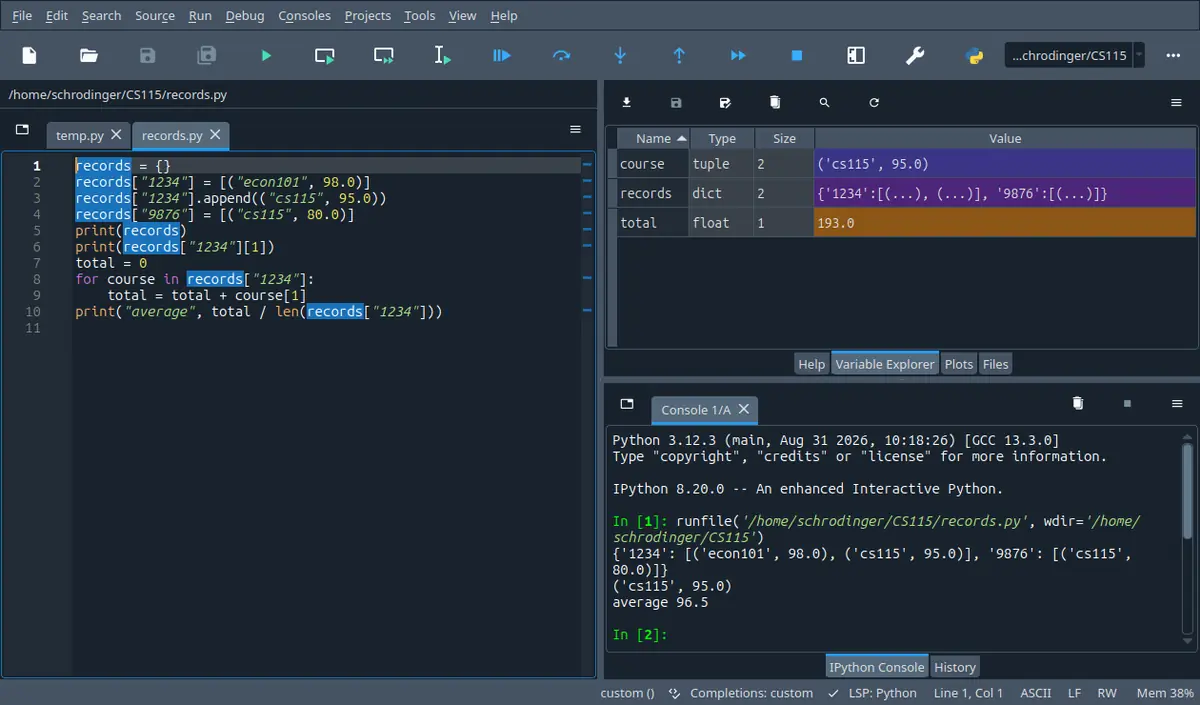
The tab next to Help. It lists every name your program left behind with its type and its size, so it answers the one question a listing cannot: what is in this name right now. The stepper on this page shows the same four columns.
Spyder 5.5.1 on Linux, running the program in its own editor. A different version moves a few toolbar icons; the panes are named the same.
A program reads a set of and a tutor asks how many were processed. The student sets a counter to zero at the top of the file, adds one to it inside the function that handles each record, runs it, and the program stops with an error on the very first record. The counter is right there, two lines above, spelled correctly, and the body cannot read it.
By the end of this section you can say, for any short program built from this week's material, exactly what it prints and exactly what is left in the files it touched, including the blank lines and the missing ones; and you can take a lab question of the shape write a module and a program that uses it and produce two files from a blank editor, with the data coming out of a text file rather than out of the program.
In 60 seconds
Three things widen a program this week. A body can be given permission to rebind a name outside it, and this section spends more time on why that permission is refused than on how to ask. Functions can move into a file of their own and be imported by more than one program. And the data can come from a text file, which means every value arrives as text with a newline stuck to it.
Assignment makes a name local unless you say otherwise
$$\texttt{x = ...}\;\text{in a body}\;\Longrightarrow\;\texttt{x}\;\text{local};\quad\texttt{global x}\;\text{first}\;\Longrightarrow\;\text{the outer one}$$
Any body that writes to a name the module level also uses. Reading needs no declaration; rebinding does, and a body that rebinds without it stops with an UnboundLocalError on the read, not on the write.
Three import forms, three different names in your file
$$\texttt{import math}\to\texttt{math.sqrt};\quad\texttt{from math import sqrt}\to\texttt{sqrt}$$
Whenever a library function or one of your own modules is needed. The form you choose decides whether the module name has to be written at the call, and whether one of your own names can be quietly replaced.
Writing anything. Mode w empties an existing file before the first write, mode a keeps it, write takes a string and adds no newline of its own, and until close runs the characters may still be in memory rather than in the file.
Every file that carries numbers or several per line. Strip first, check that find did not give -1, slice, then convert. A comparison against text fails for the newline alone.
Three most common mistakes
Adding to a module level counter inside a function without the . The program does not go quietly wrong, it stops, and it stops on the line that reads the name rather than the line that writes it, which is why the error message looks like nonsense the first time.
Writing a loop of write calls with no newline in any of them. Nothing goes wrong on the screen and the file ends up with every record jammed onto one line, which the next program reads as a single record.
Calling read() twice, or looping over a handle twice, and getting nothing the second time. The handle remembers where it got to; the only way back to the start of the file is to open it again.
Labs are 20 per cent of the course mark, the midterm 40 and the final 40. On the one past midterm paper read while writing this page, the last question was worth 25 of the 100 marks and was a single function that opened a named file, walked its lines, matched a name without regard to case and returned a number, with a stated value for nothing matched. One paper is not a rule, but the shape is worth noticing: the file question is a function question.
How much time do you have?
10 minutes
The two facts behind most of the lost marks: why a body cannot add to an outside counter without asking, and why a file written in a loop comes out as one long line.
The 60-second card · Letting a body change a name that lives outside it · Writing a file, one string at a time · Formula card
45 minutes
Everything the lab needs: the import forms, the three modes of open, the position the handle remembers, and the walk that turns a line into values. Also the whole of an exam paper's file question.
The 60-second card · Letting a body change a name that lives outside it · Borrowing code that somebody has already written · Writing a file, one string at a time · Reading a file, and the place in it you have got to · A line is text, and cutting it into the values it carries · Scaffolding comes off · B · computation
full read
Adds the part that only shows up in the lab, the split into two files: what belongs in the module, what belongs in the program, and what happens on the import line. It also adds the string operations the exam's front page lists without saying what they do.
The 60-second card · Recall first · Conventions · Letting a body change a name that lives outside it · Borrowing code that somebody has already written · Your own file, imported by another file · Writing a file, one string at a time · Reading a file, and the place in it you have got to · A line is text, and cutting it into the values it carries · The string operations that file text needs · Method boxes · Look-alike pairs · Scaffolding comes off · Full exam-style question · A · concept · B · computation · C · exam level · D · interleaved · Mistake ledger · Formula card · Check yourself
By the end of this section
Decide whether a body needs a global declaration, write it when it does, and give the version that does not need one.
Import a library function in each of the three forms and say which name each form puts into your own file.
Split a program into a module of functions and a script that uses them, and say what runs at the moment of the import.
Write a file with one record per line, choosing between mode w and mode a, and say what the file holds after the program ends.
Trace the position a handle remembers through a mixture of read, readline and a for loop, and say what each of them gives back.
Convert a line of text into the values it carries with strip, find and a slice, handling the case where the separator is not there.
Use count, find with a starting position, rfind, replace and strip on file text, and say what each one returns and what it leaves alone.
Syllabus coverage
covered
Global Variables — covered
The global declaration and what it changes, the UnboundLocalError a missing one produces, reading an outside name against rebinding it, a as the one use nobody argues with, and the version of the same program that passes values instead.
covered
Modules — covered
The and the three import forms, what name each leaves in your file, the dotted call, writing a module of your own, what runs at the moment of the import and on a second one, and how a lab question splits into a module and a script.
covered
Files — covered
open with its three modes and the handle it returns, write and the newline it does not add, close and what is lost without it, read and readline and the for loop, the position the handle remembers, and turning a line into values with strip, find and a slice.
covered
Chapter 4 — covered
The second half of the chapter, which the syllabus names for this week as well as the last one: , modules and files, with functions and scoping taken as read.
The syllabus gives this chapter two weeks running; the section before took functions and scoping, this one takes the rest. Two names from the exam's front page are deliberately unused because they belong to the next chapter: readlines and split, both of which return a list. This week's lab sheet says outright: no lists, no split.
Recall first
An assignment inside a body makes the name local
This is the rule from the section before, and it is the whole of the first concept here. If a name is assigned anywhere in a body, then every mention of that name in that body is the local one, including the ones written above the assignment. Reading a module level name from inside a body is allowed and needs nothing.
The global keyword is defined as the exception to this rule, so the rule has to be in front of you before the exception means anything.
A function returns a value; print puts characters on a screen
return v stops the body and makes the call expression stand for v. A body that reaches its end without a return hands back None. A print sends characters to the screen and hands back None as well.
The alternative to a global variable is almost always a return value, and the file examples all end with a function that returns rather than prints, because the script has to decide what to do with the answer.
Indexing, slicing, find and strip on a string
s[i] is one character, s[a:b] is the characters from a up to but not including b, s[:k] is everything before k and s[k:] is everything from k on. s.find(sub) gives the index where sub starts, or -1 when it is not there. s.strip() returns a new string with the whitespace taken off both ends, and len(s) is how many characters it has.
Every line that comes out of a file is a string, and cutting it into the values it carries is done with exactly these four operations. The -1 is where the marks go.
Counted and conditional loops
for name in thing: runs the block once per item; while test: runs it while the test holds and needs something inside the block that changes what the test reads. An accumulator is set up above the loop and reported after it, at the outer indentation.
A file handle is a thing a for loop can walk, one line per pass, and every file program on this page is an accumulator above a loop over the lines.
int, float, str and format
int(s) and float(s) turn text into a number and stop the program when the text is not a number. str(n) turns a number into text. format(value, '.2f') gives the text of a number rounded to two places after the point.
Text goes into a file and text comes out of it, so every number crossing that boundary is converted in one direction or the other, and write refuses anything that is not already a string.
Floats are not exact
A sum of values like 0.1 and 0.2 comes out as 0.30000000000000004, and total == 0.30 is False. Comparisons on money are made with a tolerance or on values scaled to whole numbers, and format is what makes the printed answer readable.
Files of prices and readings are the usual place this bites, because the ugly number now arrives from outside the program and cannot be blamed on the program.
Try it yourself first (1 questions)
1§05.0 - cutting a string at a character you searched for
Before a line out of a file can be used, it has to be cut where the separator is. This is the same cut, on a string written into the program.
line = 'Deniz,91\n'
k = line.find(',')
name = line[:k]
score = float(line[k + 1:])
print('separator at index', k)
print('name: [' + name + ']')
print('score:', score, score + 1)
Find(a) Write the three lines this prints.
Given
The string is 'Deniz,91\n', with a newline as its last character.
find gives the index of the first match, counting from 0.
s[a:b] stops before b.
IPython console
In [1]: %run untitled0.py
Two details are worth keeping. The comma is at index 5 because Deniz is five characters long and counting starts at 0, so the index of the separator is also the length of the field in front of it. And the score prints as 91.0 rather than 91, because float was asked for; the trailing newline inside the slice did not bother it.
Hint 1/4
Count the characters of the string before doing anything else. The index of the comma is the only number the rest depends on.
Hint 2/4
line[:k] is everything before index k and line[k + 1:] is everything from the character after it to the end. float accepts text with whitespace around it.
Hint 3/4
The string is 'Deniz,91\n': D at 0, e at 1, n at 2, i at 3, z at 4, then the comma.
Hint 4/4
The comma is at index 5, the name is Deniz, and the score prints as 91.0 because float was used rather than int.
Show solution
Locate the separator
$$\texttt{line.find(',') = 5}$$
Five characters come before it, and indexing starts at 0, so the count of the characters in front is the index.
$$\texttt{line[:5] = 'Deniz'}$$
The slice stops before index 5, which is exactly the field in front of the separator.
Convert the piece behind it
$$\texttt{line[6:] = '91\backslash n'}$$
One past the separator to the end, so the newline is still in there.
$$\texttt{float('91\backslash n') = 91.0}$$
float ignores whitespace at the ends, which is why this works without a strip. A comparison against the text '91' would not.
Answer $$\boxed{5,\;\texttt{Deniz},\;91.0}$$
Check
Add up the pieces: line[:5] has 5 characters, the separator is 1, and line[6:] has 3, which makes 9, and len(line) is 9. Nothing was lost or counted twice.
Notation
symbol
reads as
means
watch out
$\texttt{global name}$
global name
As the first statement of a body, it says every mention of name here is the module level one, so an assignment rebinds that rather than making a local.
It goes inside the body, not next to the name at the module level, and it is needed only for rebinding. Reading works without it.
$\texttt{import math}$
import math
Runs the module once, if it has not been run already, and puts one new name into your file: math. Everything in it is reached through that name.
After this, sqrt(25) is still an error. The name that exists is math.sqrt.
$\texttt{from math import sqrt, pi}$
from math import sqrt and pi
Runs the module and puts the two listed names straight into your file, so they are written without a dot.
The name math is not created by this form, so math.floor afterwards is an error.
$\texttt{from math import *}$
from math import everything
Puts every public name of the module into your file at once, so all of them are written without a dot.
Any of your own names spelled the same is replaced without a word, and so is a built in one. After this line pow is the module's, and it returns a float.
$\texttt{fh = open('data.txt', 'r')}$
open data dot txt for reading, and call it fh
Returns a file handle: an object standing for the open file that remembers how far into it you have got.
Mode 'r' stops the program when the file is not there; 'w' empties an existing file at this moment, before any writing.
$\texttt{fh.write(s)}$
write s to fh
Puts the characters of the string s at the current end of the file, and returns how many characters that was.
It adds nothing of its own. A record per line means the newline is in s, and anything that is not already a string has to be converted first.
$\texttt{fh.read()}$
read fh
Returns one string holding everything from the current position to the end of the file, newlines included.
It leaves the position at the end, so a second call returns an empty string rather than the file again.
$\texttt{fh.readline()}$
read a line from fh
Returns the next line as a string, with its newline still on the end, and moves the position past it.
At the end of the file it returns an empty string, and that empty string is the only signal that the file is finished. A blank line in the middle comes back as '\n', which is not empty.
$\texttt{'\\n'}$
the
One character that ends a line. It is stored in the file and comes back as part of every line you read.
It is one character, not two, even though it is written with two. len('a\n') is 2.
$\texttt{line.strip()},\ \texttt{line[:-1]}$
strip line, or line without its last character
Two ways of getting rid of the newline: strip removes whitespace from both ends, the slice drops the last character whatever it is.
On a last line with no newline the slice eats a real character. strip also removes leading spaces, which is usually wanted and occasionally not.
Conventions used here
Every output and every file on this page came out of an interpreter.
No block of output here was predicted by eye, and neither was any file. Each program was run and the characters it wrote were copied in, which is why some are uglier than a textbook would print: a sum that comes out as 0.30000000000000004, empty brackets where a file was expected to hold something, a run that stops with an error. Where a program stops, the traceback is its own; only the temporary path was replaced by the file name used in the text.
A page about files is worth nothing if it guesses what ends up in the file, since that is the one thing the reader cannot check by thinking harder.
What this page may use, and what it is waiting for.
Everything here is built from what the course has covered by the end of this week, which now adds global, import, open, write, read, readline and close to the numbers, text, branching, loops, string operations and functions of the earlier sections. Lists, tuples and dictionaries do not appear, which rules out two names from the exam's front page: readlines and split, both of which hand back a list. The lab sheet for this material says the solution should use nothing beyond the course and should not use split, so every line here is cut with find and a slice. Comprehensions and f strings are not used either.
A solution that reaches forward teaches you to write something this week's lab will not accept, and the file walk done with find is also the one an exam can ask for with the front page it actually gives you.
Where the files on this page live, and why a reading program starts by writing.
Every file name here is a bare name like scores.txt, so the file sits in the same folder as the program. In the lab the data file is given to you. On this page a program that reads one has to make it first, so several listings open with three lines under a comment saying so. Those lines are not part of the answer being taught; they are there so that you can copy any listing into an editor, run it, and get exactly the characters printed underneath it.
A listing you cannot run is a claim. A listing you can run is evidence, and the cost of that is three lines of setup.
The last line of a file may or may not end with a newline.
A file written by a loop of write(record + '\n') calls ends with a newline, and reading it back gives lines that all have one. A file typed by hand in an editor often has no newline on its last line. Both are normal. On this page the difference is shown rather than assumed, and strip() is preferred to line[:-1] for exactly this reason: the slice removes the last character whether or not it is a newline, and on the last line of a hand typed file that is a real character.
This is the difference between a program that works on your own test file and the same program failing on the one the lab hands out.
A mode letter is written out and never guessed.
Every open on this page carries its mode: 'r' to read, 'w' to write from empty, 'a' to add at the end. Leaving the mode out gives reading, but it is written anyway so that the intention is on the page. Where it matters that 'w' empties an existing file, the page shows the file before and after rather than saying so.
The destructive one is the one people leave out, and a lab where 'w' was meant to be 'r' loses the data file itself, not just the answer.
Handles are named for what they are for.
A handle opened for reading is called fh or in_file, one opened for writing is called out, and where both are open at once they keep those names. The course's own material uses fileHandle and in_file in different places, so either style is accepted; what is not accepted is one name doing two jobs, because a single f reassigned halfway down a program is how a read loop ends up walking the file it is writing.
Two open files in one program is the normal case from this week on, and the names are the only thing keeping them apart in your head.
5.1Letting a body change a name that lives outside it
A body can read an outside name freely, but rebinding one takes a declaration, and usually a rethink.
The rule we finished with was that an assignment anywhere in a body makes that name local. This week the course names the one keyword that suspends it.
Solvable with what we have
Pass a value in and get a new value back.
Read a rate set at the top of the file from any body.
Keep a running total in the loop that does the work.
Not solvable yet
Let a function add to a tally the program shares.
Let one function leave a result for another to find.
Set the tally up at the top and add to it in the body, since reading an outside name works.
lines_done = lines_done + 1
Why it fails
Reading is not the problem. The = is. Because the body assigns to lines_done, that name is local everywhere in the body, so the read on the right hand side finds a local that nothing has filled in yet, and the program stops there.
RuleRule 5.1: reading is free, rebinding is not
Conditions
A body may read a module level name with no declaration at all, as long as the body never assigns to that name.
An assignment to a name anywhere in a body makes the name local for the whole body, including mentions above the assignment.
global name, written as a statement inside the body, makes every mention of name in that body the module level one, so an assignment rebinds the outer name.
One statement may list several names, global total, items, and both are bound outside; this page writes one name per line because the course does, and because adding a name is then a one line change.
The declaration is about rebinding, which is what = does. It has nothing to say about calling a function or reading a value.
If your body only looks at the outside name, write nothing. If it puts something new in that name, say global and the name first, or accept that you are making a second name that nobody else can see.
The same two lines of a body, drawn twice. On the left the assignment creates a second name that belongs to the call and holds nothing, so the read has nothing to read and the module level 0 is never touched. On the right the declaration removes that second box.
Looks like this, but is not
This body seems to be working with the module level limit, and the program runs without complaint.
MAX_LINES = 100defcapped(n):
"""Assumes n is an int. Returns n, or the limit when n is above it."""
MAX_LINES = 20if n > MAX_LINES:
return MAX_LINES
return n
print(capped(50))
print(MAX_LINES)
It prints 20 and then 100. The body made its own MAX_LINES, capped at 20, and never touched the module level 100. No error, no warning, and a cap five times tighter than the one at the top of the file. This is the quiet version of the same mistake.
What the body does
Declaration needed
What happens without one
Reads the name in an expression
no
works, and is the normal case for a constant
Calls a function defined at the module level
no
works; calling is not rebinding
Assigns a new value to the name
yes
a separate local name is made, or the read above it stops the program
Assigns to it in one branch only
yes
the name is local through the whole body, including the branch that only reads
The first two rows are why the mistake is so easy: most of what a body does to an outside name needs nothing. Only the = does.
The tally that counts, in three versions
Here is the counter that failed, in full, with the screen it produces.
lines_done = 0defrecord(text):
"""Assumes text is a string. Counts it and returns its length."""
lines_done = lines_done + 1returnlen(text)
print(record('first'))
print('lines done:', lines_done)
What the screen shows:
Traceback (most recent call last):
File "counter.py", line 10, in <module>
print(record('first'))
^^^^^^^^^^^^^^^
File "counter.py", line 6, in record
lines_done = lines_done + 1
^^^^^^^^^^
UnboundLocalError: cannot access local variable 'lines_done' where it isnot associated with a value
Now make it work twice: once with the declaration the course names this week, and once without it. Compare what the two cost a reader.
First, with the declaration.
lines_done = 0defrecord(text):
"""Assumes text is a string. Counts it and returns its length."""global lines_done
lines_done = lines_done + 1returnlen(text)
print(record('first'))
print(record('second and longer'))
print('lines done:', lines_done)
Sample Run:
517
lines done: 2
Now without it. The function goes back to answering one question about one value, and the counting happens where the counter lives.
defline_length(text):
"""Assumes text is a string. Returns how many characters it has."""returnlen(text)
lines_done = 0
total_chars = 0
total_chars = total_chars + line_length('first')
lines_done = lines_done + 1
total_chars = total_chars + line_length('second and longer')
lines_done = lines_done + 1print('lines done:', lines_done, 'characters:', total_chars)
Sample Run:
lines done: 2 characters: 22
FindBoth versions working, and the price of each.
Given
The tally starts at 0 at the module level.
Two records are handled, of 5 and 17 characters.
In the second version the function is only allowed to return a value.
Solution
Make the declaration do exactly one thing
$$\texttt{global lines\_done}$$
First statement of the body, and it names one name. The two lines_done mentions below it are now the outer one, so the read finds the 0.
$$\texttt{lines\_done = lines\_done + 1}$$
This is now a rebinding of the module level name, which is why the last line of the program can see 2.
The returned value is the length, so from the call site the counting is invisible. Two different things now come out of one call, and only one of them is in the header.
$$\text{the tally is read on the last line}$$
Which means the answer depends on how many times the function was called anywhere in the program, including in code you did not write.
An independent check on the second version: delete the two counting lines and the printed character total is still 22. In the first version deleting the declaration stops the program, which tells you the two jobs were tangled.
The declaration saves one parameter and two lines. It costs every future reader the question of who else calls this.
The keyword is not hard. The judgement is: ask whether the outside name is data that many parts of the program share, or a total that belongs to one loop.
Checkpoint
§05.1 - two names rebound from one body
A body rebinds two module level names. Nothing is typed in.
total = 0.0
items = 0deftake(price):
"""Assumes price is a number. Adds it to the running order."""global total
global items
total = total + price
items = items + 1
take(12.5)
take(7.25)
print('items:', items, 'total:', format(total, '.2f'))
Find(a) Write the line this prints.
Given
total is 0.0 and items is 0 at the module level.
Two calls happen, with 12.5 and 7.25.
The body declares both names.
IPython console
In [1]: %run untitled0.py
Two declarations, two names reaching outside. Note what the function returns: nothing. A body that exists only for its effect on module level names is the shape the lecture warns about, because its header, take(price), says nothing about the two names it changes.
Hint 1/4
Only the last line prints, so the question is what the two module level names hold after two calls.
Hint 2/4
Every name the body rebinds has to be declared, on two lines or on one with a comma. Both are declared here, so both assignments reach outside.
Hint 3/4
The values added are 12.5 and 7.25, starting from 0.0, and the count starts from 0.
Two places after the point, which this value already has, so nothing is rounded away.
Answer $$\boxed{\texttt{items: 2 total: 19.75}}$$
Check
Take one of the two declarations out and the program stops with an UnboundLocalError on that name only, which shows each line was doing its own job.
⚠ Adding to an outside counter with no declaration
Reading an outside name works, so rebinding one feels like it should work too, and the error names the line that reads rather than the line that writes
wrong$$\texttt{total = total + 1}\;\text{in a body}$$
right$$\texttt{global total}\;\text{then}\;\texttt{total = total + 1}$$
⚠ Putting the declaration next to the name at the top
The word global sounds like a description of the name rather than a permission the body asks for
wrong$$\texttt{global total = 0}\;\text{at the module level}$$
right$$\texttt{total = 0}\;\text{outside},\;\texttt{global total}\;\text{inside the body}$$
⚠ Declaring one of the two names the body rebinds
The first declaration is added because the first error message asked for it, and the second name is never thought about until the body stops on it
5.2Borrowing code that somebody has already written
An import runs a module once and leaves names in your file; which names depends on the form you wrote.
Everything so far has been written inside one file. The standard library is a set of files somebody else wrote, and the is how a name from one of them reaches yours.
RuleRule 5.2: three forms, three sets of names
Conditions
import math runs the module and creates one name, math. Everything in it is written math.sqrt, math.pi.
from math import sqrt, pi runs the module and creates the listed names directly, so they are written with no dot. The name math is not created.
from math import * creates every public name of the module at once, which includes names you may already be using.
The module is run once per program however many times it is imported. A second import of the same module creates the name again and runs nothing.
The modules this course uses are math, random, datetime, and later numpy and matplotlib. Nothing on this page needs any of them except math.
$$\boxed{\texttt{import m}\Rightarrow\texttt{m.f()}\quad|\quad\texttt{from m import f}\Rightarrow\texttt{f()}}$$
The plain import gives you the box and you reach inside it with a dot every time. The from form takes the things out of the box and puts them on your desk, where they can cover something you already had there.
Three import lines and the names each one leaves behind in the file that wrote it. The middle column is the whole difference: the first form gives you one name and you reach everything through it, the second gives you exactly what you asked for, the third gives you everything at once including names you already had.
Looks like this, but is not
The module is imported on the first line, so the function in it should be available on the last.
import math

print('this line runs')
print(sqrt(25))
The first line does run and the first print does reach the screen. What import math created is the single name math, and sqrt on its own was never created, so the program stops with a NameError. The fix is one of two characters, math.sqrt(25), or a different import line.
The diagonal of a square, written both ways
Compute a square root and use a constant from the library, first with the plain import and then with the from form, and watch which name each one needs.
import math

side = 2.0
diagonal = math.sqrt(side * side + side * side)
print('diagonal:', format(diagonal, '.4f'))
print('pi to four places:', format(math.pi, '.4f'))
print('ceiling of the diagonal:', math.ceil(diagonal))
Sample Run:
diagonal: 2.8284
pi to four places: 3.1416
ceiling of the diagonal: 3
The same arithmetic with the other form. Now there is no dot, and also no name math.
from math import sqrt, pi

radius = 3.0
area = pi * radius * radius
print('area:', format(area, '.2f'))
print('side of a square of the same area:', format(sqrt(area), '.2f'))
Sample Run:
area: 28.27
side of a square of the same area: 5.32
FindBoth outputs, and what each import line made available.
Given
The square has a side of 2.0.
The circle has a radius of 3.0.
Four places after the point in the first program, two in the second.
Solution
Reach through the module name
$$\texttt{math.sqrt(2.0*2.0 + 2.0*2.0)}$$
Pythagoras on a square of side 2, so the argument is 8.0 and the answer is the square root of 8.
$$\texttt{2.8284}$$
Four places, as asked. Twice the square root of 2, which is worth recognising as a check.
$$\texttt{math.ceil(2.8284) = 3}$$
ceil goes up to the next whole number, which is 3 here; int would have given 2 and that is a different question.
Take the names out of the box
$$\texttt{from math import sqrt, pi}$$
Two names listed, two names created. Asking for one and using the other is the usual slip.
$$\texttt{pi * 3.0 * 3.0 = 28.27}$$
Area of the circle to two places.
$$\texttt{sqrt(28.27...) = 5.32}$$
The side of a square with the same area, which has to be a bit under 6 since 6 squared is 36. It is.
Answer $$\boxed{2.8284,\;3\;|\;28.27,\;5.32}$$
Check
The diagonal of a unit square is about 1.414, so a square of side 2 must have about 2.83, and a circle of radius 3 has to come in under the 36 of its bounding square.
Choose the form by what the reader needs. math.sqrt says where the function came from at every call site, which is worth a few characters in a file that also has functions of your own.
The star import that changes what pow means
Two programs differing by one line. Both call pow with the same two whole numbers.
base = 2print(pow(base, 10))
Sample Run:
1024
Now with the added above it.
from math import *
base = 2print(pow(base, 10))
Sample Run:
1024.0
FindBoth printed values, and why they differ.
Given
Both programs call pow(base, 10) with base equal to 2.
The only difference is the import line.
Solution
Read the first one
$$\texttt{pow(2, 10) = 1024}$$
This is the built in pow, which keeps whole numbers whole.
$$\text{no import line at all}$$
Nothing has been brought in, so the name pow is the one Python starts with.
See what the star covered up
$$\texttt{from math import *}$$
Every public name of the module lands in this file, and one of them happens to be called pow.
$$\texttt{pow(2, 10) = 1024.0}$$
The module's version works in floats, so the answer is right and its type is not what the rest of the program expected.
$$\text{no warning of any kind}$$
Nothing is reported, because replacing a name is exactly what an import is for. That is why the star form is the one to leave alone.
Answer $$\boxed{1024\;\text{then}\;1024.0}$$
Check
An independent check that the name really moved: print(pow(2, 0.5)) is an error under neither version, but print(pow(2, 10, 7)) works only before the star import, because the built in one takes a third argument and the module's one does not.
One line changed, one character of output changed, and the change is in the type rather than the value, so a program can carry it for a long time.
When a number comes out right but with a point on the end, look at the import lines before looking at the arithmetic.
Checkpoint
§05.2 - which call the import line allows
A program begins with a single line, from math import sqrt, and then has to take a square root and round a number down. Decide which pair of calls this import line makes possible.
Find(a) Choose the pair that runs.
Given
The import line is from math import sqrt and nothing else is imported.
Both a square root and a rounding down are needed.
Hint 1/4
Do not think about square roots. Think about which names exist in this file after the first line has run.
Hint 2/4
from m import f creates f and does not create m; import m creates m and does not create f.
Hint 3/4
The line here is from math import sqrt, and the calls wanted are a square root and a floor.
Hint 4/4
sqrt(16) runs; math.floor(3.9) stops with a NameError on math, and floor was never asked for either.
Show solution
List the names the line creates
$$\texttt{from math import sqrt}\;\rightarrow\;\{\texttt{sqrt}\}$$
Exactly what is listed, and nothing else. The word math here is where to look, not a name being defined.
$$\texttt{math}\;\notin\;\text{this file}$$
Which is what decides the second call, before anything about floor matters.
Test each call against that list
$$\texttt{sqrt(16) = 4.0}$$
The name exists, so the call runs. Note the float: sqrt always returns one.
Check it the other way round: with import math alone, math.floor(3.9) runs and sqrt(16) fails. The two forms are exact mirror images, which is the fact worth keeping.
⚠ Importing the module and then calling without the dot
The import line mentions the function's home, so the function feels like it has arrived; the error then names the function rather than the missing dot
⚠ Using the from form and then writing the dot anyway
Both forms are learned in the same minute, and the dotted call is the one that appears in most examples
wrong$$\texttt{from math import sqrt};\;\texttt{math.sqrt(25)}$$
right$$\texttt{from math import sqrt};\;\texttt{sqrt(25)}$$
⚠ Reaching for the star form to save typing
It works immediately and the cost only appears later, in a name that was quietly replaced
wrong$$\texttt{from math import *}$$
right$$\texttt{from math import sqrt, pi, floor}$$
5.3Your own file, imported by another file
A module is a plain source file; importing it runs it once and hands you its name.
The library modules are ordinary source files. Nothing about the import statement cares who wrote the file, which means the same line works on one of yours.
MethodMethod 5.3: splitting a program into two files
Conditions
A module is a .py file holding definitions and module level values. It is named by its file name without the extension, so pricing.py is imported as pricing.
Put in the module what more than one program needs, or what can be tested on its own: the functions and the constants they depend on.
Keep in the script the talking to the user and the deciding: input, print, and the loop that runs until the user says stop.
The import runs the module file from top to bottom, once. Definitions and assignments at its top level happen then; so does any print written there.
Both files sit in the same folder for this course, so the import needs nothing more than the name.
Take the functions out into a file named after what they are about, write one import line at the top of the program that needs them, and call them through that name.
Two files in one folder and the single line that joins them. The import runs the module file from top to bottom once, which is what creates the names inside it, and then leaves one name in the script: the module's own. Everything the script uses afterwards is reached through that name, which is why the dot is not decoration.
Looks like this, but is not
This module is only definitions plus one friendly line at the top, so the friendly line should appear when the greeting is used.
# greetings.pyprint('greetings.py is being read')
defhello(name):
"""Assumes name is a string. Returns a greeting for it."""return'hello ' + name
# hello_app.pyimport greetings
import greetings
print('the script has started')
print(greetings.hello('Ada'))
The module's line appears first, before the script's own first print, because the import is what runs it. And it appears once even though the import is written twice, since a module already loaded is not run again. Anything at the top level of a module is a side effect of importing it, which is why modules hold definitions and almost nothing else.
Money rules in pricing.py, the talking in the script
Split a small program in two. The rate and the two rules that use it go into a file of their own; the script imports it and does the printing.
# pricing.py"""Money rules that more than one program needs."""
VAT_RATE = 0.18
FREE_SHIPPING_OVER = 500.0defwith_vat(amount):
"""Assumes amount is a number of lira before tax. Returns the amount with tax added. """return amount * (1 + VAT_RATE)
defshipping(amount):
"""Assumes amount is a number of lira. Returns the shipping cost, which is 0.0 for a large enough order. """if amount >= FREE_SHIPPING_OVER:
return0.0return24.90
# basket_app.pyimport pricing
net = 420.0
gross = pricing.with_vat(net)
print('with tax:', format(gross, '.2f'))
print('shipping:', format(pricing.shipping(gross), '.2f'))
print('the rate lives in the module:', pricing.VAT_RATE)
FindThe three lines the script prints, and why the shipping is not free.
Given
The order is 420.0 before tax.
Tax is 18 per cent and shipping is free from 500.0.
Both files are in the same folder.
Solution
Decide what belongs on which side
$$\texttt{VAT\_RATE = 0.18}\;\text{in the module}$$
It is data the rules depend on, and it belongs next to them so that a change touches one file.
$$\texttt{print(...)}\;\text{in the script}$$
A module that prints cannot be reused by a program that wants to write to a file instead.
Follow the import
$$\texttt{import pricing}$$
The module file runs now: the constant is created and the two definitions are made. Nothing is called.
$$\texttt{pricing.with\_vat(420.0) = 495.6}$$
Reached through the module name, because the plain import form is what was written.
Four lira and forty kurus short, so the shipping branch returns 24.90 rather than 0.0.
$$\texttt{pricing.VAT\_RATE}\;\rightarrow\;0.18$$
A module level name is reached the same way as a function, which is what makes a module a good home for constants.
Answer $$\boxed{495.60,\;24.90,\;0.18}$$
Check
Check the near miss from the other side: raise the order to 424.0 and the tax inclusive total becomes 500.32, over the threshold, and the shipping prints 0.00. The boundary behaves, so the comparison is the right way round.
The rule to carry: the module knows the rules, the script knows the user. If you cannot decide where a line goes, ask whether a second program would want it. What the script prints:
Sample Run:
with tax: 495.60
shipping: 24.90
the rate lives in the module: 0.18
Tidying text in words.py, used by a script
A module with two functions of the kind the lab asks for: one that tidies a piece of text and one that counts the words in it. Neither prints anything.
# words.py"""Text tidying used by every part of the word counting lab."""defcleaned(text):
"""Assumes text is a string. Returns the text in lower case, with newlines turned into single spaces and the characters . , ? removed. """
text = text.replace('\n', ' ')
text = text.replace('.', '')
text = text.replace(',', '')
text = text.replace('?', '')
return text.lower()
defword_count(text):
"""Assumes text is a string of words separated by single spaces. Returns how many words it has. """
text = text.strip()
if text == '':
return0
count = 1
i = 0while i < len(text):
if text[i] == ' ':
count = count + 1
i = i + 1return count
# words_app.pyimport words
raw = 'Rain, rain.\nGo away?\n'
tidy = words.cleaned(raw)
print('[' + tidy + ']')
print('words:', words.word_count(tidy))
FindThe two lines printed, including what is inside the brackets.
Given
The raw text is 'Rain, rain.\nGo away?\n'.
Tidying means lower case, newlines turned into single spaces, and the characters . , ? removed.
Words are separated by single spaces after tidying.
Solution
Tidy in a fixed order
$$\texttt{replace(newline, space)}$$
First, because the later steps assume the text is one line. Doing it last would leave a newline in the middle of the count.
Each replace returns a new string, so the result has to be assigned back each time or the step is lost.
$$\texttt{lower()}$$
Last, because it does not matter to the others and doing it once at the end is cheaper to read.
Count with a loop, not with a split
$$\texttt{count = 1}\;\text{before the loop}$$
A non empty line of words has one more word than it has separators, so the count starts at 1 and the loop adds one per space.
$$\texttt{if text[i] == ' ': count = count + 1}$$
The guard above it returns 0 for an empty string, which is the case this off by one argument does not cover.
$$\texttt{words: 4}$$
rain, rain, go, away. The trailing space left by the newline was removed by the strip at the top of the counting function, which is exactly why it is there.
Answer $$\boxed{\texttt{[rain rain go away ]},\;\texttt{words: 4}}$$
Check
Count the separators instead: three spaces between words and one at the end, and a line of words has one more word than internal separators, so four.
Four replace calls, one pass over the characters. The tidying is the part a second program will want; the printing is not.
Notice the trailing space in the tidied text. It is harmless here only because the counter strips before counting, and that is the sort of dependency worth writing into the docstring. What the script prints:
Sample Run:
[rain rain go away ]
words: 4
Checkpoint
§05.3 - the module name left off a call
The module from the last example, words.py, holds cleaned(text) and word_count(text) and nothing else. It is imported in the ordinary way and then one of its functions is called without the module name.
# words_app.py with the module name left offimport words
print(cleaned('Hello, World.'))
Find(a) Write what the screen shows.
Given
words.py holds cleaned and word_count.
The script's import line is import words.
The call is written cleaned('Hello, World.').
IPython console
In [1]: %run untitled0.py
The module was found, was read and its functions were created, all inside the module's own . The name cleaned was never created in this file, so the error is a NameError rather than anything to do with the module. Two ways to fix it: write words.cleaned(...), or change the import line to from words import cleaned.
Hint 1/4
Decide first whether the import succeeded. Then decide what names it put in this file.
Hint 2/4
The plain import form creates one name, the module's own. Names defined inside a module are reached through it.
Hint 3/4
Here the import is import words and the call is cleaned('Hello, World.') with no dot.
Hint 4/4
It stops with a NameError saying that cleaned is not defined.
Show solution
Confirm the import worked
$$\texttt{import words}\;\rightarrow\;\text{ok}$$
The file is in the same folder, so it is found and run. If it had not been, the message would have been a ModuleNotFoundError instead.
$$\text{names created: }\texttt{words}$$
One name. Everything inside it is still inside it.
Read the failing call
$$\texttt{cleaned('Hello, World.')}$$
No dot, so Python looks for a name cleaned in this file and in the built ins, and finds neither.
$$\text{NameError, not AttributeError}$$
Worth distinguishing: an AttributeError would mean the module was reached and the name inside it was wrong.
Answer $$\boxed{\text{NameError on }\texttt{cleaned}}$$
Check
Add print(words.cleaned('Hello, World.')) above the failing line and it prints hello world before the error appears, which proves the module and its function were both fine.
⚠ Calling a module's function without the module name
The import line is at the top of the file, so the names feel local; the error mentions the function and says nothing about the module
open gives a handle, write takes only strings and adds nothing, and close is what makes it real.
Everything a program has produced so far vanished when it ended. A file is the first place output can be put that is still there for the next run.
RuleRule 5.4: open, write, close
Conditions
open(name, mode) returns a file handle. Mode 'w' empties an existing file at that moment and makes one if there is none; 'a' keeps what is there and adds at the end; 'r' reads and stops the program if the file is missing.
fh.write(s) puts the characters of s at the end of what has been written so far, and returns how many characters that was. It adds no newline and no space.
The argument has to be a string already. A number is converted with str or format first.
fh.close() finishes with the file. Until it runs, characters may still be sitting in memory, so a read of the same file can come back empty.
After close, the handle is finished: another write on it stops the program.
Open it and say what you mean to do with it, write strings into it including the newlines you want, and close it before anything else looks at it.
The same three write calls, drawn as the characters that end up in the file. Nothing separates the records in the top row, because write adds nothing; the bottom row has one extra character per record and that character is the only thing that makes the file have three lines rather than one.
Looks like this, but is not
Three records, three write calls, so three lines in the file.
One line. write puts exactly the characters it was given and nothing else, so the three records ran together and the file now holds a single record as far as any program reading it is concerned. Nothing went wrong on the screen, which is why this one survives until somebody opens the file.
The same three names, with the newline put back
Add the one character that was missing, then count the characters to see that it really is one character and really is in the file.
Now the same file with brackets around what came back, and its length.
out = open('names.txt', 'w')
out.write('Elif Karaman\n')
out.write('Tan Ozkan\n')
out.close()

check = open('names.txt', 'r')
text = check.read()
check.close()
print('[' + text + ']')
print('characters:', len(text))
Sample Run:
[Elif Karaman
Tan Ozkan
]
characters: 23
FindBoth outputs, and where the 23 comes from.
Given
Three names in the first program, two in the second.
'Elif Karaman' is 12 characters and 'Tan Ozkan' is 9.
print(..., end='') stops print adding a newline of its own.
Solution
Put the separator in the string
$$\texttt{out.write(name + '\backslash n')}$$
The newline is part of what you are writing, not something the call provides, which is the whole of this concept in one line.
$$\texttt{end=''}\;\text{on the print}$$
The file already ends with a newline, so without this the screen would show a blank line at the bottom and the output would be ambiguous.
Count what is in the file
$$12 + 1 = 13$$
The first name and its newline. The newline is written with two characters in the program and stored as one in the file.
$$9 + 1 = 10$$
The second name and its newline.
$$13 + 10 = 23$$
Which is what the program reports, so nothing invisible was added and nothing was lost.
Read the closing bracket
$$\texttt{]}\;\text{on its own line}$$
The closing bracket appears at the start of a new line because the text ends with a newline. That is how you can see a trailing newline in a printed string at all.
An independent check on the count: drop the two newlines from the program and the same print reports 21, two fewer, with the closing bracket now on the same line. Two newlines, two characters.
Put the brackets around anything you are unsure about. A trailing space and a trailing newline are invisible in ordinary output and both of them break the next program.
Writing a number, and the two lines that fix it
A report needs a count and a total in it. Written the obvious way, the program stops.
total = 1620.0

out = open('report.txt', 'w')
out.write('total: ')
out.write(total)
out.close()
What the screen shows:
Traceback (most recent call last):
File "report.py", line 5, in <module>
out.write(total)
TypeError: write() argument must be str, notfloat
The fix is a conversion on the way in, and the formatting decision is made here rather than left to whoever reads the file.
Check the file rather than the screen: open it again and len of what comes back is 25, which is orders: 3 and its newline (10) plus total: 1620.00 and its newline (15). The .2f added the two zeros that a bare str(1620.0) would not have.
Two one way doors are now in view: numbers become text on the way into a file, and text becomes numbers on the way out. Both conversions are yours to write.
Mode w against mode a, on the same two runs
The same program written twice, differing in one letter. Each version opens the file, writes a line, closes it, and then does it again.
An independent check of when the emptying happens: open with 'w' and close immediately, writing nothing at all. The file is empty afterwards, so the open did it.
One character of difference, and one of the two versions cannot be undone.
A loop that opens its output file inside itself keeps only the last record, for exactly this reason. Open once above the loop.
Checkpoint
§05.4 - reading a file that was never closed
A line is written and then the same file is read, in one program, with the close left until the end.
The reading handle is opened after the write and before either close.
The brackets in the print are there to make an empty result visible.
IPython console
In [1]: %run untitled0.py
The brackets are empty. The six characters are still in memory, waiting, and the reading handle sees a file with nothing in it. After the program ends the file does hold hello, which is what makes this so confusing in the lab: you look at the file afterwards, find it correct, and cannot reproduce what your program saw. Close the writing handle before opening the same file for reading.
Hint 1/4
The question is not what the file will eventually hold. It is what is in it at the moment the second handle reads it.
Hint 2/4
Characters given to write may be held in memory and sent to the file later. close is what guarantees they have arrived.
Hint 3/4
Here six characters were written, no close has run yet, and a second handle on the same name calls read.
Hint 4/4
It prints a pair of empty brackets, because nothing has reached the file yet.
The call returns 6 and the characters go into a buffer. Nothing about the call tells you the file is still empty.
$$\texttt{open('note.txt', 'r')}$$
A separate handle with its own view of the file as it is on disk right now.
Read the empty result
$$\texttt{check.read() = ''}$$
Zero characters, so the brackets print next to each other.
$$\texttt{out.close()}\;\text{too late}$$
It does flush the characters, but the read already happened, and this is why the order of these four lines is the answer.
Answer $$\boxed{\texttt{[]}}$$
Check
Move out.close() above the open for reading and the same program prints [hello] with the closing bracket on the next line. One line moved, and nothing else changed.
⚠ Writing records with no newline in any of them
print adds one, so write feels as if it should too, and the screen never shows the difference
5.5Reading a file, and the place in it you have got to
A handle remembers a position; read, readline and a for loop all move it forward and never back.
Writing was the easy direction, because you decide what goes in. Reading brings in a second idea that nothing before this week had: the handle is not the file, it is a place in the file.
RuleRule 5.5: one handle, one position
Conditions
A handle opened with 'r' starts at the position before the first character.
fh.read() returns everything from the position to the end as one string and leaves the position at the end.
fh.readline() returns the next line, newline included, and moves the position past it. At the end of the file it returns the empty string, which is the only signal that there is nothing left.
for line in fh: runs once per remaining line, from wherever the position is, and leaves it at the end.
Nothing here rewinds. To read a file a second time, open it again.
A blank line in the middle of a file comes back as '\n', which has length 1 and is not the empty string.
$$\boxed{\texttt{read()}\to\text{all of it};\;\texttt{readline()}\to\text{one};\;\text{both move the position}}$$
Think of a finger held in the file. Every read slides the finger forward over what it gave you, and when the finger is at the end there is nothing more to give.
One file and three moments in the life of one handle. The triangle is the position it remembers: before the first character, then past the first newline after a readline, then at the end after a read, which is why a second read gives an empty string.
Looks like this, but is not
The file is read, and then read again to count its characters, which should give the same string twice.
# the lab hands you this file; these three lines put it here so# that the program below can be run exactly as printed
setup = open('scores.txt', 'w')
setup.write('Ada,72\nBora,48\nCem,50\nDeniz,91\n')
setup.close()
fh = open('scores.txt', 'r')
print('[' + fh.read() + ']')
print('[' + fh.read() + ']')
fh.close()
Sample Run:
[Ada,72
Bora,48
Cem,50
Deniz,91
]
[]
The second pair of brackets is empty. The first read carried the position to the end of the file and there is no way back except opening it again. The same thing happens to a second for loop over one handle, and it is silent: no error, just a loop whose body never runs.
Call
What comes back
Position afterwards
fh.read()
one string: everything from here to the end
at the end
fh.readline()
one line with its newline, or '' at the end
just past that line
for line in fh:
one line per pass, each with its newline
at the end
fh.read() again
'', because there is nothing after the end
still at the end
The last row is the one that costs marks. An empty string is what a finished file gives, and it is not an error, so a program built on a second read runs perfectly and reports nothing.
read, readline and a for loop on the same four lines
One small file, read three ways. First everything at once, with the character count so that the newlines can be accounted for.
# the lab hands you this file; these three lines put it here so# that the program below can be run exactly as printed
setup = open('scores.txt', 'w')
setup.write('Ada,72\nBora,48\nCem,50\nDeniz,91\n')
setup.close()
fh = open('scores.txt', 'r')
text = fh.read()
fh.close()
print(text, end='')
print('characters:', len(text))
Sample Run:
Ada,72
Bora,48
Cem,50
Deniz,91
characters: 31
Then a line at a time, with brackets so the newline is visible.
# the lab hands you this file; these three lines put it here so# that the program below can be run exactly as printed
setup = open('scores.txt', 'w')
setup.write('Ada,72\nBora,48\nCem,50\nDeniz,91\n')
setup.close()
fh = open('scores.txt', 'r')
first = fh.readline()
second = fh.readline()
fh.close()
print('[' + first + ']')
print('[' + second + ']')
print('stripped:', first.strip())
Sample Run:
[Ada,72
]
[Bora,48
]
stripped: Ada,72
Then the loop, which is the form almost every program wants.
# the lab hands you this file; these three lines put it here so# that the program below can be run exactly as printed
setup = open('scores.txt', 'w')
setup.write('Ada,72\nBora,48\nCem,50\nDeniz,91\n')
setup.close()
fh = open('scores.txt', 'r')
for line in fh:
print('[' + line[:-1] + ']')
fh.close()
Sample Run:
[Ada,72]
[Bora,48]
[Cem,50]
[Deniz,91]
FindAll three outputs, and where 31 comes from.
Given
The file holds Ada,72, Bora,48, Cem,50 and Deniz,91, each on its own line.
Each of the four lines ends with a newline.
line[:-1] drops the last character of the line.
Solution
Account for every character
$$6 + 7 + 6 + 8 = 27$$
The four records without their newlines: Ada,72 is 6, Bora,48 is 7, Cem,50 is 6, Deniz,91 is 8.
$$27 + 4 = 31$$
One newline per line, and the last line has one too because the file was written that way. This is the number the program reports.
See what readline hands back
$$\texttt{first = 'Ada,72\backslash n'}$$
The newline comes with it, which is why the closing bracket lands on the next line of the screen.
$$\texttt{first.strip() = 'Ada,72'}$$
The same text without the newline. Almost every line that came out of a file gets stripped before it is used.
$$\texttt{second = 'Bora,48\backslash n'}$$
The second call continues from where the first one stopped, without being told to.
Read the loop
$$\texttt{for line in fh:}$$
Four passes, one per line, because the position was still at the start. Had a readline come first, there would have been three.
$$\texttt{line[:-1]}$$
Drops the newline here because every line has one. On a file whose last line has none, this would eat a real character.
The string this file was written from was 31 characters long and the read gives 31 back, which also settles that a newline is one character and not two.
Three opens, because each of the three readings needs its own position.
Prefer the loop. read is for when you genuinely want the whole file as one string, and readline is for when the first line is special.
One readline, then a loop over what is left
A file whose first line is a heading rather than a record. Take the heading off with one readline and let the loop have the rest.
# the lab hands you this file; these three lines put it here so# that the program below can be run exactly as printed
setup = open('scores.txt', 'w')
setup.write('Ada,72\nBora,48\nCem,50\nDeniz,91\n')
setup.close()
fh = open('scores.txt', 'r')
print('header:', fh.readline().strip())
for line in fh:
print('loop sees:', line.strip())
fh.close()
Add print('[' + fh.read() + ']') after the loop and before the close: it prints empty brackets, which confirms the loop consumed everything that was left rather than stopping early.
This is the standard shape for a data file with a header row, and it is one line. What makes it worth a comment in your code is that the loop below it looks exactly like a loop over the whole file.
Checkpoint
§05.5 - the slice that eats a letter
A file typed by hand, so its last line has no newline on the end. Each line is printed twice, once cut with a slice and once stripped.
# the lab hands you this file; these three lines put it here so# that the program below can be run exactly as printed
setup = open('flowers.txt', 'w')
setup.write('rose\ntulip\ndaisy')
setup.close()
fh = open('flowers.txt', 'r')
for line in fh:
print('slice: [' + line[:-1] + '] strip: [' + line.strip() + ']')
fh.close()
Find(a) Write the three lines this prints.
Given
The file holds rose, tulip and daisy, and the last of them has no newline after it.
line[:-1] removes the last character whatever it is.
line.strip() removes whitespace from both ends.
IPython console
In [1]: %run untitled0.py
The first two lines agree and the third does not. This is the difference between a file your program wrote, which ends with a newline, and a file somebody typed in an editor, which often does not. Both kinds turn up in labs, so strip is the one to reach for by default. Note also that strip would have removed leading spaces as well, which is usually wanted and is worth knowing about when it is not.
Hint 1/4
Two of the three lines will look the same from both methods. Find the one that cannot.
Hint 2/4
The slice takes off the last character with no questions asked; strip takes off whitespace only, and there may be none.
Hint 3/4
The three lines are 'rose\n', 'tulip\n' and 'daisy' with nothing after it.
Hint 4/4
The last line prints as dais from the slice and daisy from the strip.
Show solution
Handle the lines that have a newline
$$\texttt{'rose\backslash n'[:-1] = 'rose'}$$
The last character is the newline, so the slice is right by luck rather than by design.
$$\texttt{'rose\backslash n'.strip() = 'rose'}$$
Right by design, since a newline is whitespace.
Handle the last line
$$\texttt{'daisy'[:-1] = 'dais'}$$
There is no newline to remove, so the slice takes the y. No error, and a quietly wrong answer.
$$\texttt{'daisy'.strip() = 'daisy'}$$
There is no whitespace to remove, so strip does nothing, which is the correct thing to do.
Answer $$\boxed{\texttt{dais}\;\text{against}\;\texttt{daisy}\;\text{on the last line}}$$
Check
Compare the lengths rather than the text: len of the slice sum is 13 and of the stripped sum is 14. One character, and it is a letter of somebody's data.
⚠ Reading the same handle twice
Nothing in read() suggests it consumes anything, and the second call fails silently by returning an empty string rather than an error
right$$\texttt{text = fh.read()}\;\text{once, then use}\;\texttt{text}$$
⚠ Using a slice to drop the newline
It works on every file the program wrote itself, so it passes every test until the real data file arrives
wrong$$\texttt{line[:-1]}$$
right$$\texttt{line.strip()}$$
⚠ Testing a line against the empty string to find a blank
A blank line looks empty on the screen, but what comes back is a newline and has length 1
wrong$$\texttt{if line == '': }\;\text{for a blank line}$$
right$$\texttt{if line.strip() == '':}$$
5.6A line is text, and cutting it into the values it carries
Strip, find the separator, slice both sides, convert the side you need, and check for the minus one.
The loop now hands us one line per pass. Every one of them is a string, even when what is written in it is a price, a count or a temperature.
MethodMethod 5.6: one line into its fields
Conditions
Strip first: line = line.strip(). This removes the newline and any stray spaces, and it makes the blank line test possible.
Skip the empty ones: if line != '':. A blank line in the middle of a file is normal and stops a conversion dead.
Find the separator: k = line.find(','). It gives the index of the first one, or -1 when there is none.
Slice: line[:k] is the field in front, line[k + 1:] the field behind. The + 1 is what skips the separator itself.
Convert only what has to be a number: float(...) or int(...). A field that is compared with a name stays text, and lower() on both sides is how case is made not to matter.
When a line may not have the separator, test k before slicing. A -1 slices from the end and gives a wrong answer with no error at all.
Find where the comma is, take what is in front of it as the label, take what is behind it as the number, and only then ask Python to treat it as a number.
One line out of a file, with the index of every character under it. find reports 3 for the comma and both slices are read off that one number: before 3 is the field in front, from 4 on is the field behind, newline included.
Looks like this, but is not
The same two slices, on a line that happens to use a space rather than a comma.
line = 'Deniz 91'
k = line.find(',')
print('find gives', k)
print('the name would be [' + line[:k] + ']')
print('the number would be [' + line[k + 1:] + ']')
Sample Run:
find gives -1
the name would be [Deniz 9]
the number would be [Deniz 91]
find reported -1 and the slices went on cheerfully. line[:-1] is everything but the last character, so the name came out as Deniz 9, and line[0:] is the whole line, so the number came out as the whole line. No error anywhere. This is why the -1 gets tested rather than assumed away.
The average of a column of marks
Walk a file of name,mark lines and report how many there were, their total and their average. This is the shape almost every file question on this course has.
# the lab hands you this file; these three lines put it here so# that the program below can be run exactly as printed
setup = open('scores.txt', 'w')
setup.write('Ada,72\nBora,48\nCem,50\nDeniz,91\n')
setup.close()
fh = open('scores.txt', 'r')
total = 0.0
count = 0for line in fh:
line = line.strip()
if line != '':
k = line.find(',')
total = total + float(line[k + 1:])
count = count + 1
fh.close()
print('count:', count)
print('total:', total)
print('average:', format(total / count, '.2f'))
Sample Run:
count: 4
total: 261.0
average: 65.25
FindThe three lines printed, and where the total comes from.
Given
The file holds Ada 72, Bora 48, Cem 50 and Deniz 91, written as name,mark on four lines.
The average is wanted to two places.
Blank lines are to be skipped.
Solution
Set the two accumulators up above the loop
$$\texttt{total = 0.0},\;\texttt{count = 0}$$
Above the loop, because inside it they would be reset on every pass and the answer would be the last mark.
$$\texttt{0.0}\;\text{rather than}\;\texttt{0}$$
The marks are being read with float, so starting from a float keeps the type steady and the division later obvious.
Do the four steps on each line
$$\texttt{line = line.strip()}$$
Assigned back. strip returns a new string and changes nothing, so a bare line.strip() would do nothing at all.
$$\texttt{if line != '':}$$
After stripping, a blank line really is the empty string, which is what makes this test work.
One index, one slice, one conversion. The name is not needed for this question, so it is not cut out.
Report after the loop
$$72 + 48 + 50 + 91 = 261$$
Printed as 261.0 because the values were read as floats.
$$\texttt{261.0 / 4 = 65.25}$$
Four records, so the division is by count and not by a 4 written into the program. That is what makes it work on the next file.
$$\texttt{format(65.25, '.2f') = '65.25'}$$
Two places, which this value already has.
Answer $$\boxed{4,\;261.0,\;65.25}$$
Check
The four marks run from 48 to 91, so the average has to sit in the middle of that, and 65.25 does. A count wrong by one would have given 87 or 52.2.
One pass, one find and one conversion per line. Nothing is stored, which is why this works without lists.
Keep the count as well as the total even when only one of them is asked for. The count is what turns a total into an average and what tells you a blank line was skipped.
Finding one customer's total, whatever the case
A function that searches a file for a name and returns the number next to it, with a stated value for not found. This is the exam shape.
# the lab hands you this file; these three lines put it here so# that the program below can be run exactly as printed
setup = open('orders.txt', 'w')
setup.write('leyla soner,43.80\nkaan durak,74.85\nnil bozkurt,0.00\n')
setup.close()
deftotal_for(filename, who):
"""Assumes filename names a file whose lines are a customer name, a comma and an amount. Assumes who is a customer name. Returns the amount for that customer, or -1 when the name is not there. """
fh = open(filename, 'r')
answer = -1for line in fh:
line = line.strip()
if line != '':
k = line.find(',')
if line[:k].lower() == who.lower():
answer = float(line[k + 1:])
fh.close()
return answer
print(total_for('orders.txt', 'KAAN DURAK'))
print(total_for('orders.txt', 'Leyla Soner'))
print(total_for('orders.txt', 'Ayse Kilic'))
Sample Run:
74.8543.8
-1
FindThe three printed values, and why the third is -1.
Given
The file holds three lines of name,amount, with the names in lower case.
The searches are for KAAN DURAK, Leyla Soner and Ayse Kilic.
Not found is to be reported as -1.
Solution
Choose the before writing the loop
$$\texttt{answer = -1}\;\text{before the loop}$$
Assume not found and let the loop overturn it. The alternative, returning inside the loop and then -1 after it, also works and is slightly shorter; this version is easier to extend when a name can appear twice.
$$-1\;\text{is a choice, not a fact}$$
It works here because no real amount is negative. In a file of temperatures it would be a bug, and the question would have to name a different signal.
Compare names without regard to case
$$\texttt{line[:k].lower() == who.lower()}$$
Both sides lowered, because lowering one side only moves the problem rather than solving it.
$$\texttt{'KAAN DURAK'.lower() = 'kaan durak'}$$
Which is exactly what is in the file, so the match succeeds.
Read the three answers
$$\texttt{74.85}$$
The amount on Kaan Durak's line, converted with float.
$$\texttt{43.8}$$
The file says 43.80 and Python prints 43.8, because the trailing zero is a fact about the text and not about the number.
$$\texttt{-1}$$
No line matched, so the value set before the loop survives. This is the part that most often gets left out.
Answer $$\boxed{74.85,\;43.8,\;-1}$$
Check
Search for a name that appears twice and this version reports the last line rather than the sum, which is exactly what its docstring promises and no more.
Every file search question has three parts: what to look for, what to return when it is there, and what to return when it is not. The third is worth marks and takes one line.
Checkpoint
§05.6 - a blank line meeting a conversion
A file with a blank line in the middle of it, walked by a loop with no guard.
# the lab hands you this file; these three lines put it here so# that the program below can be run exactly as printed
setup = open('scores.txt', 'w')
setup.write('Ada,72\n\nBora,48\n')
setup.close()
fh = open('scores.txt', 'r')
total = 0for line in fh:
k = line.find(',')
total = total + int(line[k + 1:])
fh.close()
print('total:', total)
Find(a) Write what the screen shows.
Given
The file holds Ada,72, then a blank line, then Bora,48.
The blank line comes back from the loop as '\n'.
There is no strip and no test before the conversion.
IPython console
In [1]: %run untitled0.py
Trace the second pass: line is '\n', find gives -1, so line[k + 1:] is line[0:], which is the whole line, which is the newline. int('\n') stops the program. Two one line guards prevent it, and both are in the method box: strip the line, then skip it when what is left is empty. Note that the first pass had already succeeded, so a program like this works perfectly on a file with no blank lines in it.
Hint 1/4
Work out what the second pass of the loop is holding before worrying about what it does with it.
Hint 2/4
find on a string with no comma in it gives -1, and slicing from -1 plus 1 is slicing from 0, which is the whole string.
Hint 3/4
The second line is a blank one, so line is '\n', one character long, and line.find(',') is -1.
Hint 4/4
It stops with a ValueError saying that '\n' is not a valid number for int.
Whitespace on its own is not a number, so this is where the program stops.
Answer $$\boxed{\text{ValueError on }\texttt{int}}$$
Check
Add the two guards and the same file gives total: 120, which is 72 plus 48. The blank line contributes nothing and costs nothing, which is what skipping it should mean.
⚠ Slicing without testing what find gave back
-1 is a perfectly good index, so the slices work and produce nonsense instead of an error
right$$\texttt{k = line.find(',')};\;\texttt{if k != -1:}$$
⚠ Calling strip without assigning the result
It reads like an instruction to the string, and strings cannot be changed, so nothing happens and nothing complains
wrong$$\texttt{line.strip()}$$
right$$\texttt{line = line.strip()}$$
⚠ Forgetting the plus one and keeping the separator
line[:k] is right without any adjustment, so line[k:] looks like its mirror image
wrong$$\texttt{float(line[k:])}$$
right$$\texttt{float(line[k + 1:])}$$
⚠ Comparing a field from a file with a number
The field looks like a number on the screen, and the comparison is legal and simply False
wrong$$\texttt{if line[k + 1:] == 50:}$$
right$$\texttt{if int(line[k + 1:]) == 50:}$$
5.7The string operations that file text needs
count, find from a position, rfind, replace and strip: all of them return something new and change nothing.
Cutting at the first comma covers most files. The rest of this week's exercises want a count, a search from the middle, or a search from the right hand end.
NoteNote 5.7: the search and tidy operations
Conditions
s.count(sub) is how many times sub occurs in s. It returns 0 when there are none, never -1.
s.find(sub) is the index of the leftmost occurrence, or -1. s.find(sub, pos) is the same search started at pos.
s.rfind(sub) is the index of the rightmost occurrence, or -1. The r is for reverse, and the index it gives still counts from the left.
s.replace(old, new) returns a new string with every old changed. It replaces all of them, not the first.
s.strip() removes whitespace from both ends, s.rstrip() from the right end only, and s.strip(ch) removes only the characters you name.
Every one of these returns a new string. None of them changes the string it was called on, because a string cannot be changed.
Three questions you can ask a string about a piece of text inside it: where is the first one, where is the last one, and how many are there. The answers are numbers, and two of them can be minus one.
One string with three copies of is in it, and the three questions the search operations answer: find reports the leftmost, find with a second argument starts where you tell it, rfind reports the rightmost.
Looks like this, but is not
The commas are removed from the line, so the line has no commas in it afterwards.
The first bracketed line still has both commas. replace returned a new string and the old one was never touched, which is the same fact as strip needing to be assigned back. Nothing here modifies anything: every one of these operations hands you a new string and leaves the original exactly as it was.
Three searches on this is his coat
One string with three copies of the same two letters in it, and the four questions the search operations answer about it.
line = 'this is his coat'print('count of is:', line.count('is'))
print('first is at:', line.find('is'))
print('next is at:', line.find('is', 3))
print('last is at:', line.rfind('is'))
Sample Run:
count of is: 3
first is at: 2nextis at: 5
last is at: 9
FindThe four numbers, and where each match sits.
Given
The string is 'this is his coat', sixteen characters.
The text being looked for is 'is'.
Indexing counts from 0.
Solution
Locate the three copies by hand once
$$\texttt{th\underline{is}}\;\rightarrow\;2$$
Inside the first word. This is the one find reports, and it is easy to miss because you read the word rather than the letters.
$$\texttt{\underline{is}}\;\rightarrow\;5$$
The whole second word.
$$\texttt{h\underline{is}}\;\rightarrow\;9$$
Inside the third word.
Match each call to one of them
$$\texttt{count('is') = 3}$$
All three, whether or not they are whole words. count knows nothing about words.
$$\texttt{find('is', 3) = 5}$$
Start looking at index 3, which is past the first match, so the answer is the second one. This is how you walk every occurrence without a list.
$$\texttt{rfind('is') = 9}$$
The rightmost. The number still counts from the left, which is the part that surprises people.
Answer $$\boxed{3,\;2,\;5,\;9}$$
Check
An independent check on the count: find('is', 10) reports -1, so there is no fourth occurrence after index 9, and rfind agreeing with 9 closes the list at three.
find with a second argument is the tool for walking every occurrence: search, use the answer, search again from one past it, stop when it gives -1.
Joining what is before the first mark to what is after the last
A function that takes a piece of text and a mark, and returns the part before the first mark joined to the part after the last one. find and rfind are the whole solution.
defbetween(text, mark):
"""Assumes text and mark are strings. Returns the part of text before the first mark joined to the part after the last mark, or an empty string when mark is not in text. """
first = text.find(mark)
if first == -1:
return''
last = text.rfind(mark)
return text[:first] + text[last + len(mark):]
print('[' + between('this is his coat', 'is') + ']')
print('[' + between('I am in the house', 'the') + ']')
print('[' + between('I am there', 'are') + ']')
Sample Run:
[th coat]
[I am in  house]
[]
FindThe three bracketed results, and why the second has two spaces in it.
Given
Three calls: is in 'this is his coat', the in 'I am in the house', and are in 'I am there'.
When the mark is not there at all, an empty string is returned.
Solution
Guard before you slice
$$\texttt{first = text.find(mark)}$$
One search, and its answer is tested before anything is cut.
$$\texttt{if first == -1: return ''}$$
Which is what makes the third call safe. Without it, both slices would run on a -1 and return something plausible looking.
Cut at both ends
$$\texttt{text[:first]}$$
Everything before the leftmost mark. On the first call that is th.
$$\texttt{text[last + len(mark):]}$$
Everything after the rightmost mark. The len(mark) is what skips the mark itself, and writing 1 there would work only for one character marks.
$$\texttt{'th' + ' coat' = 'th coat'}$$
Which is the first result.
Read the double space honestly
$$\texttt{'I am in ' + ' house'}$$
The space before the and the space after it both survive, because neither of them is part of the mark.
$$\texttt{'I am in house'}$$
Two spaces between in and house. The brackets in the print are the only reason you can see it, and a question that wanted one space would have to say so.
Answer $$\boxed{\texttt{th coat},\;\texttt{I am in\;\;house},\;\text{empty}}$$
Check
Check the length rather than the look: the second result is 14 characters and 'I am in house' with one space would be 13. The brackets and the count agree, so the double space is real and not a printing artefact.
Two searches and two slices, whatever the length of the text. No loop at all.
When a result looks nearly right, count its characters. Whitespace is the commonest difference between a lab answer that is accepted and one that is not.
Checkpoint
§05.7 - strip with and without an argument
One line from a file of author-title records, tidied four different ways.
strip() with no argument removes all whitespace from the ends.
IPython console
In [1]: %run untitled0.py
The first two agree because the only whitespace on the ends is that one newline, so naming it and not naming it come to the same thing here. They would differ on a line with spaces around the record. The last two lines are the cut, and note that the title side needs its own strip because the newline is on that side of the dash, while the author side does not, since the slice already stopped before it.
Hint 1/4
Two of these four lines will come out identical. Work out which two and why before writing any of them.
Hint 2/4
strip removes characters from the ends only, never from the middle, and with no argument it removes whitespace of every kind.
Hint 3/4
The line is 'Orwell-Animal Farm\n', with one dash in the middle and one newline at the end.
Hint 4/4
The first two lines are the same, then the author is Orwell and the title is Animal Farm.
Try the same four lines on ' Orwell-Animal Farm \n' and the first two no longer agree: the named version keeps the spaces and the plain one does not. That is the difference this line was too tidy to show.
⚠ Expecting replace to change the string it was called on
The call reads like a command, and the returned value is easy to drop
wrong$$\texttt{line.replace(',', '')}$$
right$$\texttt{line = line.replace(',', '')}$$
⚠ Treating a count of 0 as not found
find gives -1 for nothing found, so count looks as if it should too
wrong$$\texttt{if line.count('a') == -1:}$$
right$$\texttt{if line.count('a') == 0:}$$
⚠ Reading rfind as an index from the right
The name says reverse, and negative indexing elsewhere really does count from the right
wrong$$\texttt{'this is his coat'.rfind('is')}\;\rightarrow\;-7$$
right$$\texttt{'this is his coat'.rfind('is')}\;\rightarrow\;9$$
From a question about a file to the loop that answers it
Every question of the shape how many, what is the total, which one, does this file contain. It is also the shape of the file question on an exam paper, and the order of the steps is what the marks are for.
Write down one line of the file on paper
Before any code. Where is the separator, is there one per line, is the last field a number, is there a heading line. Two minutes here saves the whole question.
Open once, above the loop, with the mode written
fh = open(filename, 'r'). If a file is being written as well, open that one here too, and give the two handles different names.
Set up the accumulator and the answer for nothing found
A counter at 0, a total at 0.0, a best so far, or a sentinel like -1 for not found. It goes above the loop, because inside it would be reset on every pass.
One pass per line: strip, skip, cut, convert
line = line.strip(), then if line != '':, then k = line.find(',') with a test on k, then float(...) or int(...) on the field that has to be a number. Fields that are compared with a name stay text and get lower() on both sides.
Update the accumulator inside the if, not outside
Whatever the condition of the question is, the update goes in its branch. Mixing the two is how a count of the matching lines turns into a count of all of them.
Close, then report, at the outer indentation
fh.close() for every handle you opened, then the print or the return. A report still indented inside the loop reports once per line, and on a five line file that looks almost like an answer.
Where it goes wrong
Opening the output file inside the loop, so only the last record survives.
Reporting inside the loop, one report per line rather than one per file.
Leaving out the not found answer, so a failed search returns whatever the accumulator started as.
Testing line == '' before stripping, so a blank line, which arrives as a newline, is never recognised.
Counting on one pass and summing on a second pass of the same handle, which gives a count and a zero.
Deciding what goes in the module and what stays in the script
Any lab question that says write a module and then write a program that uses it. The split is worth marks on its own and it is also the thing that makes the second half of the question easy.
Underline every noun the question names
A question that mentions an order, a customer and a total is naming the functions. Each one is something that can be worked out from a file name and a parameter.
Ask of each line: would a second program want this
A rule, a rate, a way of reading one line: yes, so it goes in the module. A prompt, a greeting, a loop that runs until the user types exit: no, so it stays in the script.
Make every module function return rather than print
Then the script can print it, write it to a file, or compare it. A module function that prints has decided for every future caller, and the lab's second part usually wants a different decision.
Put the constants next to the rules that use them
VAT_RATE, MAX_BMI, RATE_PER_HOUR: at the top of the module, in capitals, read by the functions below. This is the one use of a module level name that costs nothing, because nothing rebinds it.
Import once at the top of the script and test the module on its own first
Write a throwaway script that calls each module function once with a value you know the answer to. A module whose functions are right is a question half finished; a module tested only through the interactive program is a question you cannot debug.
Where it goes wrong
Printing inside the module, so the second part of the question cannot use the answer.
Leaving a test call at the module's top level, which then runs on every import.
Naming the module after something you also import.
Calling the module's functions with no module name after a plain import.
Writing the file name into the module function, so it can only ever read one file. The file name is a parameter.
The order total kept in two module level names
The function changes two names outside itself and returns nothing.
total = 0.0
items = 0deftake(price):
"""Assumes price is a number. Adds it to the running order."""global total
global items
total = total + price
items = items + 1
take(12.5)
take(7.25)
print('items:', items, 'total:', format(total, '.2f'))
Sample Run:
items: 2 total: 19.75
FindWhat the header tells a reader about what the call changes.
Given
total is 0.0 and items is 0 before any call.
The header is take(price).
Solution
Read the header against the body
$$\texttt{def take(price):}$$
One parameter, no return. From the call site there is nothing to suggest that two names elsewhere have moved.
$$\texttt{global total},\;\texttt{global items}$$
The truth is in the body, four lines away from the call.
Answer $$\boxed{\texttt{items: 2 total: 19.75}}$$
Check
Call take twice from two different places in a longer program and the printed total depends on both of them, which is the property being paid for here.
The order total passed in and handed back
The function takes the running total and returns the new one. Nothing outside it is touched.
defadded(running, price):
"""Assumes running and price are numbers. Returns the running total with price added to it. """return running + price
total = 0.0
items = 0
total = added(total, 12.5)
items = items + 1
total = added(total, 7.25)
items = items + 1print('items:', items, 'total:', format(total, '.2f'))
Sample Run:
items: 2 total: 19.75
FindThe same two numbers, and what the header now promises.
Given
The same two prices, 12.5 and 7.25.
The header is added(running, price).
Solution
Read the header again
$$\texttt{def added(running, price):}$$
Two parameters and a return, so everything the function depends on and everything it produces is on one line.
$$\texttt{total = added(total, 12.5)}$$
The assignment at the call site is where the total changes, which means a reader looking for that can search for total =.
Notice what did not get shorter
$$\text{the counting is still two lines}$$
This version is not shorter. What it buys is that the cost is visible: two lines at the module level rather than one line hidden in a body.
Answer $$\boxed{\texttt{items: 2 total: 19.75}}$$
Check
Reorder the four module level lines and the answer changes in a way you can see by reading them, because they are all in one place. That is the difference being bought.
Both print the same line; one of them can be understood from its header and the other cannot.
How to tell them apart
Ask what a reader has to know that the header does not say. If the answer is which other calls have already happened, you are looking at the global version, and on an exam paper that is the version whose output depends on the order of the lines below it.
Scaffolding comes off
The common skeleton
Open the input file for reading above the loop, with the mode written, and open the output file too if the question wants one.
Set up everything the answer is accumulated in above the loop: a counter at 0, a total at 0.0, a best so far, or the value that means nothing was found.
One pass per line. Strip it first and assign the result back, then skip the pass when what is left is empty.
Cut the line at its separator with find and two slices, and convert only the field that has to be a number.
Update the accumulator inside the branch that the question's condition selects, and write the record to the output file in that same branch, with its own newline.
Close every handle, then report, at the outer indentation.
1 · fully worked
Which cities were below zero, counted and listed
A file of city,temperature readings. Count how many are below zero and write those city names, one per line, to a second file. Every step is shown with its reason.
# the lab hands you this file; these three lines put it here so# that the program below can be run exactly as printed
setup = open('temps.txt', 'w')
setup.write('Ankara,-3.5\nIzmir,11.2\nBursa,4.0\nKonya,-7.8\nAntalya,14.6\n')
setup.close()
fh = open('temps.txt', 'r')
out = open('frost.txt', 'w')
frosty = 0for line in fh:
line = line.strip()
if line != '':
k = line.find(',')
city = line[:k]
reading = float(line[k + 1:])
if reading < 0:
frosty = frosty + 1
out.write(city + '\n')
fh.close()
out.close()
print('cities below zero:', frosty)
check = open('frost.txt', 'r')
print(check.read(), end='')
check.close()
Sample Run:
cities below zero: 2
Ankara
Konya
FindThe three lines printed, and where each part of the skeleton is.
Given
The file holds five readings, two of them negative.
The output file is to have one city name per line.
Both the count and the file contents are reported.
Solution
Open both files above the loop
$$\texttt{fh = open('temps.txt', 'r')}$$
Reading handle, and it stays open for the whole walk. Opening it inside the loop would restart from the first line on every pass.
$$\texttt{out = open('frost.txt', 'w')}$$
Writing handle, opened once. Inside the loop, 'w' would empty it on every pass and the file would end with one city.
Set up the accumulator
$$\texttt{frosty = 0}$$
Above the loop, so it counts the whole file. There is only one accumulator here because the question asks one question.
Strip, skip, cut, convert
$$\texttt{line = line.strip()}$$
Assigned back, because strip returns a new string and leaves the old one alone.
$$\texttt{if line != '':}$$
After the strip a blank line is exactly the empty string, which is the only reason this test works.
A check on the file rather than on the count: it holds 13 characters, which is Ankara and a newline plus Konya and a newline, so neither name lost its separator.
Five passes, one find and one conversion each, two writes. Nothing is stored, so this works on a file of any size.
This is the whole skeleton, and every rung below is the same six steps with something taken away. If you can write these twenty lines from memory, the file question on an exam paper is arithmetic.
2 · you write the reasoning
The same skeleton, an easier question: add up a column of whole numbers. There is no output file and no condition, so three of the six steps disappear. The steps are below with the reasons taken out. Write your own reason for each one before opening it. Nothing new has to be invented here; the exercise is saying why each line is where it is.
# the lab hands you this file; these three lines put it here so# that the program below can be run exactly as printed
setup = open('hours.txt', 'w')
setup.write('mon,6\ntue,8\nwed,5\nthu,7\n')
setup.close()
fh = open('hours.txt', 'r')
total = 0for line in fh:
line = line.strip()
if line != '':
k = line.find(',')
total = total + int(line[k + 1:])
fh.close()
print('hours this week:', total)
Sample Run:
hours this week: 26
The file is opened for reading, above the loop.
reasoning
Once, above the loop, because a handle carries a position and reopening inside the loop would put that position back to the start of the file on every pass.
The total is set to 0 before the loop starts.
reasoning
Above the loop for the same reason an accumulator always is: inside it, the total would be reset on every pass and the printed answer would be the last value rather than the sum.
Each line is stripped and the result is assigned back to the same name.
reasoning
Because strip returns a new string and cannot change the old one. A bare line.strip() computes the tidy version and throws it away.
A line that is empty after stripping is skipped.
reasoning
Because a blank line arrives as a newline, which is not empty until it has been stripped, and int of a newline stops the program.
The comma is found and the piece behind it is converted with int rather than float.
reasoning
int because the hours are whole numbers in this file, and using it says so; float would also work and would print 26.0, which is a different answer to a question about hours.
The file is closed and the total printed after the loop, at the outer indentation.
reasoning
At the outer indentation so that it happens once. Indented inside the loop it would print a running total four times, which on a small file looks close enough to an answer to survive testing.
3 · find the buried error
Harder, and this one is wrong. It is meant to report how many marks are 50 or more and to write the passing names, one per line, into a second file. The file it is given holds five marks: 72, 48, 50, 91 and 39, so the answer should be 3, and passed.txt should have three lines in it. Here is the program and what it really printed.
# the lab hands you this file; these three lines put it here so# that the program below can be run exactly as printed
setup = open('marks.txt', 'w')
setup.write('Ada,72\nBora,48\nCem,50\nDeniz,91\nEda,39\n')
setup.close()
fh = open('marks.txt', 'r')
out = open('passed.txt', 'w')
passed = 0for line in fh:
line = line.strip()
if line != '':
k = line.find(',')
name = line[:k]
mark = int(line[k + 1:])
if mark > 50:
passed = passed + 1
out.write(name)
fh.close()
out.close()
print('passed:', passed)
check = open('passed.txt', 'r')
print('[' + check.read() + ']')
check.close()
Sample Run:
passed: 2
[AdaDeniz]
Exactly two steps are wrong. Both of them are silent: the program runs to the end and reports something. Find them.
Open the marks file for reading and the report file for writing, both above the loop.
Set the counter to zero above the loop.
Strip each line and skip it if nothing is left.
Find the comma, take the name in front of it and convert the mark behind it.
Count a pass when the mark reaches the pass mark.
Write the name of each passing student to the report file.
Close both handles and print the count, after the loop.
the two buried errors (2)
⚠ step 5
mark > 50 leaves out the student who scored exactly 50. The file has one, Cem, so the count comes out as 2 rather than 3 and his name is missing from the report. Fifty or more means >=.
The condition is read off the words of the question and 50 or more turns into greater than 50 without the boundary being thought about. It is invisible on any test file that happens to have nobody on the boundary, which is most test files.
right
if mark >= 50:
⚠ step 6
out.write(name) puts no newline after the name, so the report file holds AdaDeniz on one line rather than one name per line. The printed brackets in the last line are the only place this shows up.
print adds a newline, so write is expected to as well, and nothing on the screen looks wrong: the count is printed by a separate statement and is unaffected. The next program to read this file sees one record.
right
out.write(name + '\n')
With both repairs in, here is the whole program and what it really prints.
# the lab hands you this file; these three lines put it here so# that the program below can be run exactly as printed
setup = open('marks.txt', 'w')
setup.write('Ada,72\nBora,48\nCem,50\nDeniz,91\nEda,39\n')
setup.close()
fh = open('marks.txt', 'r')
out = open('passed.txt', 'w')
passed = 0for line in fh:
line = line.strip()
if line != '':
k = line.find(',')
name = line[:k]
mark = int(line[k + 1:])
if mark >= 50:
passed = passed + 1
out.write(name + '\n')
fh.close()
out.close()
print('passed:', passed)
check = open('passed.txt', 'r')
print('[' + check.read() + ']')
check.close()
passed: 3
[Ada
Cem
Deniz
]
The closing bracket sits on its own line because the last name written also ends in a newline: three names, three lines.
4 · the bare problem
§05.6 - the same skeleton, from a blank file
A file called donations.txt holds one record per line, a donor's name then a comma then an amount in lira, and there may be blank lines in it. Write a program, with no help from any skeleton on this page, that reports how many donations were 100 lira or more and writes those donors' names, one per line, to major.txt. Use nothing beyond this week's material: no lists, no split, no readlines.
Find
(a) Write the program.
(b) Say which single line you would change to make it report the donations under 100 instead, and why that is the only change.
Given
The file is donations.txt, with lines like Selin,250.00.
The threshold is 100 lira or more, and the boundary counts.
The output file is major.txt, one name per line.
There may be blank lines, and there is no heading line.
Hint 1/4
Six things have to happen and only one of them is inside the loop's condition. Write the six down as comments first and fill them in afterwards.
Hint 2/4
Open both files and the accumulator above the loop, then per line: strip and assign back, skip the empty ones, find the comma, float what follows. Counting and writing both go inside the threshold test.
Hint 3/4
The data is donations.txt with name,amount lines, the threshold is 100 or more with the boundary counting, and the output is major.txt with one name per line.
Hint 4/4
The whole answer is the frost programme from the first rung with three things changed: the two file names, < 0 becoming >= 100, and the word printed at the end.
Above the loop, so the reading position is not reset and the output file is not emptied on every pass.
$$\texttt{major = 0}$$
Above the loop, because it is counting the file and not the line.
Everything that happens per line
$$\texttt{line = line.strip()},\;\texttt{if line != '':}$$
In this order, because a blank line is a newline until it has been stripped.
$$\texttt{k = line.find(',')},\;\texttt{if k != -1:}$$
The question says there may be blank lines and says nothing about malformed ones, so the test is cheap insurance rather than a requirement; without it a line with no comma would be counted with a nonsense amount.
$$\texttt{amount = float(line[k + 1:])}$$
float because the amounts have kurus in them. int would stop the program on the first one.
Everything that happens only for a match
$$\texttt{if amount >= 100:}$$
The boundary counts, so it is >=. This is where a mark is lost more often than anywhere else in the question.
$$\texttt{major = major + 1},\;\texttt{out.write(donor + '\backslash n')}$$
Both inside the branch, and the newline inside the written string.
Everything that happens at the end
$$\texttt{fh.close()},\;\texttt{out.close()}$$
Both, and the writing one especially, since anything reading major.txt afterwards would otherwise find it empty.
$$\texttt{print(...)}\;\text{at the outer indentation}$$
Once for the file. Indented into the loop it would report once per donation.
Answer $$\boxed{\text{six steps},\;\text{one of them the threshold}}$$
Check
Check it on a file with one record exactly on the boundary and one blank line in the middle. On Selin 250.00, Baris 45.50, a blank line, Ece 100.00 and Omer 12.75:
donations of 100or more: 2
[Selin
Ece
]
Two records, two lines, and Ece is there because the boundary counts. A bare greater than would have given 1, so this one file checks both faults.
Two files open at once, one accumulator, one condition. That is the file question, and the only thing that changes from question to question is the line you would edit for part (b).
Full exam-style question
Total hours for one car plate, with a value for not foundexam format
An exam shaped question, with the shape the file question on a past paper had: one function, a named file, a match that ignores case, a number returned, and a stated value for nothing matched.
The question. A car park's file has a plate, a comma and a number of hours on each line, and a plate may appear on more than one line. Write a module parking.py with charge_for(filename, plate), returning the total hours for that plate or -1 when it is not there, the plate not being case sensitive, and price(hours) returning what those hours cost at the module's own rate. Then write a program that reads plates until the user types exit and reports the hours and the price, or a message.
The data file.
34ABC12,306XYZ99,1.534abc12,235DEF07,4
The module.
# parking.py"""The car park's own rules, kept out of the program that talks to the user."""
RATE_PER_HOUR = 12.5defcharge_for(filename, plate):
"""Assumes filename names a file whose lines are a plate, a comma and a number of hours. Assumes plate is a string; case does not matter. Returns the total hours parked under that plate, or -1 when the plate is not in the file. """
fh = open(filename, 'r')
total = 0.0
seen = Falsefor line in fh:
line = line.strip()
if line != '':
k = line.find(',')
if line[:k].lower() == plate.lower():
seen = True
total = total + float(line[k + 1:])
fh.close()
if seen:
return total
return -1defprice(hours):
"""Assumes hours is a number of hours. Returns what those hours cost. """return hours * RATE_PER_HOUR
The program.
# parking_app.pyimport parking
plate = input('Plate (exit to quit): ')
while plate.lower() != 'exit':
hours = parking.charge_for('parking.txt', plate)
if hours == -1:
print('Plate Not Found!')
else:
print('Hours:', hours)
print('To pay:', format(parking.price(hours), '.2f'))
plate = input('Plate (exit to quit): ')
print('Till closed.')
FindThe two functions, the program, and the session the program produces.
Given
The file is parking.txt, with plate,hours lines.
34ABC12 appears twice, with 3 and 2 hours.
The rate is the module's own, 12.5 per hour.
Not found is to be reported as -1 by the function and as a message by the program.
Solution
Decide the sentinel and the flag before the loop
$$\texttt{total = 0.0},\;\texttt{seen = False}$$
Two names, because a total of 0.0 is a possible real answer and cannot also mean not found. This is the part of the question that carries the marks.
$$-1\;\text{only at the end}$$
The function returns the total when seen is True and -1 otherwise, so the decision is made once, after the whole file has been walked.
Walk the file the same way as every other question
$$\texttt{line = line.strip()},\;\texttt{if line != '':}$$
Strip and skip, as always. The file may well have a blank line at the end if somebody edited it by hand.
$$\texttt{line[:k].lower() == plate.lower()}$$
Both sides lowered, which is what makes the match case insensitive. Lowering only the file's side would fail on the user typing in capitals.
$$\texttt{total = total + float(line[k + 1:])}$$
Added rather than assigned, because a plate may appear more than once and the question asks for the total. An assignment here would report the last visit.
Keep the module free of printing
$$\texttt{return total}\;/\;\texttt{return -1}$$
The function decides nothing about the message. That leaves the program free to print, to write to a file, or to add the prices up.
$$\texttt{RATE\_PER\_HOUR = 12.5}\;\text{in the module}$$
Next to the function that uses it, so a change of price touches one line in one file.
Let the program do the talking
$$\texttt{while plate.lower() != 'exit':}$$
The test is lowered too, so EXIT and Exit both stop the loop, which is what the question means by not case sensitive.
$$\texttt{if hours == -1:}$$
The program's one job with the sentinel: turn it into a sentence. Comparing with -1 is legitimate only because the function's docstring promises it.
$$\texttt{input(...)}\;\text{twice}$$
Once before the loop and once at its end, which is the shape every interactive lab program on this course has.
One pass over the file per plate the user types. A file with a thousand lines and a user who types four plates is four thousand passes, which is fine and is worth knowing is happening.
Those four calls print this:
5.01.5
-162.50
The first line is 3 plus 2, which is the point of the plate appearing twice, and the case did not matter. The third is the sentinel and the fourth is 5 hours at 12.5.
Two things travel from here to the exam: a sentinel needs a flag whenever a real answer could equal it, and the module returns while the program prints. The session:
Sample Run:
Plate (exit to quit): 34abc12
Hours: 5.0
To pay: 62.50
Plate (exit to quit): 06xyz99
Hours: 1.5
To pay: 18.75
Plate (exit to quit): 01AAA11
Plate Not Found!
Plate (exit to quit): EXIT
Till closed.
Practice
A · concept 3 questions
1§05.1 - reading an outside name from inside a body
A limit is set at the top of the file and a function compares against it. Decide whether the claim below is true.
LIMIT = 3defover(n):
"""Assumes n is an int. Says whether n is above the limit."""if n > LIMIT:
returnTruereturnFalseprint(over(5), over(1), LIMIT)
The claim: this program stops with an error, because the body uses LIMIT without a global declaration.
Find(a) True or false, with the reason.
Given
LIMIT is 3 at the module level.
The body reads LIMIT and never assigns to it.
Hint 1/4
Decide what the body does to LIMIT, in one word, before deciding whether it needs permission.
Hint 2/4
A body may read a module level name with no declaration at all. The declaration is needed to rebind one, which is what = does.
Hint 3/4
Here the body's only mention of LIMIT is inside if n > LIMIT:, and there is no assignment to it anywhere.
Hint 4/4
False: it prints True False 3 and nothing goes wrong.
Show solution
Classify what the body does
$$\texttt{if n > LIMIT:}$$
A read, inside a comparison. Nothing is being rebound, so no name is being made local.
$$\text{no}\;\texttt{=}\;\text{with}\;\texttt{LIMIT}\;\text{on the left}$$
Which is the test to apply, and it takes one look at the body.
Read the three printed values
$$\texttt{over(5)}\;\rightarrow\;\texttt{True}$$
5 is above 3.
$$\texttt{over(1)}\;\rightarrow\;\texttt{False}$$
1 is not, and the explicit return False is what makes it False rather than None.
$$\texttt{LIMIT}\;\rightarrow\;3$$
Still 3, because nothing ever assigned to it.
Answer $$\boxed{\text{False}}$$
Check
Add one line to the body, LIMIT = 99, and the program now stops with an UnboundLocalError on the comparison, a line that has not changed. One assignment anywhere, and the whole body's view of the name changes.
2§05.4 - what mode w costs before anything is written
A file with two lines in it is opened again and closed immediately, with nothing written in between.
The claim: the two lines survive, because nothing was written the second time.
Find(a) True or false, with the reason.
Given
The file holds one and two before the second open.
The second open is with mode 'w'.
No write call happens between that open and its close.
Hint 1/4
The question is about timing, not about writing. Decide which call is the destructive one.
Hint 2/4
Mode 'w' empties the file at the moment of the open, before any writing is attempted. Mode 'a' empties nothing.
Hint 3/4
Here the file already held two lines, the second open used 'w', and no write followed it.
Hint 4/4
False: the brackets print empty, so both lines are gone.
Show solution
Separate the two calls
$$\texttt{open('data.txt', 'w')}$$
now. The handle it returns is on an empty file.
$$\texttt{out.close()}$$
Closes an empty file, which changes nothing back.
Read the evidence
$$\texttt{[]}$$
Zero characters, so the two lines and both their newlines are gone.
Answer $$\boxed{\text{False}}$$
Check
Change that one letter to 'a' and the same program prints both lines. One character decides whether the file survives, and no output distinguishes the two versions until the read.
3§05.5 - a second loop over the same handle
A file of two lines is walked twice, with one handle and two loops.
# the lab hands you this file; these three lines put it here so# that the program below can be run exactly as printed
setup = open('flowers.txt', 'w')
setup.write('rose\ntulip\n')
setup.close()
fh = open('flowers.txt', 'r')
for line in fh:
print('first loop:', line.strip())
for line in fh:
print('second loop:', line.strip())
fh.close()
print('done')
Find(a) Write the lines this prints.
Given
The file holds rose and tulip.
Both loops are over the same handle, with no reopening between them.
The last line prints done whatever happens.
IPython console
In [1]: %run untitled0.py
Three lines. The second loop ran zero times, because the position was already at the end of the file, and a loop whose body never runs produces no output and no error. The done at the bottom is there to prove the program reached the end rather than stopping. To walk a file twice, open it twice.
Hint 1/4
Count how many lines of output each loop can produce before working out what any of them say.
Hint 2/4
A for loop over a handle starts from the position the handle is at and leaves it at the end of the file. Nothing rewinds it.
Hint 3/4
Here the file has two lines, the first loop runs from position zero, and the second loop starts wherever the first one left off.
Hint 4/4
It prints the two first loop lines and then done, with nothing from the second loop at all.
Show solution
First loop
$$\texttt{for line in fh:}\;\text{two passes}$$
The position started before the first character, so both lines are available.
$$\text{position: at the end}$$
Left there by the loop, and nothing in the program moves it back.
Second loop
$$\texttt{for line in fh:}\;\text{zero passes}$$
There is nothing after the end, so the loop body never runs. This is silent: an empty loop is not an error.
$$\texttt{done}$$
Printed, which is how you can tell the program finished rather than stopped.
Put fh = open('flowers.txt', 'r') between the two loops and five lines appear instead of three. The only difference is a second position, which is what a second handle is.
B · computation 5 questions
1§05.1 - a best so far kept in a module level name
A function remembers the highest offer it has been shown, in a module level name, and also returns it. Nothing is typed in.
best = 0defoffer(price):
"""Assumes price is a number. Remembers it when it beats the best."""global best
if price > best:
best = price
return best
print(offer(40))
print(best)
print(offer(25))
print(offer(90))
print('best:', best)
Find(a) Write the five lines this prints.
Given
best is 0 at the module level.
The calls are with 40, then 25, then 90.
There is a bare print(best) between the first and second call.
IPython console
In [1]: %run untitled0.py
The third line is the one to look at. offer(25) returns 40, not 25, because the function returns the best rather than what it was given, and the if refused the smaller offer. A function that both returns a value and changes a name outside itself is doing two things, and a reader who thinks it is doing one of them will predict 25 here.
Hint 1/4
Five prints, three of them calls and two of them bare reads. Deal with them in the order they are written.
Hint 2/4
The declaration makes the assignment in the body rebind the module level name, so the bare reads afterwards see whatever the last call left. The if means a smaller offer changes nothing.
Hint 3/4
The offers are 40, then 25, then 90, starting from a best of 0.
Hint 4/4
It prints 40, 40, 40, 90 and then best: 90.
Show solution
First offer sets the best
$$\texttt{offer(40)}:\;40 > 0$$
The test passes, the module level best becomes 40, and the return value is that same 40.
$$\texttt{print(best)}\;\rightarrow\;40$$
A bare read of the module level name, which is why the second line repeats the first.
Second offer changes nothing
$$\texttt{offer(25)}:\;25 > 40\;\text{is False}$$
No assignment happens, so best stays at 40.
$$\texttt{return best}\;\rightarrow\;40$$
The return is outside the if, so it happens either way, and what it hands back is the best rather than the offer.
Third offer takes over
$$\texttt{offer(90)}:\;90 > 40$$
Assignment happens, best becomes 90, and 90 comes back.
$$\texttt{best: 90}$$
The final read agrees, which it has to, since the name and the return value are now the same thing.
Reorder the calls to 90, 40, 25 and the printed values become 90, 90, 90, 90 and 90. The set of offers is the same and four of the five lines changed, which is the order dependence in one experiment.
2§05.4 - three writes, one newline between them
Three records are written with a newline in only one of them, and then the file is walked with a loop that numbers the lines.
out = open('diary.txt', 'w')
out.write('mon')
out.write('tue\n')
out.write('wed')
out.close()
fh = open('diary.txt', 'r')
lines = 0for line in fh:
lines = lines + 1print(lines, '[' + line.strip() + ']')
fh.close()
Find(a) Write the lines this prints.
Given
The three writes are 'mon', 'tue\n' and 'wed'.
The loop numbers the lines as it goes.
The brackets show where each line begins and ends.
IPython console
In [1]: %run untitled0.py
Three writes, two lines. The first two records ran together because only the second carried a newline, and the third is a line of its own only because the file ends there. Notice what a program reading this file would think: there are two records and one of them is called montue. That is the whole cost of the missing character, and no output from the writing program hints at it.
Hint 1/4
Write out the characters that end up in the file before thinking about the loop at all. The loop can only see what is there.
Hint 2/4
write adds nothing of its own, so the file's lines are decided entirely by where the newlines are in the strings that were written.
Hint 3/4
The strings written are 'mon', 'tue\n' and 'wed', in that order, and the file is then read with a for loop.
Hint 4/4
Two lines come out: the first is montue and the second is wed.
Show solution
Build the file from the writes
$$\texttt{'mon' + 'tue\backslash n' + 'wed'}$$
write concatenates and nothing else, so the file is exactly this.
$$\texttt{'montue\backslash nwed'}$$
Ten characters, with one newline in the middle and none at the end.
Let the loop split it
$$\texttt{first pass: 'montue\backslash n'}$$
A line ends at a newline, so the first line is everything up to and including it.
$$\texttt{second pass: 'wed'}$$
The rest, with no newline, because the file stopped. The loop still gives it as a line, which is why files without a final newline are not a problem for this loop.
Count from the other end: len of what read gives is 10, and a file of three separate records written the same way with newlines would be 12. The two missing characters are the two missing lines.
3§05.5 - readline, then read, then read again
One handle, three reads of different kinds, on a file of three lines.
# the lab hands you this file; these three lines put it here so# that the program below can be run exactly as printed
setup = open('flowers.txt', 'w')
setup.write('rose\ntulip\ndaisy\n')
setup.close()
fh = open('flowers.txt', 'r')
print(fh.readline().strip())
rest = fh.read()
print('rest has', len(rest), 'characters')
print('[' + fh.read() + ']')
fh.close()
Find(a) Write the three lines this prints.
Given
The file holds rose, tulip and daisy, each with a newline.
The first call is a readline, the second and third are read.
The middle line reports a length rather than the text.
IPython console
In [1]: %run untitled0.py
The 12 is the check. The whole file is 17 characters, rose and its newline are 5 of them, and what is left is tulip with its newline and daisy with its newline, which is 6 plus 6. The third line is empty because the read took the position to the end, and there is nothing after the end. Nothing in this program is an error; the empty string is what a finished file gives you.
Hint 1/4
Keep track of one thing only: where the position is after each call. The three answers follow from that.
Hint 2/4
readline moves the position past one line, read moves it to the end, and at the end everything comes back as an empty string.
Hint 3/4
The file is rose, tulip, daisy with a newline on each, so 5 plus 6 plus 6 characters in total.
Hint 4/4
It prints rose, then rest has 12 characters, then empty brackets.
Show solution
One line off the front
$$\texttt{fh.readline().strip() = 'rose'}$$
The newline came with the line and the strip removed it before printing.
Add the three lengths: 5, 12 and 0 make 17, which is what len of the whole file gives when it is opened fresh. Every character counted once.
4§05.6 - cutting a line that has spaces around its fields
A line from a file of city - hotel records, with spaces around the dash and a newline on the end. Four things are printed about it.
line = '  Bursa - Green Park  \n'
k = line.find('-')
print('[' + line[:k] + ']')
print('[' + line[:k].strip() + ']')
print('[' + line[k + 1:].strip() + ']')
print(line.strip().count(' '))
Find(a) Write the four lines this prints.
Given
The line is ' Bursa - Green Park \n'.
The dash is the separator and there are spaces on both sides of it.
The last line counts the spaces in the stripped line.
IPython console
In [1]: %run untitled0.py
The first two lines are the same cut with and without strip, and the difference is three spaces, two at the front and one before the dash. The 3 on the last line is worth working through: the stripped line is Bursa - Green Park, whose spaces are the one before the dash, the one after it and the one inside Green Park. A field separator surrounded by spaces is normal in hand written data files, and it is why both sides of a cut get stripped rather than just one.
Hint 1/4
Three of the four lines are about the same cut, made with and without tidying. Decide what the raw slice contains before tidying anything.
Hint 2/4
A slice takes the characters as they are, spaces included. strip then removes whitespace from both ends of whatever the slice gave. count looks at the whole string, not just its ends.
Hint 3/4
The line is ' Bursa - Green Park \n', so the dash has a space before it and a space after it, and there are two leading spaces.
Hint 4/4
The raw slice keeps the spaces, the two tidy pieces are Bursa and Green Park, and the count of spaces is 3.
Show solution
Cut where the dash is
$$\texttt{line.find('-') = 8}$$
Two leading spaces, five letters of Bursa, one space, so the dash is the ninth character and its index is 8.
$$\texttt{line[:8] = ' Bursa '}$$
Everything before it, spaces included, which is why the first bracketed line is wider than it looks.
Tidy both sides
$$\texttt{line[:8].strip() = 'Bursa'}$$
Both leading spaces and the trailing one removed by the same call.
$$\texttt{line[9:].strip() = 'Green Park'}$$
One past the dash, then stripped, which takes off the leading space, the two trailing spaces and the newline in one go.
Count the spaces that are left
$$\texttt{line.strip() = 'Bursa - Green Park'}$$
Ends tidied, middle untouched.
$$1 + 1 + 1 = 3$$
Before the dash, after the dash, and inside Green Park. count does not care that they mean different things.
Count rather than read: the two bracketed lines differ by exactly three characters, which are the two leading spaces and the one before the dash that the strip took off.
5§05.6 - a number from a file, compared four ways
A single reading is read from a file, with spaces around it, and then four things are printed.
# the lab hands you this file; these three lines put it here so# that the program below can be run exactly as printed
setup = open('reading.txt', 'w')
setup.write(' 18.5 \n')
setup.close()
fh = open('reading.txt', 'r')
line = fh.readline()
fh.close()
print('[' + line + ']')
print(float(line) + 1)
print(line.strip() == '18.5')
print(line == '18.5')
Find(a) Write the four lines this prints.
Given
The file's only line is ' 18.5 ' followed by a newline.
float accepts text with whitespace around it.
The last two lines are comparisons against the text '18.5'.
IPython console
In [1]: %run untitled0.py
The third and fourth lines are the lesson. float(line) worked without any tidying, so a program that only ever converts will never notice the whitespace; a program that compares will notice it immediately and for no obvious reason. This is why a line from a file is stripped as soon as it arrives, whatever is going to be done with it, rather than only when something breaks.
Hint 1/4
Two of the four lines are comparisons and they do not agree. Work out what the raw line actually contains first.
Hint 2/4
float ignores whitespace at both ends, so it succeeds on a line that a comparison against tidy text would fail on. == on strings compares every character.
Hint 3/4
The line is two spaces, 18.5, two spaces and a newline, and the comparisons are against the four character text '18.5'.
Hint 4/4
The brackets show the spaces and the newline, the arithmetic gives 19.5, and the two comparisons give True and False in that order.
Show solution
See what is really in the line
$$\texttt{line = ' 18.5 \backslash n'}$$
Nine characters: two spaces, four of the number, two spaces, one newline.
$$\text{the closing bracket drops to the next line}$$
Which is how the newline shows up in the printed output at all.
Convert and compare
$$\texttt{float(line) + 1 = 19.5}$$
The conversion ignores the whitespace, so the arithmetic is on 18.5.
An independent check that it really is the whitespace: len(line) is 9 and len(line.strip()) is 4. Five characters of difference, which is exactly the two spaces, two spaces and newline that the successful conversion ignored.
C · exam level 3 questions
1§05.3 - a module, a program, and one file per answer
A department keeps a plain text catalogue. Each line is a department code, then a dash with spaces around it, then the name of one course. The file is called courses.txt and looks like this:
CS - Introduction to Programming in Python
MATH - Calculus I
CS - Data Structures
PHYS - General Physics I
MATH - Linear Algebra
Write two files. The first is a module catalogue.py with two functions in it: one that takes a catalogue line and returns the department code with no spaces around it, and one that takes a catalogue line and returns the course name with no spaces around it. The second is a program that asks the user for a department code and writes the names of that department's courses, one per line, into a new file whose name is the code in lower case followed by courses.txt. It reports how many were written, or a message when there were none, and it keeps asking until the user types exit in any case. Use nothing beyond this week's material: no lists, no split, no readlines.
Find
(a) Write the module.
(b) Write the program.
(c) Say why the two functions belong in the module and the two input calls do not.
Given
The file is courses.txt, with CODE - Course Name lines.
The codes in the file are CS, MATH and PHYS.
The output file name is the code in lower case joined to courses.txt.
The matching is not case sensitive, and neither is the word exit.
Hint 1/4
There are two jobs here and they are not the two files. One job is reading one line; the other is deciding what to do about all of them. Sort that out before writing anything.
Hint 2/4
Reading one line is find on the dash and two stripped slices. Deciding about all of them is the file walk: open and counter above the loop, lower() on both sides of the comparison, write with a newline, close, report.
Hint 3/4
The line shape is CS - Introduction to Programming in Python, the codes present are CS, MATH and PHYS, and the output name for CS is cscourses.txt.
Hint 4/4
The module holds the two line readers and nothing else; the program holds the loop that keeps asking, the walk over the file, and the two messages.
Show solution
Write the two line readers first, and test them alone
$$\texttt{line[:line.find('-')].strip()}$$
Everything before the dash, then stripped, because the data has a space in front of the dash and the code does not include it.
$$\texttt{line[line.find('-') + 1:].strip()}$$
One past the dash, then stripped, which removes the space after the dash and the newline at the end in one call.
$$\text{two calls to}\;\texttt{find}\;\text{rather than one}$$
Slightly wasteful and much easier to read. Each function does its own search, so each one can be used on its own, which is the point of putting them in a module.
Build the output file name from the answer
$$\texttt{wanted.lower() + 'courses.txt'}$$
The question asks for the code in lower case, so the name is computed rather than written out, and CS and cs produce the same file.
$$\texttt{open(..., 'w')}\;\text{inside the while}$$
Inside the outer loop, because each answer gets its own file, but above the for, because one answer gets one file.
Reset for each question, which is why it is not at the very top of the program.
Say the two things and stop
$$\texttt{if found == 0:}$$
The empty answer is a message rather than an empty file report, because the question asks for that. The file is still created and still empty, which is worth knowing and is not a bug.
$$\texttt{while wanted.lower() != 'exit':}$$
Lowered, so EXIT and Exit both stop it. The second input at the bottom of the loop is what makes the test meaningful on the next pass.
Ask for MATH and PHYS as well: two and one, which with the two for CS accounts for all five lines, so nothing was matched twice or missed.
The shape of this answer is the shape of the lab: a module of small functions and a script that loops, asks, walks and reports. Write the module first and test it on its own.
2§05.5 - merging two sorted files into one
Two railway lines each keep their station names in a file, one per line, already in alphabetical order. line1.txt holds Ankara, Eskisehir and Konya; line2.txt holds Bursa and Izmir. Write a program that makes a third file holding all of them, still in alphabetical order, without reading either file more than once and without storing the names anywhere except in the output file. No lists, no sorted, no readlines.
Find
(a) Write the program.
(b) Say how the program knows when a file is finished, given that no count of the lines was taken.
Given
line1.txt holds Ankara, Eskisehir, Konya, in that order.
line2.txt holds Bursa, Izmir, in that order.
Both files are already sorted, and the output must be too.
Nothing may be stored: the answer goes straight into the third file.
Hint 1/4
You are allowed one line from each file at a time. With those two lines in front of you, there is only one decision to make, and making it repeatedly is the whole program.
Hint 2/4
readline gives the empty string when there is nothing left, so while a != '' and b != '': runs while both files still have a line. Write the smaller of the two stripped names and advance only its file.
Hint 3/4
The names are Ankara, Eskisehir and Konya in the first file and Bursa and Izmir in the second, and string comparison with < puts names that all start with a capital into alphabetical order.
Hint 4/4
Write the smaller of the two, advance only that file, and when one file runs out, two short loops empty whatever is left of the other.
Before the loop, so that the first comparison has something on both sides. This pair of reads is the only place either file is opened at, and each line is read exactly once.
$$\texttt{while a != '' and b != '':}$$
Runs while both files still have a line. The empty string is the only signal there is.
Make the one decision, repeatedly
$$\texttt{if a.strip() < b.strip():}$$
String comparison, which for these lower case words is alphabetical order. Both sides stripped, because the newline would otherwise take part in the comparison.
The output has five lines and the inputs had three and two, so nothing was dropped or duplicated, and each name is later in the alphabet than the one above it.
What made this possible without lists: both inputs were already sorted, so one line from each was enough to decide.
3§05.6 - the quietest day that never gets found
This program is meant to report the day with the smallest amount in a file of day,amount records. The file holds mon 120, tue 45, wed 340, thu 210 and fri 95, so the answer should be tue with 45. It runs to the end and reports something else.
# the lab hands you this file; these three lines put it here so# that the program below can be run exactly as printed
setup = open('sales.txt', 'w')
setup.write('mon,120\ntue,45\nwed,340\nthu,210\nfri,95\n')
setup.close()
fh = open('sales.txt', 'r')
lowest = 0
lowest_day = ''for line in fh:
line = line.strip()
if line != '':
k = line.find(',')
amount = int(line[k + 1:])
if amount < lowest:
lowest = amount
lowest_day = line[:k]
fh.close()
print('quietest day: [' + lowest_day + ']', lowest)
Sample Run:
quietest day: [] 0
The five steps below are the program as its author would explain it. Exactly one of them is wrong.
Find(a) Choose the step that is wrong.
Given
The amounts, in file order, are 120, 45, 340, 210 and 95.
Step 1: open the file for reading above the loop.
Step 2: set lowest to 0 and lowest_day to the empty string above the loop.
Step 3: strip each line and skip it when nothing is left.
Step 4: find the comma and convert the piece behind it with int.
Step 5: when the amount is below the lowest so far, record the amount and the day.
Hint 1/4
The program printed an empty day and a zero, which means the recording line never ran. Ask why, rather than what it would have recorded.
Hint 2/4
A best so far has to start at a value the first real one can beat. Zero works for a largest over positive data; for a smallest it can never be beaten.
Hint 3/4
The amounts are 120, 45, 340, 210 and 95, all above zero, and lowest starts at 0.
Hint 4/4
Step 2 is wrong: with lowest starting at 0, amount < lowest is False on every pass, so nothing is ever recorded.
Show solution
Read the evidence before reading the code
$$\texttt{quietest day: [] 0}$$
An empty day and a zero are exactly the two starting values, so the branch that changes them never ran once in five passes.
$$\text{no error anywhere}$$
So the opening, the stripping, the cutting and the conversion all worked. That leaves the condition and what it compares against.
Test the condition on the first pass
$$\texttt{120 < 0}\;\rightarrow\;\texttt{False}$$
And the same for 45, 340, 210 and 95. The comparison is the right way round for a smallest; the thing on its right is impossible to get under.
$$\text{a starting value must be beatable}$$
For a largest, 0 is beatable by positive data. For a smallest it is not, and that asymmetry is what makes this such an easy copy to make.
Repair it in a way that survives any data
$$\texttt{lowest = -1}$$
A value chosen to mean nothing seen yet, which is legitimate only because no amount can be negative here. In a file of temperatures it would have to be something else.
$$\texttt{if lowest == -1 or amount < lowest:}$$
The first pass takes the first record whatever it is, and every later pass uses the real comparison. This is the shape to reach for whenever a best so far has no obvious starting value.
Answer $$\boxed{\text{Step 2}}$$
Check
Run the repair on a file whose amounts are all negative: it still reports the smallest, which neither the original nor a large positive starting value could do.
D · interleaved 3 questions
1§05.6 - a file walk with two accumulators
Nothing is typed in. Work out both printed lines.
# the lab hands you this file; these three lines put it here so# that the program below can be run exactly as printed
setup = open('log.txt', 'w')
setup.write('3\n7\n2\n9\n')
setup.close()
fh = open('log.txt', 'r')
biggest = 0
passes = 0for line in fh:
passes = passes + 1
value = int(line)
if value > biggest:
biggest = value
fh.close()
print('passes:', passes, 'biggest:', biggest)
print(format(biggest / passes, '.3f'))
Find(a) Write the two lines this prints.
Given
The file holds the whole numbers 3, 7, 2 and 9, one per line.
biggest starts at 0 and passes starts at 0.
The second line divides the largest by the number of passes, to three places.
IPython console
In [1]: %run untitled0.py
The 4 counts lines and the 9 is the largest, and they are at different indentations for exactly that reason. The second line is the part that interleaves: 9 divided by 4 is 2.25, and format with three places writes the third zero that the value does not have. Note also that int(line) worked without a strip, because int tolerates the newline, and that biggest = 0 is safe here only because the data is positive.
Hint 1/4
Two names are being carried through the loop and they are updated at different indentations. Work out which one is inside the if.
Hint 2/4
A counter outside the if counts every pass; a best so far inside it changes only when the test passes. A single slash always gives a float, and format pads with zeros.
Hint 3/4
The values in file order are 3, 7, 2 and 9, and int of each line works because the newline does not bother it.
The four values add to 21, so the largest over the count has to be under 21 over the count, which is 5.25. Had passes been 3, the figure would have been 3.000.
2§05.4 - a search whose answer ends up in a file
A square root is found by halving an interval, and the result is written to a file rather than printed. Nothing is typed in.
Find(a) Write the two lines the file ends up holding.
Given
The target is 2.0 and the interval starts as 0.0 to 2.0.
The loop stops when the square of the guess is within 0.0001 of the target.
The step count is written with str and the root with format to four places.
IPython console
In [1]: %run untitled0.py
Two things are interleaved here. The 1.4142 is the search from the numerical programs section, and the two writes are this section: one number goes through str because it is a whole count, the other through format because a decision about how many places to keep has to be made by somebody, and making it here means the file has a fixed shape. The 13 is worth a moment: the tolerance is on the square, not on the root, so the number of halvings is not something you can read off the tolerance directly.
Hint 1/4
Two numbers are wanted and only one of them is about square roots. Decide what the loop is converging to, then worry about how many steps that takes.
Hint 2/4
Each pass halves the interval, so the guess closes in fast. The tolerance is on the square rather than on the root, which is why the count is not something round.
Hint 3/4
The target is 2.0, the interval is 0.0 to 2.0, the tolerance on the square is 0.0001, and the true root is about 1.41421356.
Hint 4/4
It writes steps: 13 and root: 1.4142.
Show solution
What the loop is doing
$$\texttt{guess = (low + high) / 2}$$
The midpoint, recomputed after each narrowing, which is the whole of the method.
Too small, so the answer is above the guess and the lower end moves up. The other branch moves the upper end down.
Why the count is 13
$$2 / 2^{13} \approx 0.00024$$
The interval width after thirteen halvings, so the guess is within about 0.00012 of the root.
$$|g^2 - 2| \approx 2\sqrt{2}\,|g - \sqrt{2}|$$
The error on the square is about 2.83 times the error on the root, which is why the test on the square passes a step or two earlier than a test on the root at the same tolerance would.
Check the root without repeating the search: 1.4142 squared is 1.99996, which is within 0.0001 of 2, and 1.4141 squared is 1.99968, which is not. So four places is exactly the precision this tolerance buys.
3§05.3 - a tally that lives in a file, not in a name
A module keeps a count in a text file instead of in a module level name, and a script uses it three times.
# tally.py"""A tally that several programs keep in the same file."""
TALLY_FILE = 'tally.txt'defstart():
"""Sets the tally back to zero, making the file if it is not there."""
out = open(TALLY_FILE, 'w')
out.write('0\n')
out.close()
defbump():
"""Adds one to the tally in the file and returns the new value."""
fh = open(TALLY_FILE, 'r')
now = int(fh.readline())
fh.close()
now = now + 1
out = open(TALLY_FILE, 'w')
out.write(str(now) + '\n')
out.close()
return now
start writes 0 into the file, making it if it is not there.
bump reads the number, adds one, writes it back and returns the new value.
The script calls start once and bump three times.
IPython console
In [1]: %run untitled0.py
Three lines, 1 to 3. Two things are worth taking from this. First, the count survives the program: run the script again without the start call and it prints 4, 5, 6, which is something no module level name can do. Second, look at what replaced the global declaration: bump changes something outside itself, and it does it through a named file and a documented pair of functions rather than through a name that looks local. The mode 'w' is the destructive one and here that is the point, since the old number is exactly what should go.
Hint 1/4
Each bump is a complete little program: read, change, write. Follow one of them all the way through before doing the other two.
Hint 2/4
Reading needs a fresh open because the previous call closed its handle, and writing with 'w' empties the file before putting the new number in, which is exactly what replacing a value means.
Hint 3/4
The file starts at 0 and bump is called three times, each time returning what it wrote.
The declaration is the first statement of the body and names one name. An assignment without it makes a local and the read above it stops the program.
The three import forms
$$\texttt{import m}\Rightarrow\texttt{m.f()};\quad\texttt{from m import f}\Rightarrow\texttt{f()}$$
The plain form creates only the module's name; the from form creates only what it lists. The star form creates everything and can replace names you already have.
Mode w empties the file at the open, a empties nothing, r insists the file exists. The argument to write is a string and write adds nothing of its own.
Reading a file, and the position
$$\texttt{read()}\to\text{all of it};\;\texttt{readline()}\to\text{one};\;\texttt{for line in fh}\to\text{each}$$
All three move the position forward and none of them moves it back. At the end everything gives the empty string, which is the only end of file signal.
Strip and assign back first, skip the line when nothing is left, and test that k is not -1 before slicing. Convert only the field that has to be a number.
The search operations and their empty answers
$$\texttt{find}\to\text{leftmost or }-1;\;\texttt{rfind}\to\text{rightmost or }-1;\;\texttt{count}\to\text{a tally}$$
find takes an optional starting position. replace changes every occurrence and returns a new string. None of these changes the string it was called on.
Check yourself
Close the page and write, from memory and without running anything: the one thing a body needs permission for and the word that grants it; what each of the two import forms puts in your file and which call each allows; the three mode letters and what each does to a file that exists; what write adds to the string it is given; the three ways of reading and where each leaves the position; and the four steps that turn a line into the values it carries. Then, from a blank file, write a module whose function finds a named record and returns a number or -1, and a script that asks for names until the user types exit. Make the data file yourself, with a blank line in the middle and one name in capitals.
Say why a body that only reads a module level constant needs no declaration, and why a body that assigns to the same name stops on the line that reads it?
c-global
Say which of sqrt(25) and math.sqrt(25) runs after each of the two import forms, and what a star import can do to pow?
c-import
Say what happens at the moment of an import, what a second import does, and which lines of a lab answer belong in the module?
c-own-module
Say what a file holds after three write calls with no newline in them, what mode 'w' costs before anything is written, and why an unclosed file can look empty?
c-file-write
Say how many passes a for loop makes after one readline, what a second read on the same handle gives, and when line[:-1] removes a letter rather than a newline?
c-file-read
Cut 'Cem,50\n' into its two fields, say what happens when the comma is missing, and say why a blank line stops a conversion?
c-line-to-values
Give the three answers find, rfind and count return when there is no match, and say what replace does to the string it was called on?
c-string-tools
Glossary (25 terms)
global declarationglobal bildirimi
A statement inside a body saying that a named module level name is the one this body means, so an assignment rebinds it instead of making a local one.
global variableküresel değişken
A module level name that a function rebinds. Merely reading one does not make it this, and neither does being a constant nothing rebinds.
UnboundLocalError
The error raised when a body reads a name that its own assignment made local before anything gave that local a value. It is reported on the read, not on the write.
modulemodül
A source file of definitions and module level values, named by its file name without the extension, that another file can import.
standard librarystandart kütüphane
The set of modules that come with Python and can be imported without installing anything, math and random among them.
import statement
The line that runs a module once and creates one or more names from it in the file that wrote the line.
namespaceisim uzayı
The set of names one file or one call can see. An import adds to the importing file's set and never the other way round.
star import
from m import *, which creates every public name of a module at once and silently replaces any of your own names that are spelled the same.
module level constantsabit
A value set once at the top of a module, written in capitals, read by the functions below it and rebound by nothing.
file handledosya tutamacı
The object open returns. It stands for the open file and remembers how far into it the program has got.
modekip
The second argument to open: 'r' to read, 'w' to write from empty, 'a' to add at the end. It is acted on at the moment of the open.
truncate
What mode 'w' does to an existing file: everything in it goes, at the open, whether or not anything is then written.
ekleme kipi
Mode 'a', which keeps what is in the file and puts the position at the end, and which makes the file when there is none.
The holding of written characters in memory before they reach the file, which is why a file read before its writing handle was closed can look empty.
newline charactersatır sonu karakteri
The single character written '\n' that ends a line. It is stored in the file and comes back as part of every line that is read.
end of filedosya sonu
The position past the last character. readline and read both return the empty string there, and a for loop over the handle ends.
recordkayıt
One line of a data file, holding the fields of one thing, usually separated by a comma or a dash.
fieldalan
One value inside a record. Every field arrives as text, whatever it looks like, and is converted by the program if it has to be a number.
separatorayırıcı
The character between two fields of a record. find gives its index, and the slices on either side of that index are the fields.
sentinel
A value whose only job is to say something rather than to be data, and deliberately not one of the values being collected. In a loop it says stop; in a file search it says nothing was found, which is what the -1 is. It works only when no real answer could equal it.
A True or False name set up before a search loop and turned on inside it, needed whenever a real answer could coincide with the sentinel.
A comparison made with lower() applied to both sides, so that the capitals a user types do not matter.
rfind
The search that reports the rightmost occurrence, or -1. The index it gives still counts from the left of the string.
replace
The operation that returns a new string with every occurrence of one piece of text changed to another. The original is untouched.
strip
The operation that returns a new string with the whitespace taken off both ends, or with only the named characters taken off when it is given an argument.
What comes next
§06 · Structured Types, Mutability, and Higher Order Functions (Chapter 5)
Everything on this page held one value in one name. A line was cut with find and a slice because there was nowhere to put the pieces, and the two names this page refused, split and readlines, were refused for one reason: both hand back a list. The next section is where the list arrives, with the tuple and the dictionary, and these file walks get much shorter. It also brings the idea that names the section, mutability: a list can be changed without being rebuilt, which is convenient and is the largest source of lost marks in the rest of the course, because two names can then point at the same changing thing.
Sources
textbookJohn Guttag, Introduction to Computation and Programming Using Python, with Application to Understanding Data, second edition, chapter 4 The syllabus names this chapter for the week. The section before took the functions and scoping half of it; this page takes the global variables, modules and files half. The third edition is also accepted on the course and covers the same material.
course materialThe course's own lecture slides for this week Used for the boundary of what counts as covered: the import forms, writing your own module as a way of decomposing a program, the table of file operations with the three modes, reading with `read`, `readline` and a for loop, dropping the newline with a slice or with `strip`, and the table of string operations for file text. The slides credit an MIT introductory course as their source.
course materialThe lab sheet for the modules and files lab Used for the shape of an exercise, which is a named module, stated function names and what each returns, a named script and a sample run given character for character, and for the restrictions it states in as many words: only what the course covered, no lists, tuples or dictionaries, no `split`. No lab question is reproduced here; every exercise is a different problem measuring the same skill.
course materialOne past midterm paper for this course, with its solutions Used for the weight and the shape of the file question: 25 of the 100 marks, one function, a named file, a case insensitive match and a stated value for not found. One paper only, so it is quoted as an observation rather than a rule; the exam example here has that shape and a different problem.
course materialThe course information page for one autumn term Used for the assessment weights, labs 20 per cent, midterm 40 and final 40, and for the facts that the exams are closed book with a fixed list of functions on the front page, that ten labs are set and the lowest is discarded, and that there is no FZ requirement. Where your own term's syllabus differs, it wins.
standard resultThe Python 3 language reference and library documentation Used for the behaviour at the edges: that mode `'a'` creates a file that is not there, that `write` returns the number of characters written, and that `int` and `float` accept surrounding whitespace while a string comparison does not. Each of those was also checked by running it.