7 concepts19 worked examples30 exercises4 exam-level7 figures
What are you here for?
07 Arrays and Multi-Dimensional Arrays
Start with this
One question before you read anything. Getting it wrong is the point: it shows you what this section is for.
§07.0 — a list whose items are lists, before any rule about it
Three questions before the new material, to find out which old part is worth rereading first. Not knowing them is not a problem; each one says where to look. Here is the first, and nothing in it is new: the list simply happens to hold lists.
The first and third lines both say 3 for unrelated reasons: there are three items in the outer list, and the first item of [3, 4] is the number 3. If you wrote 6 on the first line, reread the part of the previous section about what len counts, because the whole of this section leans on it.
Hint 1/4
Answer the three prints separately, and for each one ask which level of the structure is being asked about: the outer list or one of the inner ones.
Hint 2/4
len counts the items of whatever it is handed. pairs[1] is the item at position 1 of the outer list, and a second bracket then indexes that item.
Hint 3/4
The items are [1, 2], [3, 4] and [5, 6], so the item at position 1 is the middle one.
Hint 4/4
The first line is a single digit, the second shows brackets, and the third does not.
Show solution
Answer each print by its bracket count rather than picturing the whole nested structure first, which takes longer and settles nothing.
Count at the outer level
$$\texttt{len(pairs)} = 3$$
Three items, each of them a list. The six numbers are one level further down and len never goes there.
$$\texttt{pairs[1]} = \texttt{[3, 4]}$$
Position 1 is the second item, because counting starts at 0. It prints with brackets because it is a list.
$$\texttt{pairs[1][0]} = 3$$
The second bracket indexes the list just obtained, so this is the first number of the middle pair.
Answer $$\boxed{3,\;\texttt{[3, 4]},\;3}$$
Check
Independent check: the brackets on the second printed line are what allow the third line to use two of them.
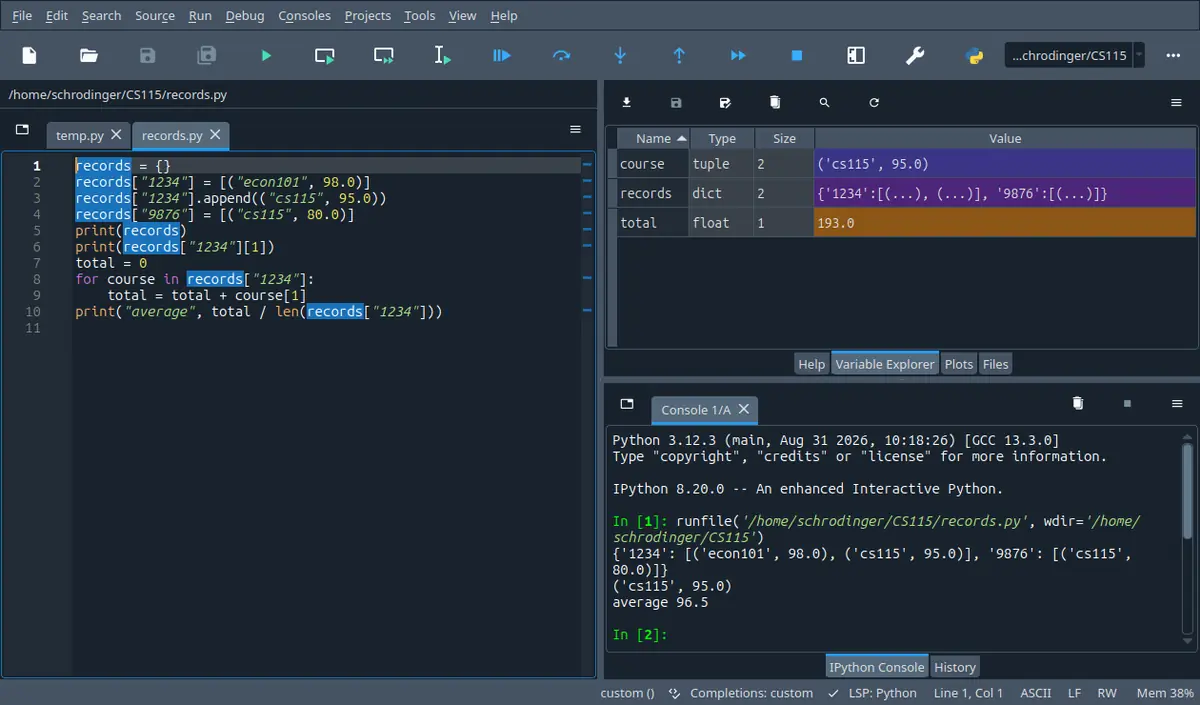
What this looks like in Spyder
The tab next to Help. It lists every name your program left behind with its type and its size, so it answers the one question a listing cannot: what is in this name right now. The stepper on this page shows the same four .
Spyder 5.5.1 on Linux, running the program in its own editor. A different version moves a few toolbar icons; the panes are named the same.
A script has to print the seating plan of an exam room, six seats across and six deep, so it builds the empty plan in one line: grid = [['-'] 6] 6. Then it writes one name into the front left seat with grid[0][0] = 'A' and prints the plan. The letter comes out in the front seat of every row, and no line of the script ever touched the other five rows.
By the end of this section you can build a of any size without the trap above, walk it by rows or by columns, say for any short program with two index brackets in it exactly what it prints, and write the two shapes of function the lab and the exam ask for: one that changes a table in place and one that hands back a new one.
In 60 seconds
A table is a list whose items are lists, so a row is table[r], a cell is table[r][c], and every question about a table comes down to which index you put on the outer loop and whether the rows you are looking at are separate objects or one object seen several times.
Every cell of a table. table[r] on its own is a whole row and is itself a list, which is why a second bracket may follow it.
The two lengths are different questions
$$\texttt{len(table)}\;=\;\text{rows},\quad\texttt{len(table[r])}\;=\;\text{cells in row }r$$
Any loop bound. The number of columns is len(table[0]) and that number only describes the whole table when every row has the same length.
Repeating a row repeats the reference
$$\texttt{[[0]*3]*2}\;\Longrightarrow\;\text{two names for ONE row}$$
Building an empty table. Build it with a loop that appends a freshly made row each time round, and the rows are separate objects.
A column walk moves the row index
$$\text{column }c:\;\texttt{for r in range(len(table)):}\;\texttt{table[r][c]}$$
Any per column answer. The index that stays still is the one in the answer, so for one number per column the column index goes on the outer loop.
Three most common mistakes
Building a table with [[0] cols] rows. That makes one row and then a list holding the same row rows times, so writing one cell appears to write a whole column.
Reading a table with table[r, c]. The comma builds a tuple, and a list refuses to be indexed by a tuple, so the program stops with a TypeError on that line.
Starting the accumulator before the outer loop instead of inside it. The first column then comes out right and every column after it carries the previous columns, which is why this one is so often handed in.
Labs are 20 per cent of the course mark, the midterm 40 and the final 40. On the one past final paper read while writing this page, one of the four questions was a function over a table of strings returning one number per column, worth 20 marks. That is one paper rather than a rule, but a table question either works or does not, so the loop bounds are worth more than the idea.
How much time do you have?
10 minutes
The two brackets with the two lengths, and the one line that silently builds a table with one row in it. Those two cover the cheapest marks and the most expensive mistake.
The 60-second card · A table is a list whose items are lists · Building a table of a size you only learn while running, and the row that was secretly one row · Formula card
45 minutes
Everything a table answer in the lab needs: build it, walk it by rows, walk it by columns, and the per column skeleton that the exam question is built on.
The 60-second card · A table is a list whose items are lists · Two nested loops, and which of the two you are allowed to write through · Building a table of a size you only learn while running, and the row that was secretly one row · Walking a column, and what a column means when the rows are not the same length · Scaffolding comes off · B · computation
full read
Adds the three parts a whole lab question needs and the tracing question likes: building a new table from an old one instead of changing it, reading a table in from the keyboard or a file and printing it so the columns line up, and finding a cell and handing back where it was.
The 60-second card · Recall first · Conventions · A table is a list whose items are lists · Two nested loops, and which of the two you are allowed to write through · Building a table of a size you only learn while running, and the row that was secretly one row · Walking a column, and what a column means when the rows are not the same length · Changing a table in place against handing back a new one · Getting a table in from the keyboard or a file, and printing it so the columns line up · Finding a cell and reporting where it was · Method boxes · Look-alike pairs · Scaffolding comes off · Full exam-style question · A · concept · B · computation · C · exam level · D · interleaved · Mistake ledger · Formula card · Check yourself
By the end of this section
Read a cell, a whole row and the two lengths out of a table, and say for any of the three which level of the structure the answer came from.
Trace a program with two nested loops over a table and write down its exact output, including where the line endings fall.
Build a table whose size is only known while the program is running, filling it from a rule on the row and column numbers, and avoid the repeated row.
Compute one number per row or one number per column of a table, and decide which loop bound is safe when the rows are not all the same length.
Distinguish a function that changes the table it is given from one that returns a new table, write either on demand, and copy a table so that its rows are independent.
Load a table from the keyboard or from a file, converting each part as it arrives, and print the result so that the columns line up.
Locate a cell in a table and hand back its position as a pair, together with an answer for the case where there is nothing to find.
Syllabus coverage
covered
Arrays — covered
A list used as an array of values of one kind: building one of a fixed size with the star operator, reaching an item by index, and the fact that Python has no separate array type.
The one dimensional case was covered as lists last section, so this page spends its space on what the second bracket adds.
covered
Multi-Dimensional Arrays — covered
A list whose items are lists
the two brackets
the two lengths
building a table at run time
the repeated row trap
the two nested loop shapes
per row and per column answers
ragged rows
in place against returning a new table
copying one safely
reading one in and printing it aligned
searching it
off syllabus
Tables of three or more dimensions — off syllabus
A list of tables, reached with three brackets, which the same rules describe with one more loop.
Named once in the notation block and nowhere else: the lecture and the lab both stop at two brackets, so the third is mentioned only so it is not mistaken for a new idea.
Recall first
A name holds a reference, not a copy
For a list, b = a makes a second name for one object. Changing the object through either name is visible through both, and a is b is True. A separate object takes a[:] or list(a).
Everything surprising in this section is this rule applied one level down, where the object being shared is a row rather than the table. The repeated row trap and the half copied table are both this sentence.
Indexing and assigning to an item of a list
For a list L, L[i] reads item i, L[i] = v replaces it, and len(L) is how many items there are, so the last index is len(L) - 1. Reading or writing past that is an IndexError.
A table uses this twice per cell, once on the table and once on a row, and the IndexError message is the one a produces.
append changes the list and hands back None
L.append(e) adds one item to the end of L and its value is None, so L = L.append(e) loses the list. L.append([1, 2]) adds one item that happens to be a list.
Tables are built by appending rows, so the item being appended is itself a list, and the None rule reappears for functions that change a table in place.
for over a range against for over a sequence
for x in L: hands over the items, and for i in range(len(L)): hands over the positions, so L[i] is the item. Only the second lets you assign to L[i].
The two loop shapes of this section are exactly these two, doubled. Which one a table walk needs is decided by whether a cell appears on the left of an equals sign.
A tuple carries several values as one
return (r, c) hands back one object holding two numbers, and the caller can print it or take it apart with pair[0] and pair[1]. A tuple cannot be changed after it is built.
A position in a table is two numbers, so a search returns a tuple. This is the section where the reason for tuples becomes concrete.
strip, split and the conversions
line.strip() hands back the line without the spaces and the newline at its ends, line.split(',') hands back a list of the pieces between the commas, and int(piece) turns one piece into a number. All three return something new and change nothing.
One line of a file becomes one row of a table with exactly these three, in this order.
print with end, and format with a
print(x, end='') writes x and does not end the line, a bare print() ends the line and writes nothing else, and format(n, '5d') gives a five character string holding the whole number n right aligned.
Every printed table on this page is these three together: the field width makes the columns, the empty ending keeps the row on one line, and the bare print ends it.
Try it yourself first (2 questions)
1§07.0 — a second name against a copy
The second one, and this is the trap of the three. Two names are made for a list, one by assignment and one by a full slice.
a = [1, 2]
b = a
b.append(3)
print(a, b)
c = a[:]
c.append(4)
print(a, c)
Find(a) Write the two lines this prints.
Given
b was made with an assignment and c with a full slice.
One item is appended through each of them.
IPython console
In [1]: %run untitled0.py
If the second line surprised you, reread the block of the previous section about aliasing and cloning before going on, because this section applies that same rule to rows rather than to lists and it is the source of the two most expensive traps here.
Hint 1/4
For each of the two appends, ask how many list objects exist at that moment. The printed lines follow from the count.
Hint 2/4
An assignment copies a reference and builds no object. A full slice builds a new list holding the same items.
Hint 3/4
So b and a are one list when the 3 is appended, and c is a separate list, made from [1, 2, 3], when the 4 is appended.
Hint 4/4
The first line shows the same three numbers twice, and on the second line only one of the two lists has four items.
Show solution
Count the list objects before following either append, or the two lines become a guess about which name the 3 landed in.
Count the objects before each append
$$\texttt{b = a}\;\Rightarrow\;\text{one list, two names}$$
Nothing is built, so the append has only one place to go and both names show it.
Two things worth carrying into this section. A range with a start of 1 skips the first item, which is right when each item is being compared with the one before it and wrong the rest of the time. And the last position is len(letters) - 1, never len(letters), which is the same off by one that a table walk meets twice, once per bracket.
Hint 1/4
List the values i takes before printing anything. Two of the four positions are involved in a way worth noticing.
Hint 2/4
range(a, b) gives the whole numbers from a up to but not including b, so range(1, 4) is 1, 2 and 3.
Hint 3/4
Here len(letters) is 4, the items are p, q, r and s, and the loop never sees position 0.
Hint 4/4
The first line has three pairs on it and p appears nowhere.
Show solution
Settle the positions range visits before reading any item, because every wrong answer here comes from the bounds and not the list.
List the positions the loop visits
$$\texttt{range(1, 4)} \rightarrow 1, 2, 3$$
The stop value is not included, so position 3 is the last one and position 0 is never reached.
$$\texttt{letters[3]} = \texttt{s}$$
The last item, since the four positions are 0 to 3. This is why the second printed line repeats the end of the first.
Independent check by counting: three pairs printed for a list of four items, which is exactly one fewer because the start was moved from 0 to 1.
Notation
symbol
reads as
means
watch out
$\texttt{[[1, 2, 3], [4, 5, 6]]}$
a table of two rows and three columns
A list whose two items are lists of three numbers each. Written on one line it is what Python prints; written on two lines with one row each it is the same object laid out for a reader.
The outer brackets are the table and the inner ones are the rows. A missing inner pair, as in [1, 2, 3, 4, 5, 6], is a flat list of six and has no rows at all.
$\texttt{table[r][c]}$
row r, column c
Two lookups in a row. The first hands back row r, which is a list, and the second hands back item c of that list.
table[r, c] is not a longer way of writing it. The comma builds a tuple and a list refuses to be indexed by one.
The first counts the items of the outer list, the second counts the items of one row. Multiplying them gives the number of cells only when all the rows have the same length.
Neither of them counts cells. len always counts the items one level down from what it is handed.
$\texttt{[0] * n}$
a row of n zeros
A new list of n items, all of them the number 0. This is the ordinary way to make a row of a fixed size, and it is safe.
Repeating a list of lists is not safe: [[0] n] m gives m references to one row. The star copies the items, and an item that is a list is a reference.
$\texttt{format(cell, '5d')}$
this whole number, right aligned in five characters
A string of exactly five characters holding the number, padded on the left with spaces, so that a column of them lines up on the right.
The letter d is for whole numbers. A float needs something like '7.2f', and handing a float to '5d' stops the program.
$\texttt{table[r][c][k]}$
the k th item of the cell at row r, column c
What three brackets would mean if the cells were lists themselves. Nothing here or in the lab uses it.
Three brackets are still three lookups, and are worth avoiding where a clearer structure would do.
Conventions used here
Every block of output on this page came out of an interpreter.
No output here was predicted by eye. Each program was written to a file, run, and the characters it printed were copied back in. Where a line ends in a space because the program used end=' ', the space is invisible on screen and is not shown; the answer checker on this page ignores spaces at the end of a line for the same reason.
In a programming course the printed answer is the whole claim.
What the word array means on this page.
Python has no separate array type of its own. Where this week says array, read list: a one dimensional array is a list, and a two dimensional array is a list whose items are lists. A library that adds a genuine array type comes later in the course and nothing on this page uses it.
The syllabus line uses the word array, and there is no array type in Python to go looking for.
The words for the parts of a table, and which index comes first.
A table has rows and columns; one value in it is a cell. The outer index is always the row and the inner one always the column, so table[2][0] is the first cell of the third row. Both counts start at 0, so a table with four rows has row indexes 0, 1, 2 and 3. The names r and c are used for the two indexes throughout.
Half the mistakes in a table question are the two indexes the wrong way round.
and ragged ones.
A table is rectangular when every row has the same length. Only then does len(table[0]) describe the whole table, and only then does a column mean anything. When rows may differ, every inner loop bound is len(table[r]), and a claim about columns has to be dropped or reworded. Each statement on this page says which kind it needs.
Nothing in Python stops rows differing in length, so a column walk that assumes otherwise is a crash waiting for the marker's data.
A Sample Run shows what the user typed.
Where a program calls input, the Sample Run shows the prompt and then, on the same line, the characters the user typed, exactly as a lab sheet does. The terminal echoes what is typed, which is why those characters are part of the picture even though the program never printed them.
Lab work is marked against a Sample Run in this shape.
What this page is allowed to use.
Everything here is built from what the course has covered by this week: numbers, text, True and False, input, print with end, format, if, while, for, range, len, def and return, the string operations, files, tuples, lists and dictionaries with their methods. Shorter ways of writing some of these loops exist and are not used, because the lab sheet says only material covered in the course may be used.
A solution that reaches past the course teaches you something the lab will not accept.
Which lab this section is for.
This page is the first half of the sixth lab, the half about : a function that builds a square table by a rule on the row and column numbers, and a main that reads a size, calls it, and prints the table in matrix form. The second half of that lab is about classes and belongs to the next section, so nothing here uses one.
The ten lab sheets carry 20 per cent of the mark between them, and half a sheet is still half a sheet.
7.1A table is a list whose items are lists
Two brackets instead of one: the first picks a row, the second picks a cell inside that row.
Every list so far held values. Nothing stops one holding lists instead, and that single change is this whole week.
Solvable with what we have
Total a list holding one student's marks.
Find the largest number in a list.
Reach any item of a list by index.
Not solvable yet
Hold three marks for each of four students and reach one of them.
Print a seating plan as six rows of six seats.
Average each quiz across the group, reading down rather than along.
The obvious move with one bracket is to lay all twelve marks out flat, three per student, and work out the index by hand.
The third student's second mark is 51; the 80 belongs to the fourth. Both counts start at 0, so the index is really (3 - 1) * 3 + (2 - 1), and that has to be remembered everywhere. The 3 in it is the row width, so a fourth quiz breaks every index.
DefinitionDefinition 7.1: a table, and its two lengths
Conditions
A table is a list whose items are themselves lists. Each inner list is a row, and one value inside a row is a cell.
table[r] is row r, and because it is a list, a second bracket may follow: table[r][c] is the cell in row r, column c. The outer index is always the row.
len(table) is the number of rows. It is not the number of cells.
len(table[r]) is the number of cells in row r. When every row is the same length, that common length is the number of columns and len(table[0]) reports it.
Indexes start at 0, so a table with len(table) rows has row indexes 0 to len(table) - 1, and the same holds inside each row.
A negative index counts back as it does in any list, so table[-1] is the last row and table[-1][-1] the last cell of it.
Nothing requires the rows to be the same length, and nothing requires the cells to be numbers. A table of strings is as ordinary as a table of ints.
$$\boxed{\texttt{table[r][c]}:\;\text{first bracket}\rightarrow\text{row},\ \text{second}\rightarrow\text{cell};\quad \texttt{len(table)}=\text{rows},\ \texttt{len(table[r])}=\text{cells in row }r}$$
Read it left to right as two separate lookups. Take the table, ask for row r, and you are holding a list; ask that list for item c, and you are holding a value.
The same table drawn as a grid, with the two indexes named the way the code names them. The blue frame is what the first bracket hands you and the orange frame is what the second one picks out of it.
Looks like this, but is not
Mathematics writes a matrix entry with one bracket pair and two numbers, so the same shape ought to work.
Traceback (most recent call last):
File "table.py", line 3, in <module>
print(table[1, 2])
~~~~~^^^^^^
TypeError: list indices must be integers or slices, nottuple
The comma builds a tuple, as it always does in Python, so the line asks the list for the item at position (1, 2). A list can only be indexed by a whole number or a slice, which is what the message says. Two brackets are two separate lookups.
The same table written two ways, and why they are equal but not the same
A table can be written out in one go, or grown a row at a time with append. Both appear in the lecture and they are worth comparing once.
FindWhat the two printed lines show about the two tables, and what the layout of the first one buys.
Given
Both tables hold the same nine numbers in the same places.
The second one was built by three calls to append.
Solution
Split the two questions the last lines ask; the word same has two meanings here, so one answer cannot serve both.
Read the printed form
$$\texttt{[[0, 3, 0], [0, 0, 1], [2, 0, 3]]}$$
This is what a table looks like when printed: one flat line of three lists. The layout in the source with one row per line is for the reader; Python never sees it.
$$\texttt{append([0, 3, 0])}$$
Appending a list adds one item to the outer list, and that item happens to be a list. Nothing about append changes for a table.
Equality on lists compares item by item, and comparing two rows compares their cells, so this is a full check of all nine values.
$$\texttt{table is other}\;\rightarrow\;\texttt{False}$$
Two separate objects were built, one by the literal and one by three appends, so no name reaches both. This is the same is against equals equals from the previous section, one level up.
Answer $$\boxed{\texttt{==}\ \text{True},\ \texttt{is}\ \text{False}:\ \text{equal contents, two objects}}$$
Check
Independent check: both tables print on one line and len is 3 for each, so the three source lines produced three items.
One statement against four, and the longer one is what you need when the number of rows arrives at run time.
Use the literal when you type the values yourself and append when a loop or a file produces them.
Reading sizes and single cells out of a four by three table
One table, five questions about it, each of them one line of code.
FindThe five printed values, and which of them would change if a row were added.
Given
The table has four rows and every row has three cells.
Row indexes run from 0 to 3 and cell indexes from 0 to 2.
Solution
Group the five lines by what each hands back rather than reading top to bottom, so the two len calls sit side by side.
The two lengths are two different counts
$$\texttt{len(table)} = 4$$
The outer list holds four items, and each item is a row. The twelve numbers are one level down, so no count of them appears here.
$$\texttt{len(table[0])} = 3$$
This asks the length of one row. It is the number of columns only because the rows here happen to match, and the page says so wherever it relies on that.
One bracket gives a list, two give a value
$$\texttt{table[2]} = \texttt{[7, 1, 9]}$$
The printed brackets are the proof that a row is itself a list. If it were not, the second bracket in the next line would be a TypeError.
$$\texttt{table[2][1]} = 1$$
Row 2 is [7, 1, 9] and its item 1 is the middle one. Counting from 0 inside the row matters here: the answer is not 7 and not 9.
Negative indexes work at both levels
$$\texttt{table[-1][-1]} = 5$$
The first bracket takes the last row, the second takes the last cell of that row. Two lookups again, which is why two negatives are allowed.
Size check: 4 rows times 3 cells is 12, and the source shows twelve numbers. A len(table) of 12 would have meant a flat list.
Whenever a table question starts, write down its two lengths before anything else. Most wrong answers in this section are a loop bound that used the other one.
Checkpoint
§07.1 — the two lengths and one cell
Thirty seconds. A table of four rows, two cells each.
The second line adds one cell from row 2 to one cell from row 3.
IPython console
In [1]: %run untitled0.py
The first line is the trap: there are eight numbers in the table and neither printed count is 8. len(table) counted the rows and len(table[0]) counted one row. On the second line table[2][0] is 5 and table[3][1] is 6, so the sum is 11.
Hint 1/4
Three separate questions are being printed: how many rows, how long one row is, and the sum of two named cells. Answer them one at a time.
Hint 2/4
len(table) counts rows and len(table[0]) counts the cells of row 0. In table[r][c] the first number is the row.
Hint 3/4
The rows are [3, 1], [4, 1], [5, 9] and [2, 6], so table[2] is [5, 9] and table[3] is [2, 6].
Hint 4/4
The first line is two small numbers separated by a space, and the second is a single number under twenty.
Show solution
Read each len at the level it asks about before touching the arithmetic, because the counts are where this question is lost.
Graphs are read as x then y, and that habit puts the across number before the down number.
wrong$$\texttt{table[c][r]}$$
right$$\texttt{table[r][c]}$$
7.2Two nested loops, and which of the two you are allowed to write through
Walking values needs no indexes; writing into cells needs them, because a loop name cannot be written through.
Reaching one cell took two brackets, so reaching all of them takes two loops, and the course gives you two ways of writing them that are not interchangeable.
MethodMethod 7.2: the two shapes of a full walk
Conditions
Reading every cell: for row in table: and inside it for cell in row:. The names row and cell hold a row and a value, and no index appears anywhere.
Writing into every cell: for r in range(len(table)): and inside it for c in range(len(table[r])):, then assign to table[r][c]. The indexes are what the assignment needs.
The inner bound is len(table[r]) and not len(table[0]) unless the table is known to be rectangular.
The order is one row at a time, left to right in each row. That order is what a printed table looks like, and it is why the row loop is the outer one.
A statement in the outer loop body but after the inner loop runs once per row. That is where the bare print() goes to end the line.
Assigning to the loop name, as in row = something or cell = something, changes nothing in the table. It points the name somewhere else and the next turn of the loop overwrites it.
Assigning to an item of the loop name, as in row[c] = something, does change the table, because row and table[r] are two names for one list.
$$\boxed{\text{read: }\texttt{for row in table: for cell in row:}\qquad \text{write: }\texttt{for r in range(len(table)): for c in range(len(table[r])):}}$$
The outer loop hands you one row at a time and the inner loop walks that row. If all you do is look, ask for the values; if you mean to change a cell, ask for the two numbers instead.
The nine cells above, and the single line of output they would make below. The orange marks are where the bare print in the outer loop body cuts that line into three.
Looks like this, but is not
The loop name stands for the row, so setting it should clear the row.
table = [[4, 8], [15, 16]]
for row in table:
row = [0, 0]
print('after rebinding :', table)
for row in table:
for c inrange(len(row)):
row[c] = 0print('after writing :', table)
after rebinding : [[4, 8], [15, 16]]
after writing   : [[0, 0], [0, 0]]
The first loop points the name row at a brand new list and then the loop moves on, so the table never hears about it. The second loop keeps row pointing where the loop put it, which is at table[r] itself, and writes into that object. One assignment moves a name, the other changes an object, and the difference is whether a bracket comes before the equals sign.
Printing a table as rows, and the one missing line that ruins it
First the version that works.
table = [[4, 8, 15],
         [16, 23, 42],
         [7, 1, 9]]
for row in table:
    for cell in row:
        print(cell, end=' ')
    print()
Sample Run:
4815162342719
Now the same program with the last print() taken out, which is the commonest thing to leave out of a table exercise.
table = [[1, 2], [3, 4]]
for row in table:
    for cell in row:
        print(cell, end=' ')
print('and the rest of the line')
Sample Run:
1234and the rest of the line
FindWhy the second program produces one line, and where the missing statement has to go.
Given
end=' ' tells print to finish with a space instead of a new line.
A bare print() prints nothing and then ends the line.
Solution
Work out what end does to the line endings first, or the missing statement has three plausible indentations and no way to choose.
See what end does to the line breaks
$$\texttt{print(cell, end=' ')}$$
This is the only printing statement in the inner loop, and it never ends a line, so nothing in the inner loop can start a new one.
$$\texttt{print()}$$
A call with no arguments prints the line ending only. That is the whole job it is doing here.
Put it at the right level of indentation
$$\text{inside the row loop, after the cell loop}$$
One line ending per row is wanted, and the outer loop body runs once per row. Indented one step further it would fire after every cell, and outside the loop altogether it fires once at the end, which is the second program.
Answer $$\boxed{\texttt{print()}\ \text{in the row loop, level with the cell loop}}$$
Check
Independent count: three rows want three line endings, and only the bare print produces one, so it runs once per row.
Indentation is the answer to most table printing questions. Ask how many times a statement should run, then put it at the level that runs that many times.
Doubling every cell, which cannot be done with the reading loop
Every mark in the table is to be doubled in place, with no new table built.
table = [[4, 8, 15],
[16, 23, 42]]
for r inrange(len(table)):
for c inrange(len(table[r])):
table[r][c] = table[r][c] * 2print(table)
Sample Run:
[[8, 16, 30], [32, 46, 84]]
FindWhy this loop needs the indexes, and what the reading loop would have done instead.
Given
The table has two rows of three cells.
The new value of each cell depends on its old value.
Solution
Start from what the assignment needs on its left, since that is what forces the index loop and nothing else does.
Decide what the assignment needs on its left
$$\texttt{table[r][c] = }\ldots$$
An assignment has to name a place, and a cell is named by its two indexes. There is no way to write the cell that cell is currently standing on, because cell is a name holding a copy of the value.
$$\texttt{for cell in row: cell = cell * 2}$$
This is the version that does nothing: it moves the name cell, and the next turn of the loop replaces it. Worth writing once to see it fail.
Set the two bounds
$$\texttt{range(len(table))}$$
Row indexes 0 up to the number of rows minus one, which is what range gives when it is handed a single bound.
$$\texttt{range(len(table[r])) }$$
The bound is read fresh for each row, so this version also works on a table whose rows differ in length. Writing len(table[0]) here costs nothing today and crashes the day the rows differ.
Check the arithmetic in one cell
$$\texttt{table[1][2]}: 42 \rightarrow 84$$
The last cell of the last row is the one furthest from the top of the loop, so if the bounds are wrong it is the one that gets missed.
Independent check without redoing the multiplications: every printed cell is even, and each one is larger than the cell it replaced.
Six assignments here, and n times m in general. There is no shorter honest way.
The test for which loop shape you need is one question: is there an equals sign with a cell on its left. If yes, you need the indexes.
Checkpoint
§07.2 — where the line endings go
Thirty seconds. The separator is a dash this time, and the bare print is missing on purpose.
table = [[1, 2], [3, 4]]
for row in table:
    for cell in row:
        print(cell, end='-')
print('end')
Find(a) Write exactly what this prints.
Given
end='-' makes print finish with a dash and no new line.
The final print is outside both loops.
IPython console
In [1]: %run untitled0.py
Four cells, four dashes, and the word end landing on the same line because nothing before it ever ended one. The dash after the 4 is easy to miss: the loop does not know it is on the last cell, so it adds the separator there too. That is the usual reason a printed table has one trailing separator per row.
Hint 1/4
Count how many statements in this program can end a line. Then you know how many lines the output has.
Hint 2/4
print(x, end='-') writes x and then a dash. Only a print whose end is left alone ends the line.
Hint 3/4
The cells come out in the order 1, 2, 3, 4, each followed by a dash, and then the word end is printed.
Hint 4/4
There is one line, and it has four dashes in it.
Show solution
Count the inner print's firings first; the dashes are all its work and the missing line ending only joins them together.
Follow the two loops
$$1\texttt{-}2\texttt{-}3\texttt{-}4\texttt{-}$$
Two rows of two cells, and the inner print fires four times, each time adding the value and then a dash.
$$\texttt{print('end')}$$
This one has its ending left alone, so it both writes the word and finally ends the only line of output.
Answer $$\boxed{\texttt{1-2-3-4-end}}$$
Check
Independent check by counting characters: four values, four separators and three letters, which is eleven characters, and the printed line has eleven.
⚠ Leaving out the bare print at the end of the row
The inner loop looks complete once the cells are printed, and on a one row table the output looks right.
wrong$$\text{all cells on one line}$$
right$$\texttt{print()}\ \text{once per row}$$
⚠ Trying to write through the loop name
The name really does stand for the cell while you are reading, so it looks as though it stands for it while writing too.
wrong$$\texttt{for cell in row: cell = 0}$$
right$$\texttt{for c in range(len(row)): row[c] = 0}$$
⚠ Using len(table[0]) as the inner bound on a table whose rows differ
It is shorter, and on the rectangular tables of the lecture it gives the same number.
wrong$$\texttt{for c in range(len(table[0])):}$$
right$$\texttt{for c in range(len(table[r])):}$$
7.3Building a table of a size you only learn while running, and the row that was secretly one row
Append a freshly built row each time round the loop; repeating a row with the star operator repeats the arrow to it.
Writing the rows out by hand only works when you know them as you type. The lab asks for a table whose size the user gives you, so the rows have to be made while the program runs.
RuleRule 7.3: how to make an empty table, and the one line that does not
Conditions
The safe shape is a loop: start with table = [], and once per row build a fresh row and append it. table.append([0] cols) inside the loop is enough, because [0] cols builds a new list every time the line runs.
[0] * cols on its own is fine and is the normal way to make a row of a fixed size. The trap is one level up.
[[0] cols] rows builds one row and then a list holding that same row rows times. The outer star copies the reference, so all the rows are one object.
The same trap wears a second disguise: making one row before the loop and appending that name every time round. row = [0] * cols then table.append(row) inside the loop has exactly the effect of the star.
table[0] is table[1] tells the two cases apart at once: True means you have the trap, False means you have real rows.
Both versions print identically when nothing has been written yet, so the trap is invisible until a single cell is assigned.
Cells can be filled as the rows are built, which is what a rule on the row and column numbers asks for, or after the table exists with an index walk.
$$\boxed{\texttt{for r in range(rows): table.append([0] * cols)}\quad\text{builds }rows\text{ rows};\qquad \texttt{[[0] * cols] * rows}\quad\text{builds }1}$$
Make the empty table first, then make one row per turn of the loop and hand it over. Never make the row once and hand the same one over several times, whichever way you write that.
The two lines drawn as memory. On the left both pictures have an outer list with two slots; the difference is entirely in how many row objects the arrows land on, which is why writing one cell behaves so differently.
Looks like this, but is not
One row of three zeros, repeated twice, is a two by three table of zeros. The printed table agrees, right up to the first assignment.
bad = [[0] * 3] * 2
good = []
for r inrange(2):
good.append([0] * 3)
bad[0][0] = 9
good[0][0] = 9print('bad :', bad)
print('good :', good)
print('bad rows are one object :', bad[0] is bad[1])
print('good rows are two :', good[0] is good[1])
bad  : [[9, 0, 0], [9, 0, 0]]
good : [[9, 0, 0], [0, 0, 0]]
bad  rows are one object : True
good rows are two        : False
Both tables have two items and both print as two rows of three, so by shape they are the same table. The star ran [0] 3 once, got one list, and put that one list in both slots, so there is only one row to write into. The loop ran [0] 3 twice and got two lists. The two is lines are the cheap test, and they are worth running in the shell the first time this bites you.
The seating plan from the top of the page, and the one line that fixes it
This is the program the section opened with: six rows of six seats, one name written into the front left seat.
FindWhy the first program shows the letter six times, and what it cost to fix.
Given
Both programs write to one cell only, grid[0][0].
Both print six lines of six items.
Solution
Count the list objects the first line builds before following the assignment, or six separate assignments look like the fault.
Count how many lists the first line builds
$$\texttt{['-'] * 6}$$
One list of six dashes. This inner star is doing nothing wrong; it repeats a string inside one list.
$$\texttt{[\,\ldots\,] * 6}$$
The outer star repeats the single item of a one item list six times, and that item is the list just built. Six slots, one row.
Follow the single assignment
$$\texttt{grid[0][0] = 'A'}$$
The first bracket lands on the one row object, the second changes its first cell. There is nowhere else the letter could go, and nothing was overwritten by mistake.
$$\texttt{print(row)}\times 6$$
The printing loop visits six slots and prints the one row six times, which is why the output looks like six identical rows rather than a mistake.
Fix it where the rows are made
$$\texttt{for r in range(6): grid.append(['-'] * 6)}$$
The expression that builds a row is now inside the loop, so it runs six times and produces six lists. This is the only change; the rest of the program is untouched.
Answer $$\boxed{\text{one row in six slots}\;\longrightarrow\;\text{six rows, built inside the loop}}$$
Check
Independent check that needs no printout: grid[0] is grid[5] is True in the broken version and False in the fixed one.
One line became three and the star runs six times instead of twice: the price of six real rows.
Any time a table is built without a loop, look at it twice. Every table whose rows are made once is the same bug wearing a different suit.
A square table filled by a rule on its row and column numbers
The lab asks for a function that takes a size and returns a square table whose cells follow a rule on the two indexes. Here the rule is that the cell in row r and column c holds (r + 1) * (c + 1), and a second function prints the table with the columns lined up.
deftimes_table(n):
"""Assumes n is an int greater than 0. Returns an n by n table whose cell at row r and column c holds (r + 1) * (c + 1). """
table = []
for r inrange(n):
row = []
for c inrange(n):
row.append((r + 1) * (c + 1))
table.append(row)
return table
defshow(table):
"""Assumes table is a table of ints. Prints it with every cell in a field four characters wide. """for row in table:
for cell in row:
print(format(cell, '4d'), end='')
print()
show(times_table(5))
Sample Run:
12345246810369121548121620510152025
FindThe shape of the building loop, and why the row is created where it is.
Given
The size is a parameter, so the table cannot be written out as a literal.
The rule needs both indexes, so the cells cannot be made with the star operator.
Solution
Decide where the fresh row is created before writing any loop, because that one placement is the whole difference from the star trap.
Put the fresh row at the top of the outer body
$$\texttt{row = []}$$
Inside the row loop, so a new empty list exists once per row. Moving this line above the loop is the trap from the counterexample, and here it would leave one row holding all n squared values.
$$\texttt{table.append(row)}$$
At the bottom of the same body, after the row has been filled. Appending it earlier also works, because the name and the slot reach the same object, but filling it first is easier to read.
Let the inner loop do the rule
$$\texttt{row.append((r + 1) * (c + 1))}$$
Appending rather than assigning, because the row has no cell c yet. Assigning to row[c] here would be an IndexError on an empty list.
$$(r + 1)(c + 1)$$
The plus ones are there because the indexes start at 0 and the table is meant to read as a multiplication table from 1. This is the only place in the function where that shift belongs.
Line the columns up when printing
$$\texttt{format(cell, '4d')}$$
A whole number right aligned in four characters, so 5 and 25 end at the same place. Printing with a space separator would leave the columns ragged as soon as the numbers differ in length.
Independent check on the printed table: it must be symmetric, since swapping r and c cannot change a product, and the diagonal holds squares.
Two loops and n squared appends. For n equal to 5 that is 25 appends and 5 more for the rows.
This is the whole pattern for any rule based table: empty table, fresh row per turn, one append per cell, hand the row over. Only the expression inside changes.
Checkpoint
§07.3 — one row in two slots
Thirty seconds, and the table is written with a literal row this time rather than with the star on the inside.
grid = [[1, 1]] * 2
grid[0][0] = 5print(grid)
Find(a) Write the line this prints.
Given
The outer star repeats a one item list twice.
Only one cell is ever assigned to.
IPython console
In [1]: %run untitled0.py
One row object, reached twice. The line grid[0][0] = 5 wrote into the only row there is, and the printing loop then showed that row in both slots. A table built this way is not broken until something is written into it, which is why this trap survives so long in a program.
Hint 1/4
Before answering, count how many list objects the first line creates. The answer follows from that number and nothing else.
Hint 2/4
Repeating a list with the star operator repeats its items. The item here is itself a list, and repeating a reference gives you the same object twice.
Hint 3/4
So grid[0] and grid[1] are the same [1, 1], and the assignment writes a 5 into the first cell of it.
Hint 4/4
Both printed rows look the same, and neither of them is [1, 1].
Show solution
Count the row objects rather than the brackets; a written out row hides the sharing that the inner star advertises.
The star copies what is in the list, and what is in it is one reference to one row.
$$\texttt{grid[0][0] = 5}$$
There is only one place this can land, and both slots report it because both slots hold the same reference.
Answer $$\boxed{\texttt{[[5, 1], [5, 1]]}}$$
Check
Independent check: grid[0] is grid[1] is True here, and len(grid) is 2 while the number of distinct rows is 1. Those two facts together are the whole answer.
⚠ Building a table with the star on the outside
It is one short line, it prints correctly, and the trap shows up only after an assignment.
wrong$$\texttt{table = [[0] * cols] * rows}$$
right$$\texttt{for r in range(rows): table.append([0] * cols)}$$
⚠ Making the row once and appending it every turn
The row is created before the loop for tidiness, and the loop then appends the name it was given.
wrong$$\texttt{row = [0] * 3}\ \text{then}\ \texttt{table.append(row)}\ \text{in the loop}$$
right$$\texttt{table.append([0] * 3)}\ \text{in the loop}$$
⚠ Assigning to a cell of a row that has no cells yet
The finished table is indexed with brackets, so the half built one looks as though it should be too.
7.4Walking a column, and what a column means when the rows are not the same length
The index that stays still while you add things up is the one that ends up in the answer.
Reading a row was easy because a row is an object you can hold. A column is not an object at all, and that is the only difficulty in this block.
RuleRule 7.4: one answer per row against one answer per column
Conditions
There is no table[c] for a column. A column exists only as the set of cells table[0][c], table[1][c] and so on, so reaching it always needs a loop over the row index.
For one answer per row, put the row index on the outer loop and start the accumulator inside that loop, just after it opens.
For one answer per column, put the column index on the outer loop and the row index on the inner one. The body is then table[r][c] with c held still.
The accumulator goes inside the outer loop and the append goes at the end of the outer body. Starting it before the outer loop is the single commonest error in this section, and it gives a first answer that is right and every later answer too large.
A per column walk needs the number of columns, which is len(table[0]), and that is a claim about the whole table only when the table is rectangular.
On a table whose rows differ, len(table[0]) is the length of row 0 and nothing more. Asking for table[r][c] beyond the end of row r stops the program with an IndexError.
Checking rectangularity is one loop: compare every len(table[r]) with len(table[0]) and report the first mismatch.
$$\boxed{\text{per row: }\texttt{for r ... : total = 0; for c ... }\qquad\text{per column: }\texttt{for c ... : total = 0; for r ... }}$$
Decide first how many numbers the answer has. If it is one per column, the column loop is the outer one, the total is reset as each column starts, and the row loop is what walks down.
A table whose rows are two, three and one cells long. The dashed box is the cell a column walk would ask for after reading row 0 and deciding the table has two columns.
Looks like this, but is not
A column walk that reads the number of columns from row 0, which is exactly what a rectangular table wants.
words = [['lion', 'ant'],
['cat', 'dog', 'ox'],
['bee']]
for c inrange(len(words[0])):
column = []
for r inrange(len(words)):
column.append(words[r][c])
print('column', c, ':', column)
column 0 : ['lion', 'cat', 'bee']
Traceback (most recent call last):
  File "columns.py", line 7, in <module>
    column.append(words[r][c])
                  ~~~~~~~~^^^
IndexError: list index out of range
Column 0 came out, because every row has a cell 0. Column 1 asked row 2 for its second cell and row 2 has one cell, so the program stopped. Notice also what column 0 quietly claimed: that ox, which is in row 1, belongs in no column at all, because the loop bound came from row 0 and row 0 is short. A ragged table has rows and has no columns, and the crash is the honest version of that.
Row totals and column totals of the same table of marks
Three students, three quizzes. One function reports how each student did, the other how hard each quiz was.
defrow_totals(table):
"""Assumes table is a table of numbers. Returns a list with one total per row, in row order. """
totals = []
for row in table:
total = 0for cell in row:
total = total + cell
totals.append(total)
return totals
marks = [[55, 70, 62],
[90, 85, 78],
[40, 51, 66]]
print(row_totals(marks))
Sample Run:
[187, 253, 157]
The column version cannot use for row in table, because it needs one cell out of each row at a time.
defcolumn_totals(table):
"""Assumes table is a rectangular table of numbers with at least one row. Returns a list with one total per column, in column order. """
totals = []
for c inrange(len(table[0])):
total = 0for r inrange(len(table)):
total = total + table[r][c]
totals.append(total)
return totals
marks = [[55, 70, 62],
[90, 85, 78],
[40, 51, 66]]
print(column_totals(marks))
Sample Run:
[185, 206, 206]
FindWhy the row version can avoid indexes entirely and the column version cannot.
Given
The marks are 55, 70, 62 then 90, 85, 78 then 40, 51, 66.
Both answers are lists of three numbers, but they are not the same three.
Solution
Let the shape of the answer pick the outer loop, and only then ask whether indexes are needed at all.
Write the row version with no indexes at all
$$\texttt{for row in table:}$$
A row is an object, so the loop can hand it over directly. Nothing in this function ever needs to know which row number it is on.
$$\texttt{total = 0}\ \text{inside the row loop}$$
One total per row is wanted, so it has to be reset as each row starts. Above the loop it would accumulate across rows and give running totals instead.
Turn the walk inside out for columns
$$\texttt{for c in range(len(table[0])):}$$
The answer has one number per column, so the column index is the one that must sit still while the inner loop runs. That decides which loop is outer, and it is the whole trick.
$$\texttt{for r in range(len(table)):}$$
This is the loop that walks down. Column 0 is table[0][0], table[1][0], table[2][0], and only the row index moves.
Read one column by hand to be sure
$$55 + 90 + 40 = 185$$
The first cell of each of the three rows. If the indexes had been swapped this would have been 55 plus 70 plus 62, which is 187 and is a row total.
Independent check that catches a swapped index: both lists count all nine marks, and both add to 597.
Nine additions either way. The cost is identical; only the order of visiting differs.
Keep that equal grand total as a habit: per row and per column answers over one table must agree when summed.
Reporting the row lengths of a table that is not rectangular
When the rows may differ, the only safe questions are per row ones, and the first thing to print is the shape.
words = [['lion', 'ant'],
['cat', 'dog', 'ox'],
['bee']]
print('rows :', len(words))
for r inrange(len(words)):
print('row', r, 'has length', len(words[r]), ':', words[r])
Sample Run:
rows : 3
row 0 has length 2 : ['lion', 'ant']
row 1 has length 3 : ['cat', 'dog', 'ox']
row 2 has length 1 : ['bee']
FindWhich claims about this table are safe and which are not.
Given
The three rows hold two, three and one strings.
The loop uses the row index because the printed line names it.
Solution
Ask which counts exist before writing the loop, because a ragged table has no number of columns to report.
Separate the counts that exist from the one that does not
$$\texttt{len(words)} = 3$$
The number of rows is always available and always means what it says.
$$\texttt{len(words[r])}\in\{2, 3, 1\}$$
Each row reports its own length. There is no single number of columns to report, and asking for one is the mistake.
Use the index loop because the output names the row
$$\texttt{for r in range(len(words)):}$$
The printed line includes the row number, so the number is needed. With for row in words the number would have to be counted by hand in a separate name, which is the same thing written longer.
Answer $$\boxed{3\ \text{rows of lengths }2,\ 3,\ 1;\ \text{no number of columns exists}}$$
Check
Independent check: row 1 printed three items while row 0 printed two, which no rectangular reading of this table could produce.
Before any column walk, either prove the table is rectangular or write the loop bounds per row. A page of correct column code on a ragged table is still a crash.
Checkpoint
§07.4 — the lengths of a ragged table
Thirty seconds. Three rows, and none of them the same length.
The second line reads one cell from row 1 and one from row 0.
IPython console
In [1]: %run untitled0.py
Both reads on the second line are inside their own row, so nothing goes wrong: table[1][1] is 5 and table[0][2] is 3. Note what is not safe here. table[1][2] would be an IndexError even though row 0 has a cell 2, and any loop with range(len(table[0])) as its inner bound would reach for it.
Hint 1/4
Each of the three lengths is a question about one row only. Do not look for a single width for the table, because it does not have one.
Hint 2/4
len(table[r]) counts the cells of row r. In table[r][c] the second index must be smaller than that row's own length.
Hint 3/4
Row 0 has three cells, row 1 has two and row 2 has one, so table[1][1] is the second cell of [4, 5] and table[0][2] is the third cell of [1, 2, 3].
Hint 4/4
The first line counts down from three, and the second line is two single digits.
Show solution
Ask each row for its own length instead of reading one width off row 0, which would be an error here.
7.5Changing a table in place against handing back a new one
Either write into the cells you were given, or build a fresh table and return it; mixing the two is where marks go.
Both walks so far either read a table or wrote into the one they were handed. A lab question usually says which of the two it wants, and the words it uses are worth learning.
RuleRule 7.5: the two families, one level up
Conditions
In place: the function takes a table, assigns to table[r][c], and returns nothing. The caller sees the change in its own table, and the call is a statement on a line of its own.
Returning a new one: the function starts from new = [], appends a freshly built row per turn, and returns new. The table it was given is untouched and the caller has to store the result.
A function that changes a table in place hands back None, so table = censor(table, 'cat') throws the table away and leaves the name holding None.
A cannot be done in place on a table that is not square, because the shape itself changes, so it belongs to the second family.
Copying the outer list with table[:] or list(table) gives a new outer list holding the same row objects. Writing a cell through the copy is visible through the original.
A copy whose rows are independent takes a loop: start from new = [] and append row[:] for each row. That is what deep means here and it is one line longer.
Which family a question wants can be read off its wording: returns a new table means the second, updates the table means the first, and a docstring should say which.
Decide at the start whether the caller wants its own table changed or a second table alongside it, write the docstring line that says so, and then the body has only one shape available to it.
A transpose, with the first row of the old table coloured so it can be followed into the new one. The shape changes from two by three to three by two, which is why this cannot be done by writing into the table you were given.
Looks like this, but is not
A transpose swaps the cell at row r column c with the cell at row c column r, so a double loop that does exactly that should transpose the table where it stands.
square = [[1, 2], [3, 4]]
for r inrange(len(square)):
for c inrange(len(square[r])):
keep = square[r][c]
square[r][c] = square[c][r]
square[c][r] = keep
print(square)
[[1, 2], [3, 4]]
Every pair of cells is swapped twice, once when the loop reaches one of them and once when it reaches the other, so the table comes back exactly as it started. The fix is not another swap but a bound: only the cells above the should be visited. On a table that is not square the same loop stops with an IndexError instead, because square[c][r] reaches past the end of a row as soon as c is a legal column but not a legal row.
Transposing a two by three table into a three by two one
The new table has one row per old column, so the outer loop of the builder is the column loop.
deftranspose(table):
"""Assumes table is a rectangular table with at least one row. Returns a NEW table whose row c is column c of the input. """
new = []
for c inrange(len(table[0])):
row = []
for r inrange(len(table)):
row.append(table[r][c])
new.append(row)
return new
small = [[1, 2, 3],
[4, 5, 6]]
flipped = transpose(small)
print('original :', small)
print('flipped :', flipped)
print('shape :', len(small), 'by', len(small[0]), 'became',
len(flipped), 'by', len(flipped[0]))
Sample Run:
original : [[1, 2, 3], [4, 5, 6]]
flipped  : [[1, 4], [2, 5], [3, 6]]
shape    : 2 by 3 became 3 by 2
FindThe loop bounds of the builder, and the proof that the input survived.
Given
The input has two rows of three cells.
The function must not change the table it is given.
Solution
Fix the shape of the answer first: with the column loop outside, no index has to be swapped by hand afterwards.
Count the rows the answer needs
$$\texttt{len(new)} = \texttt{len(table[0])}$$
One row of the answer per column of the input, so the outer loop runs over the columns. Getting this the wrong way round builds a table of the right numbers in the wrong shape.
$$\texttt{len(new[c])} = \texttt{len(table)}$$
Each new row is as long as the input has rows, because it collects one cell from each of them.
Fill one new row
$$\texttt{row.append(table[r][c])}$$
With c held still by the outer loop, this walks down column c. The two indexes appear in the input order, so nothing is swapped by hand; the swap is in which loop is outer.
Nothing in the function assigns to any cell of table, so there is no way it could have changed. Printing it is the cheap proof that the function belongs to the second family.
Independent check on the shape: rows times columns is 6 before and after, and reading the first column of the answer downwards gives 1, 2, 3.
Six appends for the cells and three for the rows, and one new list per row. Nothing is copied twice.
Whenever the answer is a table, write down its two lengths in terms of the input's two lengths before writing any loop. That one line fixes which loop is outer.
Blanking out a word wherever it appears, and why the function returns None
This one is in place: the caller's own table is changed, and nothing is handed back.
defcensor(table, word):
"""Assumes table is a table of strings and word is a string. Replaces every cell equal to word with a single asterisk. Changes table in place and returns None. """for r inrange(len(table)):
for c inrange(len(table[r])):
if table[r][c] == word:
table[r][c] = '*'
lines = [['the', 'cat', 'sat'],
['the', 'dog', 'ran'],
['a', 'cat', 'slept']]
print('what censor hands back :', censor(lines, 'cat'))
for row in lines:
print(row)
Sample Run:
what censor hands back : None
['the', '*', 'sat']
['the', 'dog', 'ran']
['a', '*', 'slept']
FindWhy the call prints None, and what a caller must not write.
Given
The table holds nine strings and two of them are cat.
The function has no return statement.
Solution
Read what the body does to the table before asking what the call prints, because the return value is the easy half.
Read what the body does with the table
$$\texttt{table[r][c] = '*'}$$
An assignment to a cell of the caller's own table. The parameter holds a reference to it, so there is only one table in the program and the caller sees the change.
$$\texttt{return}\ \text{absent}$$
A function that falls off its end hands back None, which is why the first printed line says None rather than showing a table.
Say what the caller must not do
$$\texttt{lines = censor(lines, 'cat')}$$
This throws the table away: the censoring really happened, and then the name was pointed at None. The next loop over lines then stops the program.
$$\texttt{censor(lines, 'cat')}$$
The correct call is a statement on its own, exactly like L.sort() from the previous section. Same rule, one level deeper.
Check the ragged safe bound
$$\texttt{range(len(table[r]))}$$
The rows here are all three long, but nothing in the docstring promises that, so the bound is read per row and the function works on a ragged table too.
Answer $$\boxed{\texttt{None},\ \text{and two cells replaced by }\texttt{*}}$$
Check
Independent check: the cell count is unchanged, so each printed row still holds three items, and exactly two asterisks appear.
The docstring line that says whether a function changes its argument or returns something new is not decoration. Write it first, and the body has one shape left.
Two ways to copy a table, and the one that does not protect the rows
Cloning a list was a full slice in the previous section. One level up it only half works.
table = [[1, 2], [3, 4]]
shallow = table[:]
shallow[0][0] = 9print('after writing into the slice copy :', table)
table = [[1, 2], [3, 4]]
deep = []
for row in table:
deep.append(row[:])
deep[0][0] = 9print('after writing into the row copy :', table)
print('and the copy itself :', deep)
Sample Run:
after writing into the slice copy : [[9, 2], [3, 4]]
after writing into the row copy   : [[1, 2], [3, 4]]
and the copy itself               : [[9, 2], [3, 4]]
FindWhich of the two the word copy means in a lab question, and how to write the safe one.
Given
Both copies are separate outer lists, so appending a row to either leaves the other alone.
Only the second copy has separate rows.
Solution
Ask what the slice copied rather than whether it copied, since the outer list really is new and a yes explains neither line.
See what the slice actually copied
$$\texttt{table[:]}$$
A new outer list with the same items. The items of a table are rows, so what was copied is two references, not two rows.
Same object, so writing a cell through either name shows through both. This is the aliasing rule from the previous section, unchanged; only the level is new.
Copy one level deeper
$$\texttt{deep.append(row[:])}$$
The slice is applied to the row rather than the table, so each appended item is a fresh list. Two lines of work, and the copy is now independent for cells as well as for rows.
Answer $$\boxed{\texttt{table[:]}\ \text{shares the rows};\ \texttt{append(row[:])}\ \text{does not}}$$
Check
Independent check that changes nothing: shallow[0] is table[0] is True, and for the row by row copy it is False.
A backup of a table is a loop, not a slice: the same sentence as last section with one more bracket in it.
Checkpoint
§07.5 — what a full slice of a table copies
Thirty seconds. A copy is taken, a row is added to it, and one cell is changed.
first = [[1, 2], [3, 4]]
second = first[:]
second.append([5, 6])
second[0][0] = 0print(first)
print(second)
Find(a) Write the two lines this prints.
Given
second is a full slice of first.
One row is appended to second and one cell of it is assigned to.
IPython console
In [1]: %run untitled0.py
The append is invisible to first, because the outer lists really are separate. The cell assignment is not, because the two outer lists hold the same two row objects. One copy, two different answers, and telling them apart is the whole point of this block.
Hint 1/4
Two different changes are made to second, and they are not the same kind of change. Decide separately for each whether first can see it.
Hint 2/4
A full slice builds a new outer list holding the same rows. Appending changes the outer list only; assigning to a cell changes a row.
Hint 3/4
So second has three rows while first still has two, and second[0] and first[0] are the same [1, 2].
Hint 4/4
The first line has two rows in it and the 0 appears on both lines.
Show solution
Take the length change and the cell change as two questions, because the outer list is new and the rows are not.
Take the two changes separately
$$\texttt{second.append([5, 6])}$$
Changes the length of the new outer list only. first still has two items, so it cannot show this.
$$\texttt{second[0][0] = 0}$$
Reaches through the shared reference into the row [1, 2], which is also first[0], so both names show the 0.
Independent check on lengths: len(first) is 2 and len(second) is 3, which proves the outer lists are separate, while first[0] is second[0] is True, which proves the rows are not.
⚠ Storing the result of an in place function
Most functions hand something back, so assigning the call looks like the careful thing to do.
A full slice was the correct clone of a list one section ago, and it still makes a new outer list, so it looks right.
wrong$$\texttt{backup = table[:]}$$
right$$\texttt{for row in table: backup.append(row[:])}$$
⚠ Building the new table with the input's shape
The two lengths are both in scope, so it is easy to reach for the nearer one when the answer needs the other.
wrong$$\text{transpose with}\ \texttt{for r in range(len(table))}\ \text{outside}$$
right$$\text{transpose with}\ \texttt{for c in range(len(table[0]))}\ \text{outside}$$
7.6Getting a table in from the keyboard or a file, and printing it so the columns line up
A table arrives one row at a time, and every part of every row is text until int is called on it.
Every table up to here was written into the program. The lab reads the size from the user and the exam reads the values from a file, and both are the same loop with a different source.
MethodMethod 7.6: read a table in, print a table out
Conditions
From the keyboard: read the two sizes first and convert them with int, then run the two loops, appending a fresh row per turn and a converted value per cell.
From a file: one line of the file is one row. Strip the line, split it on its separator, walk the parts, convert each with int or float, append to the row, then append the row.
split hands back a list of strings. A row of text looks identical to a row of numbers when printed inside a table, so the conversion is easy to forget and shows up later as text being joined instead of numbers being added.
strip first, split second. A line read from a file ends in a newline character, and without the strip the last part of every row carries it.
Printing a table so it lines up needs a field width: print(format(cell, '5d'), end='') puts every whole number in five characters, right aligned, and the bare print() after the inner loop ends the row.
Printing with print(cell, end=' ') is fine when the cells are all the same width and ragged as soon as they are not.
The prompt of an input call belongs inside the call, and the value typed appears on the same line as the prompt because the terminal echoes it.
Cut the line into its parts, turn each part into the number it stands for, collect them into a row, and hand the finished row to the table. Then do it again for the next line.
The four steps that turn one line of a file into one row of a table, in the order they have to happen. The loop comes back to the first box for the next line.
Looks like this, but is not
The split gave three parts per line and the table printed correctly, so the table holds the numbers from the file.
out = open('marks.txt', 'w')
out.write('55,70,62\n')
out.close()

table = []
in_file = open('marks.txt', 'r')
for line in in_file:
    table.append(line.strip().split(','))
in_file.close()

print(table)
print(table[0][0] + table[0][1])
[['55', '70', '62']]
5570
The printed table gives it away only if you look for the quotation marks, and the addition gives it away completely: 55 plus 70 came out as 5570 because both cells are still strings and the plus sign joined them. The table is a perfectly good table; it is just a table of text. One int call per part is the whole fix.
Reading a table of any size from the user and printing it in matrix form
This is the second half of the lab exercise: the size comes from the user, and the table is printed so that the columns line up.
rows = int(input('How many rows? '))
cols = int(input('How many columns? '))
table = []
for r inrange(rows):
row = []
for c inrange(cols):
cell = int(input('Value at row ' + str(r) + ' column ' + str(c) + ': '))
row.append(cell)
table.append(row)
print('The table:')
for row in table:
for cell in row:
print(format(cell, '5d'), end='')
print()
Sample Run:
How many rows? 2
How many columns? 3
Value at row 0 column 0: 4
Value at row 0 column 1: 8
Value at row 0 column 2: 15
Value at row 1 column 0: 16
Value at row 1 column 1: 23
Value at row 1 column 2: 42
The table:
    4    8   15
   16   23   42
FindWhere each conversion goes, and how the printed columns are made to line up.
Given
The sizes are typed in before any value.
Every value typed is converted with int as it arrives.
Solution
Convert each value as it arrives rather than storing the text, so nothing below has to remember to convert it.
Convert as early as possible
$$\texttt{rows = int(input(...))}$$
The size is needed by range, which refuses a string, so this conversion cannot be postponed. Doing it on the same line keeps the two sizes as numbers everywhere below.
$$\texttt{cell = int(input(...))}$$
Converting here means the table holds numbers from the moment it is built. Storing the text and converting later means every later use has to remember to.
Joining text needs text on both sides, so the two numbers are converted the other way with str. Without those calls the line stops with a TypeError.
Give every cell the same width
$$\texttt{format(cell, '5d')}$$
Five characters, right aligned, so 4 and 15 and 42 all end at the same column. The separator is then not needed at all, which is why end is the empty string.
$$\texttt{print()}$$
One line ending per row, placed in the outer body as in the printing block earlier on this page.
Answer $$\boxed{\texttt{int}\ \text{on the way in},\ \texttt{format(cell, '5d')}\ \text{on the way out}}$$
Check
Independent check: every printed line must be columns times five characters long, so 15 here, and counting the first one gives 15.
One prompt per cell, so rows times columns of them, which is why the file version exists for anything larger.
This program is the skeleton of most table lab questions: two sizes, two loops, one conversion, one printing loop with a field width.
Reading a file of comma separated marks into a table of ints
Here the file is written first so the program is complete on its own; in the lab the file is given to you.
out = open('marks.txt', 'w')
out.write('55,70,62\n')
out.write('90,85,78\n')
out.write('40,51,66\n')
out.close()

table = []
in_file = open('marks.txt', 'r')
for line in in_file:
    parts = line.strip().split(',')
    row = []
    for part in parts:
        row.append(int(part))
    table.append(row)
in_file.close()

print(table)
print('second student, third quiz :', table[1][2])
Sample Run:
[[55, 70, 62], [90, 85, 78], [40, 51, 66]]
second student, third quiz : 78
FindThe order of the four steps per line, and what happens if the strip is left out.
Given
Each line of the file holds three whole numbers separated by commas.
The rows of the table come out in the order the lines were read.
Solution
Take one line at a time in the order strip, split, convert, append, because each step needs the previous one's result.
Take the line apart in the right order
$$\texttt{line.strip()}$$
Removes the newline character at the end. Without it the last part of each row would be a string such as 62 followed by a newline, and int would still accept it here, which makes this the kind of omission that survives until a strip is really needed.
$$\texttt{.split(',')}$$
Cuts the line at every comma and hands back a list of three strings. This list is almost the row already; what it is missing is the conversion.
Convert part by part
$$\texttt{row.append(int(part))}$$
One conversion per cell, which is the only place the text becomes a number. Appending parts directly would give the table of strings from the counterexample above.
Hand the row over once per line
$$\texttt{table.append(row)}$$
In the outer loop body, after the inner loop, so exactly one row is added per line of the file. Inside the inner loop it would append a half built row several times, and all those appends would be the same object.
Independent check that the cells are numbers: table[1][2] printed as 78 with no quotation marks, and the row count matches the three lines written.
A file whose lines are rows is the normal shape of table data, and this loop is the same one whatever the separator is. Only the argument to split changes.
Checkpoint
§07.6 — a field width against a separator
Thirty seconds. The same three numbers printed twice, once with a field width and once with a space.
row = [5, 40, 300]
for cell in row:
    print(format(cell, '5d'), end='')
print()
for cell in row:
    print(cell, end=' ')
print()
Find(a) Write the two lines this prints, counting the spaces.
Given
format(cell, '5d') puts a whole number in five characters, right aligned.
The second loop uses a single space as its separator.
IPython console
In [1]: %run untitled0.py
The first line is three fields of five characters, which is why the numbers end in the same place and a column of them would line up. The second line puts one space between values, so the digits start in the same place instead, and a table printed that way goes crooked as soon as one value has more digits than its neighbour above.
Hint 1/4
Work out how many characters the first line has before working out what is in it. That number is fixed by the field width and the number of cells.
Hint 2/4
Right aligned in five characters means the value is padded on the left until the whole thing is five long. A one digit number therefore carries four spaces in front of it.
Hint 3/4
The values are 5, 40 and 300, which are one, two and three digits long, so they need four, three and two spaces in front of them.
Hint 4/4
The first line is fifteen characters long and the second is shorter than that.
Show solution
Count each field out to its width rather than counting the gaps, since format pads per value and the gaps are leftovers.
Pad each value to five
$$5\rightarrow\text{4 spaces then }5$$
One digit in a field of five leaves four to fill, and right aligned means they go in front.
Splitting is the step you are thinking about, and the newline is invisible.
wrong$$\texttt{line.split(',')}\;\rightarrow\;\text{last part ends in a newline}$$
right$$\texttt{line.strip().split(',')}$$
⚠ Appending the row inside the inner loop
Both appends belong to the same reading job, so they drift to the same level of indentation.
wrong$$\texttt{table.append(row)}\ \text{in the cell loop}$$
right$$\texttt{table.append(row)}\ \text{in the line loop}$$
7.7Finding a cell and reporting where it was
A position in a table is two numbers, so hand them back as a tuple and use one value to mean not found.
Totals and averages answer how much. A search answers where, and in a table where takes two numbers rather than one.
RuleRule 7.7: searching a table
Conditions
A full search is the index walk with a test inside it. The two indexes are the answer, so the reading walk cannot be used.
return (r, c) inside the inner loop leaves the function at once, from inside both loops. No break is needed and no flag is needed.
What to hand back when there is nothing: None is the honest choice for a position, because every pair of whole numbers could be a real answer.
return -1 is the course's other habit and works when the answer is a single index rather than a pair, since no real index is negative.
Without a return in the loop, the search needs a found flag and a break, and the break only leaves the inner loop. That is why returning is the shorter answer in a function.
Row order decides which match is found. The first match in row order is the one before which no earlier row and no earlier cell of the same row matched.
To find the largest cell rather than a given one, keep three names: the best value so far and its two indexes, and start them from table[0][0], never from zero.
$$\boxed{\texttt{for r ...: for c ...: if table[r][c] == target: return (r, c)}\quad\text{then}\quad\texttt{return None}}$$
Walk the cells in row order, and the moment one matches, leave the function carrying its two indexes. If the walk finishes, nothing matched, and the line after the loops says so.
A search for one name, with the cells numbered in the order they are visited. The search stops at the fifth cell, so the four cells drawn in grey are never compared with anything.
Looks like this, but is not
A search that keeps looking after it has found something, because a break only leaves one loop.
deflast_match(table, target):
"""Looks like a first match search and is not one. """
place = Nonefor r inrange(len(table)):
for c inrange(len(table[r])):
if table[r][c] == target:
place = (r, c)
breakreturn place
t = [['a', 'b'], ['b', 'a']]
print(last_match(t, 'b'))
(1, 0)
The break leaves the cell loop only, so the row loop carries on and a later match overwrites the earlier one. The first b is at row 0 column 1 and the function reported row 1 column 0, which is the last match rather than the first. Either return the moment you find, or keep the flag and test it in the outer loop as well.
Where is this name sitting, and what to say when it is not
Three calls: one name that appears once, one that appears twice, and one that is not there.
deffind_cell(table, target):
"""Assumes table is a table and target is a value. Returns a tuple (row, column) for the first cell equal to target, searching one row at a time. Returns None if there is no such cell. """for r inrange(len(table)):
for c inrange(len(table[r])):
if table[r][c] == target:
return (r, c)
returnNone
seats = [['ali', 'bora', 'ceren'],
['deniz', 'ege', 'ali'],
['fatma', 'gizem', 'hakan']]
print(find_cell(seats, 'ege'))
print(find_cell(seats, 'ali'))
print(find_cell(seats, 'zeynep'))
Sample Run:
(1, 1)
(0, 0)
None
FindWhy the second call reports the earlier of the two, and where the final return has to sit.
Given
ali is in row 0 column 0 and also in row 1 column 2.
zeynep is in no cell.
Solution
Return from inside the loops instead of keeping a found flag, because break only leaves the inner one.
Follow the walk to the first match
$$(0,0),\ (0,1),\ (0,2),\ (1,0),\ (1,1)$$
Row order, five cells visited before ege is reached. The four cells after it are never compared, because return leaves the function rather than the loop.
$$\texttt{return (r, c)}$$
A tuple, because a position is two numbers that belong together. This is the same use of a tuple as returning two values from a function in the previous section.
The very first cell matches, so the function leaves immediately and the second ali is never reached. First in row order is a promise the docstring makes and the code keeps.
Put the not found answer after both loops
$$\texttt{return None}$$
Reached only when every cell has been compared, which is exactly what not found means. Inside the loops it would fire after the first cell that did not match.
Independent check: seats[1][1] is ege and seats[0][0] is ali, so both returned pairs name cells that really match.
Nine comparisons in the worst case, five in the first call: stopping early is cheaper on average and no worse.
Any question of the form where is it in a table wants a tuple back and a sentence in the docstring about the case where it is nowhere.
The largest reading and the day it was taken
Three names travel together here, and the starting value matters.
deflargest(table):
"""Assumes table is a table of numbers with at least one cell. Returns a tuple (value, row, column) for the largest cell. If two cells tie, the one found first wins. """
best = table[0][0]
best_r = 0
best_c = 0for r inrange(len(table)):
for c inrange(len(table[r])):
if table[r][c] > best:
best = table[r][c]
best_r = r
best_c = c
return (best, best_r, best_c)
rain = [[12, 0, 44],
[7, 61, 5],
[61, 3, 20]]
print(largest(rain))
Sample Run:
(61, 1, 1)
FindWhy the three names have to be updated together, and why the start is table[0][0].
Given
The largest value 61 appears twice, at row 1 column 1 and at row 2 column 0.
The function starts from the first cell of the table.
Solution
Start from a real cell rather than from a number, and move all three names inside one if.
Start from a cell, not from a number
$$\texttt{best = table[0][0]}$$
Starting from 0 would be wrong for a table of negative numbers, and there is no safe number to start from in general. The first cell is always a legal answer, which is what makes it safe.
$$\texttt{best\_r = 0},\ \texttt{best\_c = 0}$$
They have to agree with best from the first line onwards, or the function can return a value and a position that belong to different cells.
Three separate assignments inside one if. Forgetting one of them is the mistake here, and it produces an answer that looks almost right.
$$\texttt{>}\ \text{rather than}\ \texttt{>=}$$
With the strict test a tie leaves the earlier cell in place, which is what the docstring promises. With >= the last of the tied cells would win instead and the printed answer would be (61, 2, 0).
Answer $$\boxed{\texttt{(61, 1, 1)}}$$
Check
Independent check: rain[1][1] is 61 and no cell exceeds 61, and the other 61 at rain[2][0] comes later in row order.
Whenever an answer is a value together with where it came from, keep the names in step and say in the docstring what happens on a tie. Both are marks.
Checkpoint
§07.7 — the first match in row order
Thirty seconds. Two rows, two cells each, and three searches.
defwhere(table, target):
"""Assumes table is a table and target is a value. Returns a tuple (row, column) for the first matching cell, or None when there is no match. """for r inrange(len(table)):
for c inrange(len(table[r])):
if table[r][c] == target:
return (r, c)
returnNone
t = [[7, 3], [3, 7]]
print(where(t, 3))
print(where(t, 7))
print(where(t, 5))
Find(a) Write the three lines this prints.
Given
The table is [[7, 3], [3, 7]], so both 3 and 7 appear twice.
The search visits cells one row at a time.
IPython console
In [1]: %run untitled0.py
Both values appear twice and both answers come from row 0, because row 0 is visited first and the function leaves the moment it matches. The 5 is in no cell, so the walk finishes and the return after both loops runs.
Hint 1/4
For each call, ask which cell the walk reaches first among the matching ones. That is the only question the function answers.
Hint 2/4
The order is row 0 left to right, then row 1 left to right, and a return ends the whole function rather than one loop.
Hint 3/4
So the visiting order is the cells holding 7, 3, 3, 7 in that sequence, at positions (0, 0), (0, 1), (1, 0) and (1, 1).
Hint 4/4
Two of the answers are pairs from row 0 and the third is a single word.
Show solution
Walk each call in row order; the question is which 3 the search reaches first, not where the 3s are.
Walk in row order for each call
$$\texttt{where(t, 3)}\rightarrow (0, 1)$$
Cell (0,0) holds 7 and does not match; cell (0,1) holds 3 and does, so the function leaves there and never sees the 3 in row 1.
$$\texttt{where(t, 7)}\rightarrow (0, 0)$$
The very first cell matches, so this is the shortest possible search.
$$\texttt{where(t, 5)}\rightarrow \texttt{None}$$
All four cells are compared and none matches, so the line after the loops runs.
right$$\texttt{best},\ \texttt{best\_r},\ \texttt{best\_c}\ \text{in the same if}$$
Building a table whose size arrives while the program is running
Whenever the number of rows or columns is a parameter, a typed value or the length of something else. That covers every table exercise in the lab sheet.
Make the empty table before the loop
table = [] on its own line. Nothing else goes above the loop, and no row does.
Open a loop over the row numbers
for r in range(rows):. The index is used even when the rule does not need it, since there is nothing yet to walk over.
Make a fresh row as the first thing inside
Either row = [] if the cells are to be appended one by one, or row = [0] * cols if they are all the same to start with. Either way the expression is inside the loop, so it runs once per row.
Fill the row
An inner loop over range(cols) with row.append(...), or nothing at all if the row was already made full of a starting value.
Hand the row to the table
table.append(row) as the last line of the outer body. One append per row, and never inside the inner loop.
Where it goes wrong
The row is built above the outer loop, so every slot holds the same row.
The whole table is built with [[0] cols] rows, which is the same failure in one line.
table.append(row) sits inside the inner loop, so a half built row is appended several times.
row[c] = value on a row made with row = [], which has no cell c yet.
Producing one answer per row, or one answer per column
Any question whose answer is a list shorter than the table: totals, averages, counts, largest values, longest strings, one number for each student or each quiz.
Say out loud how many numbers the answer has
One per row, or one per column. Getting it wrong gives a program that runs and answers another question.
Put that index on the outer loop
One per column means the column loop outside and the row loop inside. One per row is the other way round, and its outer loop can be for row in table:.
Start the accumulator as the first line inside the outer loop
total = 0, or count = 0, or best = table[0][c] for a largest. Inside, not above: above the loop it carries over from the previous row or column.
Do the work in the inner loop
One statement with the outer index held still, such as total = total + table[r][c].
Append the finished accumulator at the end of the outer body
answers.append(total), level with the inner loop rather than inside it.
Where it goes wrong
The accumulator starts above the outer loop, giving running totals with a right first answer.
The append is inside the inner loop, so the answer is as long as the table has cells.
A largest starts from 0 rather than a real cell, which breaks on negative data.
The inner bound is len(table[0]) on a table whose rows differ, which crashes on the first short row.
Turning lines of text into a table of numbers
Whenever the data is in a file or typed in, which in this course means most exam questions that mention a table at all.
Open the file and start an empty table
in_file = open(name, 'r') and table = []. Close the file when the loop is done.
Take one line at a time
for line in in_file: hands over the lines including the newline at the end of each.
Strip, then split
parts = line.strip().split(','), with the separator the file actually uses. Strip first, or the last part carries the newline.
Convert part by part into a fresh row
row = [] then a loop with row.append(int(part)). The table of strings you get without it looks right until two cells are added.
Append the row and go round
table.append(row) at the end of the line loop, so the table gets exactly one row per line.
Where it goes wrong
No conversion, so every cell is text and plus joins instead of adding.
Splitting before stripping, so the last cell of each row ends in a newline character.
A blank line at the end of the file producing an empty row.
Closing the file inside the loop, so the second line cannot be read.
doubled_copy, which leaves the table it was given alone
defdoubled_copy(table):
"""Assumes table is a table of numbers. Returns a NEW table whose cells are twice those of table. The table passed in is not changed. """
new = []
for r inrange(len(table)):
row = []
for c inrange(len(table[r])):
row.append(table[r][c] * 2)
new.append(row)
return new
Called on first = [[1, 2], [3, 4]] it hands back [[2, 4], [6, 8]] and first still prints as [[1, 2], [3, 4]].
FindWhat the caller has to do with the result.
Given
The body never assigns to a cell of table.
Every row of the answer is a list built inside the loop.
Solution
Read the two giveaway lines, new = [] and return new; the loop between them is the same in both members of the pair.
Read the two tell tale lines
$$\texttt{new = []}$$
A second table is being built, so there are two tables in the program from here on.
$$\texttt{return new}$$
The answer leaves through the return, so a caller that ignores the return value gets nothing at all from the call.
Independent check: printing first after the call shows the original numbers, which is only possible if no cell of it was assigned to.
double_in_place, which changes the caller's table and returns None
defdouble_in_place(table):
"""Assumes table is a table of numbers. Doubles every cell of table and returns None. """for r inrange(len(table)):
for c inrange(len(table[r])):
table[r][c] = table[r][c] * 2
Called on first = [[1, 2], [3, 4]] the call itself prints as None, and first then prints as [[2, 4], [6, 8]].
FindWhat the caller must not write.
Given
The body assigns to table[r][c].
There is no return statement.
Solution
Read the assignment target and look for a return, because the arithmetic is identical in both members of the pair.
Read the two tell tale lines
$$\texttt{table[r][c] = }\ldots$$
An assignment into the caller's own table, which is the whole point of this family.
$$\texttt{first = double\_in\_place(first)}$$
The call that loses everything: the doubling happens and then the name is pointed at None. The correct call is the bare statement.
Answer $$\boxed{\texttt{double\_in\_place(first)}\ \text{as a statement}}$$
Check
Independent check: printing the call shows None, so anything assigned from it is None, whatever the table now holds.
Both functions double every cell of a two by two table and their bodies are nearly the same length, so the difference has to be read off two places: whether there is a new = [] with a return at the end, or an assignment to table[r][c] with no return at all.
How to tell them apart
Look for an equals sign with a cell on its left. If there is one, the function changes the caller's table and hands back None, so call it as a statement. If instead there is a new = [] and a return, the caller must store the result or the work is thrown away.
Scaffolding comes off
The common skeleton
Decide how many numbers the answer has: one per row, or one per column. Write that down first.
Put that index on the outer loop, and the other one on the inner loop.
Start the accumulator as the first line inside the outer loop, never above it.
Do the one line of work in the inner loop, with the outer index held still.
Append the finished accumulator at the end of the outer body, level with the inner loop.
Return the list of answers after both loops.
1 · fully worked
How many cells of each column are above a limit
Four students, three quizzes, and the question is how many students beat 45 on each quiz. The answer has one number per column, so the skeleton is the per column one.
defcolumn_counts(table, limit):
"""Assumes table is a rectangular table of numbers with at least one row and limit is a number. Returns a list holding, for each column, how many of its cells are greater than limit. """
counts = []
for c inrange(len(table[0])):
count = 0for r inrange(len(table)):
if table[r][c] > limit:
count = count + 1
counts.append(count)
return counts
marks = [[60, 70, 80],
[90, 50, 40],
[30, 60, 90],
[40, 20, 10]]
print(column_counts(marks, 45))
Sample Run:
[2, 3, 2]
FindThe three counts, and where each line of the skeleton shows up in the code.
Given
The table has four rows and three columns.
The limit is 45 and the test is strictly greater.
Solution
The column loop goes outside because the answer has one number per column; the other way round needs three counters alive at once.
One answer per column, so the column loop is outer
$$\texttt{for c in range(len(table[0])):}$$
Three columns, three answers, so this loop runs three times and each turn produces one number. The table is stated to be rectangular in the docstring, which is what licenses len(table[0]) here.
$$\texttt{count = 0}$$
First line inside the outer loop, so each column starts from nothing. Above the loop it would report running totals: 2, then 5, then 7.
Only r moves, so this reads one column from top to bottom. The strict comparison matters: a mark of exactly 45 does not count.
Check one column by hand
$$60, 90, 30, 40\;\rightarrow\;2$$
Column 0 top to bottom. Two of the four are above 45, which is the first number of the answer.
$$70, 50, 60, 20\;\rightarrow\;3$$
Column 1, where three of the four beat the limit. This is the column that would give 5 if the count were not reset.
Answer $$\boxed{\texttt{[2, 3, 2]}}$$
Check
Independent check: the three counts add to 7, and counting the marks above 45 one by one also gives 7.
Every remaining rung is this function with the body of the inner loop changed. The skeleton does not move.
2 · you write the reasoning
Easier this time, and the code is given. The question is the same one turned round: how many cells of each ROW are above the limit. Because the answer is one number per row, the outer loop can hand over the row object itself and no index is needed anywhere. Read the four steps and write the reason column yourself, then open the model reasons and compare.
defrow_counts(table, limit):
"""Assumes table is a table of numbers and limit is a number. Returns a list holding, for each row, how many of its cells are greater than limit. """
counts = []
for row in table:
count = 0for cell in row:
if cell > limit:
count = count + 1
counts.append(count)
return counts
marks = [[60, 70, 80],
[90, 50, 40],
[30, 60, 90],
[40, 20, 10]]
print(row_counts(marks, 45))
Sample Run:
[3, 2, 2, 0]
for row in table: hands over one whole row object per turn, with no index anywhere.
reasoning
One answer per row, so the row index is the one held still, and a row is an object the loop can hand over directly. This is why the per row version is the easier of the two and why it also works on a ragged table without any change.
count = 0 sits as the first line inside the outer loop, not above it.
reasoning
First line inside the outer loop. Four rows means four fresh starts, and the four answers are independent of each other.
for cell in row: walks the row the outer loop just handed over.
reasoning
No index is needed because nothing is assigned to. The name cell holds the value, and the test only reads it.
counts.append(count) sits at the end of the outer body, level with the inner loop.
reasoning
At the end of the outer body, level with the inner loop. One append per row gives an answer of four numbers, which is the shape the docstring promises.
3 · find the buried error
Harder, and the program is somebody else's. It is supposed to return the average of each column to one decimal place. The table has four rows and three columns, so the correct answer is [55.0, 50.0, 55.0]. It prints something else, and there are exactly two mistakes in it.
defcolumn_averages(table):
"""Assumes table is a rectangular table of numbers with at least one row. Returns a list with the average of each column, to one decimal place. """
averages = []
total = 0for c inrange(len(table[0])):
for r inrange(len(table)):
total = total + table[r][c]
averages.append(round(total / len(table[0]), 1))
return averages
marks = [[60, 70, 80],
[90, 50, 40],
[30, 60, 90],
[40, 20, 10]]
print(column_averages(marks))
Sample Run:
[73.3, 140.0, 213.3]
Collect the answers in a list and keep a running total for the column being worked on.
One answer per column, so the column loop is the outer one.
Walk down the column, adding each cell to the total.
Divide the total by how many numbers went into it and round to one place.
Hand back the finished list.
the two buried errors (2)
⚠ step 1
total = 0 is above the outer loop instead of inside it, so each column adds itself to whatever the previous columns left behind. Column 0 sums to 220 and comes out as 220 divided by something, while column 1 sums to 200 but is divided after being added to the 220, and column 2 carries both.
One name for the total looks tidier than resetting it every turn, and the first answer still looks plausible, so nothing draws attention to it. It is the single commonest error in per column code.
right
Move total = 0 to be the first line inside the column loop, so it runs once per column.
⚠ step 4
The divisor is len(table[0]), the number of columns, where the average of a column needs the number of rows, len(table). Here that is 3 instead of 4, so every average is a quarter too large even after the first mistake is fixed.
Both lengths are in scope and both are small numbers read off the same table, and on a square table the two give the same answer, so the mistake never shows up while you are testing on a three by three example.
right
Divide by len(table): a column has one cell per row, so the count of numbers in the average is the number of rows.
4 · the bare problem
§07.4 — one spread per column, no scaffolding
Bare rung. A quiz is called uneven when the marks on it are spread far apart, and the spread of a column is its largest cell minus its smallest. Write the function, using nothing beyond what this section uses.
Find(a) Write column_ranges(table) with a docstring, and say what the call above prints.
Given
The table has four rows and three columns and may be assumed rectangular.
The spread of a column is its largest cell minus its smallest cell.
The answer is a list with one number per column, in column order.
Hint 1/4
The answer has one number per column, so before writing anything decide which loop is the outer one and how many accumulators each turn of it needs.
Hint 2/4
Two accumulators per column, a largest and a smallest, and both must start from a real cell of that column rather than from a number. table[0][c] is the safe start for both.
Hint 3/4
Column 0 is 60, 90, 30, 40, column 1 is 70, 50, 60, 20 and column 2 is 80, 40, 90, 10, so both starting values for column 0 are 60.
Hint 4/4
The three spreads are 60, 50 and 80 in that order.
Show solution
Both accumulators start from table[0][c], and one pass updates both, so the column is never read twice.
Fix the shape from the answer's length
$$\texttt{for c in range(len(table[0])):}$$
Three answers for three columns, so the column index is held still while the inner loop runs. This is the same first step as every rung of this ladder.
$$\texttt{high = low = table[0][c]}\ \text{written as two lines}$$
Both start from a cell that is really in the column, so no comparison can be against a number that does not belong to the data. Two separate lines because the course has not needed chained assignment.
Walk the column once, updating both
$$\texttt{if table[r][c] > high: high = table[r][c]}$$
One pass is enough for both, so the column is not walked twice. The row index is the only thing that moves.
Column by column from the data, which is what the printed list should match.
Answer $$\boxed{\texttt{[60, 50, 80]}}$$
Check
Independent check: no spread can be negative or exceed 90 minus 10, that is 80, and the largest of the three answers is exactly 80.
Two accumulators are no harder than one, as long as both start from a real cell rather than from 0.
Full exam-style question
best_row: the row with the largest total, and its index, in one passexam format
Exam shape: one function, a stated return type, and a tie rule. Write best_row(table) which takes a table of numbers and returns a tuple holding the index of the row with the largest total and that total. If two rows tie, the earlier one wins.
defbest_row(table):
"""Assumes table is a table of numbers with at least one row and no empty rows. Returns a tuple (index, total) for the row with the largest total. If two rows have the same total, the earlier one wins. """
best_index = 0
best_total = 0for cell in table[0]:
best_total = best_total + cell
for r inrange(1, len(table)):
total = 0for cell in table[r]:
total = total + cell
if total > best_total:
best_total = total
best_index = r
return (best_index, best_total)
sales = [[12, 4, 9],
[7, 20, 3],
[8, 8, 14],
[10, 10, 10]]
print(best_row(sales))
print(best_row([[5], [5], [4]]))
Sample Run:
(1, 30)
(0, 5)
FindWhy the answer is row 1 rather than row 2 or row 3, and why the first row is totalled before the loop.
Given
The four row totals are 25, 30, 30 and 30.
The second call has two rows tied on 5.
Solution
Total row 0 before the loop so the best so far is always a real row total rather than a chosen number.
Total row 0 first so that the best is a real row
$$\texttt{best\_total} = 12 + 4 + 9 = 25$$
Starting from a real row means no comparison is ever made against a number that is not a row total. Starting best_total at 0 would work here because the marks are positive, and would quietly fail on a table with negative numbers in it.
$$\texttt{best\_index = 0}$$
It has to agree with best_total from the first line, or the function can return an index and a total belonging to different rows.
Walk the remaining rows from 1
$$\texttt{for r in range(1, len(table)):}$$
Row 0 has already been counted, so starting at 0 would compare it with itself. Harmless here, and it is the kind of double counting that goes wrong the moment the body does anything besides compare.
$$\texttt{total = 0}\ \text{inside}$$
One total per row, reset as each row starts. Exactly the same line as in the per row skeleton earlier on the page.
Apply the tie rule with a strict comparison
$$\text{rows }1, 2, 3\ \text{all total } 30$$
7 plus 20 plus 3, then 8 plus 8 plus 14, then 10 plus 10 plus 10. All three are 30, so the tie rule decides the answer.
$$\texttt{if total > best\_total}$$
Strictly greater, so row 2 does not displace row 1 and row 3 does not displace row 2. Writing >= here would give (3, 30) and contradict the docstring.
Check the second call
$$\texttt{best\_row([[5], [5], [4]])} = (0, 5)$$
Rows of one cell are still rows. The tie between rows 0 and 1 goes to row 0, and row 2 never gets close.
Answer $$\boxed{(1, 30)\ \text{and}\ (0, 5)}$$
Check
Independent check without redoing the additions: the returned index must name a row whose total really is 30, and adding row 1 alone gives 30. The answer is also the smallest of the three indexes reaching 30, as the tie rule promised.
Each cell is added exactly once, so twelve additions for a twelve cell table and no row is walked twice.
Two things earn the marks here and neither is the loop: starting the best from a real row, and choosing between > and >= on purpose.
Practice
A · concept 4 questions
1§07.1 — what len counts on a table
A table of three rows, two cells each, and a claim about the printed number.
Independent check: len(grid) is 3 but the number of distinct row objects is 1, and grid[0] is grid[2] is True. Neither of those depends on the printed line.
3§07.5 — what a full slice of a table protects
A backup of a table is taken with a full slice, and then one cell of the backup is changed.
Independent check with no assignment at all: backup is table is False while backup[0] is table[0] is True. Those two lines say exactly what the slice did and did not do.
4§07.4 — a safe inner bound on a ragged table
A function is to walk every cell of a table whose rows are not promised to be the same length, so the inner loop bound has to be chosen carefully.
table = [[1, 2, 3], [4], [5, 6]]
for r inrange(len(table)):
for c inrange(???):
print(table[r][c], end=' ')
print()
Find(a) Which expression belongs where the question marks are?
Given
The three rows hold three, one and two cells.
The walk must reach every cell and must not stop the program.
Hint 1/4
The bound is being chosen once per row, inside the outer loop, so it is allowed to depend on which row the walk is on.
Hint 2/4
len(table[r]) is the length of row r, and that is the only expression that is correct for every row of a table whose rows differ.
Hint 3/4
Row 0 has three cells, row 1 has one and row 2 has two, so the three bounds needed here are 3, 1 and 2.
Hint 4/4
Only one of the four expressions gives a different number for each row.
Show solution
Pick the bound by what it has to depend on, not by trying candidates on row 0, where both look right.
Ask what the bound has to depend on
$$\texttt{len(table[r])}\in\{3, 1, 2\}$$
Evaluated once per row, so it changes with r, which is exactly what a ragged table needs.
$$\texttt{len(table[0])} = 3\ \text{always}$$
A single number used for every row, and row 1 has one cell, so the second turn of the walk reaches for a cell that does not exist.
Answer $$\boxed{\texttt{range(len(table[r]))}}$$
Check
Independent check by counting cells: the safe bound makes the walk print 3 plus 1 plus 2, which is six values, and the table holds six numbers.
B · computation 7 questions
1§07.2 — a diagonal printed with a separator
The walk prints the cell when the two indexes are equal and a dot when they are not.
table = [[1, 2, 3],
[4, 5, 6],
[7, 8, 9]]
for r inrange(len(table)):
for c inrange(len(table[r])):
if r == c:
print(table[r][c], end=' ')
else:
print('.', end=' ')
print()
Find(a) Write the three lines this prints.
Given
The table holds 1 to 9 in reading order.
Every printed item is followed by a space, and each row ends with a bare print.
IPython console
In [1]: %run untitled0.py
The numbers on the printed diagonal are 1, 5 and 9, which are the cells whose two indexes agree. Notice what is not on it: 2 and 4 both sit next to a diagonal cell and neither has equal indexes. The trailing space after the last item of each row is real but invisible, which is why it is not shown and why the checker ignores it.
Hint 1/4
Work out for each row which single position satisfies the test, then fill the rest of the row with dots.
Hint 2/4
The walk is one row at a time, left to right, and the bare print at the end of the outer body ends each row.
Hint 3/4
In row 0 the equal position is column 0, holding 1; in row 1 it is column 1, holding 5; in row 2 it is column 2, holding 9.
Hint 4/4
Three lines, each with three items on it, and the numbers running down from the top left to the bottom right.
Show solution
Find the one matching position per row and take the dots as the rest, rather than deciding all nine cells.
Independent check by counting: nine items are printed, three of them numbers and six of them dots, and the three numbers are the three cells with equal indexes.
2§07.2 — writing into the cells above a condition
A three by four table of zeros is built with a loop, then some of its cells are given the sum of their two indexes.
grid = []
for r inrange(3):
grid.append([0] * 4)
for r inrange(len(grid)):
for c inrange(len(grid[r])):
if c > r:
grid[r][c] = r + c
print(grid)
Find(a) Write the line this prints.
Given
The grid starts as three rows of four zeros, built inside a loop.
A cell is written only when its column index is greater than its row index.
IPython console
In [1]: %run untitled0.py
Row 0 keeps its first zero, because the test fails when both indexes are 0, and gets 1, 2 and 3 from the sums. Row 1 keeps two zeros and gets 3 and 4. Row 2 keeps three and gets 5. If the grid had been built with the star operator instead, all three printed rows would have read [0, 0, 0, 5], and that comparison is worth making once.
Hint 1/4
For each row, list which columns pass the test before working out any value. The number of cells that change falls by one each row.
Hint 2/4
The rows are separate objects here, because the row was built inside the loop, so each assignment touches one cell only.
Hint 3/4
In row 0 the columns 1, 2 and 3 pass; in row 1 the columns 2 and 3 pass; in row 2 only column 3 passes.
Hint 4/4
Every row still has four cells, and the zeros left in each row sit on the left.
Show solution
Settle which cells the condition admits before computing any value, because the refused ones keep their zeros.
Find the cells the condition lets through
$$r = 0:\;c \in \{1, 2, 3\}$$
Strictly greater, so column 0 is excluded in row 0 even though both indexes are equal there.
Independent check by counting the changed cells: 3 plus 2 plus 1 is 6, and the printed table has six non zero cells. The zeros number 6 as well, out of twelve.
3§07.3 — a board built with the star operator
A board of three rows and two cells is built in one line, one cell is set, and then the two lengths are printed.
The row index in the assignment made no difference at all: board[0][0] = 'x' would have printed the same four lines, because there is one row. The last line is the honest part of the output, since the board really does have three slots of two cells each; what it does not have is three rows.
Hint 1/4
Two questions, and they have different answers: how many slots does the board have, and how many rows does it really have.
Hint 2/4
The outer star repeats the reference to the single row that the inner star built, so all the slots reach one object.
Hint 3/4
So writing an x into position 0 of the one row is visible from all three slots, and each printed row is a list of two items.
Hint 4/4
The first three lines are identical to each other, and the last line is two small numbers.
Show solution
Count the row objects first and read the two len calls last, since both lengths hold either way.
Independent check: the number of x characters printed is 3 while only one assignment was made, and that mismatch is itself the proof that the rows are shared.
4§07.1 — a table indexed by its own contents
A while loop walks the rows, and each row says which cell of the table to write to.
t = [[1, 1], [0, 1], [1, 0]]
i = 0while i < len(t):
r = t[i][0]
c = t[i][1]
t[r][c] = i
i = i + 1print(t)
Find(a) Write the line this prints.
Given
The table is [[1, 1], [0, 1], [1, 0]] at the start.
Each turn reads the two cells of row i and uses them as a row and a column index.
IPython console
In [1]: %run untitled0.py
Turn by turn: with i 0, row 0 is [1, 1] so t[1][1] becomes 0 and row 1 is now [0, 0]. With i 1, row 1 is now [0, 0], so r and c are both 0 and t[0][0] becomes 1, which it already was. With i 2, row 2 is [1, 0], so t[1][0] becomes 2. The trap is the second turn: it reads a row that the first turn had already changed.
Hint 1/4
Write the table out after every turn of the loop. The values it holds are also the indexes it uses, so a change on one turn can change where the next turn writes.
Hint 2/4
r and c are read first, from row i, and only then is the assignment made. The assignment may land anywhere in the table, including in a row the loop has already passed.
Hint 3/4
At the start row 0 is [1, 1], row 1 is [0, 1] and row 2 is [1, 0], so the first turn reads r as 1 and c as 1.
Hint 4/4
Three turns happen and the table ends with a 2 in it, which is a value no starting cell had.
Show solution
Take the turns in order and re-read the table each time, because an earlier write changes what a later turn reads.
First turn, i is 0
$$r = \texttt{t[0][0]} = 1,\ c = \texttt{t[0][1]} = 1$$
Both indexes come out of row 0, which is untouched at this point.
Independent check: only three writes happened, at (1,1), (0,0) and (1,0), so no other cell can differ from the start and the printed table agrees.
5§07.3 — the same row appended three times
The row is built before the loop, and the loop appends it.
row = [0, 0, 0]
table = []
for r inrange(3):
table.append(row)
table[0][1] = 7print(table)
row.append(9)
print(table)
Find(a) Write the two lines this prints.
Given
One list is built before the loop and appended three times.
After the first print, an item is appended to that list through its own name.
IPython console
In [1]: %run untitled0.py
This is the star trap written with a loop, which is why the loop by itself is not the fix. What matters is where the row is created: inside the loop it is a new list per turn, outside it there is one list with three references to it. The second print adds the extra point that the shared row can also be changed through its own name, from outside the table entirely.
Hint 1/4
Count the list objects in this program. The loop runs three times and creates none, which decides both printed lines.
Hint 2/4
Appending a name adds a reference to the object that name holds. Appending it three times adds three references to one object.
Hint 3/4
So table[0], table[1] and table[2] are all the list that row names, and the last statement lengthens that very list.
Hint 4/4
Both printed lines show three identical rows, and on the second line every row has four cells.
Show solution
Count the list objects before following either change, or a fourth cell appearing in all three rows has no explanation.
Count the objects
$$\texttt{row = [0, 0, 0]}\ \text{once, above the loop}$$
One list. The loop body has no expression that builds another, so nothing new appears in three turns.
$$\texttt{table.append(row)} \times 3$$
Three references to that one list, so table has three items and one distinct row.
Follow the two changes
$$\texttt{table[0][1] = 7}$$
Reaches the shared row through the table, so all three printed rows show the 7.
$$\texttt{row.append(9)}$$
Reaches the same row through its own name and makes it longer, so all three printed rows now have four cells.
Independent check: table[0] is table[2] and table[0] is row are both True, so one row object has four names for it.
6§07.6 — field widths against a single space
Two rows printed twice over, once with a field width and once with a space, so the spaces are the answer.
table = [[7, 105, 3],
         [42, 8, 1000]]
for row in table:
    for cell in row:
        print(format(cell, '6d'), end='')
    print()
Find(a) Write the two lines this prints, with the spaces in the right places.
Given
format(cell, '6d') gives a six character string, right aligned.
The values have one, three, one, two, one and four digits.
IPython console
In [1]: %run untitled0.py
Every value ends at a multiple of six characters, which is what makes a printed table line up no matter how many digits the values have. Compare it with the same two rows printed using a space as a separator: the lines would read 7 105 3 and 42 8 1000, and nothing would be in a column.
Hint 1/4
Work out the length of each printed line before its contents. Three fields of six characters fixes it.
Hint 2/4
Right aligned in six means the digits are pushed to the right hand end of the field and the space left over goes in front.
Hint 3/4
So 7 carries five spaces, 105 carries three, 3 carries five, 42 carries four, 8 carries five and 1000 carries two.
Hint 4/4
Both lines are eighteen characters long and their last digits sit in the same column.
Show solution
Pad each value out to its own field width rather than counting gaps, since right aligned padding is decided per value.
The second row, whose values have two, one and four digits.
Place the line endings
$$\texttt{print()}\ \text{once per row}$$
In the outer body, so two lines come out. The inner print never ends a line because its ending is the empty string.
Answer $$\boxed{\text{two lines of 18 characters}}$$
Check
Independent count: three fields of six is eighteen characters per line, and counting either printed line gives eighteen. The digits of the last column end in the same place on both lines.
7§07.7 — counting matches and keeping the last place
This search does not stop early, because it has to count as well as find.
defcount_and_last(table, target):
"""Assumes table is a table and target is a value. Returns a tuple (how many cells equal target, the last such position). The position is None when the count is zero. """
count = 0
place = Nonefor r inrange(len(table)):
for c inrange(len(table[r])):
if table[r][c] == target:
count = count + 1
place = (r, c)
return (count, place)
t = [[1, 2, 1], [3, 1, 2]]
print(count_and_last(t, 1))
print(count_and_last(t, 9))
Find(a) Write the two lines this prints.
Given
The table is [[1, 2, 1], [3, 1, 2]].
The second call looks for a value that is in no cell.
IPython console
In [1]: %run untitled0.py
The pair inside the pair is what makes the first line look odd: the answer is a tuple whose second item is itself a tuple. Because the function never returns early, place ends up holding the last match rather than the first, which is (1, 1) here rather than (0, 0). In the second call nothing matches, so both starting values survive and the None is what the docstring promised.
Hint 1/4
Two answers travel together here, a count and a position, and the position is overwritten every time the count goes up.
Hint 2/4
There is no return inside the loops, so the walk always visits every cell and the last match is the one left in place.
Hint 3/4
The value 1 is at (0, 0), at (0, 2) and at (1, 1), visited in that order, and 9 is nowhere.
Hint 4/4
The first line holds a three and a pair, and the second line holds a zero and a word.
Show solution
Let the walk finish and keep overwriting place, because the last match is wanted and an early return gives the first.
Independent check: the table has six cells of which three hold a 1, so a count of 3 is consistent, and t[1][1] really is 1, so the reported position names a matching cell.
C · exam level 4 questions
1§07.4 — a function that reports whether a table is rectangular
Exam shape, and the answer has to cope with the awkward cases. Write a function is_rectangular(table) in a file called shape.py, with a docstring, which returns True when every row of the table has the same length and False otherwise. A table with no rows counts as rectangular. Then show what the four calls below print.
(a) Write is_rectangular(table) with its docstring.
(b) Give the four lines the calls above print.
Given
The parameter is a table and nothing is promised about its rows.
A table with no rows is rectangular, and so is a table of one empty row.
Only material covered in the course may be used.
Hint 1/4
The question is whether all the row lengths agree, so pick one of them as the yardstick and compare the rest against it. Decide first what to do when there is no row to pick.
Hint 2/4
len(table) is the number of rows and len(table[r]) the length of row r. Reading table[0] is only safe once you know the table has at least one row.
Hint 3/4
For the four calls the row lengths are 2, 2, 2 then 2, 1, 2 then nothing at all then a single 0.
Hint 4/4
Three of the four calls print True and the second one prints False.
Show solution
Clear the empty table with the first test, since reading table[0] needs a row; inside the loop it would run once per row.
Deal with the case that has no yardstick
$$\texttt{if len(table) == 0: return True}$$
Reading table[0] needs a row to exist. Putting this test first is what makes the rest of the body safe, and the specification says which answer to give.
$$\texttt{width = len(table[0])}$$
One row is chosen as the standard. Any row would do; row 0 is the cheapest to name.
Independent check on the two awkward calls: len([]) is 0 and len([[]]) is 1, so they take different paths and reach True for different reasons.
Any function that indexes row 0 needs a line above it for the table with no row 0.
2§07.6 — a script that loads a table from a file and totals its columns
Exam shape, full script. A file rainfall.txt holds one line per measuring station and one whole number per month, separated by commas.
12,0,447,61,520,3,18
Write a script in rain.py with two functions, read_table(filename) which returns the file as a table of ints, and column_totals(table) which returns a list with one total per column. The script should print the table with every cell in a field five characters wide, then a line of fifteen dashes, then the totals in the same field width.
Find
(a) Write the two functions and the script that uses them.
(b) Give the Sample Run for the file above.
Given
The file has three lines of three comma separated whole numbers.
Both functions need a docstring, and only course material may be used.
The printed cells are five characters wide, so each line is fifteen characters long.
Hint 1/4
Three jobs and they do not mix: turn text into a table, turn a table into three totals, print both. Write the three separately and the script is four lines.
Hint 2/4
One line of the file becomes one row: strip, split on the comma, convert each part with int, append the row. One total per column means the column index goes on the outer loop with the total reset inside it.
Hint 3/4
The columns hold 12, 7, 20 then 0, 61, 3 then 44, 5, 18, so the totals to expect are 39, 64 and 67.
Hint 4/4
Five printed lines: three of data, one of dashes, and one of totals lining up under the data.
Show solution
Split the work so one function touches the file and the other only a table, so each half can be tested alone.
Split the work into three jobs
$$\texttt{read\_table}\;\rightarrow\;\text{text to table}$$
It touches the file and nothing else, so it can be tested by printing what it returns. Mixing the totalling into it would make both harder to check.
$$\texttt{column\_totals}\;\rightarrow\;\text{table to list}$$
It touches no file, so it can be tested on a table written by hand, which is how you would find a wrong loop bound.
Convert as each part arrives
$$\texttt{row.append(int(part))}$$
One conversion per cell, inside the part loop. This is the only place where text becomes a number, and skipping it is the classic way this question is lost.
$$\texttt{line.strip().split(',')}$$
Strip first so the last part of each line has no newline on it, then split at the commas.
Total the columns
$$12 + 7 + 20 = 39$$
Column 0 read downwards, which is what the inner loop over r does with c held at 0.
$$0 + 61 + 3 = 64,\quad 44 + 5 + 18 = 67$$
The other two columns, giving the three numbers on the last printed line.
Print in fields of five
$$\texttt{format(cell, '5d')},\ \texttt{end=''}$$
The field width makes the columns and the empty ending keeps the row on one line, with the bare print after the inner loop ending it.
Answer $$\boxed{\texttt{[39, 64, 67]},\ \text{printed in fields of five}}$$
Check
Independent check: the nine numbers add to 170 and so do the three totals, and each total is at least the biggest cell of its column.
Reading, computing and printing as three functions is what lets you find which of the three is wrong.
3§07.4 — a per column largest that fails on negative data
The function is supposed to return the largest cell of each column. On this table of temperature readings, all of them at or below zero in two of the three columns, it prints something impossible.
defcolumn_maxima(table):
"""Assumes table is a rectangular table of numbers with at least one row. Returns a list with the largest cell of each column. """
maxima = []
for c inrange(len(table[0])):
best = 0for r inrange(len(table)):
if table[r][c] > best:
best = table[r][c]
maxima.append(best)
return maxima
readings = [[-4, 12, -20],
[-9, 3, -15],
[-2, 8, -30]]
print(column_maxima(readings))
It prints [0, 12, 0], and the right answer is [-2, 12, -15].
Find(a) Which line is wrong, and why does column 1 still come out right?
Given
The table is rectangular, three rows by three columns.
Columns 0 and 2 hold negative numbers only.
The printed answer is [0, 12, 0] and the correct answer is [-2, 12, -15].
Hint 1/4
Ask what answer the function would give for a column in which no cell passes the very first comparison. That is the shape of the fault.
Hint 2/4
A running largest has to start from a value that is really in the data, because any number you choose instead becomes an answer the data never offered.
Hint 3/4
Column 0 holds -4, -9 and -2, and none of them is greater than 0, so the starting value is never replaced. Column 1 holds 12, 3 and 8, and 12 beats 0.
Hint 4/4
The fix is one line: start from table[0][c] rather than from 0.
Show solution
Start from the column whose reported value is in no cell, which points straight at a starting value that survived.
Find the column where the start survived
$$\text{column 0}: -4, -9, -2\ \text{all}\ <0$$
No cell passes the comparison against 0, so best is still 0 when the append happens. The reported value is not in the data at all, which is the signature of this fault.
$$\text{column 1}: 12 > 0$$
The first cell replaces the starting value, after which the walk behaves correctly, which is why one third of the answer looked right.
Rule the other three lines out
$$\texttt{len(table[0])} = 3 = \texttt{len(table[r])}\ \text{for all }r$$
The rows all have three cells, so the bound is right and the walk reaches every cell.
$$\text{three appends, three answers}$$
The printed list has three numbers for three columns, so the append is in the right place. And with >= the wrong columns would still report 0, so the comparison is not the fault either.
Fix it and recompute
$$\texttt{best = table[0][c]}$$
Inside the column loop, before the row loop, so each column starts from its own first cell.
$$[-2, 12, -15]$$
Largest of -4, -9, -2 is -2; largest of 12, 3, 8 is 12; largest of -20, -15, -30 is -15.
Independent check: every reported value must appear in its own column, which is true of -2, 12 and -15 and false of 0.
A running largest that starts from a number instead of a cell is only right for data that happens to straddle that number.
4§07.5 — the same job written for both families
Exam shape, and the question asks for both halves on purpose. Write swap_rows(table, i, j) which trades rows i and j inside the table it is given and returns nothing, and with_rows_swapped(table, i, j) which leaves the table alone and returns a new table with the two rows traded. Both need docstrings. Then say what the script below prints.
first is [[1, 1], [2, 2], [3, 3]] before anything is called.
The indexes 0 and 2 are given and may be assumed valid.
One function changes its argument and the other must not.
Hint 1/4
Neither function needs to touch a single cell. Both of them move whole rows, which are objects, so the work happens at the outer level only.
Hint 2/4
A swap inside a list needs a third name to hold one of the two values while the other is moved. A new table is built by appending, one row per turn, choosing which row to append.
Hint 3/4
For first the rows are [1, 1], [2, 2] and [3, 3], and the indexes to trade are 0 and 2, so row 1 stays where it is in both versions.
Hint 4/4
The third printed line is None, and the two lines that print the input table are different from each other.
Show solution
Swap in place with a third name, and build the copy by choosing per row rather than copying and then swapping.
Swap in place with a third name
$$\texttt{keep = table[i]}$$
The row at i is about to be overwritten, so a name has to hold it. Without this line the first assignment loses it and the table ends with row j in both places.
The second function never assigned to a slot of the input, and the third function call has no return statement, so it hands back None and its effect shows on the line after.
Answer $$\boxed{\texttt{None}\ \text{from}\ \texttt{swap\_rows};\ \texttt{first}\ \text{changed only after it}}$$
Check
Independent check: swapping twice must give the table back, and second is first is False while second[1] is first[1] is True.
When a question asks for both families, write the docstring lines first. They differ by one sentence, and that sentence decides the whole body.
D · interleaved 4 questions
1§07.2 — digits of three numbers, collected and totalled
A table is built from three numbers, one row per number, and then each row is totalled.
numbers = [407, 92, 1358]
table = []
for n in numbers:
digits = []
for ch instr(n):
digits.append(int(ch))
table.append(digits)
print(table)
for row in table:
total = 0for d in row:
total = total + d
print(row, 'digit total', total)
Find(a) Write the four lines this prints.
Given
The numbers are 407, 92 and 1358.
str(n) gives the digits as text and int(ch) turns one character back into a number.
IPython console
In [1]: %run untitled0.py
The table is ragged, and nothing here minds, because every loop that walks it either walks a row object or is bounded by that row's own length. A column walk over this table would crash on its second column, and the digit totals of 407 and 92 agreeing at 11 is a coincidence worth not reading anything into.
Hint 1/4
Two separate jobs are happening: a table is being built with rows of different lengths, and then one number per row is worked out. Do the first job completely before starting the second.
Hint 2/4
Walking a string hands over its characters one at a time, so the row for a number has as many cells as the number has digits. The rows here are therefore not all the same length.
Hint 3/4
407 has three digits, 92 has two and 1358 has four, so the three rows have lengths 3, 2 and 4.
Hint 4/4
The first line shows a ragged table, and two of the three totals are the same number.
Show solution
Build the whole table first and total it afterwards, because the row lengths differ and the two jobs have different bounds.
The characters are walked in order and each is converted, so the row holds the digits as numbers rather than as text. Without the int call the totals would be a joined string.
$$\text{rows of length }3, 2, 4$$
One cell per digit, so the row lengths are the digit counts and the table is ragged.
The per row skeleton with the inside the outer loop, which is why the three totals are independent.
Answer $$\boxed{11,\ 11,\ 17}$$
Check
Independent check: all nine digits add to 39, and the three printed totals also add to 39.
2§07.6 — a file whose lines hold a name and then numbers
One list collects the names and a table collects the numbers, from the same lines.
out = open('week.txt', 'w')
out.write('Mon 3 4\n')
out.write('Tue 0 7\n')
out.write('Wed 5 1\n')
out.close()
days = []
table = []
in_file = open('week.txt', 'r')
for line in in_file:
parts = line.strip().split()
days.append(parts[0])
row = []
for i inrange(1, len(parts)):
row.append(int(parts[i]))
table.append(row)
in_file.close()
print(days)
print(table)
for r inrange(len(table)):
print(days[r], table[r][0] + table[r][1])
Find(a) Write the five lines this prints.
Given
Each line of the file holds a day name and then two whole numbers, separated by spaces.
split() with no argument splits on the spaces.
IPython console
In [1]: %run untitled0.py
The names keep their quotation marks because they were never converted, and the table shows none because every part that went into it passed through int. The two lists are kept in step by position, so days[r] names the row table[r], and that is the arrangement the lecture warns about: the day one of the two is sorted, the other is wrong. A dictionary from the day to the row would be the safer shape.
Hint 1/4
Each line is being cut into three parts and the three are going to two different places. Decide which part goes where before predicting anything.
Hint 2/4
The inner loop starts at 1, so part 0 is deliberately skipped by it, and that part is the one already appended to the names list.
Hint 3/4
So the parts of the first line are Mon, 3 and 4, giving the name Mon and the row [3, 4].
Hint 4/4
The names print with quotation marks and the numbers do not, and two of the three sums are equal.
Show solution
Cut each line into parts once and then decide what each part is for, rather than reading the file twice.
Split with no argument cuts at the spaces, so the day and the two numbers come out as three strings.
$$\texttt{days.append(parts[0])}$$
Part 0 goes to the names list as text, which is why it prints with quotation marks.
Convert the rest into a row
$$\texttt{for i in range(1, len(parts))}$$
Starting at 1 skips the day, and the bound is the number of parts, so a line with three numbers would give a row of three without any change to the code.
$$\texttt{row.append(int(parts[i]))}$$
One conversion per number, so the table holds ints and the additions on the last lines are additions.
Read the three sums
$$3 + 4 = 7,\quad 0 + 7 = 7,\quad 5 + 1 = 6$$
Row by row, with the day name taken from the same position of the other list.
The dictionary starts empty and two keys are added.
The value for the second key is taken from the first.
IPython console
In [1]: %run untitled0.py
The dictionary has two keys and one list, so the 90 appears under both names. This is the same rule as the shared row of a table, with a key in place of an index, and the printed dictionary keeps the order the keys were added in. A dictionary whose values are lists is the usual shape for data with names in it, and a genuinely separate list per key needs marks['ali'][:] on the second line.
Hint 1/4
Count the list objects in this program before reading the append. The dictionary has two keys and that is a separate count.
Hint 2/4
Storing a value under a key stores a reference to it, so two keys can name one list, and appending through either key changes that one list.
Hint 3/4
So marks['ali'] and marks['bora'] are the same [55, 70], and the 90 is appended to it once.
Hint 4/4
Both printed values have three numbers in them, and the two numbers on the second line are different from each other.
Show solution
Count the objects before reading either line, since the append and both counts follow from that one question.
Count the objects
$$\texttt{marks['bora'] = marks['ali']}$$
The right hand side is a reference to the existing list, so nothing is built and two keys now reach one list.
$$\texttt{marks['bora'].append(90)}$$
One append into the one list, which is why both printed values show it.
The first counts keys and the second counts the items of the shared list. Both are true and they answer different questions.
Answer $$\boxed{\text{two keys, one list of three}}$$
Check
Independent check without printing the dictionary: marks['ali'] is marks['bora'] is True, and that single line says everything the two printed lines say.
4§07.3 — a table as the default value of a parameter
The parameter has a default, and the body changes whatever it is handed.
The default value of the parameter is an empty list.
The function appends one row and returns the table.
Two of the four calls pass nothing and one passes a table of its own.
IPython console
In [1]: %run untitled0.py
The default list is built once, when the def line runs, and the calls that supply nothing all append into that same list, which is why it grows. The third call supplies its own table, so it is untouched by the others and untouched by them afterwards. Nothing here is special to tables: the same output would appear with plain numbers appended. A parameter whose default has to be empty every time is written with table=None and an if that builds a fresh list in the body.
Hint 1/4
Ask how many times the expression that builds the default list is evaluated over the whole run of the program. It is not once per call.
Hint 2/4
A default value is worked out once, when the definition is executed, and the same object is used by every call that does not supply its own. When that object is a list, the calls share it.
Hint 3/4
So the first, second and fourth calls all append into one list, and the third call appends into the table it was handed instead.
Hint 4/4
The last printed line shows three rows, and the third printed line shows two.
Show solution
Work out when the default list is built before following any call, or the second line looks like a printing fault.
Work out when the default is built
$$\texttt{def add\_row(table=[]):}$$
The empty list is created once, as the definition is executed, and then belongs to the function rather than to any call.
$$\text{calls 1, 2 and 4 share it}$$
None of them passes an argument, so all three append into that one list. This is why the lengths run 1, 2 and then 3.
Back to the shared list, which already held two rows, so it now holds three. The third call left no mark on it.
Answer $$\boxed{1, 2, 2, 3\ \text{rows on the four lines}}$$
Check
Independent check on the counts: three of the four calls append into the shared list, so its final length must be 3, and the call with its own table must show 2.
Mistake ledger (21 entries)
⚠ Treating len(table) as the number of cells
With one bracket, len really did count the values, and nothing in the call says which level it is asking about.
right$$\texttt{best},\ \texttt{best\_r},\ \texttt{best\_c}\ \text{in the same if}$$
Formula card
A cell, and the two lengths
$$\boxed{\texttt{table[r][c]}:\;\text{first bracket}\rightarrow\text{row},\ \text{second}\rightarrow\text{cell};\quad \texttt{len(table)}=\text{rows},\ \texttt{len(table[r])}=\text{cells in row }r}$$
The outer index is the row and the inner one the position inside it. len(table[0]) describes the whole table only when the rows have the same length.
The two shapes of a full walk
$$\boxed{\text{read: }\texttt{for row in table: for cell in row:}\qquad \text{write: }\texttt{for r in range(len(table)): for c in range(len(table[r])):}}$$
The reading shape cannot assign to a cell, because the loop name holds the value. The writing shape works for both and is longer.
Building a table of a given size
$$\boxed{\texttt{for r in range(rows): table.append([0] * cols)}\quad\text{builds }rows\text{ rows};\qquad \texttt{[[0] * cols] * rows}\quad\text{builds }1}$$
The expression that builds a row must be inside the loop. Starting from table = [] and appending is the only safe shape.
One answer per row, one answer per column
$$\boxed{\text{per row: }\texttt{for r ... : total = 0; for c ... }\qquad\text{per column: }\texttt{for c ... : total = 0; for r ... }}$$
The accumulator starts inside the outer loop and the append is at the end of the outer body. The per column version needs the table to be rectangular.
Strip before splitting, and convert every part as it arrives. Without the conversion the cells are text and plus joins them.
Finding a cell and reporting where
$$\boxed{\texttt{for r ...: for c ...: if table[r][c] == target: return (r, c)}\quad\text{then}\quad\texttt{return None}}$$
A return inside the loops leaves the function, so no break and no flag is needed. The answer for nothing found must be a value no real position could be.
Check yourself
Close the page and write, from memory: the two lengths of a table and what each counts; the two shapes of a nested walk and which can assign to a cell; the line that builds a table of a given size and the two ways of getting it wrong; where the accumulator goes for a per column answer; the safe inner bound on a ragged table; the two families of table function and what each hands back; and what a search returns when it finds nothing.
Say what len(table) and len(table[0]) each count for [[3, 1], [4, 1], [5, 9]], and why table[1, 2] is not a way of reaching a cell?
c-table
Write the walk that doubles every cell, say why the reading walk cannot do it, and place the bare print() that ends each printed row?
c-walk
Build a table of rows by cols zeros in three lines, and say what [[0] cols] rows builds instead and how is proves it?
c-build
Write the per column skeleton from memory, say which line has to be inside the outer loop, and give the inner bound that is safe when the rows differ?
c-columns
Write both a function that doubles a table in place and one that returns a doubled copy, and say what each call looks like on the caller's side?
c-newtable
Turn the line 12,0,44 into the row [12, 0, 44] in the right order of operations, and print a row of three numbers in fields five characters wide?
c-io
Write a search that returns the position of the first matching cell as a pair, say why a break would not do, and give the answer for nothing found?
c-search
Glossary (15 terms)
tabletablo
A list whose items are lists, holding values arranged in rows and columns. Python has no separate type for one.
two dimensional listiki boyutlu liste
The same thing as a table, named after the two index brackets needed to reach one value in it.
rowsatır
One item of a table, which is itself a list. table[r] is a row and can be handed around, printed and changed on its own.
columnkolon
The set of cells at the same position in every row. It is not an object, so reaching one takes a loop over the row index.
cellhücre
One value inside a table, named by two indexes as table[r][c].
The order two nested loops reach the cells in when the row loop is outer: row 0 left to right, then row 1, and so on.
rectangular table
A table in which every row has the same length. Only for such a table does a number of columns exist, and only then does len(table[0]) describe more than row 0.
ragged table
A table whose rows differ in length. A column walk over one stops with an IndexError at the first short row.
transposedevrik
The table whose row c is column c of the original, so a table of n rows by m columns becomes one of m rows by n columns. It has to be returned as a new table when the shape is not square.
A copy of a table whose rows are new objects as well, built by appending row[:] for each row. Writing a cell of it cannot be seen through the original.
field widthalan genişliği
The number of characters a printed value is padded out to, as in format(cell, '5d'). Equal field widths are what line the columns up.
accumulator reset
Starting a total or a count as the first statement inside the outer loop, so each row or column begins from nothing.
shared row
A row object reached by more than one slot of a table, which [[0] m] n builds. Writing one of its cells appears to write a column.
A position in a table, handed back as a tuple (r, c) because it takes two numbers to say where a cell is.
main diagonal
The cells whose two indexes are equal, so table[0][0], table[1][1] and so on.
What comes next
§08 · Classes and Object-Oriented Programming (Chapter 8)
Every table here held numbers or strings, and the row index had to be remembered separately from what it meant. The next section gives the cells names and behaviour: a row becomes one object that knows its own parts, so a table of stock items becomes a list of things, each of which can be asked its price. The loops that walk a list of objects are the ones already written here.
Sources
textbookJohn Guttag, Introduction to Computation and Programming Using Python, with Application to Understanding Data, second edition The syllabus line for this week names no chapter number, so none is claimed here. The textbook treats tables as an application of the chapter on lists and mutability rather than as a chapter of their own.
course materialThe course's own lecture slides for structured types, whose last four slides are on tables Used for the boundary of what counts as covered: tables as lists of lists, the two ways of creating one, two brackets, the two lengths, the two nested loop shapes, and the lecture's two exercises, a table read from the user with its row and column sums and a table of words with one blanked out.
course materialThe lab sheet for the two dimensional list and class lab Used for the shape of an exercise: a named script or function, a stated return value, and a Sample Run given character for character. Its first question builds a square table from a rule on the two indexes and prints it in matrix form.
course materialOne past midterm paper and one past final paper, both with solutions Used only for the shape and weight of questions, never their wording. The final's third question returns one number per column of a table of strings, worth 20 marks; the midterm's heaviest is four programs traced by hand, worth 30.
standard resultThe Python interpreter itself Every block of output here came from running the program above it. The two tracebacks are real, with the temporary path replaced by a plain file name.