7 concepts20 worked examples30 exercises4 exam-level7 figures
What are you here for?
01 Introduction to programming, Introduction to Python (Chapter 1, 2)
Start with this
One question before you read anything. Getting it wrong is the point: it shows you what this section is for.
§01.0 — dividing two whole numbers
Before any Python: two whole numbers, seven and two, and an ordinary division. School arithmetic gives one answer and a pocket calculator gives another, so it is worth knowing which one Python picks.
Find
(a) Write what print(7 / 2) puts on the screen.
(b) Write what print(7 // 2) puts on the screen.
Given
The two numbers are 7 and 2
Python is asked for 7 / 2 and then for 7 // 2
IPython console
In [1]: %run untitled0.py
Answering 3 on the first line is the usual loss: one slash is true division and always hands back a float, so 7 / 2 prints 3.5 and even 8 / 2 would print 4.0. The 3 on the second line is not 3.5 rounded either; // floors, which is why -7 // 2 is -4 rather than -3.
Hint 1/4
You are not asked to round anything. You are asked what Python writes, which means the answer includes the : a whole number has no point, a float always shows one.
Hint 2/4
There are two division operators. One always produces a float, the other throws away the fraction and produces a whole number.
Hint 3/4
With 7 and 2: the first operator keeps the half, the second keeps only how many whole twos fit into seven.
Hint 4/4
So the screen shows 3.5 on the first line and 3 on the second.
Show solution
Pick the operator apart
$$\texttt{7 / 2}$$
the single slash is true division and its result is a float even when it divides exactly
$$\texttt{7 // 2}$$
the double slash keeps only the whole part, so the answer is an int
Multiply back: 3 twos is 6, and 7 minus 6 is 1, which is the remainder the second operator threw away. Nothing is lost.
Any time a question says how many, the answer is an int and the operator is the double slash.
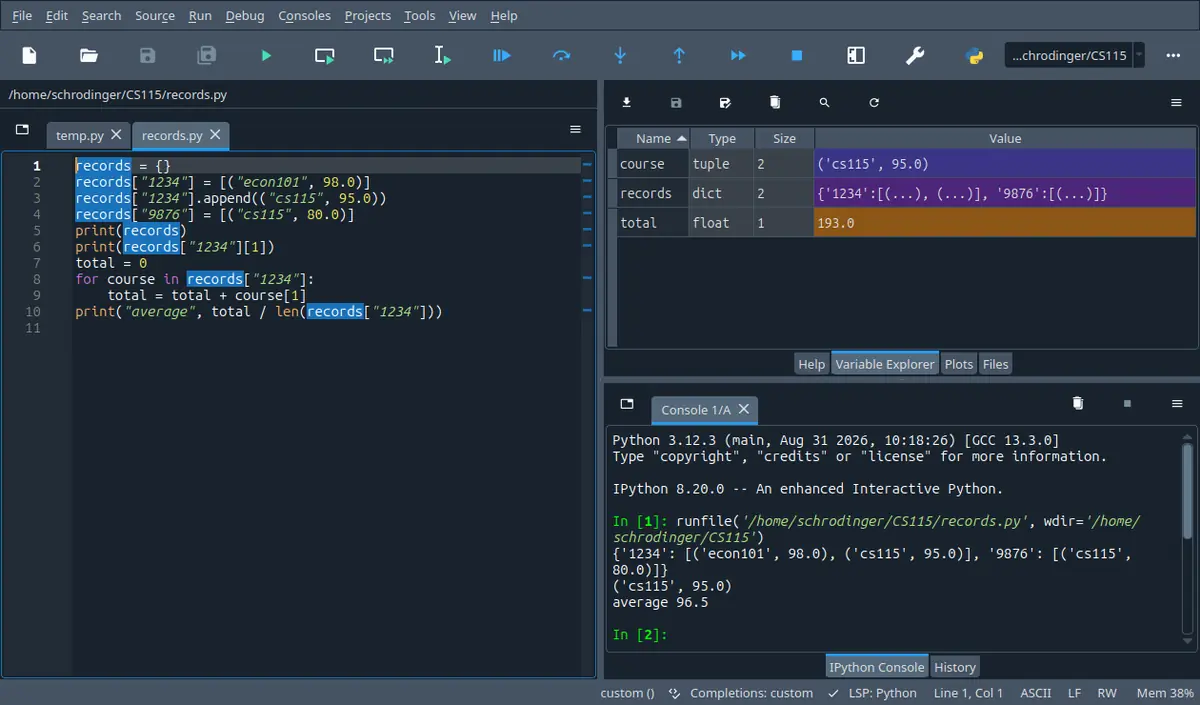
Your screen
Spyder 5.5.1 on Linux, running the program in its own editor. A different version moves a few toolbar icons; the panes are named the same.
1 · the file is open, nothing has run yet
The editor is on the left and the file name sits in a tab above it. The console at the bottom right shows Python's banner and nothing else, because not one line of your program has run. The tab next to yours, temp.py, is the scratch file Spyder opens by itself.
2 · you pressed F5
Spyder writes the runfile(...) line into the console for you, and underneath it everything your program printed appears in the order it was printed. The In [2]: at the bottom is the console waiting for whatever you do next.
3 · the Explorer
The tab next to Help. It lists every name your program left behind with its type and its size, so it answers the one question a listing cannot: what is in this name right now. The stepper on this page shows the same four columns.
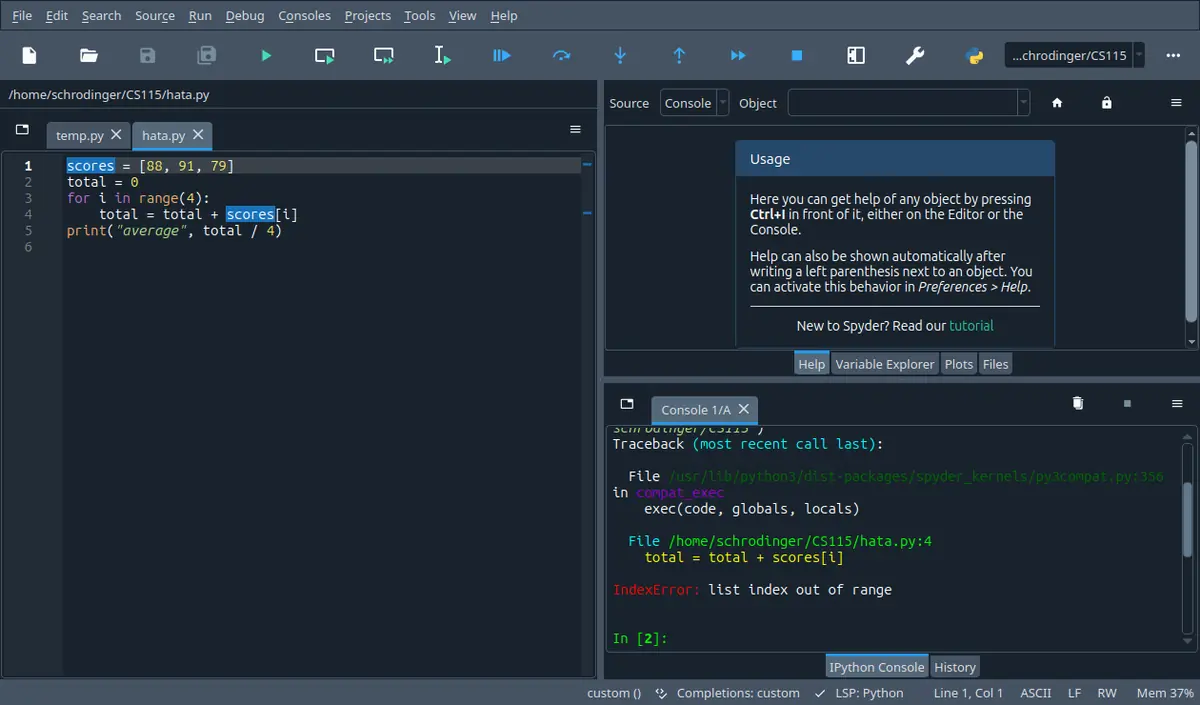
4 · when it breaks, read from the bottom
The last line names what went wrong. The File lines above it are the path Python took to get there, newest last. The first one is inside Spyder itself, not your bug; yours is the one with your file name and a line number, and that is the line to go and look at.
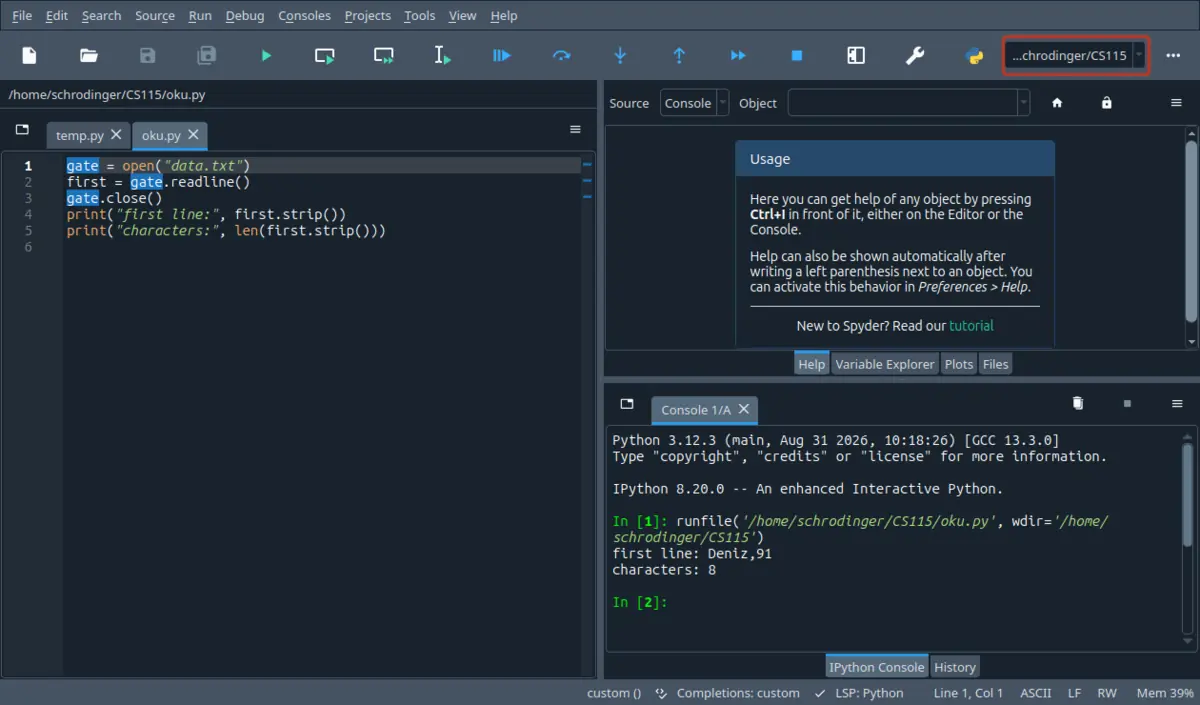
5 · where Python looks for your file
open('data.txt') does not search your computer. It looks in one folder: the one in the box at the top right, outlined here in red, which is also the wdir= in the runfile line. A file sitting anywhere else gives you a FileNotFoundError even though it exists. The red outline is ours, drawn on top; Spyder does not put it there.
Getting it on your own machine
The Spyder documentation recommends the standalone installer for most people: one download for Windows, macOS or Linux, with its own Python and with NumPy, SciPy, Pandas and Matplotlib already inside. Nothing else has to be installed for this course.
If you are told to install Anaconda, that brings Spyder with it, so you do not need both.
You can also open Spyder in a browser through Binder before installing anything, if you only want to look around first.
A till program has three prices in it and has to print one line: total: 193.99. You run it and the screen says total: 193.99200000000002. Nothing crashed, no red text appeared, and the number is even correct to the penny. It is still the wrong answer, because the line that was asked for is not the line that came out.
By the end of this section you can take any short program built from , arithmetic and print calls, and write down its output by hand, line by line and space by space, without running it.
In 60 seconds
A program is a list of assignments and that Python evaluates top to bottom; almost every mark in this part of the course is lost either on the type of a division or on the exact shape of the printed line.
the sample run shows a fixed number of decimal places or a padded column
Three most common mistakes
Using / where the answer has to be a whole number, then meeting a float where an integer was expected.
Expecting a name to follow its inputs: after area = pi * radius ** 2, changing radius does not change area.
Printing the exact value when the sample run shows a rounded one, or the other way round: 26.3925 and 26.392 are different answers.
Labs are 20 per cent of the course, the midterm 40 and the final 40. This section is the machinery every later question sits on, so it is rarely a question of its own; it turns up inside every other question. In one past midterm paper the whole of question 2, worth 30 marks out of 100, was nothing but "what is the output of this program", and the exams are closed book.
How much time do you have?
10 minutes
The two blocks that actually lose marks: which division gives which type, and why a name does not update itself.
The 60-second card · Seven operators, and the two that decide most of the marks · A name is an arrow to an object, and assignment moves one arrow · Formula card
45 minutes
Enough to trace a short program on paper and to write the four lab style programs in this section without looking anything up.
The 60-second card · Every value has a type, and the type decides what is allowed · A name is an arrow to an object, and assignment moves one arrow · Seven operators, and the two that decide most of the marks · Printing exactly the line that was asked for · Scaffolding comes off · C · exam level
full read
Adds the vocabulary the rest of the course keeps using, the three kinds of error, and the habits a lab assistant will ask you about while marking.
The opening pages · Recall first · From a problem in words to an ordered list of steps · Three kinds of error, and only two of them tell you · Every value has a type, and the type decides what is allowed · A name is an arrow to an object, and assignment moves one arrow · Seven operators, and the two that decide most of the marks · Printing exactly the line that was asked for · Names Python will accept, and code a marker can read · Method boxes · Look-alike pairs · Scaffolding comes off · Full exam-style question · Practice set · Mistake ledger · Check yourself
By the end of this section
Write an for a small numerical task as an ordered list of steps, and say which parts of it are language independent.
Distinguish a , a crash while running, and a program that finishes and prints a wrong answer, and say what the screen looks like in each case.
Predict the type of any expression built from int, float, str and bool values, and say what each of the four conversions keeps and throws away.
Trace assignment by hand: say which name points at which object after each line, including and the compound operators.
Evaluate any expression made of the seven arithmetic operators, with the right precedence, the right and the right result type.
Produce an exact output line with print and a format field: the right number of decimals, the right column width, and the right spaces between the pieces.
Name variables in a way Python accepts and a marker can read, and say what a comment is for.
Syllabus coverage
covered
Introduction to programming — covered
Problem solving
algorithms
what a programming language is
against
the kinds of error a program can have
what interpreted means
covered
Introduction to Python — covered
Objects and their types
the scalar types and their conversions
variables and assignment
the arithmetic operators and their precedence
print and format fields
comments and naming
covered
(Chapter 1, 2) — covered
Chapter 1 in full: what a program is, what an algorithm is, and where the two kinds of error come from. Chapter 2 in part: objects, expressions, the numerical types, variables and assignment. Branching, strings as sequences, input and iteration are the rest of chapter 2 and belong to the next section; nothing here uses them
Chapter 2 is split across two sections. Everything in this one works on values written straight into the file, so every listing can be run before you have met input, a condition or a loop.
Recall first
order of operations
From school arithmetic: powers first, then multiplication and division, then addition and subtraction, and brackets beat all of them. Python keeps this order and adds two operators to the middle tier.
Every expression in this section is read with this rule, and the two new operators slot into a tier you already know.
quotient and remainder
Dividing 17 by 4 gives 4 with 1 left over, and 17 = 4 times 4 plus 1. The quotient is how many whole fours fit, the remainder is what is left.
Python has one operator for each half of that sentence, and most whole number work in this course is one of the two.
a percentage as a multiplier
Eighteen per cent of an amount is the amount times 0.18, and adding eighteen per cent is multiplying by 1.18.
The worked examples price things and weight marks, and Python has no per cent sign for this: the sign it does have means remainder.
Try it yourself first (2 questions)
1§01.0 — the equals sign is not an equation
A single line of Python can look like an algebra statement and mean something completely different. This is the most common place where a first week of programming goes wrong, so it is worth testing before anything else.
Find(a) Say what print(t) shows after those two lines.
Given
t = 4
then the next line is t = t + t
IPython console
In [1]: %run untitled0.py
The right side is read before the name moves, so both ts are the old 4 and the name lands on the 8 only afterwards. That order is the whole rule, and it cuts both ways: with the two lines swapped, t = t + t runs before any t exists and raises a NameError instead of printing a 0.
Hint 1/4
Do not read the second line as a claim that has to be true. Read it as an instruction with a left half and a right half, and ask which half is worked out first.
Hint 2/4
In an assignment the right side is evaluated first, using the values the names have at that moment. Only then is the name on the left pointed at the result.
Hint 3/4
At the moment the second line runs, t is 4, so the right side is 4 plus 4.
Hint 4/4
So t ends up at 8 and the screen shows 8.
Show solution
Evaluate the right side with the current value
$$\texttt{t + t}\ \to\ 4 + 4 = 8$$
the right side uses the value t has now, which the first line set to 4
$$\texttt{t = 8}$$
only now does the name move; the old 4 is not needed again
The exact output
8
Answer $$\boxed{\texttt{8}}$$
Check
Read the line as algebra instead and you get t = 2t, whose only solution is t = 0. Python printed 8, so the algebra reading is the wrong reading.
An assignment is one directional: compute on the right, then move the name on the left.
2§01.0 — what a silent program proves
A classmate runs a program in the lab, gets no red text and no error message, and says the program is finished. The lab assistant is about to ask a question about it.
Find(a) True or false, and say in one sentence why: a program that produces no error message has produced the right answer.
Given
The program ran to the end
No error message appeared anywhere
Hint 1/4
Ask what an error message is actually evidence of. It is produced by Python, and Python only knows about its own rules.
Hint 2/4
Python checks that your instructions are legal. It has no idea what you meant them to compute, so it cannot check that.
Hint 3/4
A program that adds where you meant to multiply is completely legal Python. It runs, it prints, it never complains.
Hint 4/4
So the statement is false: silence only proves the program was legal, not that it was right.
Show solution
Separate legal from correct
$$\text{no message} \Rightarrow \text{legal}$$
Python stops and reports only when a rule of the language is broken or an operation is impossible
$$\text{legal} \not\Rightarrow \text{correct}$$
adding where you meant to multiply breaks no rule, so there is nothing for Python to report
The consequence for a lab
You are the only checker of meaning in the room. That is why every listing in this section is followed by the output it really produced, and why you should read the output before you read the code.
Answer $$\boxed{\text{False}}$$
Check
One counterexample settles it: a program that prints a total ten kurus short runs perfectly and is still wrong.
Checking your own output against a hand computed value is part of writing the program, not an extra.
Notation
symbol
reads as
means
watch out
$\texttt{=}$
gets, or is bound to
Work out the expression on the right, then point the name on the left at the result.
Not a claim of equality. t = t + t is a legal instruction, and it is not an equation to be solved.
$\texttt{/}$
divided by
True division. The result is always a float.
8 / 2 is 4.0, not 4, and a float can be refused where an integer is wanted.
$\texttt{//}$
floor divided by
Divide and keep only the whole part, throwing the fraction away.
With a negative left side it goes down, away from zero: -17 // 4 is -5.
$\texttt{\%}$
, or remainder
What is left over after the whole divisions have been taken out.
Nothing to do with percentages. In a format field the same sign has no meaning at all.
$\texttt{**}$
to the power
Raise the left value to the right one.
Groups from the right and binds tighter than a leading minus: -2 ** 2 is -4.
$\texttt{+=}$
increase by
n += 3 is shorthand for n = n + 3, and the same shape exists for the other operators.
Still one directional. The old value of n is used, then thrown away.
$\texttt{\#}$
hash, comment from here to the line end
Python ignores the rest of the line; it is a note for a human.
Ignored means ignored: a comment can never fix a wrong calculation, and a wrong comment is worse than none.
$\texttt{:.2f}$
as a float with two decimals
Inside a format field, the part after the colon says how the value should be laid out on the line.
It changes the printed text only. The value in memory keeps all of its digits.
Conventions used here
Output blocks
Every block under a listing is what the screen really showed when that exact code was run, spaces and blank lines included. If a line ends in a bar, the bar is part of the program, put there so you can see where the padding stops.
In this course the output is the answer, so a hand guessed output block would be worse than none.
Error reports
When a program stops with an error we show the report without the arrows Python draws under the guilty part. The error name and the line number are the same everywhere; the sentence after the error name is worded a little differently by different Python versions, so read the name first.
You are marked on recognising the kind of error, not on quoting its sentence.
int against float in an answer
4 and 4.0 are two different answers. When a question asks what the program prints, the point and the trailing zero are part of the answer and leaving them out is wrong.
This is the single most common way a correct calculation loses its mark in this part of the course.
Quotes and spacing
Python takes 'like this' and "like this" as the same thing; every listing here uses single quotes. Spaces around an operator never change the result, so a+b and a + b compute the same thing.
It stops you hunting for a difference that is not there when you compare your code with someone else's.
What the listings need
Every listing in this section runs in any Python 3 with nothing extra installed, and every value it works on is written into the file, so you can run each one, change a number and run it again.
Reading an output block is useful; changing a number and predicting the new block is what actually makes it stick.
1.1From a problem in words to an ordered list of steps
The part of your answer that outlives the language: ordered steps, a flow of control, and a point where it stops.
We start where every program starts, with a task written in words and not a line of code in sight.
Solvable with what we have
Work out a weighted mark on paper: multiply each mark by its weight, add the three products.
Say in words what has to happen, in the right order, to turn three marks into one number.
Check a result by hand, because you know roughly where it should land.
Not solvable yet
Hand those words to a machine and get the number back.
Be sure two people reading your words would do the same arithmetic.
Repeat the work for thirty students without doing it thirty times.
So write the recipe down, three lines, numbered, the way a recipe book would: take the three marks, weight them, show the result.
Why it fails
Not one of those three lines is a single thing a machine can do. Weight them hides four multiplications and two additions, and it never says with which weights. Show the result never says how many decimal places. Numbering the lines made the list look ordered without making any line precise, and precision is the whole job.
DefinitionDefinition 1.1: algorithm
Conditions
Every step is one thing, with no room for two readings.
The order of the steps is part of the answer, not a detail.
There is a point at which the work is finished and stops.
An algorithm is a list of unambiguous steps, plus a statement of which step runs when, plus a guarantee that the list ends. Get all three and any programming language can carry it out; get two of the three and you have a description, not an algorithm.
The same task twice. On the left the three steps a person would agree to; on the right the lines that make each step precise enough for a machine. The arrows are where the translation happens, and that translation is the only part that is Python specific.
Looks like this, but is not
Read the three marks. 2. Compute the weighted total. 3. Make the total look nice. 4. Done.
It is numbered, it is ordered and it ends, so three of the boxes are ticked. Step 3 is still not a step: two people would round differently, pad differently and disagree about whether to print a per cent sign. A step that two careful readers can carry out differently is a description of a step.
Weighting marks of 84, 61 and 73 into one number
The course counts labs as 20 per cent, the midterm as 40 and the final as 40. A student has 84, 61 and 73. Write the algorithm first, in words, then the program.
The algorithm, with every step doing exactly one thing:
Name the three marks and give each its value.
Multiply each mark by its weight as a decimal: 0.2, 0.4, 0.4.
Add the three products into one name.
Show that name.
Now the same four steps as Python, which is the only part that would change if the course switched language:
FindThe overall mark, and an algorithm that would work for any three marks
Given
Marks 84, 61 and 73
Weights 0.2, 0.4 and 0.4
Solution
Turn each weight into a multiplier
$$20\% \to 0.2,\quad 40\% \to 0.4$$
Python has no per cent operator for this; the sign it does have means remainder, so the weight has to be written as a decimal
$$0.2 \cdot 84 = 16.8$$
the lab part, and the first of the three products the third step will add
Add the three products in one expression
$$0.4 \cdot 61 = 24.4$$
the midterm part
$$0.4 \cdot 73 = 29.2$$
the final part
$$16.8 + 24.4 + 29.2 = 70.4$$
one name holds the answer, so step four has something to show
Read the output that came out
overall: 70.4
The word overall: and the number are separated by a single space that no one asked for. That space came from the comma in the print call, and it matters when a sample run has to be matched exactly.
Answer $$\boxed{70.4}$$
Check
The three weights add to 1, so the answer has to sit between the smallest mark, 61, and the largest, 84. It does, and it sits closer to the midterm and the final than to the lab mark, which is where two weights of 0.4 against one of 0.2 should put it.
Four multiplications and two additions, written as one line.
Steps 1 to 4 are the algorithm and would survive a move to any language. Only the last block is Python.
The same three marks, averaged instead of weighted
Here is a second program for the same task. It runs, it prints a believable mark, and it is wrong. Find the step of the algorithm it fails to carry out.
step 2 of the algorithm was replaced, not carried out
Read the two outputs side by side
This program prints overall: 72.7 and the correct one prints overall: 70.4, formatted to overall: 70.4. Both numbers look plausible on their own, and nothing on the screen says which is which.
Push the lab mark to 0 and rerun in your head: the weighted answer drops by 16.8 to 53.6, the averaged one drops by 28 to 44.7. A program that reacts too strongly to the smallest weight is not weighting.
A wrong program and a right program are equally silent. The algorithm, written out in words first, is what lets you tell them apart.
Checkpoint
§01.1 — what makes a step list an algorithm
Four numbered lists are handed in for the same task: turn a length in metres into a price at 7.25 lira per metre and show it to the nearest kurus. Only one of them is an algorithm.
Find(a) Pick the list that is an algorithm, and be able to say which condition each of the other three breaks.
Given
The length is a number of metres
The price is 7.25 lira per metre
The answer has to be shown to the nearest kurus
Hint 1/4
Do not look for the list that is most detailed. Look for the list where every single line is one thing that cannot be read two ways.
Hint 2/4
Three conditions have to hold at once: each step unambiguous, the order fixed, and the work ends.
Hint 3/4
With 12 metres at 7.25 the answer is 87.00. Ask of each list: would two people following it both land on 87.00, and both write it the same way?
Hint 4/4
The list that names the multiplication and names the number of decimals is the only one that passes all three.
Show solution
Test each list against the three conditions
$$\text{step} \to \text{one reading only}$$
make it look like money fails here: two readers pad differently
$$\text{order fixed}$$
a list that shows the result before multiplying gives the wrong answer even though both steps are present
$$\text{it ends}$$
keep multiplying until it looks right never stops, so it is not an algorithm at all
Confirm the survivor
$$12 \cdot 7.25 = 87.00$$
one multiplication, one stated precision, one stop
Answer $$\boxed{\text{the list that names the multiplier and the decimals}}$$
Check
Give the surviving list to a second reader with a different length, 41.6 metres, and both readers get 301.60. A list that two strangers carry out identically is the test that matters.
Unambiguous beats detailed. A long vague list is not closer to an algorithm than a short precise one.
⚠ Calling a numbered list an algorithm because it is numbered
Numbering looks like rigour, and it does fix the order, which is one condition out of three. The other two are about each line on its own.
⚠ Writing the program first and the steps afterwards
The code feels like progress, so the temptation is to start typing. Then the missing step never gets noticed, because there is nothing to compare the code against.
1.2Three kinds of error, and only two of them tell you
What the screen looks like tells you which kind of error you have, and the quiet one is the expensive one.
The last example printed a wrong mark without complaining, which is worth a name and a place in a list.
RuleRule 1.2: the three symptoms
Conditions
Python reads the whole file before it runs any of it.
Legal instructions can still be impossible to carry out.
Possible instructions can still compute the wrong thing.
$$\boxed{\text{syntax: no output}\ \mid\ \text{runtime: part of the output}\ \mid\ \text{semantic: all of it, wrong}}$$
A syntax error is found before anything runs, so the screen stays empty. A stops the program part way, so whatever the earlier lines printed is already on the screen and the report comes after it. A breaks no rule, so the program finishes normally and the wrong answer sits there looking exactly like a right one.
Where each kind of error catches the program. The first two doors are before or during the run and Python tells you about both. The third is not a door at all: the program walks out the far end carrying a wrong number.
Looks like this, but is not
A file whose second line is print('total is ' + total) with total holding 5. It looks like a spelling mistake Python should catch on sight.
The line is perfectly legal Python: a plus between two things is always legal to write. Only when the line actually runs does Python find that one side is text and the other a number, so the file starts, prints its first line, and only then stops. Legal to write and possible to do are two different questions, asked at two different moments.
Two broken files: one prints nothing, one prints a line first
Both files below are wrong. Before reading the outputs, decide which one gets to print something.
First file.
print('this line is fine')
print'this line is not'print('this line never runs')
What the screen shows:
File "broken.py", line 2print'this line is not'SyntaxError: Missing parentheses in call to 'print'. Did you mean print(...)?
The first line is flawless and it still never ran. Python read the file, found a line it could not even parse, and refused the whole file. That is why the screen has no this line is fine on it.
Second file.
print('this line is fine')
total = 5print('total is ' + total)
print('this line never runs')
What the screen shows:
this line is fine
Traceback (most recent call last):
File "broken.py", line 3, in <module>
print('total is ' + total)
TypeError: can only concatenate str (not"int") to str
Here the first line did run, and its output is sitting above the report. Python only discovered the problem when it tried to join a piece of text to the number 5.
FindWhich file prints something before it stops, and why
Given
Both files have a correct print on line 1
File one breaks the shape of a line; file two breaks what a line does
Solution
Ask when the problem can be seen
$$\text{shape of the line} \to \text{before running}$$
Python has to parse every line to know what the file says, so an unparseable line is found while reading
$$\text{meaning of the line} \to \text{while running}$$
whether a plus can join text to a number depends on the values, and those only exist once the program is moving
Match each file to its screen
File one: nothing, then the report. File two: this line is fine, then the report.
So the blank screen is itself a clue. If you expected three lines of output and got none at all, look for a broken line rather than a wrong calculation.
Answer $$\boxed{\text{file two prints one line; file one prints nothing}}$$
Check
Add a fourth line to file one that prints something else. The screen stays empty, which no runtime error would ever do: proof that the refusal happened before the first line, not at it.
Read the screen before the code. An empty screen and a half full screen point at two different kinds of mistake.
A till that never complains and is ten per cent wrong
Three items at 80 lira each, with a ten per cent discount on the bill. The program below runs to the end and prints a number with no complaint at all.
The discount was meant to take ten per cent off 240, which is 24, leaving 216. What came out was 239.9, which is 240 minus ten hundredths. The program subtracted discount / 100, a tenth of a lira, instead of that fraction of the total.
FindThe correct total, and why nothing on the screen warned about it
Given
Three items at 80 lira
A discount of 10 per cent
The program prints total: 239.9
Solution
Do the arithmetic the words asked for
$$80 \cdot 3 = 240$$
the bill before any discount
$$240 \cdot \tfrac{10}{100} = 24$$
ten per cent of the bill is a fraction of the bill, not a fraction of the number 10
$$240 - 24 = 216$$
the total that was asked for
See what the program did instead
$$\texttt{discount / 100} = 0.1$$
this is a tenth of one lira, and it has nothing to do with the bill
$$240 - 0.1 = 239.9$$
a legal subtraction of a legal number, which is why Python had nothing to say
A ten per cent discount can never leave more than 95 per cent of the bill. 239.9 is 99.96 per cent of 240, so the size of the answer alone rules it out, before any recalculation.
One misplaced operand; no error message anywhere.
Before you accept a number, ask how big it should be. Order of magnitude catches most quiet errors in one second.
Checkpoint
§01.2 — reading the screen to name the error
You run a file that is supposed to print three lines. The screen shows the first line of output, then a report ending in a word that finishes with the letters Error, and nothing else.
Find(a) Say which of the three kinds of error this is.
Given
The file was expected to print three lines
The screen shows one line of output, then an error report
Hint 1/4
You are being asked to read evidence, not to guess a cause. The evidence is how much output made it to the screen.
Hint 2/4
Nothing at all on the screen means the file was refused before it ran. Some output then a report means it was running and hit something impossible.
Hint 3/4
Here exactly one of the three expected lines arrived, and then the report. So the first line ran successfully.
Hint 4/4
That is a runtime error: the file was legal, and line two asked for something that could not be done.
Show solution
Use the amount of output as the test
$$\text{output} = 1\ \text{line of}\ 3$$
output exists, so the file was accepted and started running
$$\text{report after the output}$$
the report follows the printed line, so the failure happened at a later line, while running
Rule out the other two
A syntax error would have printed none of the three lines. A semantic error would have printed all three and no report at all.
Answer $$\boxed{\text{runtime error}}$$
Check
Comment out line two and rerun: if lines one and three both appear with no report, the diagnosis was right and line two was the only impossible one.
Count the lines you got against the lines you expected. That count names the kind of error before you have read any code.
⚠ Treating an empty screen as a crash in the last line
A crash feels like the natural explanation for a missing answer, so the last line gets stared at. But an empty screen means nothing ran, so the broken line can be anywhere in the file, including the last one.
⚠ Trusting a program because it printed something
Output feels like success. It only proves that the lines before it were possible to carry out, which says nothing about whether they computed what you meant.
Ask an object what it is with type, and you get one of int, float, str or bool, or NoneType for the single object called None. Each of those four names is also a function that takes an object and hands back a new object of that type. What you cannot do is change the type of an object in place, because a type is not a label stuck on the outside.
The four conversions worth memorising, with what each one keeps and what it drops. The two orange arrows are the ones that lose information, and both of them lose it silently.
Looks like this, but is not
bool('False') looks like it should be False. The word is right there.
bool of a string asks one question only: is this string empty. 'False' has five characters in it, so the answer is True. The characters could spell anything at all and the answer would be the same. The only string that converts to False is the one with nothing in it.
what was written
what came out
what to notice
float(7)
7.0
nothing lost; the point is now always shown
int(7.9)
7
the fraction is cut off, not rounded
int(-7.9)
-7
cut towards zero, so up for a negative
str(7)
7 of type str
looks identical on screen, behaves differently
bool(7)
True
any number that is not zero
bool(0)
False
and bool(0.0) is False too
bool('0')
True
a text zero is still text, and it is not empty
bool('')
False
the only text that is False is the empty one
bool(None)
False
None is not zero, but it is not true either
Read the middle column as the answer to what does Python print, not as what the value means. Two of these rows, int(7.9) and bool('0'), are where marks go.
Asking five different values what they are
type is the tool that settles arguments. Here it is used on one value of each kind, including the odd one out.
Line four is the one to look at twice. The screen shows 7 and then says the thing printed was a str. A number and the text of a number look identical once they are on the screen, which is exactly why the earlier till program could break.
FindThe type of each of the five values, and what each conversion returns
Given
One int, one float, one str, one bool and None
Then float, int, str and bool used as conversions
Solution
Read the type of each literal
$$7 \to \texttt{int}$$
no point, so it is a whole number object
$$7.0 \to \texttt{float}$$
the point is part of the literal, and it changes the type
$$\texttt{'7'} \to \texttt{str}$$
the quotes are what make it text; the character inside is irrelevant
Read what each conversion hands back
$$\texttt{int(7.9)} = 7$$
cut, not rounded, which is the single most useful fact in this block
$$\texttt{int(-7.9)} = -7$$
cutting towards zero moves a negative number up, so this is not the same as rounding down
Convert and convert back: int(7.9) gives 7 and float(7) gives 7.0, not 7.9. The round trip does not return the original, which proves something really was thrown away.
When an operation is refused, ask for the type of both sides before you change anything else.
Why int(9.99) * 2 and int(9.99 * 2) differ by one
Same value, same conversion, same multiplication, and two answers one apart, because the brackets decide which happens first.
value = 9.99print(int(value) * 2)
print(int(value * 2))
print(float(int(value)))
Output:
18199.0
Cut first and the 0.99 never gets doubled, so the answer is 18. Double first and the 0.99 becomes 1.98, which pushes the value past 19 before the cut, so the answer is 19. The third line shows how permanent the loss is: converting to int and back to float gives 9.0, and the 0.99 is not coming back.
FindEach of the three printed values, and which operation runs first in each
Given
value is 9.99
Three lines: int(value) 2, int(value 2), float(int(value))
Solution
Work the brackets from the inside out
$$\texttt{int(9.99)} \cdot 2 = 9 \cdot 2 = 18$$
the conversion is inside the brackets, so 0.99 is gone before the doubling and never gets doubled
the inner call drops the fraction, and the outer call cannot put back what is no longer there
Read the exact output
18199.0
Two tens and a nine point zero. The last line proves the loss: a float that came back from an int can only ever end in point zero.
Answer $$\boxed{18,\ 19,\ 9.0}$$
Check
Check the gap against the exact product: 2 times 9.99 is 19.98. Converting first throws away 0.99 and then doubles what is left, so it loses 1.98 in total and lands on 18. Converting last throws away only 0.98 and lands on 19. The two losses differ by one, which is exactly the gap between the answers.
A conversion is an operation with a position in the expression, not a property of the value. Where you put it changes the answer.
⚠ Reading int() as rounding
Rounding is what a calculator button does, so the habit is strong. Python cuts towards zero instead, and the two agree on 7.2 and disagree on 7.9.
wrong$$\texttt{int(7.9)} = 8$$
right$$\texttt{int(7.9)} = 7$$
Checkpoint
§01.3 — the type that comes out of a division
A program divides 8 by 2 twice, once with each division operator, and asks Python for the type of each result rather than for the values.
Find(a) Write both lines of output exactly as Python prints them.
Given
print(type(8 / 2))
print(type(8 // 2))
IPython console
In [1]: %run untitled0.py
8 / 2 divides exactly and still comes out 4.0, because the operator decides the type and the numbers never get a vote. Copy the text exactly as well: type() prints <class 'float'> with the angle brackets and the quotation marks, so a bare float is not what is on the screen.
Hint 1/4
You are not asked for 4 or 4.0 here but for the two class names, which is a harder question and the one exams prefer.
Hint 2/4
One of the two division operators always produces a float, whatever the numbers are. The other keeps the whole part and produces an int when both sides are ints.
Hint 3/4
8 divides exactly by 2, so both values are four. The types are still not the same.
Hint 4/4
So the output is <class 'float'> and then <class 'int'>.
Show solution
Take the operators one at a time
$$\texttt{8 / 2} = 4.0$$
true division is defined to give a float, and dividing exactly does not change that
Print the values instead of the types: 4.0 and 4. The point in the first is the same fact seen from the other side.
Exact division does not make a float into an int. Only an operator or a conversion can do that.
⚠ Expecting a string of a number to behave like the number
On screen 7 and '7' are the same single character, so the difference is invisible until an operation refuses.
⚠ Expecting bool of a non empty string to follow the words in it
'False' and '0' read like falsehoods. The only question bool asks a string is whether it is empty.
wrong$$\texttt{bool('0')} = \text{False}$$
right$$\texttt{bool('0')} = \text{True}$$
1.4A name is an arrow to an object, and assignment moves one arrow
Assignment computes the right side once, then points one name at the result; nothing recomputes itself later.
Types belong to objects, and objects are reached through names, so the next question is what a name actually holds.
RuleRule 1.4: what an assignment does, in order
Conditions
The right side is evaluated first, with the values the names have at that instant.
Then, and only then, the name on the left is pointed at the result.
Every name on the right keeps whatever it had; only the name on the left moves.
$$\boxed{\texttt{name = expression}}$$
Work out the expression on the right into a single object, then make the name on the left refer to that object. The order is the whole rule: because the right side is finished before the name moves, a line like t = t + t is sensible, and because the name is only pointed once, changing an input afterwards cannot reach back and change the result.
Why the stale value is not a bug
Take the three lines pi = 3.14, radius = 2.0, area = pi * radius ** 2 and ask what the third one leaves behind.
The right side is evaluated: 2.0 to the power 2 is 4.0, times 3.14 is 12.56. That is a new float object, sitting in memory.
The name area is pointed at that object. The object has no memory of how it was made: it does not know that a number called radius was involved, so there is nothing in it that could react to radius changing.
So when line five says radius = 3.0, exactly one arrow moves. area still points at 12.56, and it is right to, because 12.56 is what line three computed.
If you want the new area you have to run the multiplication again. A spreadsheet would recompute for you; a Python assignment is a one off instruction, not a stored formula, and that difference is worth more marks in this course than any other single idea.
The same three names before and after one reassignment. Only the radius arrow moves; area keeps pointing at the product that was computed from the old radius, and the old 2.0 object is left with no name at all.
Looks like this, but is not
a = b = 5 looks like it ties a and b together, so that changing one changes the other.
It points both names at the same 5 and then stops. There is no link left between the names: b = 9 moves the b arrow to a new object and a still points at 5, so the program prints 5 9. A name can only ever be moved by an assignment that has that name on its left.
line
long form
value of `n` afterwards
n = 7
starting point
7
n += 3
n = n + 3
10
n *= 2
n = n * 2
20
n //= 4
n = n // 4
5
n -= 1
n = n - 1
4
Each line uses the value from the line above and then replaces it. The program that runs these five lines prints 4, and the only way to get there is one line at a time.
radius changes from 2.0 to 3.0 and area does not follow
The classic first week trap, and the reason the memory diagram above exists. Read the code, decide what the second print shows, then look.
pi = 3.14
radius = 2.0
area = pi * radius ** 2
radius = 3.0print('radius:', radius)
print('area:', area)
Output:
radius: 3.0
area: 12.56
The first line of output moved and the second did not. If you want the area of the bigger circle you have to say so:
pi = 3.14
radius = 2.0
area = pi * radius ** 2
radius = 3.0
area = pi * radius ** 2print('radius:', radius)
print('area:', area)
Output:
radius: 3.0
area: 28.26
One extra line, the same expression as before, and now both numbers belong to the same circle.
FindThe two printed lines, and the smallest change that makes area agree with radius
Given
pi = 3.14, radius = 2.0
area = pi * radius ** 2
then radius = 3.0
Solution
Evaluate the assignment when it runs
$$2.0^{2} = 4.0$$
the power binds tighter than the multiplication
$$3.14 \cdot 4.0 = 12.56$$
this object is what area is pointed at, and it is the only thing area will ever hold until another assignment says otherwise
Rebind radius and ask what moved
$$\texttt{radius} \to 3.0$$
one arrow moves; no expression is re-run because no assignment to area was written
$$\texttt{area} \to 12.56$$
unchanged, and correctly so: it holds what line three computed
Repeat the assignment to bring it up to date
$$3.14 \cdot 3.0^{2} = 28.26$$
the same expression evaluated again, now with the new radius
Order of magnitude: the radius grew by half, so a correct area would have grown by about a factor of 2.25, from 12.56 to 28.26. The printed 12.56 has not grown at all, which is the signature of a stale name rather than a wrong formula.
One assignment repeated; no new names.
When two printed values disagree, check the order of the lines before you check the arithmetic.
Swapping two names in one line, and the two line version that fails
Two names, and the job is to exchange their values. Python has a one line way to do it, and the obvious two line way is broken.
x, y = 2, 3
x, y = y, x
print('x =', x)
print('y =', y)
Output:
x = 3
y = 2
Both right hand sides are worked out before either name moves, so the pair on the right is the old pair, 3 and 2. Now the two line attempt:
x, y = 2, 3
x = y
y = x
print('x =', x)
print('y =', y)
Output:
x = 3
y = 3
The first line pointed x at 3 and nothing is left pointing at the old 2, so the second line can only copy 3 back. Both names end at 3 and one value is gone.
FindWhy the one line swap works and the two line version loses a value
Given
x, y = 2, 3
The aim is x holding 3 and y holding 2
Solution
Evaluate the whole right side first
$$\texttt{y, x} \to (3, 2)$$
both values are read while the names still hold the old ones
$$\texttt{x, y} \to (3, 2)$$
only now do the two arrows move, together
Watch the two line version destroy a value
$$\texttt{x = y} \Rightarrow \texttt{x} \to 3$$
the old 2 now has no name pointing at it, so it cannot be recovered
$$\texttt{y = x} \Rightarrow \texttt{y} \to 3$$
the right side reads the new x, which is 3, not the old one
Read both outputs
One line version: x = 3 then y = 2.
Two line version: x = 3 then y = 3.
Same intent, same two names, and one value destroyed.
Add the two values before and after. The correct swap keeps the sum at 5; the broken version gives 6, and a swap that changes the total cannot be a swap.
Everything on the right of one assignment is read at the same instant. That single fact explains the swap and most trace questions.
⚠ Expecting a name to track the expression it came from
Spreadsheets do exactly that, and most people meet spreadsheets first. A Python assignment happens once and then it is over.
Three lines set a name from another name, and then the first name is changed. Nothing is printed until the end, so the only question is what the second name holds by then.
Find(a) Write the output.
Given
k = 2
m = k ** 3
k = 5
then print(m)
IPython console
In [1]: %run untitled0.py
m = k 3 stored the number 8, not the recipe k 3, so line three moves k and leaves m exactly where it was. This is where Python parts company with a spreadsheet cell: nothing recomputes when an input changes later, and 125 is the answer only if the last two lines are swapped.
Hint 1/4
Do not evaluate the middle line last. Take the three lines strictly in the order they are written and ask what each one leaves behind.
Hint 2/4
An assignment evaluates its right side with the values that exist at that moment, and afterwards nothing re-runs.
Hint 3/4
At the moment line two runs, k is 2, so the right side is 2 to the power 3.
Hint 4/4
So m holds 8 for the rest of the program and the output is 8.
Show solution
Run the lines in written order
$$\texttt{k} \to 2$$
line one
$$\texttt{m} \to 2^{3} = 8$$
line two, evaluated with the current k
$$\texttt{k} \to 5$$
line three moves one arrow and leaves m alone
The exact output
8
Answer $$\boxed{\texttt{8}}$$
Check
If m had followed k the answer would be 125, which is more than fifteen times bigger. The two candidate answers are far apart, so this is a question you can be sure about rather than half sure.
Read a trace question downwards, once, keeping a small table of names and values. Never jump to the print and work backwards.
⚠ Swapping two names in two lines
It reads like two independent copies. The first line overwrites the value the second line needs, and no error is reported because both lines are perfectly legal.
⚠ Believing `a = b = 5` keeps the two names together
The line looks like a chain. It is two arrows pointed at one object once, and nothing joins them afterwards.
1.5Seven operators, and the two that decide most of the marks
Division splits in two: one operator keeps the fraction, the other keeps the whole part and hands the rest to a third.
Names hold objects, expressions build new ones, so the next thing to nail down is exactly what each operator produces.
RuleRule 1.5: quotient and remainder always fit back together
Conditions
The right hand operand is not zero.
If both operands are ints then both results are ints.
If either operand is a float then both results are floats, even when the division is exact.
$$\boxed{a = (a\ \texttt{//}\ b)\cdot b + (a\ \texttt{\%}\ b)}$$
Floor division tells you how many whole b fit inside a, and modulo tells you what is left over; multiply the first back by b, add the second, and you are exactly where you started. That is what makes the pair safe to use on anything that has to be split without losing a unit: hours and minutes, lira and kurus, boxes and leftovers, the digits of a number.
Checking the identity on a positive and a negative case
Take a as 17 and b as 4. Python gives 17 // 4 as 4 and 17 % 4 as 1. Put them back: 4 times 4 plus 1 is 17. The identity holds.
Now the case people get wrong. Take a as minus 17 and b as 4. Python gives -17 // 4 as minus 5, not minus 4, and -17 % 4 as 3, not minus 1.
Put those back: minus 5 times 4 is minus 20, plus 3 is minus 17. The identity still holds, and it could not have held with minus 4 and minus 1 unless the remainder were allowed to be negative.
That is the reason for the rule: floor division rounds downwards, towards minus infinity, rather than towards zero, precisely so that the remainder can always be kept between zero and b.
The contrast to remember: int(-17 / 4) gives minus 4, because a conversion cuts towards zero, while -17 // 4 gives minus 5, because floor division goes down. Two operations that agree on every positive number and disagree on every negative one.
One expression with four operators, numbered in the order Python works through it, and the tier ladder that produced that order. The two lines about associativity are the ones worth copying onto a card.
Looks like this, but is not
-17 // 4 looks like it should be minus four, because seventeen divided by four is four and a bit and the minus is just carried along.
Floor division rounds down, not towards zero, so it goes to minus five. The reason is the identity: minus five fours is minus twenty, and minus twenty plus three is minus seventeen, so the leftover stays a positive three. If you want the cut towards zero instead, that is what a conversion does, and int(-17 / 4) gives minus four.
expression
output
type and why
17 + 4
21
int, both sides int
17 - 4
13
int
17 * 4
68
int
17 / 4
4.25
float, always, even when it divides exactly
17 // 4
4
int, the fraction is dropped
17 % 4
1
int, what floor division dropped
17 ** 4
83521
int, and it grows fast
-17 // 4
-5
rounded down, away from zero
-17 % 4
3
kept positive so the identity survives
int(-17 / 4)
-4
cut towards zero, so not the same as //
17.0 // 4
4.0
one float on either side makes the result a float
3.45 * 7.65
26.392500000000002
float arithmetic is not exact
Rows four to six are the ones that get asked. Row twelve is the one that makes students think they have a bug: the product really is a tiny bit off, on every computer, and the fix is in how you print it rather than in the arithmetic.
197 minutes as hours and minutes, first with the wrong slash
A duration in minutes has to come out as whole hours and whole minutes. Here is the attempt almost everybody writes first.
Traceback (most recent call last):
File "clock.py", line 5, in <module>
print('{:d} h {:d} min'.format(hours, minutes))
ValueError: Unknown format code 'd'forobject of type'float'
Read the error name rather than the sentence: a value that should have been a whole number is a float. 197 / 60 is 3.283333333333333, and a field that says d refuses it.
FindWhy the first version stops, and the output of the corrected one
Given
minutes_total is 197
Hours and minutes must both be whole numbers
Solution
Choose the operator from the type the answer needs
$$\texttt{197 / 60} = 3.28\ldots$$
true division answers how many sixties fit including the fraction, which is not what hours means
$$\texttt{197 // 60} = 3$$
floor division answers how many whole hours fit, which is the question that was asked
Take the leftover from modulo, not from a second division
$$\texttt{197 \% 60} = 17$$
the minutes are what the whole hours did not cover
$$3 \cdot 60 + 17 = 197$$
the identity, used as a check: nothing was lost or invented
Read the corrected output
3 h 17min
Both numbers are ints, so both fit a d field, and the program no longer stops.
Answer $$\boxed{\texttt{3 h 17 min}}$$
Check
Convert back independently: three hours is 180 minutes, and 180 plus 17 is 197, the number we started from. Any pair of answers that fails this addition is wrong whatever the code looks like.
One character changed; one crash removed.
Pick the division from the type the answer has to have, not from the shape of the sum. If the words say how many, the operator is the double slash.
Evaluating 2 + 3 * 4 ** 2 // 5 without a calculator
Four operators, no brackets, one right answer. Work through it with the tier ladder rather than left to right.
The first two lines are the plain precedence check, the third is the four operator expression, and the last three are the two associativity traps that turn up in every exam: the power tower and the leading minus.
FindThe value of the expression, and the values of 2 3 2 and -2 ** 2
Given
The expression 2 + 3 * 4 ** 2 // 5
No brackets anywhere in it
Solution
Work the strongest tier first
$$4\ \texttt{**}\ 2 = 16$$
the power tier beats everything else, so this happens before any multiplication
Then the middle tier, left to right
$$3 \cdot 16 = 48$$
the multiplication is to the left of the floor division, and both sit in the same tier, so it goes first
$$48\ \texttt{//}\ 5 = 9$$
nine whole fives fit into forty eight, and the leftover three is discarded by this operator
Addition last
$$2 + 9 = 11$$
the weakest tier waits until everything else has collapsed to a number
powers group from the right, so the exponent is computed first; grouping from the left would have given 64
$$\texttt{-2 ** 2} = -(2^{2}) = -4$$
the leading minus is weaker than the power, so it is applied to the result; brackets are the only way to get 4
Answer $$\boxed{11,\quad 512,\quad -4}$$
Check
Bracket the expression the way the tiers say and evaluate again: 2 + ((3 * (4 ** 2)) // 5). Same answer, 11, and now the order is written down rather than remembered.
Four operators, three tiers, one pass.
If an expression has more than two operators, put the brackets in. They cost nothing, and here they are the difference between 11 and the 80 that strict left to right would have given.
⚠ Reaching for the single slash when the answer is a count
One slash is what division looks like everywhere else, so it is the default reflex. It hands back a float, and a float cannot be a number of hours or a number of boxes.
wrong$$\texttt{hours = total / 60}$$
right$$\texttt{hours = total // 60}$$
Checkpoint
§01.5 — a quotient and a remainder in one line
One line asks Python for both halves of the same division, in the order remainder first. The numbers are small enough to do in your head, and the point is the order and the types.
Find(a) Write the output.
GivenThe line is print(23 % 5, 23 // 5)
IPython console
In [1]: %run untitled0.py
% is written to the left of //, so the leftover leads and the count follows; the two always rebuild the original as 4 * 5 + 3. One thing these small positive numbers hide: % takes the sign of the right operand, so -23 % 5 is 2 and not -3.
Hint 1/4
Two values will be printed on one line. Before computing either, note which operator comes first in the line, because that is the order they appear in.
Hint 2/4
Modulo gives what is left over; floor division gives how many whole fives fit. Both are ints when both operands are ints.
Hint 3/4
Four whole fives fit into 23 and 3 is left over, and the remainder was asked for first.
Hint 4/4
So the line is 3 4, with a single space between them.
Show solution
Split 23 by 5
$$23 = 4 \cdot 5 + 3$$
four whole fives, three left over: the identity written out
$$\texttt{23 \% 5} = 3$$
the remainder, and it was asked for first
$$\texttt{23 // 5} = 4$$
the quotient, asked for second
The exact output
34
One space between the two numbers, put there by the comma in the print call.
Answer $$\boxed{\texttt{3 4}}$$
Check
Reassemble: 4 times 5 plus 3 is 23. If the two numbers do not rebuild the original, one of them is wrong.
Read the order of the operators in the line before you compute anything. Answering 4 3 here is a reading mistake, not an arithmetic one.
⚠ Expecting a leading minus to bind before a power
It is written first, so it looks like it happens first. The power tier is stronger, so the minus applies to the answer.
wrong$$\texttt{-2 ** 2} = 4$$
right$$\texttt{-2 ** 2} = -4$$
⚠ Expecting floor division of a float to give an int
The operator is the whole number one, so the result feels like a whole number. One float anywhere in the expression makes the result a float, and 17.0 // 4 is 4.0.
wrong$$\texttt{17.0 // 4} = 4$$
right$$\texttt{17.0 // 4} = 4.0$$
1.6Printing exactly the line that was asked for
A format field says width, then decimals, then type, and it changes the text on the line, never the value in memory.
The arithmetic is settled; what is left is the gap between the number in memory and the line a sample run demands.
MethodRule 1.6: the three parts of a format field
Conditions
The field sits inside a string, and format supplies the values in the order the fields appear.
Width pads with spaces and never truncates: a value too wide for its field simply takes more columns.
The type letter has to match what the value is: f and d for numbers, s for text.
$$\boxed{m\ \text{columns},\quad n\ \text{decimals},\quad \texttt{f}\ \texttt{d}\ \texttt{s}\ \text{for the type}}$$
Read a field from the colon rightwards: the first number is how many columns to reserve on the line, the number after the point is how many digits to show after the decimal point, and the last letter says what kind of value is coming. Numbers are pushed to the right of their field and text to the left, so a column of numbers lines up on its last digit and a column of names lines up on its first letter.
What print does on its own, before any field is involved
A comma between two things inside print is not a decoration: it puts exactly one space between them on the screen. This listing prints the same pair twice, once written tightly and once with spaces around the commas:
m = 0
n = 2print('m =', m, 'n =', n)
print('m =' , m , 'n =' , n)
print(m, n, 5)
Output:
m = 0 n = 2
m = 0 n = 2025
Both lines come out identically, which shows two things at once: the spaces you type around a comma change nothing, and the single space you did not type is always there. If a sample run has no space in that position, a comma cannot produce it.
Every print also ends its line, unless you say otherwise with end:
Line by line: first had end='' so second continued on the same line. third had end=' | ' so a bar and two spaces were put between it and fourth. The bare print() produced the empty line. Nothing here needs a format field yet, and already three of the four lines of output are not what a first reading of the code suggests.
So there are two separate jobs. print decides what goes on which line and what separates the pieces; a format field decides what each piece looks like. Sample runs are matched by getting both right, and most lost marks are in the first one.
One field taken apart, then laid on a ruler of screen columns. The shaded columns are the three spaces the width pushed in front of the value, and the bar at the end is a character the program printed so that the padding is visible.
Looks like this, but is not
'{:.1f}'.format(mark) looks like it rounds mark, so the rest of the program can be trusted to use the rounded value.
It builds a new piece of text and leaves the object alone. Print the name again on the next line and all the digits are still there, and doubling it doubles the unrounded value. A field is make up applied on the way to the screen; if a calculation needs a rounded number, the rounding has to happen in the calculation.
field and value
output
what the field did
'{:.3f}' with 26.3925
26.392
three decimals, no width, and the fourth digit is dropped from the text only
'{:.2f}' with 22.2
22.20
a zero is added: two decimals means exactly two
'{:8.3f}|' with 3.14159
3.142|
eight columns, so three spaces come first and the bar shows where the field ends
'{:05d}' with 42
00042
a zero before the width pads with zeros instead of spaces
'{:10s}|' with 'Ada'
Ada |
text is pushed left, so the seven spaces come after it
Count the characters in the third and fifth rows against the ruler in the figure. Both fields are wider than their value, and the padding goes to opposite sides because one value is a number and the other is text.
A three line receipt whose numbers line up on the last digit
Three prices, an 18 per cent tax, and the answer that opened this section: the line that was asked for against the line that came out.
# bill.py - subtotal, VAT and total for three items.
price_1 = 24.5
price_2 = 9.9
price_3 = 130.0
vat_rate = 0.18

subtotal = price_1 + price_2 + price_3
vat = subtotal * vat_rate
total = subtotal + vat

print('subtotal:{:10.2f}'.format(subtotal))
print('vat:     {:10.2f}'.format(vat))
print('total:   {:10.2f}'.format(total))
print('exact total:', total)
The first three lines are the receipt. Each label is different in length, so the widths after the labels are different too, and the effect is one column of numbers whose last digits agree. The fourth line is the same total with no field at all, and it is the number the hook complained about: the value really is 193.99200000000002, and only the printed text was ever 193.99.
FindThe four printed lines, and why the last one differs from the third
Given
Prices 24.5, 9.9 and 130.0
Tax rate 0.18
The three money lines must line up and show two decimals
The last line is the same object as the third. Nothing rounded it, because nothing asked the arithmetic to round; the field only ever changed the text.
Answer $$\boxed{\texttt{193.99}\ \text{printed while}\ 193.992\ldots\ \text{stays in memory}}$$
Check
Add the three printed money lines by hand: 164.40 plus 29.59 is 193.99, which matches the third line. The receipt is internally consistent, so the rounding is only in the display.
Three fields, all the same width, which is what makes a column.
Match the sample run with a field. Never try to match it by changing the arithmetic.
The same mark printed three ways, and the value left untouched
One float, three printings, and the proof that a field is not a change.
mark = 61.276print('{:.1f}'.format(mark))
print(mark)
print(mark * 2)
Output:
61.361.276122.552
The first line is the field, the second is the value, and the third doubles it. If the field had rounded anything the third line would read 122.6.
The same two lines can be written with a different tool, and they produce the same text:
name = 'Ada'
mark = 61.276print(f'{name:s} scored {mark:.1f}')
print('{:s} scored {:.1f}'.format(name, mark))
Output:
Ada scored 61.3
Ada scored 61.3
The first form puts the name straight inside the string, the second passes the values to format. The part after the colon is identical in both, which is the part worth learning; a closed book exam sheet lists format, so that is the form used throughout these notes.
FindAll three printed lines, and what they prove about the value
Given
mark is 61.276
Three lines: the field, the bare name, then the name doubled
The gap is the check: 122.552 against 122.6 is a difference of 0.048, which is exactly twice the 0.024 the field hid on the first line. The hidden amount reappears, doubled, which it could not do if the value had really been rounded.
Two different questions: what is the value, and what does the line look like. Answer them separately.
⚠ Putting a float into a `d` field
The value is a number and the field says number, so it looks compatible. d means whole number only, and the usual cause is a single slash upstream that should have been a double one.
Checkpoint
§01.6 — one value through two fields
The same float goes through two fields, one with a width and one without. A bar is printed after the second so that the padding is visible on the page.
Find(a) Write both lines of output, including any spaces.
Given
value is 2.349
print('{:.1f}'.format(value))
print('{:5.1f}|'.format(value))
IPython console
In [1]: %run untitled0.py
The 5 in {:5.1f} counts the whole field, decimal point included, so 2.3 fills three columns and two spaces are pushed in front of it. A width never touches the digits: both lines read 2.3 because .1f rounds the text, while the value 2.349 sits in memory unchanged.
Hint 1/4
The two fields ask for the same number of decimals, so the digits will be the same on both lines. The difference is how much room each one reserves.
Hint 2/4
A width pads a number on the left with spaces up to that many columns; with no width the text is only as wide as it needs to be.
Hint 3/4
With one decimal, 2.349 prints as 2.3, which is three characters. The second field reserves five columns for those three characters.
Hint 4/4
So the first line is 2.3 and the second is two spaces, then 2.3, then the bar.
the digits after the first are dropped from the text, not from the value
Count the padding
$$5 - 3 = 2$$
the field reserves five columns and the text needs three, so two spaces go in front because the value is a number
The exact output
2.32.3|
The bar sits in column six, immediately after the five column field.
Answer $$\boxed{\texttt{2.3},\ \text{then two spaces and}\ \texttt{2.3|}}$$
Check
Change the width to 3 and the padding has to vanish, because the text already fills three columns. Change it to 8 and five spaces should appear. A width rule that behaves like this is the padding rule, not a rounding rule.
When a question shows a bar or a pipe after a field, it is asking you to count spaces. Count them.
⚠ Forgetting the space a comma adds
You never typed it, so it is easy not to count it. Every comma inside a print call puts exactly one space on the screen, and a sample run with no space there cannot be matched with a comma.
⚠ Believing the field changed the value
The screen shows the rounded text, and the screen is all you normally see. The object keeps every digit, and the next calculation will use them all.
wrong$$\texttt{format}\ \text{rounds the object}$$
right$$\texttt{format}\ \text{builds new text}$$
1.7Names Python will accept, and code a marker can read
Three naming rules, thirty five words you cannot use, and comments that explain a choice rather than repeat a line.
Everything so far had names in it; this is the short list of rules those names have to obey, and the habits that get you through the questions a lab assistant asks.
RuleRule 1.7: what Python accepts as a name
Conditions
The first character is a letter or an underscore, never a digit.
The rest are letters, digits or underscores, with no spaces and no punctuation.
A name starts with a letter or an underscore and continues with letters, digits and underscores, and it is not one of the words Python has already taken. Break any of the three and the file is refused before a single line runs, which is why a naming slip behaves like a syntax error rather than like a wrong answer.
Four candidate names against the three rules. Each rejected name breaks exactly one rule, and one broken rule is enough: Python refuses the file rather than warning you about the name.
Looks like this, but is not
total and Total look like the same name with a stray capital, so a program that sets one and prints the other looks like it should still work.
They are two separate names pointing at two separate objects, and the program total = 100, Total = 250, print(total, Total) prints 100 250. Nothing warns you, because using two names is not an error. This is the quietest kind of mistake there is: a capital letter in the wrong place produces a program that runs perfectly and answers a different question.
what Python uses them for
the words
the three named values
FalseNoneTrue
logic and membership
andornotinis
choosing between paths
ifelifelse
repeating and skipping
forwhilebreakcontinuepass
functions and classes
defreturnlambdaclass
bringing in other code
importfromasglobalnonlocal
handling failures
tryexceptfinallyraiseassert
the remaining five
delwithyieldasyncawait
Thirty five words. You do not need to memorise the list, because the three that bite are the ordinary English ones: class, in and is. A newer Python may add a word or two, so if a name is refused for no visible reason, suspect this list.
The same area calculation, written twice
Both programs below compute the same number and print it. One of them you can hand to a lab assistant.
Written for the machine.
p=3.14
r=2.0
a=p*r**2print(a)
Output:
12.56
Three names of one letter each, no spaces around the operators, no unit anywhere, and an answer with fourteen digits in it. Nothing here is wrong and nothing here can be checked either.
Written for a reader.
# Area of a circular flower bed, in square metres.
PI = 3.14
radius = 2.0
area = PI * radius ** 2print('area: {:.2f}'.format(area))
Output:
area: 12.56
The same arithmetic. The names now say what the numbers are, the constant is in capitals because it does not change, one comment gives the unit, and the output has the two decimals money and measurements normally get.
FindWhat the two programs have in common, and what only the second one gives you
Given
PI = 3.14 and radius = 2.0
Both programs compute PI * radius ** 2
Solution
Check that the arithmetic really is identical
$$3.14 \cdot 2.0^{2} = 12.56$$
the same expression in both, so any difference is in the reading, not the result
Compare the two screens
The first prints 12.56 and the second prints area: 12.56. The second is the line a sample run would ask for.
Name the four differences
Names that say what the value is, so a reader can check the formula against the words.
A constant in capitals, which is how Python programmers mark a value that is not meant to change.
One comment, giving the unit, which is the one thing the code cannot say for itself.
A blank line between the inputs and the calculation, so the two halves can be read separately.
Hand both to someone who has not seen the problem and ask what the program computes. The second gets an answer in a few seconds; the first needs the formula explained first, which is the cost being measured here.
You will be asked to explain your own code while it is being marked. Names are how you avoid having to.
Two comments, and only one of them earns its line
A comment costs a line and buys nothing automatically. Here are one of each kind in the same file.
# Add 1 to counter.
counter = 41 + 1# The till sends the amount in kurus, so it is turned into lira# once, here, and every later line can trust the unit.
total_kurus = 19399
total_lira = total_kurus / 100print(counter, total_lira)
Output:
42193.99
The first comment says what the line already says, word for word. If the line changes and the comment does not, it becomes a lie, and it was never informative anyway.
The second says something the code cannot: which unit the number arrived in and why the division happens once, here, rather than in three places later. That is a choice, and a choice is the kind of thing a comment is for.
FindWhich comment would survive a review, and what the file prints
Given
A file with two comments, one per assignment
Python ignores everything after a hash to the end of the line
Solution
Test each comment against what the code shows
$$\texttt{\# Add 1 to counter.}$$
the line beneath it is counter = 41 + 1, so the comment carries no information the line does not
$$\texttt{\# ... in kurus ...}$$
nothing in total_kurus / 100 says where the number came from or why 100; the comment is the only place that can
Confirm the comments changed nothing
42193.99
Exactly what the two assignments compute: 42, and 19399 divided by 100. A comment is invisible to Python, so it can never fix or break a calculation.
Answer $$\boxed{\texttt{42 193.99}}$$
Check
Delete both comments and run it again: the output is character for character the same. That is the test that a comment is a note to a human and nothing else.
Write comments about why, not what. A comment that repeats the line is one more thing that can go out of date.
⚠ Assuming two names that differ only in case are one name
total and Total look the same at a glance. They are two names, and the program runs perfectly while answering the wrong question.
Checkpoint
§01.7 — which of four names Python will accept
Four names are typed at the top of a file, one per line, each given a value. Exactly one of the four lines makes Python refuse the whole file.
Find(a) Pick the line that stops the file from running.
Given
net_total = 1
total2 = 2
_rate = 3
class = 4
Hint 1/4
Check the four names against the three conditions one at a time, rather than looking for the one that seems unusual.
Hint 2/4
First character a letter or an underscore; the rest letters, digits or underscores; and the whole name not already taken by Python.
Hint 3/4
A digit inside a name is fine, and a leading underscore is fine. The third condition is the one that has a list attached to it.
Hint 4/4
class is on that list, so the fourth line is the one that stops the file.
all start with a letter or an underscore and contain nothing but letters, digits and underscores
$$\texttt{total2}$$
a digit is only forbidden as the first character, and this one is last
Apply the third
$$\texttt{class}$$
one of the thirty five reserved words, so it cannot be used as a name at all
Note the symptom
This is refused while the file is being read, so the screen shows nothing, not even the output of earlier lines. It behaves like the first kind of error, not the third.
Answer $$\boxed{\texttt{class = 4}}$$
Check
Rename it to class_size and the file runs. Rename total2 to 2total instead and the file is refused again, which confirms the two conditions are independent.
A name that Python refuses costs you the whole file, so it is cheap to check. A name that Python accepts but a reader cannot follow costs you the explanation.
⚠ Using a word Python has already taken
The words on that list are ordinary English, and class, in and is are exactly the words you want for a class size, an input or an is-it-valid flag.
⚠ Writing comments that repeat the code
They feel like documentation and they are free to write. They cost a line, they carry nothing, and they turn into lies as soon as the line below them changes.
Turn a formula into a program that prints one exact line
Any task of the shape: here are some numbers, here is a formula, print the answer like this. That is every exercise in this section and the first half of the first lab.
Name every input and give it its value
One assignment per input, at the top, with a name that says what it is. Nothing below this block should contain a raw number except a genuine constant.
Write the formula with brackets you can defend
Copy the formula from the question, then put in the brackets the precedence tiers imply. If the expression has three or more operators, bracket it even where the tiers already agree with you.
Decide the type of each value you will print
Ask of every printed value: is it a count or a measurement. Counts come from // and % and print with d; measurements come from / and * and print with f. This is the step that is usually skipped, and it is the step that decides whether the program runs.
Build the line, field by field
Take the required output line and read it left to right, writing a piece of fixed text or a field for each part. Count the decimals in the sample run rather than guessing them.
Run it and compare character by character
Put your output and the required output on two consecutive lines on the screen. Spaces and trailing zeros count, so compare them, do not skim them.
Where it goes wrong
Using / in step 2 for a value that step 3 would have shown to be a count, and meeting the type error only at the print.
Guessing the number of decimals instead of counting them in the sample run.
Matching the sample run by rounding the arithmetic instead of the text, which gives the right line and the wrong value.
Split a whole number into parts without losing a unit
Seconds into hours, minutes and seconds; kurus into lira and kurus; items into full boxes and leftovers; a number into its digits.
Write down the exchange rates
An hour is 3600 seconds, a lira is 100 kurus, a digit position is a power of ten. Every step below uses one of these numbers, so get them on paper first.
Take the largest unit with floor division
total // 3600 is the number of whole hours. Use // and not /, or the answer is a float and every later step inherits the problem.
Keep the leftover with modulo, then divide again
total % 3600 is what the hours did not cover, and total % 3600 // 60 is the minutes inside that leftover. The two operators sit in the same tier and run left to right, so no brackets are needed, though they do no harm.
Take the smallest unit with modulo alone
total % 60 is the seconds, and nothing is left after it.
Rebuild the original as a check
Hours times 3600, plus minutes times 60, plus seconds, has to give the number you started with. If it does not, one of the operators is the wrong one.
Where it goes wrong
Dividing twice instead of dividing and then taking the remainder, which counts the same seconds in two places.
Using the leftover of the wrong unit: total % 60 // 60 is always zero, and it looks plausible until you test it.
Skipping step 5, which is the only step that catches the other two.
Trace a program by hand, the way the exam asks
Any question that says what is the output. In one past midterm this was question 2, worth 30 marks out of 100, and there was no computer in the room.
Draw two columns: names and output
On the left a small table with one row per name. On the right the screen, one line per printed line. Never keep either of them in your head.
Take one line at a time, downwards, no jumping
Read the line, evaluate its right side with the values currently in the table, then cross out the old value and write the new one. Crossing out rather than erasing leaves a trail you can check.
Write the type next to every value
4 and 4.0 are different answers, so carry the difference through the trace rather than deciding it at the end.
Print exactly what print would print
One space per comma, no newline where end says otherwise, and the field applied to the value as it is at that moment.
Reread the output block, not the code
Check your screen column against the question: right number of lines, right spaces, right points and trailing zeros. Most lost marks here are transcription, not reasoning.
Where it goes wrong
Evaluating the print first and working backwards, which misses every reassignment above it.
Dropping the space a comma adds, or adding a space a comma did not.
Writing 4 where Python would write 4.0, which is a wrong answer even though the arithmetic was right.
9 divided by 4 with one slash
The same two numbers, the same division, one slash.
a = 9
b = 4print(a / b)
Output:
2.25
FindThe value and the type
Givena is 9 and b is 4
Solution
Divide and keep everything
$$\texttt{9 / 4} = 2.25$$
true division keeps the quarter, and the result is a float because true division always is
Answer $$\boxed{2.25\ \text{of type float}}$$
Check
Multiply back: 2.25 times 4 is exactly 9, so nothing was thrown away.
9 divided by 4 with two slashes
Same numbers again, one extra character.
a = 9
b = 4print(a // b)
Output:
2
FindThe value and the type
Givena is 9 and b is 4
Solution
Divide and keep only the whole part
$$\texttt{9 // 4} = 2$$
two whole fours fit into nine, and the 1 left over is discarded by this operator
Answer $$\boxed{2\ \text{of type int}}$$
Check
Multiply back: 2 times 4 is 8, one short of 9, and that missing 1 is exactly what 9 % 4 gives.
One slash answers how much each part gets, two slashes answer how many whole parts there are, and the second question is the one that has a whole number as an answer.
How to tell them apart
Read the question, not the code: if the answer is something you could count on your fingers, use // and expect an int. If it is a measurement, use / and expect a float.
Printing 61.276 through a one decimal field
The value goes to the screen through a field.
mark = 61.276print('{:.1f}'.format(mark))
Output:
61.3
FindThe printed text
Givenmark is 61.276
Solution
Apply the field on the way out
$$\texttt{:.1f} \to \texttt{61.3}$$
the field builds a new piece of text and rounds while it does so
Answer $$\boxed{\texttt{61.3}}$$
Check
Three characters became four. The text is a different length from the value, which is the clue that it is a different object.
Printing the same 61.276 with no field
The same object, straight to the screen.
mark = 61.276print(mark)
Output:
61.276
FindThe printed text
Givenmark is 61.276
Solution
Print the object as it is
$$\texttt{print(mark)} \to \texttt{61.276}$$
no field, so nothing is rounded and every digit that is in the object reaches the screen
Answer $$\boxed{\texttt{61.276}}$$
Check
Double it and the extra digits come with it: 122.552, not 122.6. The object never lost anything.
The field changed what the line looks like; the object is identical in both cases, which is why the second print can still show all three decimals.
How to tell them apart
Ask which side of the print the change is on. Before the print, in the arithmetic, changes the value. Inside the field, it changes only the line.
Scaffolding comes off
The common skeleton
Name every input on its own line, with the value the question gave.
Write the formula, bracketed the way the precedence tiers say.
Decide, for each value you will print, whether it is a count or a measurement.
Build the output line piece by piece, counting the decimals the question asked for.
Rebuild the inputs from your answer as a check before you believe it.
1 · fully worked
400 K printed as a Celsius temperature with one decimal
Four hundred kelvin, and a line that has to show the Celsius value to one decimal place. Every step of the skeleton is written out here.
# kelvin.py
kelvin = 400.0
celsius = kelvin - 273.15print('{:.1f} K is {:.1f} C'.format(kelvin, celsius))
Output:
400.0 K is126.9 C
FindThe program, and the line it prints
Given
The temperature is 400.0 K
Zero Celsius is 273.15 K
The line must show one decimal place
Solution
Name the input
$$\texttt{kelvin = 400.0}$$
written as a float because the answer will be a measurement, and starting from a float keeps the whole line in one type
Write the formula
$$400.0 - 273.15 = 126.85$$
one subtraction, no precedence question to settle, so no brackets are needed
Classify the printed values
Both printed values are measurements, not counts, so both get f fields rather than d fields. Nothing here needs // or %.
one decimal was asked for, and the printed digit rounds up from 126.85
Answer $$\boxed{\texttt{400.0 K is 126.9 C}}$$
Check
Go back the other way: 126.9 plus 273.15 is 400.05, which agrees with 400.0 to the one decimal the field kept. A round trip that lands within the printed precision is the check to use on every conversion.
One subtraction, two fields, five skeleton steps.
2 · you write the reasoning
Easier than the last one, and the steps are already written. Your job is the reason column: say why each step is legitimate, then open the model reasons and compare.
Twelve metres of cable at 7.25 lira per metre, printed with two decimals.
unit_price = 7.25 and metres = 12, one input per line, at the top.
reasoning
The price is a float because money has a fraction; the number of metres is an int because it is a count. Mixing them is fine, and the product will be a float, which is what a price should be.
total = unit_price * metres, and the product is $7.25 \cdot 12 = 87.0$.
reasoning
One multiplication, one tier, nothing to get wrong about the order. The exact product happens to be a whole number of lira, which is why the field has something to do.
The field :.2f turns 87.0 into the text 87.00.
reasoning
Two decimals means exactly two, so a value of 87.0 gains a trailing zero rather than losing anything. This is the case people forget: padding, not just cutting.
The line printed is total: 87.00.
reasoning
The label and the number are separated by a space that is inside the string, not produced by a comma, so the spacing is fully under your control here.
3 · find the buried error
Harder than the last one, and this solution is wrong. Forty seven items go into boxes of six, and the required line is 7 full boxes, 5 left over. Exactly two of the four steps below are wrong. Find them before you read the planted error list.
Traceback (most recent call last):
File "pack.py", line 7, in <module>
print('{:d} full boxes, {:d} left over'.format(boxes, left_over))
ValueError: Unknown format code 'd'forobject of type'float'
items = 47 and per_box = 6: name the two inputs, one per line, with the values the question gave.
boxes = items / per_box: how many boxes the items fill, which is items divided by box size.
left_over = per_box % items: what is left after the full boxes, which is a remainder, so the remainder operator is the right one.
print('{:d} full boxes, {:d} left over'.format(boxes, left_over)): both values are counts, so both fields are d, and the values go in in the order the fields appear.
the two buried errors (2)
⚠ step 2
The division is the wrong one. 47 / 6 is 7.833..., a float, where the question asked how many whole boxes, which is 7.
One slash is what division looks like everywhere outside programming, so it is the reflex; and the step reads correctly in words, which is what hides it.
right
Use items // per_box, which gives the int 7 and makes the d field in step 4 legal.
⚠ step 3
The operands are the wrong way round. per_box % items is 6 % 47, which is 6, because 47 does not go into 6 at all. The leftover wanted is items % per_box, which is 5.
The names are both in the sentence and the operator is the right one, so the line looks finished; and with these numbers the wrong order returns 6, a plausible looking small number.
right
Write items % per_box. The identity is the check: 7 boxes of 6 is 42, and 47 minus 42 is 5, which is the leftover the required line asks for.
4 · the bare problem
§01.6 — a fuel bill with two precisions
No scaffolding this time. A tank takes 41.6 litres at 44.35 lira per litre, and the receipt line has to show the money with two decimals and the litres with one.
Find
(a) Write the program, with the two values named at the top.
(b) Write the line it prints, exactly.
Given
41.6 litres
44.35 lira per litre
The line must read like <money> TL for <litres> litres
Money to two decimals, litres to one
IPython console
In [1]: %run untitled0.py
The two precisions are not decoration. {:.2f} on the total is what guarantees two decimals when the arithmetic does not supply them: at 44.50 a litre the product is 1851.2, which a bare print shows as 1851.2 and the field shows as 1851.20. And the litres must go through .1f, because .2f would write 41.60 and the required line asks for 41.6.
Hint 1/4
Two printed values, two different precisions, one line. Before any arithmetic, decide whether either value is a count. Neither is, so neither needs //.
Hint 2/4
A multiplication for the money, then one field per value: f with two decimals for the lira, f with one for the litres.
Hint 3/4
With 41.6 litres at 44.35 the product is 1844.96 to the penny, and the litres are printed from the same 41.6 that was named at the top.
both are measurements, so both are floats and no conversion is needed anywhere
One multiplication
$$41.6 \cdot 44.35 = 1844.96$$
no other operator, so precedence never comes up
One field per precision
$$\texttt{:.2f} \to \texttt{1844.96}$$
money always gets two decimals, and here the exact product already has exactly two
$$\texttt{:.1f} \to \texttt{41.6}$$
the litres were given to one decimal and are printed to one; the field does not invent precision
The program and the line
# fuel.py
litres = 41.6
price_per_litre = 44.35

total = litres * price_per_litre
print('{:.2f} TL for {:.1f} litres'.format(total, litres))
Output:
1844.96 TL for41.6 litres
Answer $$\boxed{\texttt{1844.96 TL for 41.6 litres}}$$
Check
Sanity check the size before believing it: forty litres at roughly forty five lira is about eighteen hundred, and 1844.96 sits there. A digit slip would have moved it by a factor of ten.
Two precisions in one line is not two programs. It is two fields in one string.
Full exam-style question
A six line program with a swap, a compound assignment and a fieldexam format
Exam format: a short program, and the only question is what reaches the screen. Nothing here is longer than one line, and every line is one of the moves from this section.
a = 7
b = 2
a, b = b, a * b
a += b // 4print(a, b)
print('{:5.2f}|'.format(a / b))
Work it with a two column table, names on the left and screen on the right, and do not look at the print calls until you reach them.
FindBoth printed lines, exactly
Given
a = 7 and b = 2 to start
Then a, b = b, a * b
Then a += b // 4
Two print calls, the second with a five wide two decimal field
both values are read while a is still 7, which is the whole point of doing the right side first
$$\texttt{a} \to 2,\quad \texttt{b} \to 14$$
now the two names move together; a is no longer 7 anywhere
Expand the
$$\texttt{a += b // 4} \equiv \texttt{a = a + b // 4}$$
the compound form is shorthand, and expanding it stops the precedence question being guessed
$$14\ \texttt{//}\ 4 = 3$$
floor division binds tighter than the addition, so it happens first, and three whole fours fit into fourteen
$$\texttt{a} \to 2 + 3 = 5$$
b is untouched and stays 14
First print
Two values separated by a comma, so one space between them: 5 14.
Second print, through the field
$$\texttt{a / b} = 5 / 14 = 0.3571\ldots$$
one slash, so a float, and the exact value has more digits than the field will show
$$\texttt{:5.2f} \to \texttt{ 0.36}$$
two decimals rounds 0.3571 up to 0.36, which is four characters, and the five wide field pushes one space in front of it
The bar in the string is printed as it stands, so the line is one space, 0.36, then the bar.
The exact output
5140.36|
Answer $$\boxed{\texttt{5 14}\ \text{then one space and}\ \texttt{0.36|}}$$
Check
Two independent checks. The swap has to preserve nothing in particular, but the compound assignment must leave a smaller than b here, and 5 is smaller than 14, so the second line has to be less than 1, and it is. And 5 divided by 14 is a bit over a third, so 0.36 is the right neighbourhood.
Three assignments, five operators, two lines of output.
Almost every trace question in this course is this shape: one multiple assignment, one compound assignment, one field. Get the order of those three right and the arithmetic is the easy part.
Practice
A · concept 4 questions
1§01.1 — numbering against unambiguity
A classmate hands in a four line numbered list for a lab task and says it is the algorithm. Every line begins with a number and the last line says stop.
Find(a) Numbering the lines of a description and ending with stop is enough to make it an algorithm. True or false, and give the reason in one sentence.
Given
The list is numbered 1 to 4
The last line says stop
Line 3 reads: format the answer nicely
Hint 1/4
Count the conditions an algorithm has to meet, then check the list against each one separately rather than as a whole.
Hint 2/4
Three conditions: every step has exactly one reading, the order is fixed, and the work ends. Numbering settles one of them and stop settles another.
Hint 3/4
Line 3 says format the answer nicely. Ask whether two people following that line would produce the same characters on the screen.
Hint 4/4
They would not, so the first condition fails and the list is not an algorithm.
Show solution
Check the conditions one at a time
$$\text{order}: \checkmark$$
the numbering does settle this
$$\text{it ends}: \checkmark$$
the last line says stop
$$\text{one reading per step}: \times$$
format nicely leaves the number of decimals, the padding and the currency sign to the reader
Say what would fix it
Replace line 3 with: print the answer with two decimal places and no currency symbol. Now two strangers produce the same characters, and the list is an algorithm.
Answer $$\boxed{\text{False}}$$
Check
Hand the list to two people with the same inputs. If their screens differ by a single character, some step had two readings.
Numbering is cheap and unambiguity is the expensive part. Check the expensive part.
2§01.2 — what an empty screen tells you
A program was written to print three lines. It is run, and the screen shows an error report and nothing else at all: not even the first of the three lines.
Find(a) Because the first line of output is missing, the broken line must be the first line of the file. True or false, and give the reason in one sentence.
Given
Three print calls were expected to produce output
The screen shows only an error report
Hint 1/4
Separate two questions: which line is broken, and when Python found out about it. The screen answers the second one.
Hint 2/4
Python reads the whole file before running any of it, so a line it cannot parse anywhere in the file stops the whole file.
Hint 3/4
Nothing at all printed, so nothing ran, so the failure was found during the reading, not during the running.
Hint 4/4
That means the broken line could be anywhere, including the last, so the claim is false.
Show solution
Use the screen to date the failure
$$\text{no output at all}$$
if any line had run, its output would be above the report
$$\Rightarrow \text{found while reading the file}$$
which is the stage before the first line is executed
Draw the consequence about position
The reading stage looks at every line, so the unparseable one is as likely to be the last as the first. Position and timing are independent.
Answer $$\boxed{\text{False}}$$
Check
Put a deliberate parse error on the last line of a working file and run it. Nothing prints, which could not happen if the position of the error decided how much output appeared.
An empty screen tells you the kind of error, not where it is.
3§01.3 — cutting towards zero against rounding down
Two ways of getting rid of a fraction are often treated as the same thing: a conversion to int, and a floor division by one. On positive numbers they agree, which is why the habit forms.
Find(a) Those two lines print the same number. True or false, and give the reason in one sentence.
Given
print(int(-7.9))
print(-7.9 // 1)
Hint 1/4
Do not test the claim on a positive number, because that is where the two agree. Use the negative value the question gives.
Hint 2/4
A conversion to int cuts towards zero. Floor division rounds down, towards minus infinity. On a negative value those are opposite directions.
Hint 3/4
With minus 7.9: cutting towards zero gives minus 7, and rounding down gives minus 8. The types differ too, since one operand is a float.
Hint 4/4
So the two lines print minus 7 and minus 8.0, and the claim is false twice over.
Show solution
Name the two directions
$$\texttt{int(-7.9)} = -7$$
a conversion cuts towards zero, which moves a negative number up
$$\texttt{-7.9 // 1} = -8.0$$
floor division rounds down, which moves a negative number away from zero
Do not miss the type
$$\texttt{-7.9 // 1} \to \text{float}$$
one operand is a float, so the result is a float and prints with a point
Check both against the identity: minus 8 times 1 plus 0.1 is minus 7.9, so minus 8 is the floor. Minus 7 is not, because minus 7 is larger than minus 7.9.
Two operations that agree on every positive number can still disagree on every negative one. Test the negative case.
4§01.7 — two names that differ only in case
A program sets a total near the top of the file and prints it at the bottom. Between the two lines somebody has changed the capital letter on one of them, and the program still runs without any complaint.
Find(a)total and Total are the same variable, so the second assignment replaces the first. True or false, and give the reason in one sentence.
Given
total = 100 near the top
Total = 250 a few lines later
print(total, Total) at the bottom
Hint 1/4
Ask how Python decides that two names are the same name. It is not by reading them the way a person does.
Hint 2/4
A name is the exact sequence of characters. Two sequences that differ anywhere, capitals included, are two different names.
Hint 3/4
So the file has two names, each with its own value, 100 and 250, and the print shows both.
Hint 4/4
The program prints 100 250, so the claim is false.
Show solution
Compare the names character by character
$$\texttt{total} \ne \texttt{Total}$$
the first characters differ, so these are two names, and nothing about the second touches the first
Read the output
100250
Both values survive, which could not happen if the second assignment had replaced the first.
Note why this one is dangerous
Using two names is not an error, so there is no report and no warning. A program built on this mistake runs perfectly and answers a different question.
Answer $$\boxed{\text{False}}$$
Check
Delete the Total = 250 line. If the two names were one, the print would still show 250 somewhere; instead the program stops with a report about an undefined name, which proves they were separate.
A capital letter is a character. Python compares characters.
B · computation 7 questions
1§01.5 — four divisions of the same pair
The first of the trace questions, and the shape that carries 30 marks in one past midterm paper: a short program, and the whole question is what reaches the screen. Write the types as well as the digits.
Find(a) Write the four lines of output exactly as Python prints them.
Given
a = 9 and b = 4
Four print calls: a / b, a // b, a % b, then a / b + a // b
IPython console
In [1]: %run untitled0.py
The fourth line is where the marks go: 2.25 + 2 mixes a float with an int, Python widens the int, and the result is 4.25 and never 4. Nothing on that line rounds anything; the only discarding in the whole program already happened on lines two and three.
Hint 1/4
Four lines will be printed, one per call, so plan for four lines on your paper before computing anything.
Hint 2/4
One slash keeps the fraction and always gives a float; two slashes keep the whole part; the percent sign gives what two slashes threw away. Mixing a float into a sum makes the sum a float.
Hint 3/4
With 9 and 4: two whole fours fit and one is left over. The last line adds a float to an int.
Hint 4/4
So the lines are 2.25, 2, 1 and 4.25.
Show solution
Take the three operators separately
$$\texttt{9 / 4} = 2.25$$
true division, so a float; the quarter is kept
$$\texttt{9 // 4} = 2$$
two whole fours fit into nine
$$\texttt{9 \% 4} = 1$$
what the two fours did not cover
Add a float to an int
$$2.25 + 2 = 4.25$$
one float in the sum makes the whole sum a float, so the answer is not 4
The exact output
2.25214.25
Answer $$\boxed{2.25,\ 2,\ 1,\ 4.25}$$
Check
The identity checks the middle two: 2 times 4 plus 1 is 9. And the last line must equal the first plus the second, 2.25 plus 2, which it does.
Write the point and the type. 4 instead of 4.25 on the last line loses the mark even though the arithmetic was right.
2§01.5 — precedence with two associativity traps
Two names and four expressions with no brackets anywhere. Two of the four are the standard traps, and both of them come from which end an operator groups from.
Find(a) Write the four lines of output.
Given
x = 2 and y = 3
Four print calls: x + y * x ** y, (x + y) * x y, y x 3, -y x
IPython console
In [1]: %run untitled0.py
Both traps are grouping rather than arithmetic. is the one operator that groups from the right, so y x 3 is 3 8 and not 9 3, which would have printed 729. And the leading minus is weaker than , so -y x means -(3 2); (-y) ** x is the way to get the positive 9.
Hint 1/4
Work each expression with the tier ladder rather than left to right, and do the two power expressions last because they are the traps.
Hint 2/4
Power first and it groups from the right; then a leading minus; then multiplication and division left to right; then addition and subtraction.
Hint 3/4
With x as 2 and y as 3: x y is 8 in the first two lines. In the third the exponent is itself a power, 2 3. In the fourth the minus is outside the power.
Hint 4/4
So the four lines are 26, 40, 6561 and -9.
Show solution
The two straightforward lines
$$2 + 3 \cdot 2^{3} = 2 + 24 = 26$$
the power goes first, then the multiplication, then the addition
$$(2 + 3) \cdot 2^{3} = 5 \cdot 8 = 40$$
the brackets promote the addition above the multiplication, and the power is untouched by them
right to left, so the exponent is computed first; grouping from the left would have given nine cubed, which is 729, so this line separates the two readings
The leading minus is weaker than the power
$$\texttt{-y ** x} = -(3^{2}) = -9$$
the minus applies to the result of the power, not to the 3
The exact output
26406561
-9
Answer $$\boxed{26,\ 40,\ 6561,\ -9}$$
Check
Bracket each expression the way you evaluated it and evaluate again. The third becomes 3 (2 3), which is 3 to the eighth; the other grouping, (3 2) 3, is 729, so the two readings are far apart and there is no ambiguity about which one Python used.
Powers group from the right and a leading minus is weaker than a power. Those two sentences cover both traps in this question.
3§01.4 — a value computed before its input moved
Four lines, two of which use the same name before and after it changes. The print at the end shows three values, and only one of them is what a first reading suggests.
Find(a) Write the line of output.
Given
side = 4
area = side * side
side = side + 1
perimeter = 4 * side
then print(area, perimeter, side)
IPython console
In [1]: %run untitled0.py
area was frozen at 16 while side was still 4 and nothing re-ran it, so the line describes two different squares: area from side 4, perimeter from side 5. An answer of 25 20 5 means the program was read as a set of formulas; a spreadsheet would give you that, Python gives you the order the lines are written in.
Hint 1/4
Three values on one line, separated by single spaces. Take the four lines in order and keep a small table of the two names.
Hint 2/4
Each assignment evaluates its right side with the values that exist at that moment, and nothing recomputes afterwards.
Hint 3/4
area was set while side was still 4. perimeter was set after side became 5. So the two describe different squares.
Hint 4/4
The line is 16 20 5.
Show solution
Run the lines in order, keeping a table
$$\texttt{side} \to 4$$
line one
$$\texttt{area} \to 4 \cdot 4 = 16$$
line two, computed with the current side, and frozen there
$$\texttt{side} \to 4 + 1 = 5$$
line three moves one arrow; area is not on the left of it, so area does not move
$$\texttt{perimeter} \to 4 \cdot 5 = 20$$
line four, computed with the new side
Print the three names
Two commas, so two single spaces.
16205
The area belongs to a square of side 4 and the perimeter to a square of side 5, which is exactly what the code says and never what it looks like.
Answer $$\boxed{\texttt{16 20 5}}$$
Check
Check for consistency instead of just recomputing: a square whose perimeter is 20 has side 5 and area 25, not 16. The three printed numbers cannot all describe one square, which is the signature of a stale value.
When a name is used twice with a reassignment in between, mark the reassignment on your paper before you evaluate anything.
4§01.4 — a swap followed by two compound assignments
A multiple assignment, then two of the shorthand operators. Everything here is legal and nothing is printed until the end, so the only way through is one line at a time.
Find(a) Write the line of output.
Given
p, q = 4, 10
p, q = q, p
p += q
q //= p
then print(p, q)
IPython console
In [1]: %run untitled0.py
The swap needs no temporary because the whole right side q, p is read before either name moves, which is why p is already 10 when p += q runs. The second value is the one nobody believes: q //= p is 4 // 14, fourteen fits into four zero times, so q ends at 0 instead of staying 4.
Hint 1/4
Two values on one line with one space between them. Keep a two row table and update it line by line; do not try to hold it in your head.
Hint 2/4
In a multiple assignment the entire right side is read first, then both names move. A compound operator is shorthand: p += q means p = p + q.
Hint 3/4
Starting from p as 4 and q as 10, the swap leaves p as 10 and q as 4. Then p grows and q is divided by the new p.
Hint 4/4
The line is 14 0.
Show solution
Read the whole right side of the swap first
$$(\texttt{q}, \texttt{p}) = (10, 4)$$
both values are taken while the names still hold the old ones
fourteen does not fit into four even once, so the floor is zero, and it is an int because both sides are ints
The exact output
140
Answer $$\boxed{\texttt{14 0}}$$
Check
Check the last step against the identity: 0 times 14 plus 4 is 4, which is the value q had, so nothing was lost. And a floor division of a smaller number by a larger one always gives zero, which is worth recognising on sight.
Expand every compound operator into its long form on paper. It costs one line and removes the guesswork about precedence.
5§01.6 — four fields on values that are nearly the same
One float goes through four different fields, and one of them converts it on the way. The bar after the second field is printed so that you can count the padding.
Find(a) Write the four lines of output, including every space.
Given
value = 7.456
'{:.2f}'.format(value)
'{:6.1f}|'.format(value)
'{:04d}'.format(int(value))
'{:s}!'.format('done')
IPython console
In [1]: %run untitled0.py
Three spaces on the second line, not two: 7.5 is three characters and the field reserves six. On the third line the 0 in {:04d} is the fill character rather than part of the width, and d insists on an int, which is why int(value) has to be there; '{:04d}'.format(7.456) raises a ValueError instead of printing anything.
Hint 1/4
Four lines, and at least one of them has spaces in it that you have to count rather than estimate.
Hint 2/4
Read each field from the colon: a number before the point is the width in columns, a number after it is the decimals, and the letter is the type. Numbers are padded on the left, text on the right, and a leading zero in the width pads with zeros.
Hint 3/4
With 7.456: two decimals rounds up, one decimal rounds up too, and the conversion to int cuts down to 7 before the zero padded field sees it.
Hint 4/4
So the lines are 7.46, three spaces then 7.5|, 0007, and done!.
Count columns on the second line: three spaces plus 7.5 is six characters, then the bar sits in column seven. If the bar is not in column seven the padding was miscounted.
A field with a width is a counting question. Count the characters the value needs, subtract from the width, and that is the padding.
6§01.3 — a conversion chain on one float
The same float is converted four times, in four different places in the expression. Two of the four lines differ by exactly one, and the reason is where the conversion sits.
Find(a) Write the four lines of output.
Given
n = 5.7
print(int(n) * 2)
print(int(n * 2))
print(float(int(n)))
print(bool(int(n) - 5))
IPython console
In [1]: %run untitled0.py
Lines one and two differ only in where the bracket closes: cutting first throws the 0.7 away and doubles a clean 5, cutting second doubles the 0.7 into 1.4 and keeps a whole unit of it. Remember that int() cuts towards zero rather than rounding, so int(5.7) is 5; round(5.7) is the call that gives 6.
Hint 1/4
Four lines. For each one, find the innermost bracket and work outwards; the position of the conversion is the whole question.
Hint 2/4
A conversion to int cuts towards zero. A conversion to float adds a point and a zero. A conversion to bool asks only whether the value is zero.
Hint 3/4
With 5.7: cutting first gives 5, doubling first gives 11.4 and then cutting gives 11. The last line subtracts 5 from 5.
the outer conversion cannot restore what the inner one threw away, so the answer ends in point zero
A bool of a subtraction
$$\texttt{int(5.7)} - 5 = 0$$
the cut value is exactly 5, so the subtraction is zero
$$\texttt{bool(0)} = \text{False}$$
zero is the only number that converts to False
The exact output
10115.0False
Answer $$\boxed{10,\ 11,\ 5.0,\ \text{False}}$$
Check
The gap between the first two lines has to equal the doubled discarded part, rounded: 0.7 doubled is 1.4, which crosses one whole unit, and the answers differ by exactly one.
A conversion is an operation with a position. Find the brackets before you compute anything.
7§01.5 — a lab style program for the digits of a number
Lab format, so this one is written and run rather than traced. A five digit number is written into the file; the program has to report the sum of its first and last digits, and its middle digit, without any string work.
No keyboard input is needed: the value sits in an assignment at the top, so the Sample Run below is the whole screen after the file is run.
Find
(a) Write the program.
(b) Say which single line would change if the number were six digits long instead of five.
Given
Write the program in a file called digits.py
The value is written into the file: number = 38492
Use arithmetic only: no strings, no slicing
Required Sample Run:
first + last = 5
middle digit = 4
Hint 1/4
Two values have to be printed, and both are single digits, so both are counts and both come from the whole number operators rather than from a division that keeps a fraction.
Hint 2/4
Floor division by a power of ten throws away digits from the right; modulo by ten keeps the rightmost digit. Chaining the two, number // 100 % 10, gives the third digit from the right.
Hint 3/4
With 38492: dividing by 10000 leaves the 3, modulo 10 leaves the 2, and dividing by 100 then taking modulo 10 leaves the 4.
Hint 4/4
So the first line is first + last = 5 and the second is middle digit = 4.
Show solution
Peel the leftmost digit with floor division
$$38492\ \texttt{//}\ 10000 = 3$$
a five digit number divided by ten thousand leaves exactly the leading digit, because the rest is smaller than the divisor
Peel the rightmost digit with modulo
$$38492\ \texttt{\%}\ 10 = 2$$
modulo ten is always the last digit, whatever the length
$$3 + 2 = 5$$
the sum the first line asks for
Reach the middle digit by combining the two
$$38492\ \texttt{//}\ 100 = 384$$
two digits removed from the right
$$384\ \texttt{\%}\ 10 = 4$$
the last digit of what is left, which is the third digit from the right, that is the middle one of five
The program and its Sample Run
# digits.py - outer digits and the middle digit of a 5-digit number.
number = 38492
first = number // 10000
last = number % 10
middle = number // 100 % 10print('first + last =', first + last)
print('middle digit =', middle)
Reassemble the number from the digits you extracted: 3, then 8, 4, 9 from the middle positions, then 2. If any extracted digit does not appear in 38492 in the right position, the divisor was wrong.
Floor division moves the window left, modulo reads the digit at the window. Every digit problem in this course is those two moves.
C · exam level 4 questions
1§01.4 — exam level: three short programs to trace
Written in the shape of the real thing: in one past midterm paper, question 2 was four unrelated programs and the whole question was what each one printed, for 30 marks out of 100 and no computer in the room. Here are three, each using a different move from this section.
Find
(a) Write the output of part a.
(b) Write the output of part b.
(c) Write the two output lines of part c.
Given
Part a: total = 25, parts = 4, total += parts, parts = total // parts, then print(total, parts)
Part b: u = 3, v = u, u = u * 2, then print(u, v, u % v)
Part c: m = 7, then print('{:d}/{:d} = {:.2f}'.format(m, 2, m / 2)) and print('{:d}/{:d} = {:d}'.format(m, 2, m // 2))
Hint 1/4
Three independent programs, so three independent tables. Do not carry a name from one part into the next; the names repeat but the programs do not.
Hint 2/4
Part a needs the compound operator expanded and then a floor division that uses the new value. Part b needs the rule that copying a name copies the arrow, not a link. Part c needs the difference between a d field and an f field.
Hint 3/4
Part a: after total += parts, total is 29 and parts is still 4. Part b: after u = u * 2, u is 6 and v is still 3. Part c: 7 divided by 2 is 3.5, and 7 floor divided by 2 is 3.
Hint 4/4
So: part a prints 29 7, part b prints 6 3 0, and part c prints 7/2 = 3.50 then 7/2 = 3.
Show solution
Part a: expand the compound operator, then reuse the new value
Each part has its own independent check. Part a: 7 times 4 is 28, one short of 29, so the floor division discarded a remainder of 1. Part b: u ended at twice v, so the remainder had to be zero. Part c: the two lines must differ only in the last field, and they do.
Three parts, three tables, one rule each. An exam question of this shape is testing whether you write the table down.
2§01.2 — exam level: naming the error from the screen
A program is meant to print a duration. It is run and the screen shows one line of ordinary output, then a report whose last line names a problem with a format code and a float. The question is what kind of error this is and where it came from.
Find(a) Pick the description that fits both the screen and the cause.
Given
The program printed one line before the report
The last line of the report mentions a format code and a float
The program divides a number of minutes to get hours
Hint 1/4
Two separate things to settle: the kind of error, which the amount of output tells you, and the cause, which the report's last line hints at.
Hint 2/4
Output followed by a report means the file was accepted and started running, so it is a runtime error rather than a syntax one. A format code complaining about a float means a whole number field met a value with a fraction.
Hint 3/4
Hours have to be a whole number. A single slash division always gives a float, even when it divides exactly, so 197 / 60 is a float and a d field refuses it.
Hint 4/4
So it is a runtime error caused by the wrong division operator upstream of the print.
Show solution
Date the failure from the amount of output
$$\text{one line, then the report}$$
output exists, so the file parsed and was running: not a syntax error
Read the cause from the report's last line
$$\texttt{d}\ \text{field} + \text{float value}$$
a d field accepts whole numbers only, so the value handed to it had a fraction
$$\texttt{197 / 60} = 3.28\ldots$$
one slash always produces a float; the hours should have come from 197 // 60
Note where the fix goes
Not at the print, which is only where the problem was noticed, but at the division that produced the value. The line that reports an error and the line that caused it are often different lines.
Change the field to f instead of fixing the division: the program then runs and prints 3.28 h, which is legal and wrong. That confirms the field was the messenger and the division was the cause.
An error report names where Python noticed, not where you went wrong. Walk backwards from the reported line to the value.
3§01.5 — exam level: a lab style duration program
Lab format. A number of seconds is written into the file and has to come out as whole hours, whole minutes and whole seconds, with the minutes and seconds always shown as two digits so that the line has a fixed width.
No keyboard input is needed yet, so the Sample Run below is the whole screen after the file is run.
Find
(a) Write the program.
(b) Show the arithmetic check that the three parts rebuild the original number of seconds.
Given
Write the program in a file called duration.py
The value is written into the file: total_seconds = 10000
Minutes and seconds must always show two digits, zero padded
Required Sample Run:
10000 s = 2 h 46min40 s
Hint 1/4
Three printed numbers and all three are counts, so none of them may come from a division that keeps a fraction. Decide that before writing anything.
Hint 2/4
Hours are total // 3600. The leftover after the hours is total % 3600, and the minutes are that leftover floor divided by 60. The seconds are total % 60. Two digits with zero padding is the field :02d.
Hint 3/4
With 10000 seconds: 3600 goes in twice, leaving 2800, which is 46 whole minutes with 40 seconds left over.
Hint 4/4
So the line is 10000 s = 2 h 46 min 40 s.
Show solution
Take the largest unit first
$$10000\ \texttt{//}\ 3600 = 2$$
two whole hours fit; floor division because hours are counted, not measured
Work inside the leftover
$$10000\ \texttt{\%}\ 3600 = 2800$$
what the two hours did not cover
$$2800\ \texttt{//}\ 60 = 46$$
whole minutes inside the leftover; written in one line as total_seconds % 3600 // 60, which runs left to right because both operators share a tier
Take the smallest unit with modulo alone
$$10000\ \texttt{\%}\ 60 = 40$$
the seconds, and no leftover is possible after the smallest unit
Pad to two digits
$$\texttt{:02d}\ \text{on}\ 46 \to \texttt{46}$$
already two digits, so the padding does nothing here and would matter for a value like 5
# duration.py - split a number of seconds into h / min / s.
total_seconds = 10000
hours = total_seconds // 3600
minutes = total_seconds % 3600 // 60
seconds = total_seconds % 60print('{:d} s = {:d} h {:02d} min {:02d} s'.format(total_seconds, hours,
minutes, seconds))
10000 s = 2 h 46min40 s
Rebuild as the check
$$2 \cdot 3600 + 46 \cdot 60 + 40 = 10000$$
the original number, so no seconds were lost or counted twice
Answer $$\boxed{\texttt{10000 s = 2 h 46 min 40 s}}$$
Check
Try a value where the padding shows: with 3605 seconds the line has to read 1 h 00 min 05 s, and a field of plain d would give 1 h 0 min 5 s. A padding rule you can only see on some inputs still has to be written for all of them.
Largest unit with floor division, leftover with modulo, repeat. The rebuild at the end is not optional: it is the only cheap check there is.
4§01.5 — exam level: one expression, four operators
No brackets, four operators, and every distractor below is the value you get from one specific wrong reading of the precedence rules.
Find(a) Pick the value Python prints.
Given
The expression is 3 + 8 // 3 * 2 ** 2
It is printed directly, with no assignment
Hint 1/4
Do not evaluate left to right. Find the strongest operator in the expression and start there.
Hint 2/4
Power is strongest and groups from the right. Then multiplication, floor division and modulo share a tier and run left to right. Addition is last.
Hint 3/4
So 2 ** 2 is 4 first. Then, left to right in the middle tier, 8 // 3 comes before the multiplication by 4.
Hint 4/4
That gives 2, then 8, then 3 plus 8, which is 11.
Show solution
Strongest tier first
$$2\ \texttt{**}\ 2 = 4$$
power beats both the multiplication and the floor division
Middle tier, strictly left to right
$$8\ \texttt{//}\ 3 = 2$$
the floor division is to the left of the multiplication, and they share a tier, so it goes first; two whole threes fit into eight
$$2 \cdot 4 = 8$$
now the multiplication, with both operands already reduced to numbers
Addition last
$$3 + 8 = 11$$
the weakest tier waits for everything else
The exact output
11
Answer $$\boxed{11}$$
Check
Bracket it as 3 + ((8 // 3) * (2 ** 2)) and evaluate again: 11. Then bracket it the way each distractor implies and you get that distractor, which is how the distractors were built.
Two operators in the same tier are settled by position, not by which one looks stronger. Floor division to the left of a multiplication runs first.
D · interleaved 4 questions
1§01.5 — a short program with five printed values
Five values reach the screen from four lines of code. Work out which part of this section each line is testing as you go; that decision is the point of the question.
Find(a) Write the two lines of output.
Given
q = 25 and d = 4
q += d
print(q / d, q // d, q % d)
print('{:.2f}'.format(q / d))
IPython console
In [1]: %run untitled0.py
All three values on the first line are computed from the updated q of 29, so any answer built on 25 is wrong three times over. The second line is a deliberate non-event: {:.2f} on 7.25 neither pads nor rounds, and a field that leaves a value looking untouched is worth recognising, because on 7.256 the same field would print 7.26.
Hint 1/4
Two printed lines, three values on the first and one on the second. Before computing, note that the compound operator on line two changes what all three of the first line's expressions see.
Hint 2/4
Expand the compound operator into its long form. Then: one slash gives a float, two slashes an int, the percent sign the leftover. A field with two decimals pads or cuts the text only.
Hint 3/4
After q += d the value of q is 29 and d is still 4. Twenty nine over four is seven and a quarter.
The identity ties the first line together: 7 times 4 plus 1 is 29. And the first value has to equal the second plus the third over four, 7 plus 0.25, which it does.
A compound operator on line two changes every line under it. Handle it before you touch the print calls.
2§01.3 — a mixed program with a conversion and an end
Four printed values, a string converted to a number, one print that does not end its line, and a bool at the end. Decide for each line which rule from this section it is leaning on.
Find(a) Write the output exactly, including how many lines it occupies.
Given
v = '12' and n = int(v)
print(n ** 2 // 5, end=' ')
print(float(n) / 5)
print(bool(n % 12))
IPython console
In [1]: %run untitled0.py
Four values but two lines: end=' ' swaps the newline for a space, so 28 and 2.4 share a screen line and that space is the one end supplied. binds tighter than //, so the first value is 144 // 5; the other grouping, 12 (2 // 5), would be 12 ** 0 and print 1.
Hint 1/4
Start by counting the lines of output, which is not the same as counting the print calls here. One of the calls does not end its line.
Hint 2/4
A conversion from a string of digits gives the int. Power beats floor division. One slash gives a float. A bool of zero is False, and of anything else True.
Hint 3/4
With n as 12: the square is 144, and 144 floor divided by 5 is 28. Then 12.0 over 5 is 2.4. Then 12 modulo 12 is 0.
Hint 4/4
So the output is two lines: 28 2.4 and then False.
Show solution
Convert the string once
$$\texttt{int('12')} = 12$$
a string of digits converts cleanly; the quotes were the only thing making it text
Power before floor division
$$12^{2} = 144$$
the power tier is the strongest
$$144\ \texttt{//}\ 5 = 28$$
twenty eight whole fives fit into 144, and the 4 left over is discarded
The end keeps the next print on the same line
end=' ' replaces the usual line ending with a single space, so the next print continues the same screen line. That is why four values produce two lines and not three.
A float division and a bool
$$\texttt{float(12)} / 5 = 2.4$$
converting first changes nothing here, because one slash would have given a float anyway
Count the line endings rather than the print calls: three calls, one of which suppressed its ending, so two lines. And check 28 against the identity: 28 times 5 is 140, four short of 144.
When a print carries an end, mark it before you compute anything: it changes the shape of the answer, not just its content.
3§01.6 — a lab style program with three precisions
Lab format again, and this one mixes everything in the section: a constant, a power, a division that must keep its fraction, and three different precisions on the same screen.
No keyboard input is needed, so the Sample Run is the whole screen after the file is run.
Find
(a) Write the program.
(b) Say why the two exact lines have so many digits when the first line is short.
Given
Write the program in a file called sphere.py
The radius is written into the file: radius = 2.35
Use PI = 3.141592653589793 as the constant
Volume is four thirds times PI times the radius cubed; surface area is four times PI times the radius squared
The volume is shown to three decimals and the surface to one, and both exact values are shown as well
Three printed lines, and the first is the only one with fields in it. Decide first whether any value here is a count: none is, so every division keeps its fraction.
Hint 2/4
Four thirds has to be written so that it stays a fraction: 4 / 3 gives 1.333..., while 4 // 3 would give 1 and ruin the volume. The power operator handles the cube and the square, and it binds tighter than the multiplications around it.
Hint 3/4
With a radius of 2.35: the cube is 12.977875 and the square is 5.5225, so the volume is about 54.36 and the surface about 69.40.
Hint 4/4
So the first line reads volume is 54.362, surface is 69.4.
Show solution
Keep the fraction in four thirds
$$4 / 3 = 1.3333\ldots$$
one slash, so the fraction survives; 4 // 3 would give 1 and shrink the volume by a quarter
$$2.35^{3} = 12.977875$$
the power binds tighter than the multiplications, so no brackets are needed around it
Nothing rounded the objects. A field builds text on the way to the screen and leaves the value alone, so printing the name with no field shows every digit the arithmetic produced.
Answer $$\boxed{\texttt{volume is 54.362, surface is 69.4}}$$
Check
Check the ratio instead of recomputing: for a sphere the volume divided by the surface area is always the radius over three. Here 54.3616 over 69.3978 is 0.7833, and 2.35 over 3 is 0.78333. The two agree, which no single arithmetic slip would allow.
Three precisions on one screen is three fields, not three calculations. Do the arithmetic once at full precision and format at the end.
4§01.6 — one line has to change
A program is nearly right. It has to print 3 boxes, 2 left for 20 items in boxes of 6, and instead it prints something else. Exactly one expression in it is wrong.
Compare the two output blocks first. One of the two numbers is already right, so half the program is already correct and can be ruled out.
Hint 2/4
The first number is a count of whole boxes, which floor division gives. The second is what the full boxes did not cover, which is a remainder rather than a subtraction of the box size.
Hint 3/4
With 20 items in boxes of 6: three whole boxes, and 20 minus 18 is 2 left over. The program computes 20 minus 6, which is 14.
Hint 4/4
So the second expression has to become items % per_box.
Show solution
Rule out the half that already works
$$20\ \texttt{//}\ 6 = 3$$
the printed 3 matches the required 3, so the first expression and its field are both fine
Find what the wrong expression computes
$$\texttt{items - per\_box} = 20 - 6 = 14$$
subtracting one box size removes one box, not the three that were filled
$$20 - 3 \cdot 6 = 2$$
what was actually wanted: the items minus all the full boxes
Test the fix on a second input in your head: 47 items in boxes of 6 should give 7 boxes and 5 left. Modulo gives 5; the subtraction would have given 41. A fix that survives a second input is a fix.
When one of two printed values is right, the bug is in the other expression. Do not rewrite the whole line.
Mistake ledger (19 entries)
⚠ Calling a numbered list an algorithm because it is numbered
Numbering looks like rigour, and it does fix the order, which is one condition out of three. The other two are about each line on its own.
⚠ Writing the program first and the steps afterwards
The code feels like progress, so the temptation is to start typing. Then the missing step never gets noticed, because there is nothing to compare the code against.
⚠ Treating an empty screen as a crash in the last line
A crash feels like the natural explanation for a missing answer, so the last line gets stared at. But an empty screen means nothing ran, so the broken line can be anywhere in the file, including the last one.
⚠ Trusting a program because it printed something
Output feels like success. It only proves that the lines before it were possible to carry out, which says nothing about whether they computed what you meant.
It reads like two independent copies. The first line overwrites the value the second line needs, and no error is reported because both lines are perfectly legal.
⚠ Believing `a = b = 5` keeps the two names together
The line looks like a chain. It is two arrows pointed at one object once, and nothing joins them afterwards.
⚠ Reaching for the single slash when the answer is a count
One slash is what division looks like everywhere else, so it is the default reflex. It hands back a float, and a float cannot be a number of hours or a number of boxes.
wrong$$\texttt{hours = total / 60}$$
right$$\texttt{hours = total // 60}$$
⚠ Expecting a leading minus to bind before a power
It is written first, so it looks like it happens first. The power tier is stronger, so the minus applies to the answer.
wrong$$\texttt{-2 ** 2} = 4$$
right$$\texttt{-2 ** 2} = -4$$
⚠ Expecting floor division of a float to give an int
The operator is the whole number one, so the result feels like a whole number. One float anywhere in the expression makes the result a float, and 17.0 // 4 is 4.0.
wrong$$\texttt{17.0 // 4} = 4$$
right$$\texttt{17.0 // 4} = 4.0$$
⚠ Putting a float into a `d` field
The value is a number and the field says number, so it looks compatible. d means whole number only, and the usual cause is a single slash upstream that should have been a double one.
⚠ Forgetting the space a comma adds
You never typed it, so it is easy not to count it. Every comma inside a print call puts exactly one space on the screen, and a sample run with no space there cannot be matched with a comma.
⚠ Believing the field changed the value
The screen shows the rounded text, and the screen is all you normally see. The object keeps every digit, and the next calculation will use them all.
wrong$$\texttt{format}\ \text{rounds the object}$$
right$$\texttt{format}\ \text{builds new text}$$
⚠ Using a word Python has already taken
The words on that list are ordinary English, and class, in and is are exactly the words you want for a class size, an input or an is-it-valid flag.
⚠ Writing comments that repeat the code
They feel like documentation and they are free to write. They cost a line, they carry nothing, and they turn into lies as soon as the line below them changes.
⚠ Assuming two names that differ only in case are one name
total and Total look the same at a glance. They are two names, and the program runs perfectly while answering the wrong question.
Every step is one thing, with no room for two readings. · The order of the steps is part of the answer, not a detail. · There is a point at which the work is finished and stops.
Rule 1.2: the three symptoms
$$\boxed{\text{syntax: no output}\ \mid\ \text{runtime: part of the output}\ \mid\ \text{semantic: all of it, wrong}}$$
Python reads the whole file before it runs any of it. · Legal instructions can still be impossible to carry out. · Possible instructions can still compute the wrong thing.
A program manipulates objects, and every object has a type. · The type is a property of the object, not of the name you gave it. · A conversion builds a new object; it never edits the old one.
Rule 1.4: what an assignment does, in order
$$\boxed{\texttt{name = expression}}$$
The right side is evaluated first, with the values the names have at that instant. · Then, and only then, the name on the left is pointed at the result. · Every name on the right keeps whatever it had; only the name on the left moves.
Rule 1.5: quotient and remainder always fit back together
$$\boxed{a = (a\ \texttt{//}\ b)\cdot b + (a\ \texttt{\%}\ b)}$$
The right hand operand is not zero. · If both operands are ints then both results are ints. · If either operand is a float then both results are floats, even when the division is exact.
Rule 1.6: the three parts of a format field
$$\boxed{m\ \text{columns},\quad n\ \text{decimals},\quad \texttt{f}\ \texttt{d}\ \texttt{s}\ \text{for the type}}$$
The field sits inside a string, and format supplies the values in the order the fields appear. · Width pads with spaces and never truncates: a value too wide for its field simply takes more columns. · The type letter has to match what the value is: f and d for numbers, s for text.
The first character is a letter or an underscore, never a digit. · The rest are letters, digits or underscores, with no spaces and no punctuation. · The whole name is not one of the reserved words.
Check yourself
Shut the page and write, from memory: the two division operators and what type each one gives; what an assignment does, in order; and the three parts of a format field. Then write the six line program from the exam style example and its two output lines. Anything you cannot produce from memory is the block to reread, and the list below says which one.
Write four steps for a small numerical task in which no step could be carried out two different ways?
c-algorithm
Say, from how much output reached the screen, which of the three kinds of error you are looking at?
c-error-kinds
Give the value and the type of int(-7.9), float(7), bool('0') and str(7) without running them?
c-objects-types
Trace p, q = 4, 10 then p, q = q, p then p += q and say what both names hold?
c-names-
Give -17 // 4, -17 % 4 and int(-17 / 4), and say why the first and the third differ?
c-arithmetic
Write the exact characters '{:8.3f}|'.format(3.14159) puts on the screen, counting the spaces?
c-printing-format
Say which of 2nd_price, unit price, class and _rate Python will accept, and which single rule each rejected one breaks?
c-readable-code
Glossary (27 terms)
algorithmalgoritma
An ordered list of unambiguous steps, with a stated flow of control and a point at which it stops. Independent of any programming language.
sözde kod
An algorithm written out in ordered lines for a human reader rather than for a machine, with no syntax rules to obey.
akış şeması
A diagram of an algorithm in which each step is a box and the arrows show which step runs next.
syntaxsözdizimi
The rules about how the symbols of a language may be put together. Python checks these before it runs anything.
semantics
What a statement means, as opposed to whether it is legally written. A program can be perfectly legal and mean the wrong thing.
yorumlanan dil
A language whose instructions are carried out directly from the source, rather than first being turned into machine code and then run.
syntax errorsözdizimi hatası
A break in the rules of the language, found while the file is being read. Nothing in the file runs, so the screen shows no output at all.
runtime errorçalışma zamanı hatası
A legal instruction that turns out to be impossible to carry out. The program stops there, and whatever the earlier lines printed is already on the screen.
semantic error
A program that breaks no rule and computes the wrong thing. There is no report of any kind, which is what makes it the expensive one.
objectnesne
The thing a program manipulates. Every object has a type, and the type decides which operations are allowed on it.
typetür
The kind of a value: int, float, str, bool or NoneType in this section. Asked for with the built in type.
scalarskaler
An object that cannot be subdivided and looked into, such as an int or a bool, as opposed to one with an internal structure.
tür dönüşümü
Building a new object of a requested type from an existing one, with int, float, str or bool. The original object is never changed.
Throwing away the fractional part of a number rather than rounding it. int truncates towards zero, so int(-7.9) is minus seven.
variabledeğişken
A name that refers to an object. It has a label, and through the object it has a type and a value.
bindingbağlama
The link between a name and the object it refers to. An assignment makes a binding, and a second assignment to the same name replaces it.
assignmentatama
The instruction name = expression: evaluate the right side, then point the name on the left at the result. Not a statement of equality.
multiple assignment
Several names set from several expressions in one statement. The whole right side is evaluated before any name moves, which is what makes a one line swap work.
expressionifade
A combination of objects and operators that has a value, and therefore a type. Every expression can stand on the right of an assignment.
işlem önceliği
Which operator is applied first when several appear without brackets. Power, then a leading minus, then the multiplying tier, then the adding tier.
associativity
Which end a tier groups from when the same tier appears twice. Power groups from the right; everything else in this section groups from the left.
floor divisiontam bölme
The // operator: divide and round the answer down, towards minus infinity. With two ints it gives an int.
modulokalan
The % operator: what is left after the whole divisions have been taken out. Nothing to do with percentages.
compound assignment
A shorthand such as n += 3, which means n = n + 3. The old value is read, used, and then replaced.
format field
The part inside the braces of a string that says how a value should be laid out: width, then decimals, then a letter for the type. It changes the text, never the value.
commentyorum
Text after a hash that Python ignores entirely. It exists for a human reader, and it should say why rather than what.
reserved wordayrılmış sözcük
One of the thirty five words Python has taken for itself, such as class or in. They cannot be used as names.
What comes next
§02 · The Basic elements of Python, Branching, Strings, Input, Iteration (Chapter 2)
Everything in this section had its values written into the file and ran straight down the page. The next section adds the three things that break that pattern: asking the user for a value, choosing between two paths, and repeating a block. That is also the half of the first lab this section does not cover: the arithmetic and the printing are here, the conditions are there.
Sources
textbookJohn Guttag, Introduction to Computation and Programming Using Python, with Application to Understanding Data, Second Edition — chapters 1 and 2 Chapter 1 for what a program and an algorithm are; chapter 2 for objects, types, expressions, variables and assignment. The rest of chapter 2 belongs to the next section.
standard resultPEP 8, the Python style guide The source of the layout habits in the last block: spaces around operators, blank lines between logical sections, names in lower case with underscores.
course materialThe function list printed on the cover page of a past closed book paper `int`, `float`, `str`, `input`, `print` with `end`, `format` and the string, list, dictionary and file methods. It tells you what you are expected to recognise rather than recall, which is why this section explains what each one returns rather than drilling its name.
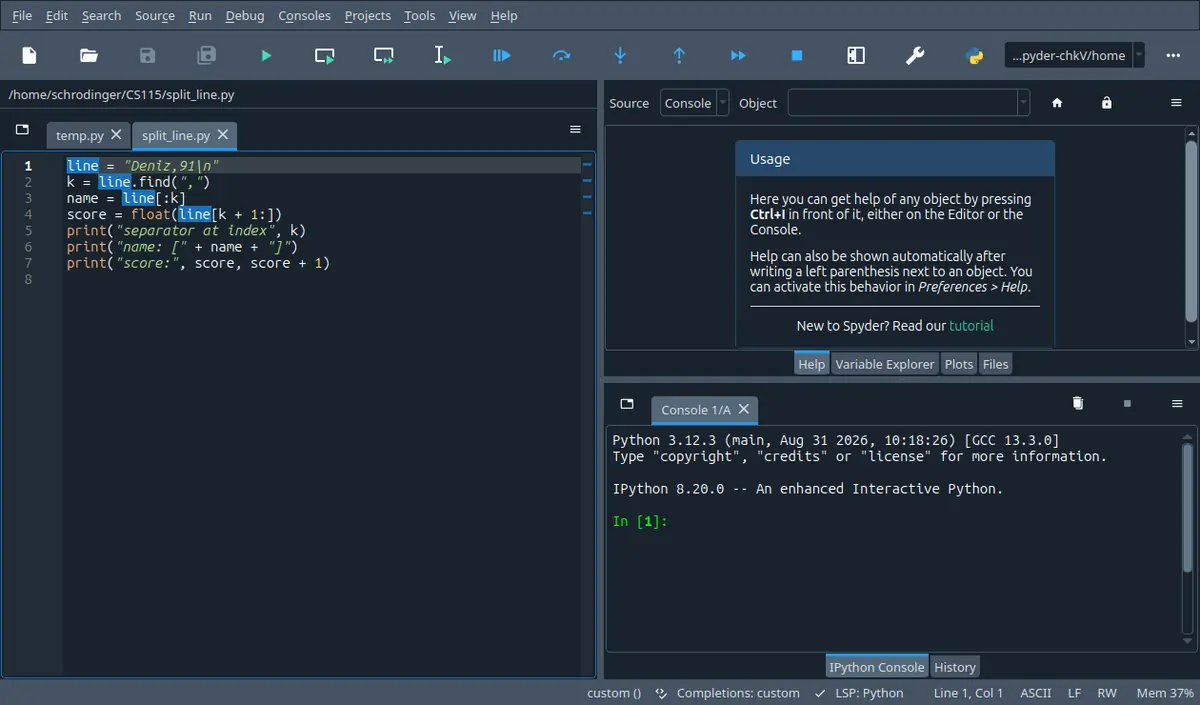
![The same window after running the file: the console shows a runfile call followed by the three printed lines and then a fresh In [2] prompt.](/assets/notes-img/cs115-kos.webp)